


The short answer
Why does my TikTok have 0 views? There are seven usual causes. The video is too new. Only you can see it. Your age keeps it off the For You feed. TikTok is still reviewing it. TikTok has kept it off the For You feed. Your account has a limit on it. Or the video is reused or asks for likes.
How you fix 0 views depends on the cause, and each cause leaves a clue in a different place in the app. Check them in the order below. It only takes a few minutes. Do not delete or repost the video until you know which cause it is.
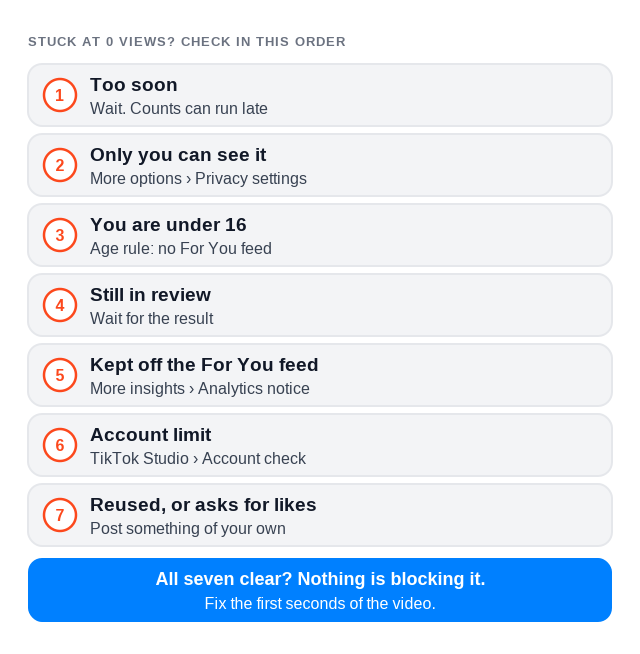
1. It is too soon to tell
A new post does not show views the second it goes live. TikTok may still be checking it. The count on the video can also run behind. TikTok’s own analytics help page says data may be delayed, and it suggests waiting a few days before you treat a number as wrong.
So the clock matters. A video stuck at 0 views for less than an hour is usually just early. Use the table to decide what to do next.
| How long it has been at 0 | What it most likely means | What to do |
|---|---|---|
| Less than 1 hour | Still being checked, or the count is late | Wait. Check the privacy setting. |
| 1 to 24 hours | A setting, a review or a notice | Run checks 2 to 7 below |
| More than 24 hours | Something is holding it back | Run all seven checks |
| Several posts in a row | A pattern on the account | Start with check 6 |
A quick test helps here. Open the video from a second account, or from a browser where you are not logged in. If you cannot play it there, the problem is who can see it, not the count.
2. Only you, or only friends, can see it
Every post has its own audience setting. On a public account you pick Everyone, Friends or Only you. On a private account you pick Followers, Friends or Only you. TikTok explains each one on its post privacy page.
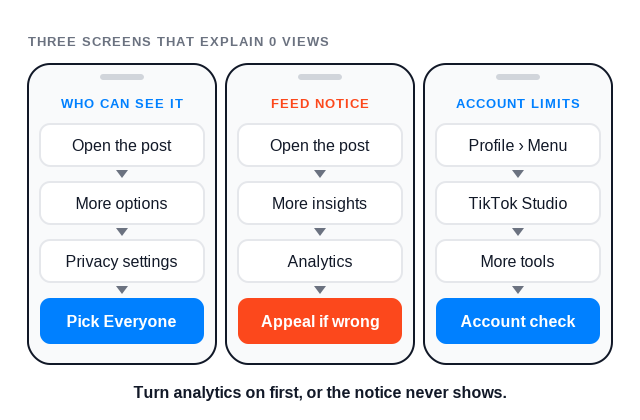
If a post is set to Only you, nobody else can watch it. A 0 is the right number. To change a post you already shared:
- Tap Profile and open the post.
- Tap the More options button (the three dots) on the side.
- Tap Privacy settings. You may need to swipe left to find it.
- Choose Everyone.
Then check the whole account. A private account only shows posts to followers you approve, so strangers on the For You feed never see them. To switch, go to your profile, open the Menu, choose Settings and privacy, then Privacy, and turn off Private account.
3. Your age keeps it off the For You feed
TikTok’s youth safety rules say you must be 16 or older for your videos to appear on the For You feed. Under that age, TikTok will not recommend your posts to strangers.
Teens also start with tighter settings. TikTok sets accounts under 18 to private when they sign up. Its help page adds that, depending on your age and where you live, new posts may be set to Only you, with no way to change it until you are older.
This is a safety rule, not a bug. Your approved followers can still watch. No hashtag, setting or paid push changes it.
4. TikTok is still reviewing it
A video under review can sit at 0 for a while. TikTok can check a post at three moments: right after you upload it, when it starts to get popular, and after someone reports it. Software and people both do the checking. Then its safety team decides one of three things. The post stays up, it gets removed, or it stays up but is kept off the For You feed.
If TikTok removes a post, it tells you why, and you can appeal. Its content moderation page walks through the whole process.
While a check is running, leave the post alone. Do not edit it, delete it or post it again.
5. TikTok kept it off the For You feed
Some posts stay up but are not allowed on the For You feed. TikTok calls these posts “ineligible for the For You feed.” People can still find them in search or on your profile. But a small account has few followers to watch first, so most of its views have to come from the For You feed. Without it, the count can sit near 0.
TikTok tells you when this happens, but only inside the post’s analytics. You need to turn analytics on first. If it is off, you will never see the notice.
To turn analytics on: go to Profile, open the Menu, and pick TikTok Studio. Under Analytics, tap Get started, then Turn on.
To read the notice and appeal:
- Open the post.
- Tap More insights at the bottom. Or tap the More options button, then Analytics.
- Tap the notice about the post not being eligible.
- Read the reason TikTok gives.
- If you think TikTok got it wrong, tap Appeal at the top.
If the appeal works, the post can go back into the For You feed.
TikTok lists what it keeps off the feed in its For You feed eligibility standards. The page also says something many creators miss: a video with few views has not always broken a rule.
6. Your account has a limit on it
When one post is fine but nothing you post gets views, look at the account. Repeated breaks of TikTok’s Community Guidelines can lower your account status. They can also lead to limits on features, such as posting or commenting.
TikTok shows this in a tool called Account check. You can reach it two ways:
- TikTok Studio: go to Profile, open the Menu and pick TikTok Studio. Under More tools, tap Account check.
- Safety Center: tap Menu, then Settings and privacy, then Support, then Safety Center, then Account check.
A check mark means no issue. A warning sign means TikTok has limited something. TikTok’s account status page lists the parts it checks: login, posts, comments, profile and messages.
Two facts help here. Your account status covers only the last 90 days, and violations expire after 90 days. For some first violations, TikTok may also offer a short training in the app. If you finish it, some limits can be lifted.
7. The video is reused, or it asks for likes
TikTok’s integrity rules keep two kinds of posts off the For You feed.
- Reused content with nothing new. A clip from a TV show, a film or another creator, posted as it is. A duplicate of your own old video is close to this. TikTok says it usually does not recommend videos a person has already seen.
- Posts that bait people. TikTok says posts that try to trick people into giving gifts, likes or follows are not eligible. Think “follow for follow” or a fake prize for likes.
The fix is to add something of your own. Film it yourself. Add your voice, your take or your edit. Give the viewer a reason to watch that the original did not.
If all seven checks are clear
Then nothing is blocking the video. Either the count has not caught up yet, or TikTok has not found viewers for it. Give it a day. If it ends up with only a handful of views, the first people who saw it swiped past.
TikTok has not said that new accounts get held back. But a new account has no followers to watch first, so every view has to come from the For You feed. The recommendation system behind that feed, which most people call the algorithm, favors videos people watch to the end. A slow hook loses them in the first seconds.
If your TikTok is not getting views even with every check clear, the fixes, opening first, are in our guide to getting more TikTok views. When you post matters too. The best time to post on TikTok guide shows how to find when your viewers are online.
If the app itself acts up, with videos that will not load or counts that freeze for everyone, check our TikTok not working guide first.
Is it a shadowban?
TikTok does not use that word. One video at 0 is not a shadowban. Several videos in a row with no views from the For You feed is a pattern worth looking at.
TikTok does describe one case that feels like a shadowban. Its account rules say an account can break no rule and still post a lot of content that TikTok keeps off the For You feed. When that happens, TikTok may keep the whole account off the feed and make it harder to find. Our TikTok shadowban guide shows how to check for it and what to change.
Should you delete a TikTok with 0 views?
Usually not. Deleting does not help in any of the seven cases.
- If the post broke a rule, TikTok says deleting it does not remove the violation.
- If it is in review or ruled out of the For You feed, deleting throws away your chance to appeal.
- If it is fine, it can still pick up views from search and your profile.
Want it off your profile? Set it to Only you instead. Then make a new version, not a copy. Change the first two seconds, the first line on screen and the caption. Posting the same file again gives TikTok nothing new to judge.
What bought views can and cannot fix
People often ask if they can buy their way past 0 views. For most of the causes above, the answer is no.
| Cause | Can bought views help? | The real fix |
|---|---|---|
| Too soon | Not needed | Wait a day |
| Only you or a private account | No. Paid views need a public video | Set the post to Everyone |
| Under 16 | No | It lifts when you turn 16 |
| Still in review | No | Wait for the result |
| Kept off the For You feed | No | Read the reason, then appeal |
| Account limit | No | Fix the cause, let violations expire |
| Reused or asks for likes | No | Post something original |
| All clear, slow start | Yes, as a first audience | A stronger opening, then a push |
A paid push only helps a video that is allowed to be seen and is worth finishing. If you are unsure how TikTok treats bought numbers, read can you buy TikTok followers first. It covers TikTok’s rules on fake engagement.
Where Famoid fits
Famoid has sold growth services for social media since 2017. If your video passed every check above and simply had a slow start, you can buy TikTok views from us. We place your public video in third-party ads, so new people see it. We need only the link to the video. We never ask for your password.
We do not promise reach, a For You feed spot or income. A push cannot clear a review, undo a For You feed ruling, lift an account limit or change an age rule. If you would rather pay TikTok itself, read is TikTok Promote worth it? first.