The short answer
TikTok has never said what Shared with you means on TikTok. The label is not on any Help Center or Newsroom page we could find. Nobody outside TikTok can tell you for sure what triggers it.
TikTok does explain how it suggests accounts. Its Suggested accounts page says it may suggest your account to someone who sent you a TikTok link. It may also suggest you to someone who opened a link you sent. Links sent outside TikTok count too, like a text.
So Shared with you most likely means a TikTok link passed between you and that account. It could be from last week or from years ago. It does not mean they viewed your profile or that they are watching you.
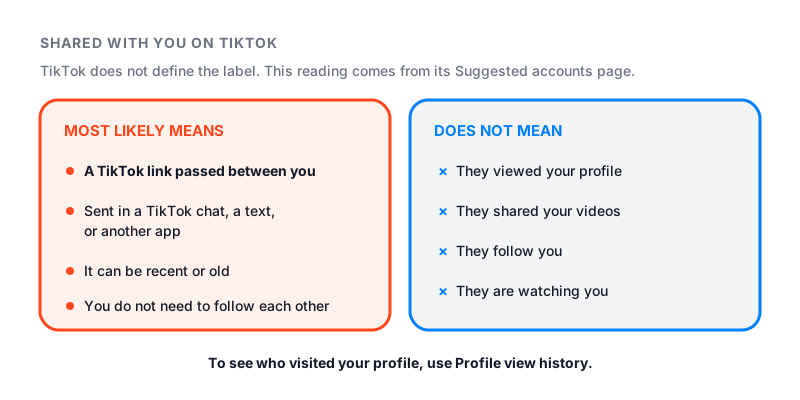
Where you see it, and what it most likely means
People see the words in three places.
| Where you see it | Most likely meaning | Does TikTok explain it? |
|---|---|---|
| Under a suggested account | A link passed between you | Partly: links can trigger suggestions |
| On a video in a chat | That person sent it to you | Yes: you can share videos in messages |
| On a For You video | Not clear | No |
On a suggested account
This is the most common case. You tap Add friends on your profile, or Activities in your inbox. You see a name you know, with Shared with you under it.
TikTok has a setting called People who open or send links to you. When it is on, TikTok may suggest your account to people who sent you a TikTok link. It may also suggest you to people who opened a link you sent. The setting is on by default for people 18 and older.
Links also show up in TikTok’s list of mutual connections. You can be linked to someone if you have shared or received links from accounts they follow.
That would explain why people see it on an old friend, a coworker or an ex. One of you may have sent the other a TikTok once, maybe by text. You do not need to follow each other for that to count.
On a video someone sent you
If a video sits in a chat, someone sent it to you. To see videos shared with you, tap Inbox at the bottom. Then tap the chat.
One detail surprises people. TikTok’s sharing help page covers links sent on other apps. If a friend texts you a TikTok and you tap the link, TikTok also sends that post to your TikTok inbox. This only happens if you allow messages from them.
A few more rules from TikTok’s help pages:
- Messages from people you do not follow may arrive as a message request first.
- Private videos cannot be shared.
- If a creator makes a video private later, it stops playing in the chat.
TikTok also has two features with “Shared” in the name. Shared Feed puts 15 videos a day in a chat with a friend. Shared Collection is a folder of saved videos that two people build together. Neither one is the Shared with you label.
On a video in your For You feed
TikTok does not document a Shared with you tag on For You videos. If you see one, check your inbox first. Someone may have sent you that video.
Two things TikTok does document can look similar. A repost shows the photo and nickname of the person who reposted it, with a repost label. Our guide on how to repost on TikTok covers that. TikTok may also show a prompt under some For You posts. It asks you to share the post with someone you may know.
What the label does not mean
The label does not tell you who looked at your profile. It does not mean the person shared your videos with others. It does not mean they follow you.
To see who visits your profile, TikTok has one tool: Profile view history. It lists accounts that viewed your profile in the past 30 days. It only shows people who also have the setting on. You must be 16 or older and have fewer than 5,000 followers. Our guide on how to see who viewed your TikTok profile walks through it. Our free TikTok counter shows your exact live follower count, so you can see how close you are to 5,000.
Some apps and sites claim to show who shared your videos or who viewed your profile. They cannot see more than TikTok shows you. Many ask for your password, and some are spyware. Do not log in to them.
How to control sharing and suggestions
- Tap Profile at the bottom.
- Tap the Menu button at the top, then Settings and privacy.
- Tap Privacy, then Suggest your account to others.
- Turn off People who open or send links to you. You can also turn off Contacts and Facebook friends.
This is not a full off switch. TikTok says your account may still be suggested to people you follow or interact with. The same goes for people you share mutual connections with. If you are 13 to 17, TikTok does not suggest you to mutual connections.
To stop syncing contacts, go to Privacy, then Sync contacts and Facebook friends. Turn the sync off. Then tap Remove previously synced contacts. If you only turn off access in your phone settings, TikTok keeps suggesting accounts from contacts it already synced.
When you want someone gone for good
TikTok lets you remove an account from your suggested list to show you are not interested. If a suggestion keeps showing someone you would rather not see, block them. Open their profile, tap the Share button at the top, then tap Block. TikTok says blocked people are not told.
After a block, you cannot see each other’s posts or find each other in search. You cannot message each other. Any prior connection between you is removed.
If you only want a calmer app, TikTok also points to the Following feed and the Friends tab.