


The short answer
There is no one list of the best hashtags for TikTok. The best tags for your video are the ones that describe it. TikTok reads hashtags to work out what a video is about and who might like it. So pick two or three that match the video, in words a person would search.
A trending tag only helps when the video is truly about that trend. To find this week’s trending TikTok hashtags, use TikTok’s own Creative Center, not a copied list. The steps are below.
Do hashtags work on TikTok?
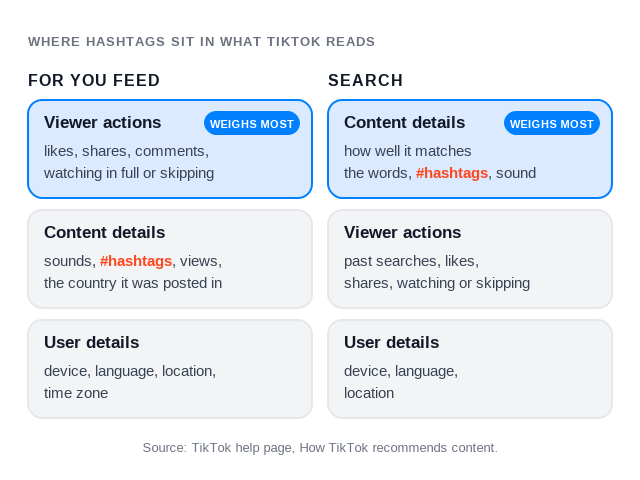
Yes, but not the way most people think. TikTok explains its feeds on its How TikTok recommends content page. Hashtags show up in two places.
The For You feed. TikTok lists hashtags as “content information,” next to sounds, view counts and the country a video was posted in. But it also says that for most people, what viewers do weighs more. That means likes, shares, comments, and watching in full or skipping. A great tag on a video people skip does not get far.
Search. Here the order flips. TikTok says that in search, content information usually weighs the most. That includes how well a video matches the words someone typed, its hashtags and its sound. So in search, the words around your video count for more than they do on the feed.
TikTok’s Creator Academy puts it in plain words. Choose one clear topic for your account. Then use the same words, tags and sounds as the people who make videos about it. That helps TikTok find viewers who will like yours.
How many hashtags should you use on TikTok?
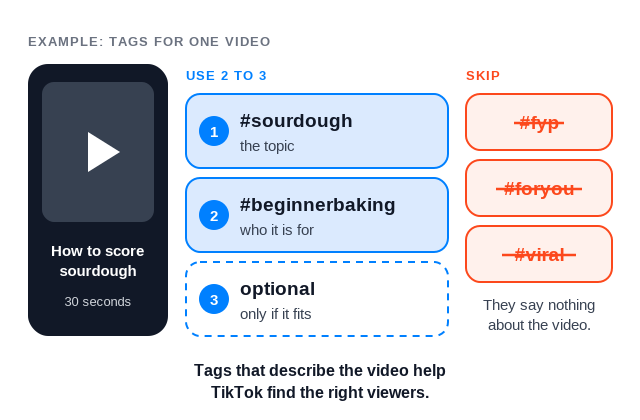
Two or three. TikTok’s Creator Academy says it directly: “When it comes to hashtags, less is more.” Its page on the parts of a TikTok video suggests 2 to 3 relevant hashtags on each video.
There is also a hard limit for many users. In August 2025, Social Media Today reported that TikTok had started capping posts at five hashtags. TikTok did not explain the change, and we could not find the limit on its help pages. Either way, if you follow TikTok’s own advice, you will never hit the cap.
More tags do not mean more reach. Each extra tag that does not fit the video makes it harder for TikTok to tell what the video is about.
How to use hashtags on TikTok: a three-step method
Use this method to pick the best tags for every post.
- Name the topic. Ask what the video is about in one or two words. That is your first tag. Example: #sourdough.
- Name who it is for, or the exact angle. Beginners? A city? A problem? That is your second tag. Example: #beginnerbaking.
- Add a third only if it truly fits. A trend, a challenge or a series name you use on every part. If nothing fits, stop at two.
Then test your tags in the app. Type each one into the TikTok search bar and look at the top videos.
- If the top videos look like yours, the tag fits.
- If they are about something else, drop it. The wrong tag sends your video to the wrong people, and they swipe.
- Look at the search terms TikTok suggests as you type. They show the words people really use.
Put the same words in your caption and on screen, too. Search weighs how well a video matches what someone typed, not just the tags.
Example hashtag sets by niche
These are examples of the pattern, not a list of tags that are trending now. Check each one in search before you use it, because a tag’s crowd can change.
| Video | Topic tag | Exact angle |
|---|---|---|
| A 30-second bread scoring tip | #sourdough | #beginnerbaking |
| A 10-minute leg workout at home | #homeworkout | #legday |
| A short review of a fantasy novel | #booktok | #fantasybooks |
| A small shop packing an order | #smallbusiness | #packingorders |
| Teaching a dog to sit | #dogtraining | #puppytraining |
| A budget trip to Lisbon | #lisbon | #budgettravel |
Notice the pattern. Each pair says what the video is and who it is for, so TikTok can find people who want exactly that.
Trending TikTok hashtags: how to find this week’s list
Lists of “trending hashtags” on blogs go stale fast. TikTok publishes its own list in the Creative Center, and anyone can open it.
- Open the Creative Center link above in any browser.
- Make sure you are on Trends, then Hashtag.
- Pick your country at the top of the page.
- Pick an industry, such as Food & Beverage, or leave it on All.
- Pick a time range: the last 7, 30 or 90 days.
- Read the list. Each tag shows its rank, its number of posts and views, and a small trend line.
Without a login, the page shows only the top three tags. A free TikTok for Business login shows more of the list.
Inside the app, TikTok Studio has a Trending tab too. The go-viral guide shows where to find it.
Why trend tags expire
Before you use a tag from the list, check what it is about. If it is tied to a holiday, a game release, a sports event or a news story, it will fade once that moment passes. That is why a copied list of “trending TikTok hashtags” rarely helps. A trend tag only works on a video that is really about that trend, posted while people still care.
Does #fyp work?
There is no proof that it does, and there are no secret hashtags to go viral. TikTok has never said that #fyp, #foryou or #viral helps a video reach the For You feed. Its help pages list hashtags as information about the content. A tag that means “For You page” tells TikTok nothing about your topic.
These tags are also used on a huge number of videos about everything. Being one more post under them gives TikTok no clue about who your video is for. Use that tag slot for a word that describes the video.
Hashtag mistakes that cost you views
- Stuffing. Ten tags look spammy to viewers, and many users cannot post more than five anyway.
- Borrowing a trend that does not fit. People who follow that trend see a video that is not about it, and they swipe away fast.
- Only giant tags. A tag with millions of posts on every topic says little about yours.
- Tags instead of a hook. Hashtags help TikTok sort a video. They do not make anyone watch it. If your videos sit near zero, our guide to why a TikTok has 0 views covers what to check first.
For the bigger picture, our TikTok views guide puts hashtags in their place, after the opening seconds and watch time.
Where Famoid fits
Since 2017, Famoid has sold growth services for TikTok, Instagram and Facebook. Hashtags help TikTok sort a video, but they cannot hand it an audience. If you want a first group of people to see a video, you can buy TikTok views or TikTok likes from us. We place your video in third-party ads. We only need the link to the video, never your password.
Keep it honest with yourself. A paid push has no effect on how TikTok ranks your videos, and it will not fix a video people skip. Nobody can honestly promise you reach, a For You feed spot or money, and we do not. Use it on a video that already holds people, with tags that describe it well.