


The short answer
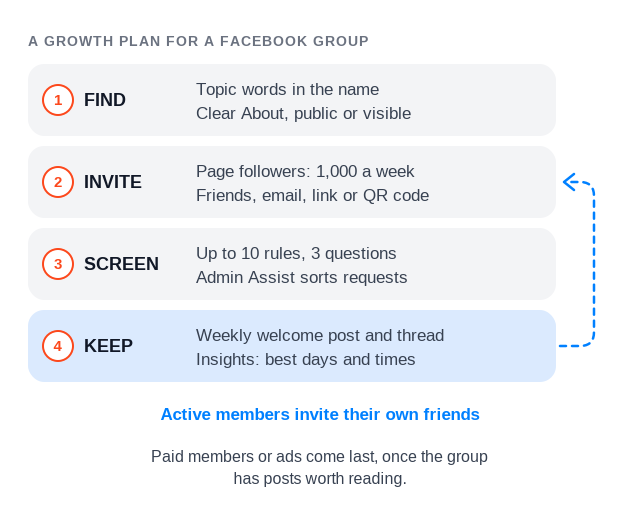
How to grow a Facebook group comes down to three questions. Can people find it? Do they know what it is for? Do they get something once they join? That makes four jobs, in this order.
- Set it up to be found. A name that says who it is for, a clear About section, and a privacy setting that lets people see it.
- Invite the people you already reach. Your Page followers, friends, email list and other social profiles.
- Screen requests. Rules, a few membership questions, and Admin Assist to sort who gets in.
- Give members a reason to come back. A welcome post, regular threads, and posts members can answer.
Paid help belongs at the end, not the start. A group with no posts loses new members as fast as it gets them.
Set up your group so people can find it
Many people find groups through Facebook search. They type a topic and look at the groups that come up. Three things help yours show up and get picked.
The name. Say who the group is for and what it covers. “Denver Trail Runners” tells people far more than “Run Club.” Lead with the words someone would type into search.
The About section. Write two or three sentences on what members get and who should join. Facebook’s group setup steps suggest adding a description and cover photo right after you create the group. Meta also asks admins to say so in the description if the group has a business link.
The privacy setting. This one matters most for growth. A group is public or private, and a private group is also visible or hidden.
| Public | Private, visible | Private, hidden | |
|---|---|---|---|
| Who can find it | Anyone, on or off Facebook | Anyone on Facebook | Members and invited people |
| Who sees the posts | Anyone | Members only | Members only |
| How people get in | They join right away | They ask, you approve | Invite, then approval |
| Group QR code | Yes | Yes | No |
A hidden group can’t grow from search. If you want new people to find you, pick public, or private and visible.
Make this choice early. Meta’s privacy page says a public group can’t switch to private once it has 10,000 or more members and is at least 30 days old. A private group can now switch to public, but posts from its private days stay visible only to people who were members back then.
How to promote a Facebook group
Start with people who already know you. Facebook gives you several ways to invite them, and each has its own limit.
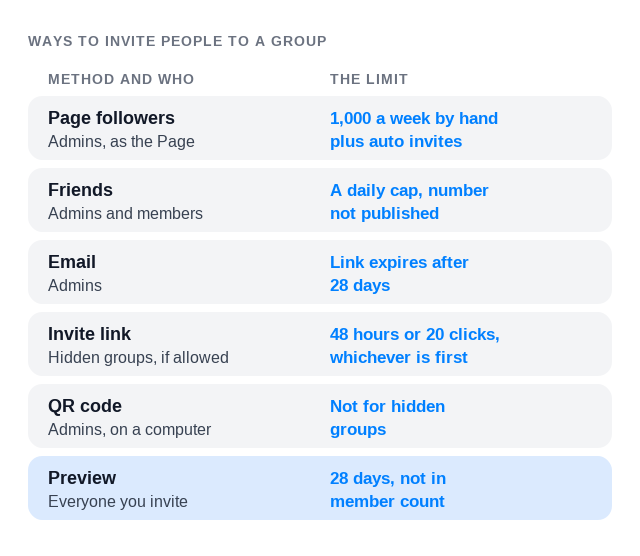
Invite your Page followers. If your Page is an admin of the group, switch into the Page, open the group, click Invite, then Invite Facebook followers. Meta’s Page invite steps allow up to 1,000 hand-picked invites per week. You can also turn on Automatic invitations, which invites followers who recently engaged with your Page. Automatic invites work for one group at a time, and once you pick the group, you can’t change it for 7 days.
Invite friends. Click + Invite below the cover photo, then Invite Facebook friends. Members can do this too. Meta’s invite page says each person can only invite a limited number per day, but it does not give the number.
Invite by email. Admins can invite anyone by email, Facebook friend or not. The link in that email works only for that person and expires after 28 days.
Share a link or a QR code. In a private hidden group, admins can allow an invite link. It stops working after 48 hours or 20 clicks, whichever comes first. Public and visible groups can use a group QR code instead. On a computer, click the menu icon in the top right of the group, then Share, then Share via QR Code. Put it on a flyer, a slide at your event, or your shop counter.
Then share the plain group link everywhere your people already are: your email signature, your newsletter, your website and your bios on other apps.
People you invite can preview the group for 28 days before they decide. They don’t count toward your member count while they look around. Each time they interact with a post, the preview gets another 28 days. So the posts they see in that window decide whether they stay.
Link your group to a Page
Groups with a Page as admin are listed on that Page, so Page visitors can find them too.
To create a group as your Page, switch into the Page, click Groups in the left menu, then Create new group. Fill in the details and click Create. Already run a group from your profile? Add your Page as an admin instead. Meta’s Page group steps say one Page can admin up to 200 groups. Pages with age limits can’t connect to a group.
Linking also unlocks the follower invites above. If your Page is still small, start by inviting friends to follow your Page, then bring those followers into the group.
Can you boost a Facebook group?
Not directly. Facebook has no Boost button for groups. Meta’s comparison of Pages, profiles and groups lists advertising as something Pages can do and groups can’t.
The workaround runs through your Page. Write a Page post that says who the group is for, add the group link or its QR code, and boost that post. The steps and the budget are in our guide to boosting a post on Facebook.
Check the group before you pay for reach. People who tap through land on its About page and its newest posts. If those look empty, the money is wasted.
Facebook group rules: write them before you grow
Rules set the tone before the group gets busy. New members read them to learn what is welcome.
Facebook lets you set up to 10 rules. Meta’s rules steps: open the group, click Group rules in the left menu, click Get started, then pick from the example rules or write your own. Click Create. You can drag the rules into a new order at any time.
Short, specific rules work best. Five that suit most groups:
- Stay on topic. Say in one line what the group is for.
- Be kind. No insults, bullying or hate.
- No spam or self-promotion. Or give it one set day a week.
- No selling unless allowed. Say where and when it is fine.
- Respect privacy. What members share in the group stays in the group.
Then make the rules stick. You can ask people to agree to them when they request to join. When you remove a post, you can tag the rule it broke, so the member knows why.
One rule is Meta’s, not yours. Its policies for Pages, groups and events say a contest or giveaway must not require people to share, repost or tag others. “Tag 3 friends to win” is out.
Membership questions and Admin Assist
Questions help keep spam out. Meta’s questions page lets you ask up to three, each 200 characters or less. Use checkboxes, multiple choice or a written answer. Answering is optional for the person asking to join.
Admin Assist does the sorting. You pick conditions, and it approves or declines requests on its own. For example, it can approve people who answered your questions and decline brand-new accounts. Meta’s membership page has the steps: open the group, click Admin Assist, then add your conditions under Manage people.
Good questions are easy to answer and tell you something:
- “What do you hope to get from this group?”
- “How did you hear about us?”
- “Do you agree to the group rules?” as a checkbox.
Want to collect email addresses in a question? Meta’s policies allow it only if you say clearly that you, not Meta, are collecting them, and people agree.
Group engagement posts that keep members coming back
A group stays alive when members talk to each other, not only to you. Posts that give people an easy way in work best.
- A weekly welcome post. Tag new members and ask each one to share one thing about themselves.
- A regular thread. “Wins on Wednesday” or “Ask anything Monday.” People return when they know which day to show up.
- Real polls. Use Facebook’s poll tool on a question the group cares about.
- Show-and-tell posts. Photos of members’ gardens, desks, pets or projects.
- Questions with a clear answer. “What is one tool you could not work without?”
- Lives and events. A short live Q&A or a planned meetup gives people a date to come back.
- Group experts. Give members who know the topic the group expert badge, so others know whose answers to trust.
Skip engagement bait. Meta’s engagement bait page says posts that ask people to react, comment a set word, share or vote with reactions get less reach. “Comment YES if you agree” counts. Asking for help, advice or recommendations does not.
Then look at what worked. Group insights show popular days and times, top posts and your most active members. Meta’s insights page says age, gender and location only appear once a group has 250 members. Put your weekly thread on the group’s busiest day.
Facebook group ideas
If you haven’t started yet, a narrow topic is easier to name and easier to find in search. Some ideas that suit a group better than a Page:
- Local: a neighborhood, a town’s runners, parents at one school.
- Hobby: one craft, plant, game or car model.
- Learners: people working through the same course, exam or language.
- Support: a shared health issue or life stage, set to private.
- Fans: a creator’s most active followers, with the group run from their Page.
The test is simple. If members would want to talk to each other, not just to you, it is a group. If you mostly post and they read, it is a Page.
What a group moderator does on Facebook
A moderator is a member an admin picks to help run the group. Moderators handle the daily work, while admins also control the settings. Meta’s roles table splits it like this:
| Task | Admin | Moderator |
|---|---|---|
| Approve or decline members | Yes | Yes |
| Approve or decline posts | Yes | Yes |
| Remove posts and comments | Yes | Yes |
| Remove and ban people | Yes | Yes |
| Pin or unpin a post | Yes | Yes |
| Change the name, cover photo or privacy | Yes | No |
| Add or remove admins and moderators | Yes | No |
Admins and moderators get a badge next to their name. They can choose to hide it.
How to add an admin to a Facebook group
Only admins can invite someone to be an admin or moderator. Meta’s admin steps:
- Go to facebook.com/groups and pick your group.
- Click Members or People under the cover photo. If you can’t see it, click More.
- Click Options next to the person.
- Choose Invite as admin or Invite as moderator, then Send invitation.
The person must be active in the group, and they have to accept. Choose with care. A new admin can remove members, remove other admins and change settings.
Keep at least two admins. If the only admin leaves or deletes their account, they are asked to pick a new one. If nobody accepts within seven days, Facebook pauses the group.
Facebook Page vs group: which do you need?
Pages and groups do different jobs. Meta’s help page describes Pages as the place where public figures, brands and creators connect with fans. Groups are for people talking about a shared interest.
| Page | Group | |
|---|---|---|
| Who does the talking | Mostly you | Everyone |
| People who join are | Followers | Members |
| Can be private | No | Yes |
| Can run ads | Yes | No |
| Stats | Page insights | Group insights |
You can run both, with the Page as the public front door and a group linked to it where fans talk. For the Page side, read how to get more followers on Facebook. Earning, including paid subscriber groups, is covered in how to get paid on Facebook.
Where Famoid fits
Famoid has been around since 2017. One thing we sell is Facebook group members for groups you run. We show your group in third-party ads, and join requests come from people who saw it there. In a private group, you still approve each one. You give us the group link and nothing else: no password and no admin role. We refill members who leave during the first 30 days. Our services are for personal groups, not businesses.
A fuller member count helps a new group look worth joining. It can’t make members stay. That part comes from the steps above: clear rules, a warm welcome and posts people want to answer. We don’t promise activity, reach or a spot in Facebook’s suggestions. Meta’s rules on paid engagement still apply to groups. Our look at buying Facebook followers and members explains them.