The short answer
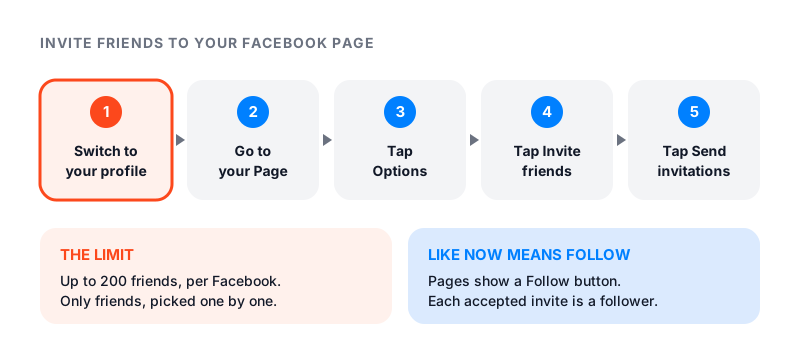
To invite people to like your Facebook Page, first switch into your personal profile. Then go to your Page, tap Options, and tap Invite friends. Tick the friends you want and tap Send invitations.
One thing has changed. Pages that had a Like button may now only have a Follow button. So when a friend accepts, they become a follower. That is the number that counts now.
Page likes vs followers
Facebook’s Follow a Facebook Page help page explains the change. Pages that had a Like button may now only have a Follow button. If someone liked and followed your Page before, they still follow it. If they only liked it, that link was removed.
When someone follows your Page, your posts may show up in their Feed. That is why the follow matters more than the old like. People still say “invite people to like my Page,” and they mean the same thing.
How to invite friends on iPhone or Android
This is how to invite friends to like your Facebook Page from the app. Facebook’s business help page says to switch into your profile first. If you are using Facebook as your Page, switch back before you start.
- From your profile, search for your Page and open it.
- Tap Options at the top of your Page.
- Tap Invite friends.
- Search for friends and tick the box next to each name.
- Tap Send invitations at the bottom.
How to invite friends on a computer
- Go to your Page.
- Click Options below the Page’s cover photo, then select Invite friends.
- If a pop-up asks you to switch profiles, click Switch.
- Click the names of the friends you want to invite.
- Click Send invitations.
These steps work for any Page you want to share. That answers a common question: you can invite friends to follow a Page you like but do not run.
What your friends receive
Each friend you pick gets an invitation to follow the Page. They can accept it or ignore it.
Only invite people who would care. A friend who follows your bakery Page because they love cake is likely to react to your posts. A friend who follows to be polite will probably scroll past them.
How many people you can invite
Facebook’s business help page on inviting friends to follow your Page has one short note. You can only invite up to 200 friends to follow your Page. It does not say if that is per day or in total.
Facebook does not document a “select all” button either. You tick friends one by one. If you want to invite all friends, start with the 200 most likely to care.
Facebook also has general feature limits based on speed and amount, to stop spam. It does not share the exact numbers. If you send a lot of invites fast, you may be blocked from the feature for a while.
Why you can’t invite people to like your Page
Check these in order.
- You are acting as your Page. Switch back to your personal profile. Facebook says you need to be in your profile to invite friends.
- You hit the invite limit. Facebook says you can only invite up to 200 friends.
- You hit a feature limit. Sending many invites in a short time can trigger a temporary block. Wait and try later.
- The person is not your friend. The invite tool only shows your friends. See the section below for everyone else.
- Your app is out of date. Update the Facebook app and check again.
Inviting people who reacted to your posts
Many Page owners ask how to invite people who liked a post to also follow the Page. Facebook has no help page for this today. If your Page shows an Invite button next to names in a post’s reaction list, you can use it. If you do not see one, the feature is not available to your Page right now.
How to reach people who are not your friends
The invite tool stops at your friends list. For everyone else, you need to put the Page where people already are.
- Share your Page link. Copy the web address of your Page and add it to your email signature, your website and your other social profiles.
- Post in groups you belong to. Share a Page post in a group only when it fits the group’s topic. Our guide on how to get more followers on Facebook has the steps.
- Post steady. People follow Pages that post things worth seeing. Photos and videos give people a reason to stop. Our guide on how to get more likes on Facebook covers what to post.
- Use a profile if it fits. A profile in pro mode lets your followers invite their own friends to follow you. See our guide on what a digital creator is on Facebook.
A sample invite message
Facebook’s invite steps do not include a message box. Send a short note of your own to close friends first, then send the invite.
I just started a Page for my bakery. I post new cakes every Friday and share early deals there first. I would love it if you followed along.
Change the details to fit you. Say what you post and how often. Keep it to three lines, and never send it more than once.
Paid options, honestly
Facebook’s own paid route is to boost a post or run an ad from your Page. That puts your Page in front of people who are not your friends.
Famoid sells Facebook Page likes and followers delivered through third-party ads. Real people see your Page in the ad and choose whether to tap Follow. We only need your Page link, never your password. Paid reach gets your Page seen, but people still decide whether to stay based on what you post.