The short answer
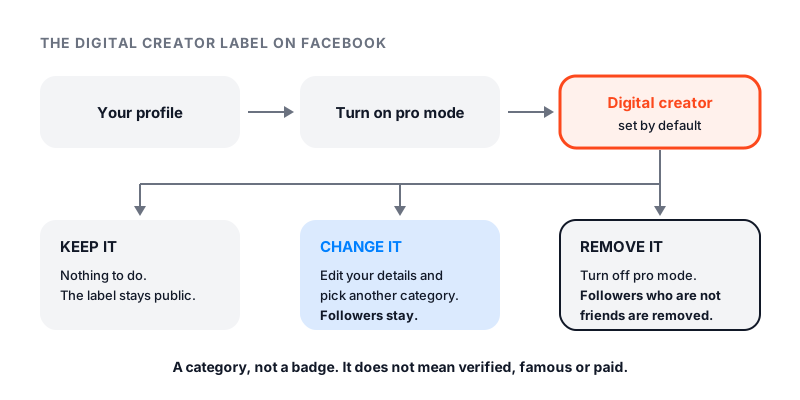
A digital creator on Facebook is simply a profile with the Digital creator category. The words sit under the person’s name. They show up when the person turns on pro mode. Facebook’s About pro mode page says the profile is set to Digital creator by default.
Digital creator on Facebook means someone switched on Facebook’s creator tools. It does not mean the person is famous, verified or paid. You can keep the label, pick a better category, or turn pro mode off to remove it.
Why so many profiles say Digital creator
Facebook added profile categories as part of pro mode. It says they are available only in pro mode. When you turn pro mode on, you get a category, and it starts as Digital creator.
You cannot make up your own category. You choose from Facebook’s list, and Facebook tells you to pick the closest match. If the person never opens that setting, Digital creator stays.
You may also see the label on a Page. Pages pick up to three categories, and the main one appears under the Page name.
What is a digital creator, in general
Outside Facebook, a digital creator is a person who makes content for the internet. That can be videos, photos, podcasts, posts or art. Some do it for fun. Some do it as a job.
On Facebook, the term is narrower. It is one category in Facebook’s list. Having it does not require any followers or any skill test.
What pro mode adds to your profile
Pro mode was first called professional mode. It does not create a second profile. It adds tools to the one you have. Your friends and your old posts stay the same.
Here is what Facebook says changes:
- Followers. Your Who can follow me setting is set to Public. Anyone can follow you, with no limit. You can still have up to 5,000 friends.
- Professional dashboard. You see insights about your followers, post reach and engagement.
- Safety tools. You get Moderation Assist, which can filter profanity and block keywords in comments.
- Discovery. Facebook can recommend your posts, or suggest that people follow you.
- Money. If you are eligible, you can use monetization tools.
You still choose the audience for each post. A post can go to Public or to Friends only.
How to become a digital creator on Facebook
Anyone can be a digital creator on Facebook. You only need a profile. The steps work in the app and on a computer.
- Go to your Facebook profile.
- Below your profile header, click or tap Options.
- Click or tap Turn on pro mode.
- Click or tap Turn on and finish the steps.
Your profile now shows Digital creator under your name. You can change it right away.
How to change the Digital creator category
On a profile in pro mode, Facebook gives these steps for the app:
- From your profile, tap More options.
- Tap Edit, then scroll to the details under your bio and tap Edit.
- Tap Edit next to Category and choose a new one.
Pick the most specific option that fits what you post. Profile categories are public, and they show in Facebook search results next to your name.
On a Page, the path is different. Switch into your Page and click About. Select Category, then click Edit next to it. Remove the old one, start typing a new one, pick it from the list, and click Save. Facebook sets no limit on how often you can change it.
How to remove Digital creator from your profile
Facebook does not describe a way to clear the category and stay in pro mode. Since profile categories only exist in pro mode, turning it off is how you drop the label.
- Go to your profile.
- Click or tap Options below your profile header.
- Click or tap Turn off pro mode and finish the steps.
Know what you give up first. Facebook lists these changes:
- Who can follow me goes back to Friends. You lose followers who are not your friends.
- Your content and audience insights are no longer available.
- You lose Moderation Assist and discovery on Facebook.
- If you earn money, future payouts and bonuses are paused.
- If content protection is on, it is removed.
Your friends and your posts stay. You can turn pro mode on again at any time.
If you like pro mode but dislike the word, change the category instead. You keep your followers that way.
Does a digital creator on Facebook get paid?
Not for the label. Pay comes from monetization programs, and you must qualify for each one. Facebook says people under 18 are not eligible.
The main program is Facebook content monetization. It pays for the performance of eligible public reels, photos, stories and text posts. It is invite-only. If you have no invite, you can fill in an interest form. Go to your Professional dashboard in the app, open the Monetization tab, then Content Monetization. Facebook says the form is not an application and does not promise an invite.
Facebook also lists Subscriptions for pro mode profiles. Fans subscribe, and you earn steady income from them.
Facebook does not publish a pay rate. Meta did share two numbers in March 2026. It said it paid creators nearly $3 billion in 2025. And its Creator Fast Track program pays $1,000 or $3,000 a month for three months. That program is for creators new to Facebook with at least 100,000 followers on Instagram, TikTok or YouTube.
Be careful with messages that promise monetization. Facebook says real invites come through the app, email, Meta Business Suite or your Professional dashboard.
Can a digital creator see who viewed their profile?
No. Facebook’s help page on who views your Facebook profile is clear. Facebook does not let people track who views their profile, and outside apps cannot do it either. Pro mode does not change that.
Your dashboard shows numbers, like reach and engagement. It does not show names of profile visitors. Stories are the exception, since you can see who viewed your own story.
Digital creator profile or a Page
The label mostly shows up on profiles. The bigger choice is where your public side lives.
| Profile in pro mode | Page | |
|---|---|---|
| Lives on | Your personal profile | A separate Page |
| Friends | Up to 5,000, plus followers | No friends, only followers |
| Best for | One person who mixes personal and public posts | A brand, a business or a public side kept apart |
Facebook suggests a Page if you want your public presence separate from your personal profile.
Growing as a digital creator
The label does not bring followers by itself. Posting Reels, posting when your audience is online, and inviting friends to follow do. Our guide on how to get more followers on Facebook walks through each step. If you run a Page, see how to invite people to like your Facebook Page.
If you want a head start on a Page, Famoid sells Facebook Page followers delivered through third-party ads. Real people see your Page in the ad and choose whether to tap Follow. We only need your Page link, never your password. We do not promise reach or payouts, and Facebook still decides what it recommends.