


The short answer
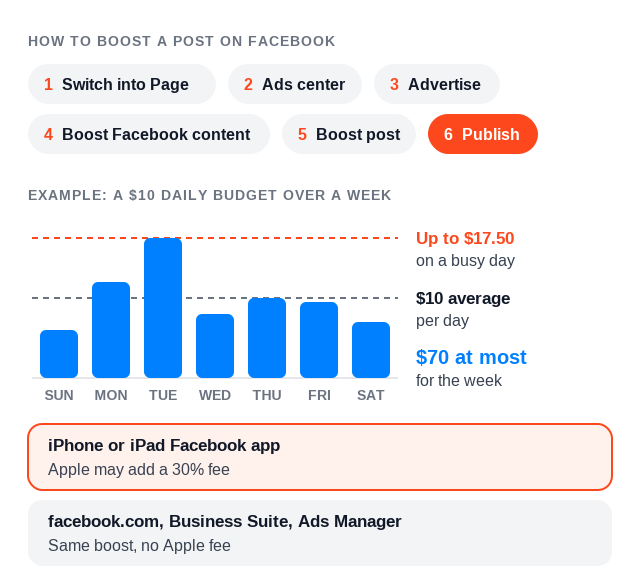
Boosting turns a post that is already on your Page into an ad. Meta’s steps on a computer:
- Switch into your Page.
- Open Ads center and choose Advertise, then Boost Facebook content.
- Find the post and click Boost post.
- Set the goal, audience, duration and daily budget.
- Click Publish.
Meta reviews the ad before it runs, and most reviews finish within 24 hours. Then the post reaches people beyond your followers, with an Ad label. You follow the results in Ad Center.
A boost buys reach, meaning more people see the post. Likes, follows and sales are never part of the deal. Those still depend on the post.
What does boost post mean on Facebook?
A boosted post is an ad made from a post you already shared on your Page. Meta’s About boosted posts page draws the line clearly. A boost reuses an existing post. A new ad, built in Ads Manager, uses images and text you have not posted before.
Boosting is the short route. Meta’s ad cost page says ads bought from your Page come with fewer settings than Ads Manager. For a small Page, that is often a good thing.
Three things change once a post is boosted:
- It reaches people who don’t follow you. Meta picks them from the audience you set.
- It carries an Ad label. Meta now uses “Ad” where older ads said “Sponsored.”
- It stops earning creator pay. Meta’s content monetization page lists boosted content among posts that earn no performance payouts. If you earn on Facebook, think twice before you boost a reel that is already paying. The rules of that program are in how to get paid on Facebook.
Before you start
You need four things.
- A Facebook Page. Meta’s boost steps are written for Pages. You need full Facebook access to the Page, or task access to ads. Groups have no Boost button. Our guide to growing a Facebook group shows the workaround.
- A payment method. You add it or check it in the last step.
- A post that can be boosted. Shared posts, albums and some reels can’t be. The full list is further down.
- The right label for sensitive topics. If the ad is about credit or other money products, jobs, housing, social issues, elections or politics, turn on Special Ad Category.
If you live in the EU, the EEA or Switzerland, one more limit applies. When your account pays to use Meta without ads, or picked less personal ads, your ability to advertise is limited.
How to boost a post on Facebook from a computer
These are Meta’s steps for a Page on a computer.
- Log in to Facebook and click your profile picture at the top right.
- Switch into the Page you want to boost from.
- Click Ads center on the left, then Advertise.
- Select Boost Facebook content.
- Find your post in the list and click Boost post.
- Fill in the details. Meta uses your post’s photo and text, and you choose the rest.
- Click Publish.
The details screen holds the real choices. Not every field shows for every post.
- Goal. What you want people to do, such as message you, call you, watch a video or engage with the post. You can let Facebook choose for you.
- Audience. Take Meta’s suggested Advantage+ audience, or build your own from traits like location, age and interests.
- Duration. Pick a suggested length or set an end date.
- Daily budget. Pick a suggested amount or type your own.
- Placements. Where the ad may appear.
- Advantage+ creative. When on, Meta tests small changes to how your post looks as an ad.
- Ad transparency. Verify yourself or your organization, so people can see who pays for the ad.
How to boost a Facebook post from your phone
The Facebook app has the same boost options as facebook.com. One cost catches iPhone users, though.
Meta’s Apple fee page explains it. Since February 2024, boosting in the Facebook app on an iPhone or iPad runs through Apple’s App Store. Apple may add a service fee of 30% of your ad payment, and Meta does not get that money. A 20 dollar boost can end up costing 26 dollars.
Meta lists ways around the fee:
- Open facebook.com in your phone’s browser and boost there. It has the same features as the app.
- Add money to your ad account’s prepaid balance on facebook.com first. Then boost in the app from that balance.
- Boost from the Meta Business Suite app, or build the ad in Ads Manager.
Boost from Meta Business Suite, or schedule it
Meta Business Suite on a computer has its own Boost button, and it can schedule a boost for later. Your Page must be in a business portfolio first. Meta’s Business Suite steps:
- Open Meta Business Suite and click Content, then Posts & reels.
- Click Published or Scheduled and select the post.
- Click Boost.
- Set the goal, audience, schedule and budget.
- Click Publish. To start later, click the arrow next to Publish, then Schedule.
There is also a Run this ad continuously option. The boost then runs until you pause it, so check on it every week.
How much does it cost to boost a post on Facebook?
You set the cost. Your plan is the daily budget times the number of days. Meta’s daily budget page, which the boost screen links to, adds two details:
- A daily budget is an average, not a hard limit. On a good day, Meta may spend up to 75% more. On quiet days it spends less.
- Across a week, from Sunday to Saturday, Meta won’t spend more than 7 times your daily budget.
Say you set 10 dollars a day. One day might cost up to 17.50 dollars. The week stays at 70 dollars or less.
Meta has no single minimum for everyone. Its minimum budget page says minimums vary by country and goal. Before you publish, the boost screen shows how many people you may reach for the budget you chose.
Meta publishes no price per like, view or click. Ads are sold in an auction, so the cost of each result rises and falls with who else wants to reach the same people. On an iPhone, add the 30% Apple fee unless you boost another way.
Can you boost a Facebook post for free?
No. Every boost is a paid ad, and Facebook has no free version of the Boost button. Posts that promise a “free boost” mean free reach, which is a different thing.
Free reach is still worth the effort. Post Reels, post at the hours your audience is active, and share to groups where the post fits. Our guides on getting more likes on Facebook and getting more Facebook followers cover those steps.
What is the 20 rule on Facebook?
It is an old ads rule. For years, Facebook limited how much text an ad image could carry, at about 20% of the picture. Advertisers checked their images with a text overlay tool before running them.
Meta has dropped the rule. Its image ad tips now say there is no longer a limit on the amount of text in an ad image, and the text overlay tool is gone.
Less text still tends to read better on a phone. Meta’s tips ask you not to let text cover the picture. For tall 9:16 ads, such as reels, Meta also suggests keeping key words away from the edges, where buttons can cover them. And since you can’t change a boosted post’s text later, check it before you boost.
Posts Facebook won’t boost
If a post says Boost unavailable, hover over it. Meta’s troubleshooting page says a tip appears with the reason. These are the usual ones, from Meta’s list of posts that can’t be boosted.
| Post | Try this instead |
|---|---|
| A post you shared from someone else | Post your own content and boost that |
| An album, or a mix of many photos and videos | Post one photo or video and boost it |
| Your profile picture or cover photo | Upload the image as a new post |
| A draft | Publish it first |
| A post with an app install button | Use a regular post |
| A live video on an unverified Page | Boost a regular video |
| A reel with copyrighted music, GIFs, stickers or effects | Boost a reel without them |
| A remix, a reel posted in a group, or a reel made from a music video | Boost an original reel |
Account problems stop boosts too. The usual ones are a disabled ad account, a disabled payment method, or a Page role that needs permission to advertise.
After you publish: review, results and changes
Review. Meta’s ad review page says most ads are reviewed within 24 hours. Ads can be reviewed again later, even while they run.
Results. On a computer, open your Page and click Ad Center on the left. Find the boost and click View results. The ad is named after its goal, so a boost set to get more engagement shows up as “Post engagements.”
Changes. While a boost runs, you can change its audience, budget and end date. Go to Ad Center, click More options next to the boost, then Edit ad. You can’t change the text, photo or video. Meta says to make a new post and boost that instead. You also can’t edit a boost in the iPhone app, so use facebook.com. A new audience sends the ad back through review. A new budget does not.
Pause. In Ad Center, click the three dots next to the boost, choose Pause ad, then Confirm. Pick Resume ad to start it again. A bill can still arrive after you pause, for the days the ad already ran.
Is boosting a post on Facebook worth it?
It can be, when the job fits. A boost does one thing well: it shows a post to people who have not seen your Page.
It tends to pay off when:
- Your followers already loved the post. Meta’s own advice is to boost posts that drew lots of comments, likes and shares.
- You have one clear goal, such as messages, calls or video views.
- You serve one area and can set the location.
It tends to waste money when:
- The post fell flat with your own followers. Paid reach rarely rescues a post that people skipped for free.
- All you want is a bigger follower count. A boost is built around one post, not your Page.
- The post is a reel that already earns content monetization pay, since boosting it ends that pay.
Start small. Boost last month’s strongest post for a week on a modest budget. Then compare what it got with what it earned for free, and decide from there.
Boost vs ad-based likes and followers
Boost and services like Famoid both use ads, but they do different jobs.
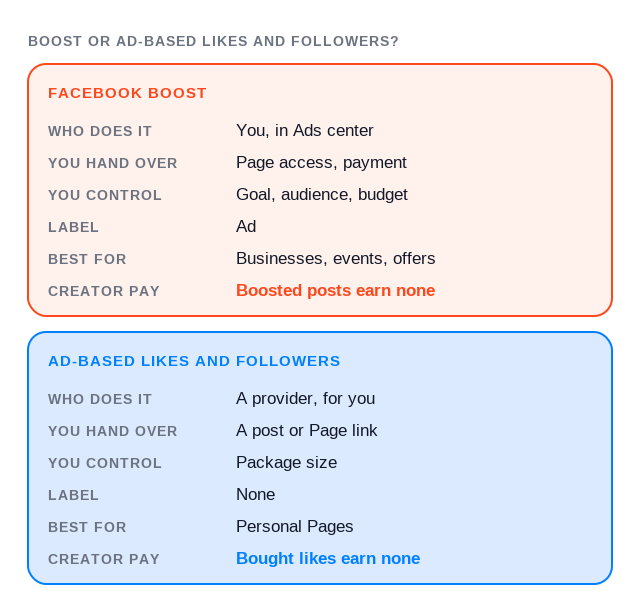
- Boost is Meta’s own ad. You pick the audience and the budget, Meta shows the post, and results vary. The post carries an Ad label. It suits businesses, offers, events and local services.
- Ad-based likes or followers are a done-for-you service. A provider places your post or Page in third-party ads and delivers a set number for a set price. It suits a personal Page that wants a fuller count, not a business. Meta’s rules on paid engagement still apply, as our answer to can you buy Facebook followers explains.
Neither one turns a weak post into a strong one. If you post on Instagram too, its Boost has its own rules. See how to boost a post on Instagram for that app.
Where Famoid fits
Famoid started selling social media growth in 2017. For Facebook, we place your post or Page in third-party ads to bring Facebook post likes or Page followers. You send a link. We never ask for your password or your ad account. We only serve personal Pages, for creators, hobbies and fans. If you run a business, Meta’s own Boost is the right tool. Likes or followers lost in the first 30 days are topped up.
We don’t promise reach, sales or creator pay. Bought likes and followers earn nothing from Meta by themselves, and a good post still does the heavy lifting.