The short answer
Here is how to boost a post on Instagram. You need a professional account. Open the post on your profile and tap Boost below it. Pick a goal, an audience, a daily budget and a number of days. Then tap Boost post.
Meta reviews the ad first, and it says most ads start to run within the hour. Your post then shows to more people, with an Ad label under your name. You can pause it at any time.
A boost buys reach. It does not promise likes, follows or sales. Those still depend on the post.
What boost post means on Instagram
To boost a post means to pay to show it to more people. It is the same post, with the same photo and caption, in a paid spot.
Instagram’s help page on how to boost a post on Instagram lists where it can show up. Boosted posts appear in Home Feed, Explore, profile feed and Stories. You can boost a feed post, a Reel or a Story.
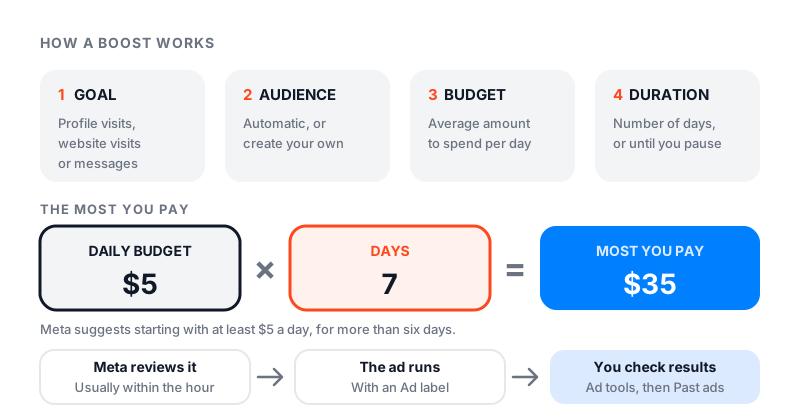
A boost is the simple way to run Instagram ads. Meta’s Ads Manager has far more settings. A boost has four: goal, audience, budget and duration.
What you need before you boost
Check these first. Each one can hide the Boost button.
- A professional account. You cannot boost a post on Instagram with a personal account. Switch to a creator or business account in Settings and activity, under Account type and tools. If your account is private, switching makes it public.
- Your age. Instagram says you must be over 16 to create ads.
- An ad account. The first time, Instagram asks you to pick one. You can connect a Facebook ad account, or keep Facebook and Instagram apart.
- A way to pay. You add it when you create your first ad.
- A post that meets the ad rules. Every ad is checked before it runs.
Your first boost may also ask you to connect a Facebook Page. You can pick a Page or tap Skip.
Two rules only affect some people. In the EU, the EEA and Switzerland, ads are limited if you pay to use Meta without ads. In the US, ads about credit, jobs, housing, social issues or politics must pick a Special Ad Category.
How to boost a post on Instagram, step by step
These steps follow Instagram’s own help page for the app.
Step 1: Open the post
Go to your profile and tap the post you want to boost. Below the photo, tap Boost.
To boost an already posted Instagram post from months ago, use the dashboard. Tap Professional dashboard, then Ad tools, then Choose a post.
Step 2: Pick a goal
The goal is what you want people to do. Instagram offers three: more profile visits, more website visits, or more messages.
- Pick profile visits if you want new people to see your page and follow.
- Pick website visits if you sell on a website.
- Pick messages if people usually ask a question before they buy.
Step 3: Pick an audience
You have two choices. The automatic option shows the ad to people like your followers. Your app may call it Automatic or Suggested audience.
Or tap Create your own. Then you choose places, interests, age and gender. A local shop should always set a location.
Step 4: Set the budget and duration
The budget is the average amount you want to spend each day. The duration is how many days the ad runs. You can also let it run until you pause it.
As you set the budget, the app shows an estimate of how many people you may reach. Meta suggests at least seven days, so its system has time to find the right people.
Step 5: Preview and boost
Tap Next. Then tap Preview ad to see the places your ad will run. When it looks right, tap Boost post.
On a computer, go to instagram.com, open your profile, select the post and click Boost.
How much it costs to boost a post on Instagram
You set the price. The most you plan to pay is your daily budget times the number of days. Five dollars a day for seven days comes to about 35 dollars.
Here is what Meta itself says about cost:
- Where to start. Meta suggests at least 5 US dollars and more than six days.
- The limit. Meta aims to spend your budget evenly over the days. Typically, you won’t be charged more than the budget you set.
- How you are charged. Usually by impressions, each time the ad is shown. Prices come from an auction, so Meta publishes no fixed price per view.
- Minimums vary. The lowest budget you can set depends on your country.
One cost catches iPhone users out. When you boost in the iPhone app, you pay by adding funds first. Apple may keep a 30% service fee on money you add there. Instagram’s own tip is to boost on instagram.com instead, which avoids that fee.
What happens when you boost a post
First comes the review against Meta’s ad rules. You get a notice when it is under review, when it is approved or turned down, and when it ends.
Then the ad runs. People in your audience see your post with an Ad label under your name, in Feed, Stories and Explore. A boosted Reel can also show in the Reels tab. The post stays on your profile the whole time.
How to see results, pause or stop a boost
To see results, tap Professional dashboard, then Ad tools. Under Manage, tap Past ads. Find the ad and tap View insights.
The results screen shows a few numbers:
- Results: how the goal you picked went, such as link clicks or messages.
- Reach: how many accounts saw the ad.
- Impressions: how many times it was shown. One person can see it more than once.
- Engagement: likes, saves, shares, comments and three-second video plays.
- Profile activity: profile visits and follows that came from the ad.
To pause a boost, open Ad tools, tap Edit on the ad, and tap Pause ad. You can’t really edit a live boost. Meta says to delete it and boost the post again with new settings.
To delete a boosted post, delete the ad first. This is true even after the ad has ended. In Ad tools, tap Edit next to the ad, then Delete ad. Only then can you delete the post from your profile.
For the numbers on your normal posts, read our guide on how to see insights on Instagram.
Why you can’t boost a post on Instagram
If the Boost button is missing or greyed out, one of these is almost always why.
| What you see | Why | What to do |
|---|---|---|
| No Boost button at all | Personal account, or you are 16 or under | Switch to a professional account |
| A Reel will not boost | It uses licensed music | Use original audio or royalty-free music |
| A Reel will not boost | Face or camera effects, GIFs, product tags or interactive stickers | Boost a clean version instead |
| A Reel will not boost | Over 90 seconds, or not full screen 9:16 | Trim it or pick another Reel |
| A Reel will not boost | Already shared to Facebook, or posted before Oct 15, 2021 | Pick a newer Reel |
| “Resolution is too low” | The video is not sharp enough | Upload a better quality video |
| Boost does nothing | An app or ad account error | Try instagram.com or Meta Business Suite |
Instagram lists all the Reel rules on its page about how to boost an Instagram Reel. Check them before you post, not after. A Reel with a popular song may be great for views, but you can’t turn it into an ad.
Can you boost a collab post?
Yes, but not from the normal Boost button. Meta calls it boosting partner content, and you do it on instagram.com or in Meta Business Suite.
Both of you must meet Meta’s rules for partnership ads. You also need your partner’s permission. If you don’t have it yet, Instagram asks for it when you boost. The ad shows as Pending partner approval until they say yes. When it runs, your name comes first in the ad and theirs comes second.
Our guide on how to do a collab post on Instagram covers the setup.
Is boosting a post on Instagram worth it?
It can be, for the right job. A boost is good at one thing: putting a post in front of people who have not seen you.
Boosting is worth it when:
- The post already did well with your followers. Meta itself says to build an audience with normal posts first.
- You have a clear goal, like website visits or messages.
- You serve one area, like a salon or a shop, and can target it.
It is usually not worth it when:
- The post got little love from your own followers. Paying rarely saves a weak post.
- You only want a bigger number of likes or followers. A boost is not built for that.
To choose between two posts, open Ad tools and tap Compare two posts. It boosts both at once, so you can see which one works better.
| Boost | Posting for free | Famoid likes or followers | |
|---|---|---|---|
| What you pay | Your daily budget times the days | Your time | A set price for a set amount |
| What you get | Your post shown to people you pick | Reach, if people react well | Likes or followers from real people |
| Set number promised | No, results vary | No | Yes, the amount you order |
| Shows as an ad | Yes, with an Ad label | No | No |
| Best for | New people, clicks and messages | Building an audience that comes back | A fuller count on a post or profile |
Paid options, if you want a head start
A boost buys reach. Some people want a fuller count instead, so a new post or profile does not look empty. Famoid has sold Instagram likes and followers since 2017. Delivery runs through third-party ads, where real people see your post or profile and choose whether to act. We ask for your username, never your password.
Bought likes do not change how Instagram ranks you, and they do not bring sales. The plan is still good posts, plus a boost when a post deserves more reach.
A simple first boost to try
If you have never boosted before, keep the first one small.
- Open your Insights and find a post from the last month that your followers liked a lot.
- Tap Boost and pick profile visits as the goal.
- Use the automatic audience, or set your city if you are local.
- Set 5 dollars a day for seven days, and leave it alone.
- When it ends, check reach, profile visits and follows in Past ads.
Then compare the new follows with what the post earned for free. Our free Instagram engagement rate calculator shows if the new followers engage. If the boost paid off, boost the next strong post. If not, put the money into better posts, and read our guide on how to get more views on Instagram.