The short answer
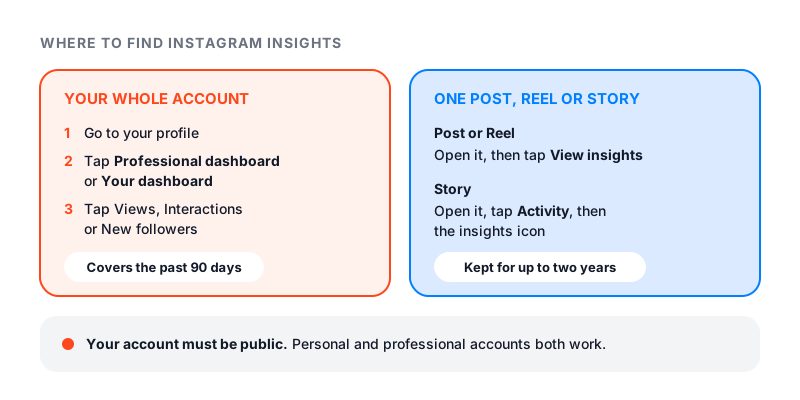
Here is how to see insights on Instagram. Go to your profile. If you have a professional account, tap Professional dashboard. If you have a personal account, tap Your dashboard. You will see your last 30 days: views, interactions, new followers and the content you shared.
For one post or Reel, open it and tap View insights. For a Story, open it, tap Activity, then the insights icon.
Your account must be public. Private accounts don’t get insights.
What does insights mean on Instagram?
Insights are the free stats Instagram gives you about your account and your content. They show how many times people saw your posts, how many different people that was, what they did, and who your followers are.
Instagram’s help page About Instagram insights says these insights are free for public accounts. It also says some numbers are estimated and still in development. So treat small gaps between screens as normal.
Who can see insights
You need a public account. Instagram’s current help pages say this can be a personal or a professional account.
- Personal and public: you get Your dashboard, with insights on your account and content.
- Professional (creator or business): you get Professional dashboard. It adds ad insights from your boosts and insights on money tools, if you are eligible.
- Private: no insights. If you switch from public to private, you lose access. You get your past data back if you go public again within 90 days.
So you can see insights without a professional account, as long as your account is public. You also don’t need a set number of followers to see insights on your content. Only the follower trends need at least 100 followers.
One odd thing: a few older Instagram help pages still say insights need a business or creator account. If your public personal account shows no dashboard, switching to a professional account gives you the Professional dashboard. Instagram’s page on how to set up a professional account has the steps. Tap the menu on your profile, then Account type and tools, then Switch to professional account.
Two notes before you switch. If your account is private, switching makes it public. And if you recently went public, you may not see insights from before that.
How to see insights on Instagram for your whole account
In the app:
- Go to your profile.
- Tap Professional dashboard, or Your dashboard on a personal account.
- Tap the insight you want, such as Views, to see more detail.
- Tap the date menu at the top, pick a range, then tap Update.
If you don’t see the dashboard on your profile, tap More (the menu) to open Settings and activity. Then tap Insights under For professionals, or Your dashboard under Your insights and tools.
You can pick the last 7, 14, 30 or 90 days, or the previous month. You can also pick your own dates, as long as they are within the past 90 days. On any insight, tap the small (i) at the top right to see what each metric means.
On a computer, go to instagram.com and select Dashboard from the menu on the left. Then pick Insights or Your dashboard, and choose Account or Content from the dropdown.
How to see insights on Instagram posts
- Go to your profile and tap the post.
- Tap View Insights below it.
For a post, you see three things:
- Views: how many times the post was shown.
- Interactions: likes, comments, saves and shares.
- Profile activity: what people did on your profile after seeing the post.
Post insights stay for up to two years.
How to see insights on Instagram Reels
- Go to your profile and open the Reels tab.
- Tap the Reel.
- Tap View insights.
Reels get the richest insights:
- Views: each time the Reel starts to play or replay.
- Watch time: total time it was played, including replays.
- Viewers: how many different accounts saw it on screen.
- Average watch time: watch time divided by first plays.
- Follows: accounts that followed you after watching.
Reel insights last two years and exist only for Reels posted on or after May 14, 2021. For how Instagram counts each view, see what counts as a view on Instagram.
How to view insights on an Instagram Story
For a Story that is still live:
- Tap your profile picture at the top of your feed to open your Story.
- Tap Activity.
- Tap the insights icon.
For an older Story, open your dashboard and tap Content you shared. Then tap the Story. Stories vanish after 24 hours, but their insights stay for up to two years.
Story insights show views, viewers, interactions, accounts engaged and profile activity. Interactions include replies, shares, sticker taps and link taps. Instagram notes that Story numbers may be delayed while they fill in.
What each Instagram insight means
These are the names Instagram uses on its help pages today.
| Metric | What it means | What to do with it |
|---|---|---|
| Views | Times your content was played or shown, repeats included | Compare posts of the same type, not a Reel with a photo |
| Viewers | Different accounts that saw it at least once | Read it as your reach. Views far above viewers means people came back |
| Interactions | Likes, comments, saves and shares | Find the topics people act on, and make more |
| Accounts engaged | Different accounts that interacted, split into followers and non-followers | A rising non-follower share means you are reaching new people |
| Profile activity | What people did on your profile after seeing the content | High views with no profile visits means the content does not point to you |
| Follows (Reels) | Accounts that followed you after a Reel | Repeat the Reels that bring follows, not just views |
| Average watch time (Reels) | How long people watched on average | Short times point to a weak opening |
| Total followers | Growth, top places, ages and most active times | Post just before your followers are most online |
Accounts reached is an older name you may still see in guides. It meant how many different accounts saw your content. Today the closest number is Viewers.
Where have Instagram insights gone?
People usually ask this after an update. Two things trip them up.
First, insights now sit inside your dashboard. The button on your profile is Professional dashboard or Your dashboard, not Insights.
Second, the names may not match what you remember. Instagram’s help pages now use views and viewers for posts, Reels and Stories. Instagram says the views metric is being rolled out step by step, so some accounts may not see it yet.
Why insights are missing or look wrong
Work through this list:
- The account is private. Only public accounts get insights.
- You just went public or just switched account type. Older data may not show.
- The content is too old. Account insights cover 90 days. Content insights last two years.
- The Reel was posted before May 14, 2021. Those Reels have no insights.
- No follower data. Follower trends need at least 100 followers.
- No audience details. Age and country need over 100 viewers or engaged accounts, and a preset time range. Try Last 30 days instead of Last 7.
- Numbers still filling in. Give new posts and Stories a day.
If the app itself won’t load insights, update it or try instagram.com.
How to use your insights
Numbers only help if they change what you post next. Here are three ways to use them.
Find your best time to post. Open Total followers and look at the times your followers are most active. Post a little before the busiest hour. Our guide to the best time to post on Instagram shows how to read this chart.
Find the Reels to repeat. In Content you shared, tap a content type to open your content library, then filter it. Filter it to Reels and find your top ones by views. Then check follows and average watch time on each. The ones that kept people watching and brought follows are your model. Our guide on how to get more views on Instagram covers what to change on the rest.
Check your engagement rate. Views alone can flatter you. Put your likes, comments and followers into our free Instagram engagement rate calculator to see how much people react, not just how many saw.
A 10-minute monthly check
Once a month, open your dashboard and do this:
- Set the range to Last 30 days.
- Write down views, viewers, interactions and new followers.
- Open your three best and three worst posts. Note what the best ones had in common.
- Check Total followers for your most active times.
- Plan next month around what worked.
After three months you will have a clear trend. That beats checking every hour and guessing.