The short answer
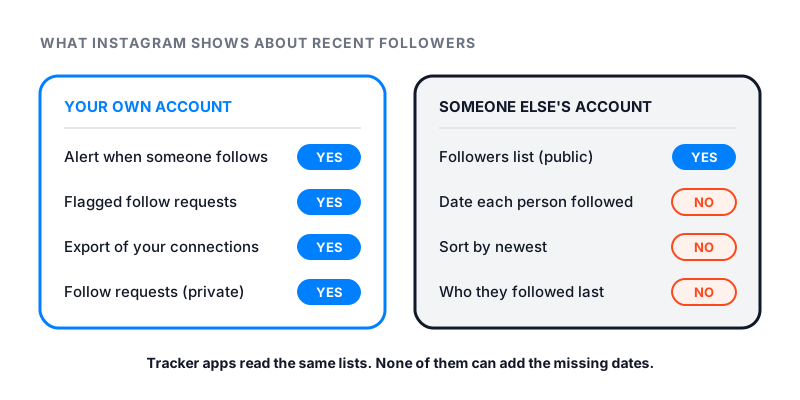
You cannot see someone’s recent followers on Instagram in date order. Open another person’s Followers or Following list and you get names with no dates. There is no sort button. Instagram does not say how it orders the list.
Your own account is different. Instagram can send you a notification each time someone starts following you. That is the simple way to see your recent followers on Instagram.
Tracker sites and apps cannot get around this. They see the same lists you do. Many of them ask for your password, and that puts your account at risk.
What order is someone’s following list in?
Go to a public profile and tap Followers or Following. You see a long list of names. No name has a date next to it. You cannot sort the list.
So you cannot see someone’s followers in chronological order. Accounts you already follow often show near the top. After that, the order is mixed. Instagram does not publish how it builds the list, so nobody outside Instagram can tell you for sure.
That makes the top of the list a weak clue. A name near the top may be someone they followed years ago. It may just be a friend you both have.
Can you see who someone recently followed?
Not in the app. Years ago, the activity screen had a tab that showed some of what the people you follow were doing. It no longer does. Today, Instagram’s help page for Activity says it shows likes and comments on your own posts.
People often ask this about a partner, an ex or a friend. The answer is the same for every account. Instagram gives no timeline of anyone’s follows. If it matters to you, asking the person is the only reliable way to know.
How to see your own recent followers
Your own account gives you more to work with.
Check your notifications
Instagram can notify you when someone starts following you or asks to follow you. Tap the heart icon at the top right of your feed to open your notifications.
To choose which alerts you get:
- Go to your profile.
- Tap the Menu icon in the top right.
- Below How you use Instagram, tap Notifications.
- Turn on the alerts for new followers.
Check the Flagged folder
Some new followers never reach your main list. Instagram may flag accounts that look like spam, bots or irrelevant. On a public account, a follow from a flagged account comes in as a request instead.
Tap Followers on your profile and look for the Flagged folder. You can confirm or delete each request there. If you do nothing for 30 days, Instagram declines it. Instagram notes that this feature may not be available to you yet.
See who you followed last
Your own Following list may show a sort option at the top. If yours offers Date followed, pick the latest to see who you followed most recently. Instagram’s Help Center does not describe this option, so your screen may look a little different.
Compare two copies of your data
For a full record, export your information. Go to your profile, tap Menu, then Meta Account or Accounts Center. Tap Your information and permissions, then Export your information. The export has a Connections part that covers who you are connected with.
Save one export now and another one next month. Names in the new file that are not in the old one are your newer followers.
Why tracker apps and sites cannot show more
Sites that sell a “recent followers checker” read the same lists you can open. They cannot see dates that Instagram does not show. At best, they save a copy of a public list today and compare it with a copy from later. You can do that yourself.
Many of these tools ask for your Instagram login. Instagram’s page on outside apps that ask for your login says such an app can get complete access to your account. It can read your private messages and post spam as you. Some viewer and tracker apps are spyware. They take your data and give you nothing real back.
No honest tool needs your password to read a public list. If you already shared it with one of these apps, change your password now. That is also Instagram’s advice.
Private accounts: what you can see
You cannot open the lists on a private account until it approves you. Instagram’s public and private accounts table sets out who sees what.
| What you want to see | Public account | Private account you do not follow |
|---|---|---|
| The follower and following counts | Yes | Yes |
| The Followers and Following lists | Yes | No (but see below) |
| The date each person followed | No | No |
| The last account they followed | No | No |
One thing still shows. Instagram’s table says anyone can see which public accounts a private account follows, and which public accounts follow it. That is because the public accounts’ own lists are open to everyone. A private account’s name shows up on them, even though its own lists stay closed.
To keep your own lists away from strangers, switch to a private account. Our guide on how to hide followers on Instagram shows every step.
What you can do instead
These are the honest ways to track follower changes without risk.
- Watch the count. Our free Instagram follower count checker shows the live follower count for any public username. Check it on a few different days to see when the number moves. It shows the number, not names.
- Check one name. To see if one account follows someone, open the list and type the name in the search bar at the top.
- Turn on your own alerts. Set your notifications as shown above, so each new follower pings you.
Counts also drop for reasons that have nothing to do with people. Instagram removes disabled and fake accounts on a regular basis. Its help page says your total can change even within a short time. If your own number is falling, our guide on how to see who unfollowed you on Instagram shows how to check.