The short answer
You cannot see deleted messages on Instagram from inside the app. Instagram’s help page on recovering deleted content says it plainly: deleted messages on Instagram cannot be restored. Unsent messages are gone for everyone in the chat.
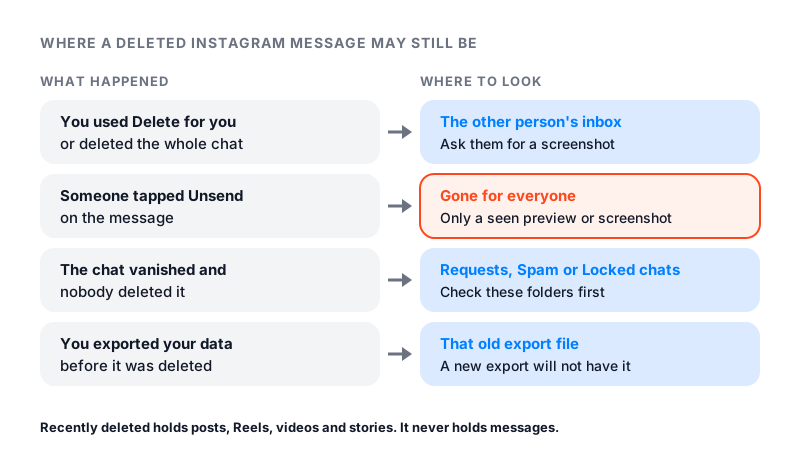
That does not always mean the words are lost. If you deleted a message or a chat on your side, the other person still has it. Your phone may still show an old notification. And if you exported your data before the delete, that file still holds it.
If messages vanished and you did not delete them, they may not be deleted at all. Check your requests, your spam folder and your locked chats first.
Why Instagram cannot bring them back
Instagram has a Recently deleted folder, and people often look there first. It only holds posts, Reels, videos and stories. Items stay there for 30 days. Stories that are not in your archive stay for up to 24 hours. Messages never go there.
Your data export will not help either. Instagram says your download file does not include messages you deleted or unsent. It also says some deleted information may be kept for a while for safety and security. That copy does not appear when you download your information.
This is the same on iPhone and Android. Instagram describes no message backup you can restore from on either phone.
Where a deleted message may still exist
1. The other person’s inbox
This is your best chance to retrieve deleted Instagram messages you removed yourself. Delete for you only removes a message from your side. Deleting a whole chat works the same way. Instagram says the chat still appears in the inbox of the other people in it.
So if you deleted a chat by mistake, ask the other person. They can send you a screenshot of the part you need. In a group chat, anyone in the group can.
2. Your phone’s notifications
When a message arrives, your phone may show a preview. If you have not cleared it, the text may still be in your notification list. This depends on your phone, not on Instagram. It only works for messages that arrived while notifications were on.
3. An export you made earlier
If you downloaded your Instagram information before the message was deleted, that old file still has it. Open the file and look for the messages section. A new export will not have it.
4. Screenshots
Check your photos for screenshots you or a friend took of the chat. It sounds obvious, but it is easy to forget.
Can you see unsent messages on Instagram?
No. When someone unsends a message, it is no longer visible to anyone in the chat. Instagram also says unsent messages are not in the sender’s download file.
The only traces are what someone already saw. That means a notification preview, a screenshot, or your own memory of the chat. Our guide on what happens when you unsend a message covers the rest.
One exception matters for safety. Instagram says that if a chat or a nearby message is reported, unsent and deleted messages could be included in the report. If someone sent you something harmful and then unsent it, report the chat anyway.
How to download your Instagram messages
You cannot use an export to recover deleted messages. You can use it to save the chats you still have. The steps below follow Instagram’s page on how to export a copy of your information.
- Go to your profile and tap Menu in the top right.
- Tap Accounts Center or Meta Account, then Your information and permissions. Instagram is moving people to Meta Accounts, so you may see either name.
- Tap Export your information, then Create export.
- Pick your Instagram profile and tap Next.
- Choose Export to device.
- Pick the types of information you want. You can choose messages only.
- Tap Start export.
Instagram says it may take up to 30 days to send the link by email. Once the file is ready, you have 4 days to download it from Available downloads.
Messages that vanished on their own
If a chat disappeared and nobody deleted it, it may have moved to another folder. Check these places in order.
- Message requests. Tap Messages, then Requests in the top right. Chats from people you do not follow wait here until you accept them.
- Spam. Inside Requests, tap Spam. Requests that may be offensive, spam or match your Hidden Words go here. You get no notification for them.
- Locked chats. In Messages, swipe down from the top of your inbox and tap Locked chats. If you ever swiped left on a chat and tapped Hide chat, it moved there.
- Restricted accounts. If you restrict someone, your chat with them moves to Message Requests. Our guide on how to restrict someone on Instagram explains how to undo it.
If chats will not load at all, or show “failed to load,” that points to a loading problem, not a deleted chat. Our guide on Instagram DMs not working walks through the fixes.
Encrypted chats ended in May 2026
Instagram ended end-to-end encrypted chats on May 8, 2026. If you had chats affected by this change, Instagram says the app shows steps to download the messages and media you want to keep. You may need to update the app first.
Why recovery and spy apps are a trap
Search for how to recover deleted Instagram messages and you will find apps that promise to do it. They cannot. They have no access to anything Instagram hides from you, and Instagram says deleted messages cannot be restored.
Many of them want your login. Instagram warns that apps with your login details can gain complete access to your account. They can see your personal messages and post spam on your profile. Some so-called recovery tools are spyware that watches the phone they are installed on.
If you already typed your password into one of these apps, change your password now. Then remove any apps you do not know from your account.
How to keep a copy next time
- Hide instead of delete. A locked chat leaves your main inbox but stays saved. You can open it later with your face, fingerprint or passcode.
- Unsend with care. Once you unsend, nobody can bring the message back, you included.
- Export now and then. A message export takes a few minutes to request. Save the file somewhere safe.
- Screenshot what matters. Receipts, addresses and promises are worth a quick screenshot.
Messages come and go, but your follower count is public. You can check any account’s live number with our free Instagram follower count checker.