The short answer
When you unsend a message on Instagram, it is removed from the chat for everyone in it. The other person can no longer see it in the conversation. This works in one-on-one chats and in group chats.
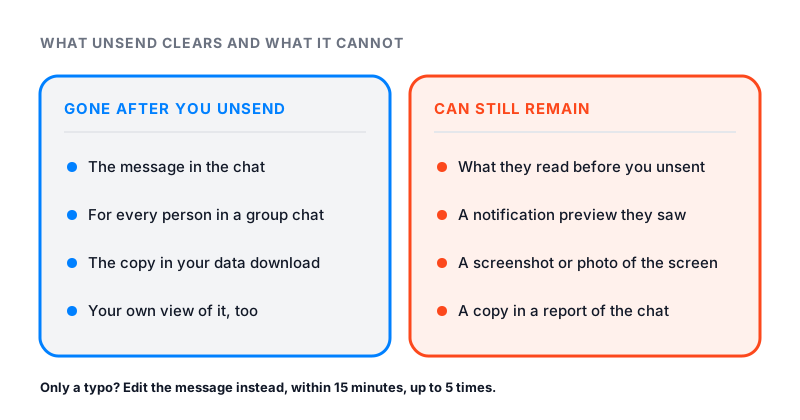
What unsending cannot do is undo the past. If they already read the message, or saw it in a notification, they know what it said. Instagram’s own help page warns about this. The people you sent it to may have already seen it.
Instagram describes no alert to the other person when you unsend. It does not list a time limit either. Editing is the one with a clock: 15 minutes.
How to unsend a message on Instagram
The steps below come from Instagram’s page on how to unsend a message you’ve sent in a chat.
On the iPhone or Android app:
- Tap Messages at the bottom.
- Open the conversation and find the message.
- Tap and hold the message.
- Tap Unsend.
On a computer:
- Click Messages on the left.
- Open the conversation and find the message.
- Click Options next to the message.
- Click Unsend, then click Unsend again to confirm.
What the other person sees after you unsend
Here is what changes, and what does not.
| What | After you unsend |
|---|---|
| The message in the chat | Gone for everyone in the chat |
| What they read before you unsent | They already know what it said |
| A notification they already saw | Unsending cannot take that back |
| A screenshot they took | Stays on their phone |
| A report of the chat | Can still include the message |
| Your own data download file | Does not include it |
The last two rows surprise people. Instagram says that if the chat or a message near it is reported, unsent messages could be part of the report. And your own copy of your data will not have the message at all.
Does Instagram notify when you unsend a message?
Instagram’s help page describes no alert for unsending. It only says the message will no longer be visible to people in the chat. It does not say whether a note shows up where the message was.
So think about timing. If they have not opened the chat or seen a notification yet, they may never know. If they are in the chat when it vanishes, they may notice. And if they remember a message that is now missing, they can tell something was removed.
Can you unsend a message after they read it?
Yes. Instagram still lets you unsend it, but the message is out of your hands by then. Unsend removes it from the chat. It does not erase what they read.
A “Seen” label under your message tells you they viewed it. No label does not prove they missed it. People can turn read receipts off for all chats or for one chat.
Instagram’s help page lists no time limit for unsending. The 15-minute window only applies to editing.
What happens to the notification
When you send a message, their phone may show a notification with a preview of the text. That can happen in a second, before you have time to unsend.
Instagram does not say that unsending removes a preview that already appeared. A preview they already read is read. Compare that with editing. For an edit, Instagram says unread notifications are replaced with the new text. It gives no such promise for unsend.
Unsend vs Delete for you
These two look alike, but they do different things.
- Unsend removes a message you sent, for everyone in the chat.
- Delete for you removes a message from your view only. You can use it on messages you sent or got. Instagram says deleting messages in your conversation does not delete them for others.
Deleting a whole chat works like Delete for you. The chat leaves your inbox, but it stays in the other person’s inbox. If you want a message gone for them, unsend it first. Then delete the chat if you like.
Once a message is unsent or deleted, Instagram says your data download file will not include it. Our guide on how to see deleted messages on Instagram explains what you can and cannot get back.
Edit instead of unsend
If you only made a typo, editing is the gentler fix. You get up to 15 minutes after you send.
- Tap and hold the message.
- Tap Edit. If the option is gone, the time limit has passed.
- Change the text.
- Tap Send to update it.
The chat then shows Edited above the message. Each message can be edited up to 5 times. You cannot edit a message that has mentions or commands, but you can still unsend it. Instagram explains the rest on its page about how to edit a message you’ve sent.
Group chats and shared posts
Unsend works the same in a group chat. The message is no longer visible to anyone in the group. More people in the chat means more chances that someone read it first.
Shared posts have one extra rule. If you send one of your own posts in a chat and later delete that post, Instagram says it is deleted from the chat too. The people you sent it to can no longer see it.
Unsend does not erase evidence
Some people unsend a rude or threatening message and hope it is gone for good. It may not be. Instagram says that if the chat or a nearby message is reported, unsent messages could be included in the report. The same is true for deleted messages.
If someone sent you something abusive and then unsent it, you can still report the chat.
Before you send next time
- Read long or emotional messages once more before you tap send.
- Use Edit for typos while the 15 minutes are open.
- Send private photos as View Once. Our guide on whether Instagram notifies when you screenshot covers how that works.
- If your messages will not send or load at all, the problem is different. See Instagram DMs not working.