The short answer
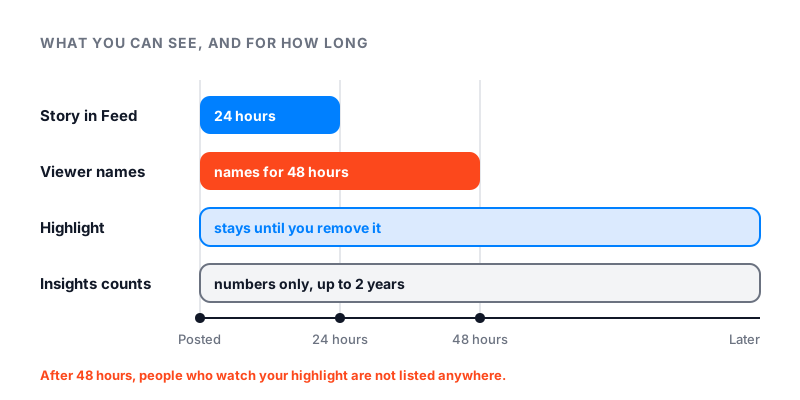
You can see who views your highlights on Instagram only for a short time. Instagram lets you see who watched a story for up to 48 hours after you post it. A highlight is made of your old stories, and that 48-hour clock starts when each story was posted.
After that, the highlight stays on your profile until you remove it. People can keep watching it. But Instagram shows you no names for those later views.
No setting changes this, and no outside app can add the names back.
How to see who viewed your highlight in the first 48 hours
A story disappears from Feed and your profile after 24 hours. For one more day, you can still check who saw it. Instagram’s page on who has seen your story gives these steps.
- Tap your profile picture in the bottom right to go to your profile.
- Tap Menu in the top right.
- Below How you use Instagram, tap Archive.
- Find the story and tap it.
- Swipe up on the screen.
You will see a view count and the usernames of people who watched. Only you can see this list. The count includes replays, so it can be higher than the number of names.
You can still see who viewed it after 24 hours, as long as the story is under 48 hours old. Once 48 hours have passed, Instagram no longer lets you see the names.
Can you see who viewed your Instagram highlights after 48 hours?
No. After 48 hours, Instagram gives you no list of names to open.
What you can see is numbers. If your account is public, story insights stay for up to two years. You get Views (how many times it was played) and Viewers (how many different accounts saw it). To find them:
- Go to your profile and tap More to open Settings & activity.
- Tap Insights (professional account) or Your dashboard (personal account).
- Tap Content you shared, then the story.
These are counts, not names. Instagram also does not say whether views that come later through a highlight are added to them. For the same kind of limit on Reels, see our guide on who views your Reels.
Can someone see if you viewed their highlight?
Instagram says that when you see someone’s story, they can tell you have seen it. So if the story in their highlight is less than 48 hours old, your name can show up in their list.
If the story is older, the owner has no viewer list for it. You can watch it without your name showing up. Our guide on whether someone can see how many times you viewed their Instagram covers the other places people worry about.
Instagram Plus and Story Preview
Instagram now sells a subscription called Instagram Plus. It is not available to everyone yet. One feature, Story Preview, lets a subscriber peek at a story without showing up in the viewer list. Instagram’s help page on story viewers says the viewer list does not include subscribers who previewed a story this way.
Another feature, Story Extend, lets a subscriber keep a story up for 48 hours instead of 24. Instagram does not say whether either feature works the same way on highlights.
Why “anonymous highlight viewer” sites are a bad idea
Some websites promise to show highlights anonymously, or to tell you who viewed yours. They are not part of Instagram.
A site that claims to list your highlight viewers is guessing, because Instagram keeps no such list for you to see. Many of these sites ask you to log in with Instagram. Instagram warns that apps with your login can gain complete access to your account, read your messages and post spam. Some of these tools are spyware. Never type your password into one.
The same logic applies to profile visits. Our guide on who viewed your Instagram profile explains why no app can show that list either.
How to control who sees your highlights
Instagram’s page on adding a story to your highlights gives the key rule. The people you allow to see your story can also see your highlights. So the controls for stories work for highlights too.
- Make your account private. In Menu, tap Account privacy, then turn on Private account. Only followers you approve can see your content. Business profiles cannot be private.
- Hide your story from someone. In Menu, tap Story, live and location, then Hide your story and live videos from specific people.
- Think before you highlight a Close Friends story. It was meant for a small group. A highlight stays on your profile until you remove it.
- Remove one story from a highlight. Open the highlight, tap More on that story, then Remove from Highlight.
- Delete a whole highlight. On your profile, tap and hold the highlight, then tap Delete Highlight.
If you want to know who saw a story, check the list within 48 hours. After that, only the numbers remain.
Your follower count is easier to track, because it is public. Check it any time with our free Instagram follower count checker.