The short answer
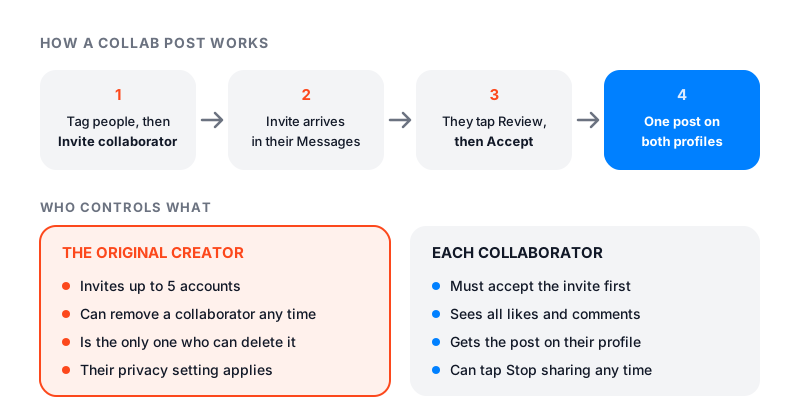
Here is how to do a collab post on Instagram. Make a post or Reel as usual. Before you share it, tap Tag people, then Invite collaborator. Search for the account, tap it, and tap Done. Then share the post.
The other person gets the invite in their messages. When they accept, their name joins yours at the top of the post. The post shows on both profiles, and it goes to both sets of followers.
You can invite up to 5 collaborators. You can’t add collaborators to a Story.
What an Instagram collab post is
A collab post is one post with two or more authors. Instagram calls it co-authoring. The header shows every account that accepted, and the post sits on each of their profiles.
It is not two copies. It is one post with one set of likes and comments. Instagram’s page on collab posts explains that the original author owns it. The others are collaborators.
This is how two people share the same post on Instagram. It is also why creators and brands use collabs. One post reaches both audiences, and nobody has to repost anything.
Collab vs tag: what changes
People often mix up a collab with a tag. Instagram treats them very differently.
| Tag or mention | Collab | |
|---|---|---|
| Shared with your followers | No | Yes |
| Listed as an author | No | Yes |
| Added to your profile | Yes, unless you approve tags by hand | Only after you accept |
| Works in Stories | Yes, as a mention | No |
How to invite a collaborator on Instagram
These are the steps from Instagram’s help page on creating collaborative posts, in the app.
Step 1: Make your post
Start a new post, carousel or Reel. Add your photos or video, edits and caption as usual.
Step 2: Open Tag people
Before you share, tap Tag people.
Step 3: Invite the collaborator
For a post, tap Invite collaborator. For a Reel, the button says Invite collaborators. Search for the account and tap it.
Step 4: Tap Done and share
Tap Done, then share the post as normal.
Collabs work in the iPhone, iPad and Android apps. Instagram says the feature is not available on computers.
To take someone off before you share, go back to Tag people and tap Remove next to their name.
How to accept a collab invite
You get a message when someone invites you. To accept:
- Tap Messages at the bottom of the app.
- Open the chat with the invite.
- Tap the collaboration invite.
- Tap Review.
- Tap Accept.
To say no, follow the same steps and tap Decline. Until you accept, the post does not show on your profile or go to your followers.
How to add a collaborator after posting
Instagram’s help page says the original author can add or remove a collaborator at any time. But it only gives the step by step for removing one after posting. Those steps open the post, tap Options, then Edit, then Tag people. That same screen is where to look for Invite collaborator on a post that is already live.
If you don’t see it there, the safe fallback is to plan the collab before you share next time.
How to remove a collaborator or yourself
If you made the post, you can remove a collaborator any time:
- Open the post.
- Tap Options in the top right.
- Tap Edit, then Tag people.
- Tap Remove next to their name.
- Tap Done, follow the steps on screen, and tap Done again.
To remove yourself from a collab post someone else made:
- Open the post.
- Tap Options in the top right.
- Tap Stop sharing, then confirm.
The post stays on the original creator’s profile either way. Only the original creator can delete it. If they do, it disappears from every collaborator’s profile too.
Who controls a collab post
The original creator is in charge. Here is what that means in practice:
- Privacy. The creator’s account settings decide who sees the post. If they switch to private, only their followers can see it.
- Deleting. Only the creator can delete the post.
- Blocking. If either side blocks the other, the collab ends. The post stays with the creator.
- Deactivating. If the creator deactivates their account, the post is gone from every profile. It comes back if they reactivate.
So think before you accept an invite from an account you don’t know well. Their choices decide what happens to the post on your profile.
Private accounts and collab posts
A public account can invite public or private accounts. A private account can invite either kind too, but only people who follow it.
There is a catch for private accounts. If a public account accepts, the post is shared publicly through that account. Instagram shows private accounts a notice about this the first time they invite someone.
When a private account accepts an invite, its name appears on the post. People who want to follow it still have to send a request.
Why you can’t do a collab post on Instagram
If the option is missing, check these:
- You are on a computer. Collabs work only in the app.
- You are posting a Story. Stories can’t have collaborators.
- You are private and they don’t follow you. Private accounts can only invite their followers.
- You already added 5. That is the limit on a post.
- One of you blocked the other. A block ends any collab between you.
- The account broke the rules. Instagram says accounts that went against its guidelines may lose access to Collabs.
If none of these fit, update the app and try again.
How creators use collabs to grow
Once you know how to collab post on Instagram, the harder part is picking the partner. A collab is one of the few free ways to show your work to another person’s followers, and it works best when both sides plan it. Our guide on how to get more followers on Instagram covers the rest of the growth plan.
- Pick a partner with a similar audience. A baker and a coffee shop often share followers who care about the same things. Size matters less than fit.
- Split the work. Agree who films, who edits, and who writes the caption. Decide who posts, since that account owns the post.
- Agree on a time. Post when both audiences tend to be online. Our guide on the best time to post on Instagram shows how to find yours.
- Both reply to comments. Each of you sees every comment. Answer the people from your side.
- Keep it fair. Take turns being the original creator on the next collab.
Keep expectations modest. A collab puts your post in front of new people. Whether they follow you still depends on the post and your profile.
After the collab goes live
Check the results a few days later. Open the post and tap View insights to see its views and interactions. Note your follower count on the day you post, using our free Instagram follower count checker. Check it again a few days later to see if the collab brought anyone new.
If you want to share someone else’s post without being a co-author, a collab is the wrong tool. Our guide on how to repost on Instagram explains the other options.