


The short answer
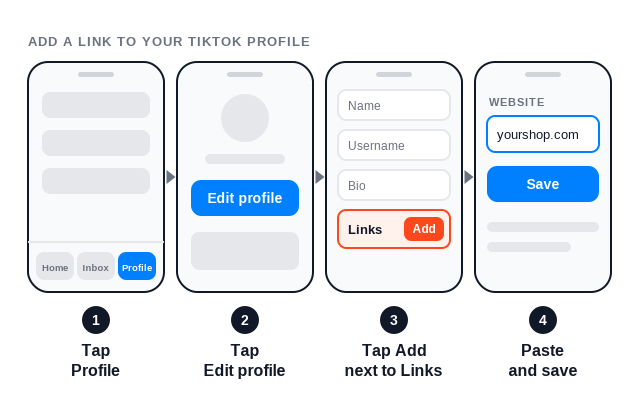
Here is how to add a link to your TikTok bio. Open the TikTok app and tap Profile. Tap Edit profile. Next to Links, tap Add, then follow the steps.
That option only appears for some accounts. TikTok’s help page on profile links says you need at least 1,000 followers, or a Verified Business Account. If you have neither, you cannot add a website yet.
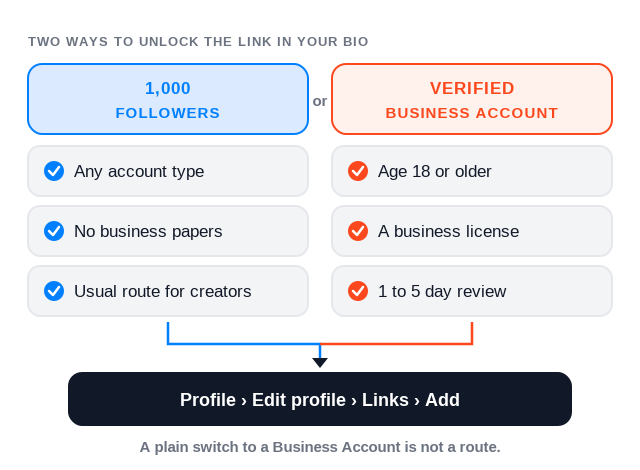
Who can add a link to their TikTok bio
TikTok names two routes. You only need one of them.
| Route | What you need | Good to know |
|---|---|---|
| 1,000 followers | At least 1,000 followers | Works on a personal account. TikTok lists no other condition for this route. |
| Verified Business Account | Age 18 or older, a valid business license, a phone check | TikTok says review usually takes 1 to 5 business days. |
Business verification is not open everywhere. TikTok’s business verification page lists the countries where it works. The US, the UK, Canada and Australia are on it.
You may also see an option to add a Lemon8 account to your profile. TikTok says this is only offered in some places.
How to add a link to your TikTok profile, step by step
TikTok’s steps are for the app.
- Open the TikTok app. Tap Profile in the bottom bar.
- Tap Edit profile.
- Find Links and tap Add next to it.
- Paste your web address and follow the steps to save it.
- Go back to your profile. The link now shows under your bio.
Then test it. Tap the link from your own profile and make sure the right page opens. TikTok opens profile links in its own in-app browser first.
How to add your Instagram link to TikTok
Many older guides tell you to tap an Instagram button in Edit profile and log in. Do not count on it. TikTok’s help page now says it no longer supports links that open or log you into other social media apps.
What still works is a normal web link. To link Instagram to TikTok:
- Write out your Instagram web address: instagram.com/ followed by your username.
- Go to Profile, tap Edit profile, then tap Add next to Links.
- Paste the address and save.
The same trick works for YouTube. Use your channel address, such as youtube.com/@yourname.
This uses your one website link, so it needs the same 1,000 followers. Under that? Type your Instagram handle in your bio text, like “IG: @yourname.” It will not be clickable, but people can search for it.
How to add a link to TikTok bio without 1,000 followers
There are only two honest options, plus a few ways to send people to you in the meantime.
Get business verification. This only fits if you run a real business and you are 18 or older. You need a business license that matches the place your business works. To apply, open the Menu on your profile, tap Settings and privacy, then Account, then Business verification. TikTok lists each screen on its business verification steps page.
Reach 1,000 followers. This is the route for most creators. Our guide on getting your first 1,000 TikTok followers covers it step by step.
Until then, point people to you:
- Put your handle or your site’s name in your bio as plain text.
- Say where to find you in your videos, and repeat it on screen.
- Pin a video that explains where your shop or page lives.
Skip any app that promises to “unlock” the link for you. If it asks for your TikTok password, it is not a shortcut. It is a risk to your account.
Business Account vs Verified Business Account
These are two different things, and a lot of guides mix them up.
A Business Account is a free switch in your settings. A Verified Business Account is an account that has passed TikTok’s business check, with a real business license. TikTok’s link page names the verified one. So a quick switch to a Business Account, on its own, is not one of the two routes.
Think before you switch for a link. TikTok’s Commercial Music Library page says businesses cannot use the general music library for commercial use. That can cut you off from many popular songs. If you are a creator, not a company, the follower route is the better fit.
Linktree and other link-in-bio pages
TikTok gives you one website link. A link-in-bio page, like Linktree, turns that one link into a page of buttons. To add one, copy its address and paste it in the Links field, the same way as any other link.
There is one catch. TikTok says it limits how people move through chains of links inside its in-app browser, to protect them from scams. Visitors may see a prompt to open the page in their phone’s browser instead. TikTok also recommends that creators add direct links, so people reach the page in a few steps.
So pick based on your goal:
- One thing matters most, like a shop or a newsletter? Link straight to that page.
- You truly need several links? Use a link page, but put your most important button at the top. Then tap through it from TikTok yourself to see what a visitor sees.
Why can’t I put a link in my TikTok bio?
Run down this list.
- You are just under 1,000. Your profile rounds the number, so “1K” can still mean 990. Our free TikTok follower counter gives the exact number.
- Your business check is still pending. TikTok says it usually takes 1 to 5 business days, and it sends a notice when it is done.
- You are under 18. Business verification is for adults only.
- Your country is not on the list. Business verification only works in the places TikTok lists.
- Your app is out of date. Update TikTok, close it fully, and open it again.
If you have 1,000 followers and still see no Add button, update the app first. If that does not help, tell TikTok through the Report a problem option in your settings.
Make the link worth a tap
A link only helps if people use it. Three small habits make a big difference.
- Say it in the video. Few viewers check a bio without a reason. A short line like “the recipe is in my bio” works.
- Match the page to the promise. If the video talks about one product, the link should open that product, not your home page.
- Check it on a phone. Visitors tap through from the TikTok app, so the page has to load fast on a small screen.
Links on TikTok are about trust, too. To fight phishing, TikTok tells viewers to check that a site is real before they type in personal details. People can also report a link from your profile. Link to a real page that does what your video says.
Where Famoid fits
The 1,000-follower line is a hard rule, and it is the one we can help with. Famoid has helped people grow their social accounts since 2017. When you buy TikTok followers from us, we put your profile in third-party ads, so more people find it. We need only your username, never your password.
Be clear about what this does. Crossing 1,000 opens the link field under TikTok’s rule. It does not make anyone tap your link, and it does not change how TikTok shows your videos. We do not promise reach, a spot on the For You feed, or money. Our services are for personal accounts only, so a business should use business verification instead. If you want the full picture first, read can you buy TikTok followers.