The short answer
TikTok has a real reset button. It is called Refresh your For You feed. To reset your TikTok algorithm, tap Profile, then the Menu button, then Settings and privacy. Tap Content preferences, then Refresh your For You feed, and follow the steps.
This is also how you reset your FYP on TikTok, since FYP is short for the For You page. After a refresh, TikTok shows you popular posts. What you like and comment on then shapes a new For You feed. TikTok says you cannot undo it.
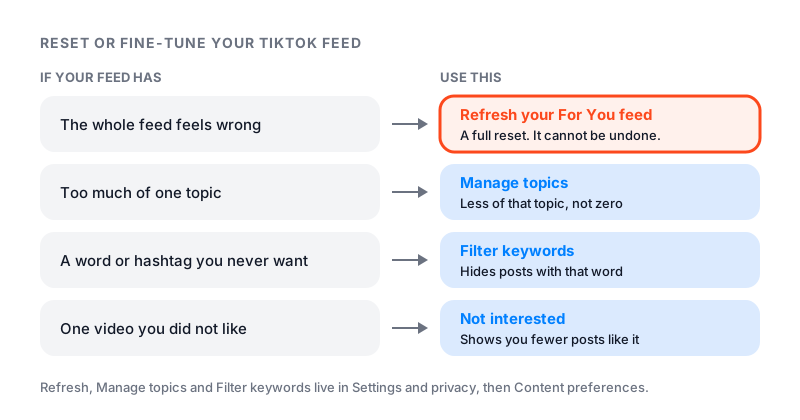
A refresh only changes your For You feed. Your follows, profile, inbox and settings stay as they are. If only one topic bugs you, a smaller fix may be better. The chart below shows which tool to use.
How to refresh your For You feed
TikTok gives two ways in. Both are on its Refresh your For You feed help page.
From your settings
- In the TikTok app, tap Profile at the bottom.
- Tap the Menu button at the top.
- Tap Settings and privacy, then Content preferences.
- Tap Refresh your For You feed and follow the steps on the screen.
From a video in your For You feed
- Press and hold a post, or tap the Share button.
- Tap Why this video. Some versions call it Why this post.
- Tap Adjust your For You.
- Tap Refresh your For You feed and follow the steps.
TikTok says the second way only works in some regions. TikTok gives one set of app steps for iPhone and Android. TikTok’s help pages only give app steps, so use your phone even if you mostly watch on a computer.
What a refresh changes and what it keeps
TikTok launched the feature in 2023. Its newsroom post said a refresh shows your For You feed “as if you just signed up” to TikTok. It also said a refresh won’t override settings you already chose. It does not change the accounts you follow either.
| Part of TikTok | After a refresh |
|---|---|
| For You feed | Starts over with popular posts |
| Accounts you follow | Stay the same |
| Your profile and posts | Stay the same |
| Following feed and inbox | Stay the same |
| Keyword filters and settings | Stay the same |
| Ads | Not affected |
What happens after you refresh
First you see popular posts, not posts picked for you. Then TikTok learns from what you do. Likes, shares, comments and full watches all count. So does scrolling past a video fast.
TikTok does not say how long a new feed takes to settle. It only says your likes and comments help reshape it. Every like and skip after a refresh is a new signal. So go slow. Like only what you truly enjoy, and skip what you do not.
Search helps too. TikTok names searching for topics you are curious about as one of the ways you shape your feed.
Fine-tune your feed instead of a full reset
Most people do not need a full reset. They need less of one thing. To change your TikTok algorithm without starting over, TikTok has four tools.
Not interested. Press and hold a post, then tap Not interested. You can also tap Share, then Not interested. TikTok shows you fewer posts like it. Tap Details for more choices, such as filtering a hashtag from that post.
Manage topics. Go to Settings and privacy, then Content preferences, then Manage topics. Move the sliders for topics like sports or food, then tap Save. TikTok says this will not remove a topic fully. It changes how often you see it.
Filter keywords. Go to Settings and privacy, then Content preferences, then Filter keywords. Tap Add keyword, type a word or hashtag, pick the feeds, and tap Save. Turn on Smart filter to also catch similar words. TikTok says some keywords cannot be filtered.
Unfollow. Unfollowing an account can remove its posts from your Following feed and Friends tab.
Two more tools help in special cases. Restricted Mode limits content that may not be comfortable for everyone. It sits under Content preferences too, and you set a passcode to turn it on. While it is on, you lose the Following feed, going LIVE and LIVE gifts. To clear old searches, tap Search, then tap Clear search next to each one.
Reset vs fine-tune: which one to use
| Your problem | Use this | Can you undo it? |
|---|---|---|
| The whole feed feels wrong | Refresh your For You feed | No |
| Too much of one topic | Manage topics | Yes, move the slider back |
| One kind of video you never want | Filter keywords | Yes, delete the keyword |
| One video or creator you dislike | Not interested | Not listed by TikTok |
| You want only people you chose | The Following feed | Yes, switch back |
In some regions, including the EU, you can also turn off personalized feeds. TikTok says your For You feed then becomes a Popular feed. It shows popular posts from your region and around the world.
If you are a creator
Refreshing your feed changes what you watch. TikTok says a refresh does not affect your profile. It is not a fix for low views on your own videos.
If your own views dropped, start with our guide on how to get more views on TikTok. If every video stalled at once, read our TikTok shadowban guide before you change anything. To track your follower count while you fix things, use our free TikTok counter.
Rebuilding an account and the profile looks empty? Famoid sells TikTok followers delivered through third-party ads. Followers will not lift your views on their own. Better videos do that.
Tips for training your new feed
- Watch the videos you enjoy all the way through. Skip the rest fast.
- Like, favorite or comment on posts you want more of.
- Follow a few creators in the topics you like.
- Use Not interested early, before a topic takes over.
- Break old habits. If you watch the same videos as before, the old feed will likely drift back.
If your Instagram feed needs the same fix, see our guide on how to reset your Instagram algorithm.