The short answer
Here is how to get more likes on Instagram, in one paragraph. Post when your followers are online. Make the first hour count: reply to every comment and share the post to your Story. Post Reels people watch to the end, because Reels reach people who do not follow you. Put a face and one clear subject in photos. Write the words people search for in the caption, and end it with a question. Fix the settings that hide likes or keep your posts out of recommendations. Post on a steady schedule. Do that and you will get likes on Instagram from people who mean it, and more Instagram likes on every post after that.
The rest of this guide takes each step in turn, with the rule from Instagram behind it.
Why a post gets likes
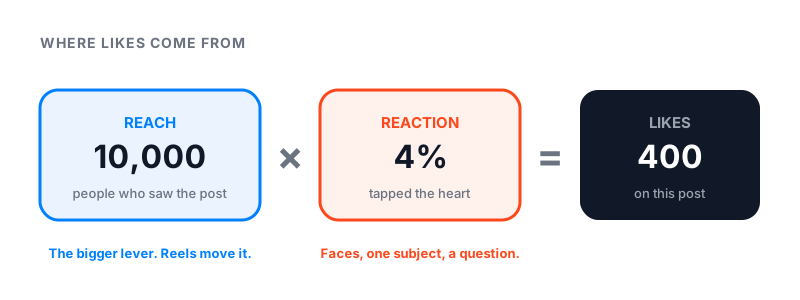
A like needs two things to happen. Someone has to see the post. Then they have to care enough to tap. So every post has a reach number and a reaction rate, and likes are the two multiplied. Most people only work on the reaction. Reach is the bigger lever.
Instagram has no single feed. Feed, Reels and Explore each rank posts their own way, and Instagram explains the signals on its own site.
| Where | What Instagram predicts before it shows your post |
|---|---|
| Feed | Will they spend a few seconds, comment, like, share, or tap your profile |
| Reels | Will they watch to the end, like it, find it fun, or open the audio |
| Explore | Will they like, save, or share |
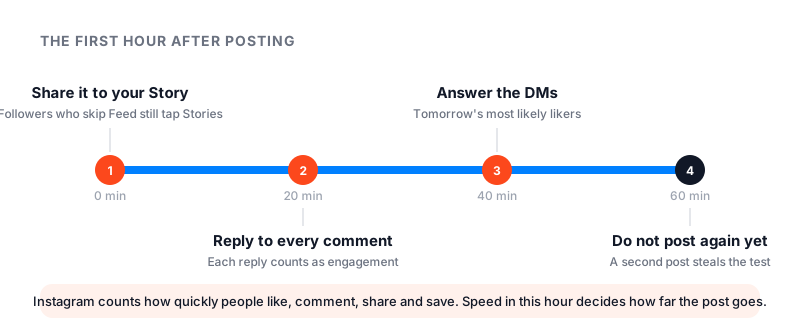
Two details in that page matter for likes. First, Instagram counts how quickly people like, comment, share and save a post. Speed counts, which is why the first hour gets its own step below. Second, for Reels, Instagram shows a new Reel to a small group of non-followers first, then to a wider group if that small group reacts. That is how a post from a 300-follower account can reach 30,000 people.
Step 1: Post when your followers are online
Insights shows the hours and days your followers are most active. It works on any public account, personal or professional.
- Open your profile and tap Insights.
- Tap Total followers.
- Scroll to Most active times.
Find the tallest bar and post 30 to 60 minutes before it. The post is fresh when the crowd arrives, and the fast likes that follow tell Instagram to show it to more people. If Insights is still empty, our best time to post on Instagram guide has a starting schedule for every day of the week.
Step 2: Win the first hour
What you do right after posting changes how far the post goes. People search for “how to get more likes on Instagram after posting” for a reason. Here is the routine.
- Share the post to your Story at once. Followers who never scroll Feed still tap through Stories.
- Reply to every comment within the hour. Instagram tells creators to like or reply to comments within the first couple of days. Doing it in the first hour is better. Each reply counts as engagement, and it brings the commenter back.
- Answer direct messages about the post. People who message you are your most likely likers next time.
- Do not post again for a few hours. A second post pulls attention from the first while it is still being tested.
Then leave it alone. Deleting and reposting a slow post resets it to zero and can look like spam.
Step 3: Make Reels people finish
Reels make up more than half of the time people spend on Instagram, by Instagram’s count, and they are the format shown to non-followers. Watch time is the first signal Instagram lists for Reels. A Reel people finish gets pushed to more people, and more people means more likes. Instagram’s own growth page says what helps and what hurts.
- Hook in the first three seconds. Show the result first, then how you got it.
- Three minutes or less. Longer Reels are not recommended to non-followers.
- Good quality. At least 720p, 30 frames per second, well lit.
- Captions on screen. Many people watch with the sound off.
- Trending audio that fits. Instagram counts audio popularity when ranking Reels.
- Relatable. Instagram’s own words: if people think “that is literally me”, they share it. Shares travel further than likes, and they bring likes with them.
What hurts: reposts, another app’s watermark, muted or bordered video, and engagement bait like “comment YES for part two”. Instagram says these are less likely to be recommended, or not at all.
Step 4: Photos and carousels that earn the heart
Photos mostly reach people who already follow you, so the reaction rate is everything. A few things raise it, and they are the same things a good photographer would tell you.
- A face. Posts with a person in them get a warmer reaction than empty scenes. A face looking at the camera does best.
- One subject. A single clear thing, close up, well lit. Not a busy room.
- First slide sells the swipe. In a carousel, the first image has one job: make people swipe. Put the result or the question on it, and the steps behind it.
- A reason to save. Carousels with steps, lists or before-and-after get saved, and saves are one of the signals Instagram counts on Explore.
- A real caption. Two or three plain sentences, then a question. “Which one would you pick?” gets comments. Comments bring the post back into feeds.
Step 5: Write captions people search for
Instagram search reads captions, names and bios. Put the words someone would type, in plain language, in the first line. “Easy sourdough for beginners” finds people for months. “Sunday vibes” finds no one.
Hashtags still help, but only when they match the topic. Instagram says trending hashtags that fit your Reel can reach people who care about that topic. Off-topic tags do nothing, and the “#likeforlike” family marks you as spam to the people you want. Three to five good tags beat thirty random ones.
Step 6: Reply to comments, and get more of them
Comments and likes travel together. A post with a lively comment section gets shown to more people, and more people means more likes.
- Reply to all comments while the post is young. Ask a follow-up question in your reply.
- Pin the best comment. It sets the tone for the next people who arrive.
- Ask one question in the caption. One, not three.
- Reply with a Reel to the best question, and say who asked. That person, and their friends, will come back.
Step 7: Trial reels, collabs and Favorites
Three features do more for likes than any trick.
- Trial reels. A trial reel is shown to non-followers first and does not appear on your grid. After about 24 hours you see its views, likes, comments and shares. If it did well, share it with everyone. Use trials to find the hook that gets likes from strangers, then make more of that.
- Collab posts. Invite another account as a collaborator. If they accept, the post shows on both profiles and reaches both audiences. One post, two audiences, one like count.
- Favorites. Ask your fans to add you to Favorites. Posts from Favorites show higher in their Feed, so more of your followers see each post.
Step 8: Check the settings that hide likes
People search for “how to get more likes on Instagram settings”, and there are real settings that matter. Check them once.
| Setting | Where | Why it matters |
|---|---|---|
| Account is public | Settings, Account privacy | Private posts are never recommended to non-followers |
| Like count is visible | Advanced settings on the share screen, and Settings, What you see | A hidden count makes a post look like it has zero likes |
| Professional account | Settings, Account type and tools | Turns on Boost and creator tools |
| Account Status | Settings, Account Status | Shows whether your posts are eligible for recommendations |
| Original content | Your own posting habits | Reposts and watermarked videos get less reach |
If the like count is hidden on a post you see, it is your own view setting, not the poster’s. Our how to hide likes on Instagram guide has every step, in both directions.
Step 9: Post steady, not in bursts
Ten posts in one day and then nothing for three weeks is the most common pattern on accounts that ask why they get no likes. Each post competes with the others, and the long gap tells followers to stop expecting you.
Pick a pace you can keep. Three Reels a week and one carousel is enough for most accounts. Put it on a calendar. Steady posting also gives Insights enough data to show your best hours, which makes Step 1 sharper every month.
Why you are not getting likes
Check these in order.
- Is the like count hidden? See Step 8. You still see your own totals.
- Is your reach low? Insights splits reach into followers and non-followers. If non-follower reach is near zero, your posts are not being recommended.
- Check Account Status. If it says your account is not eligible for recommendations, read our Instagram shadowban guide. If Instagram blocks you from liking or commenting, read Instagram action blocked.
- Are you reposting? Reposts and watermarked videos get less reach. Use Remix instead.
- Is the audience just small? Ten likes on a 100-follower account is normal. The fix is reach, which means Reels.
- Are your followers real? Bought bot followers never like anything, and they drag the rate down. Check any account’s real size with our free Instagram follower count checker.
How many likes is good?
A like count means nothing without the audience size next to it. Divide likes by followers to get a like rate, or use our Instagram engagement rate calculator to include comments and saves.
| Followers | Likes per post that is normal | Likes per post that is good |
|---|---|---|
| 500 | 10 to 20 | 30 or more |
| 2,000 | 40 to 80 | 120 or more |
| 10,000 | 150 to 300 | 500 or more |
| 50,000 | 500 to 1,000 | 2,000 or more |
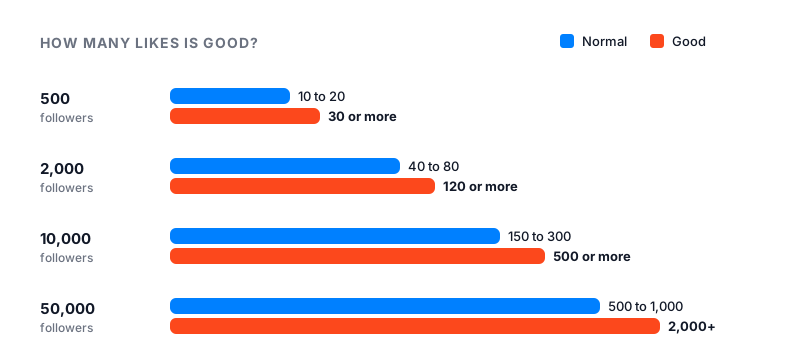
Small accounts have higher rates because most of their followers are people they know. As the account grows, the rate drops and the count rises. Judge yourself against your own last ten posts, not against someone with a hundred times your audience. More Instagram likes come from a bigger reach and a steady rate, in that order. And if you want more followers to like from, our guide on how to get more followers on Instagram picks up where this one ends.
Paid options, honestly
Instagram sells reach itself. On a professional account, open a post and tap Boost. You set a goal, an audience, a daily budget and a duration. The ad goes through review, then runs. A boost buys views, not likes. Likes only come if the post earns them. Our guide on how to boost a post on Instagram covers the cost and when it pays off.
Famoid sells Instagram likes delivered through third-party ads. Delivery starts within minutes and is spread out at a natural pace. There is also an automatic likes plan, which sends likes to each new post you share. We only need your username, never your password. Paid likes do not change how Instagram ranks you. They give a post an early push while the nine steps above do the real work.