The short answer
TikTok coins are virtual items you buy with real money. You spend them on gifts for creators, during a LIVE or on videos. You can also use them for Promote and Star Comments. You must be 18 or older to buy them (19 in South Korea).
A TikTok coins recharge works in two official places. In the app, go to Profile, tap the Menu button (three lines), then Balance. In a browser, go to tiktok.com/coin. The website is usually the cheaper way. TikTok’s own coin page says it saves you around 25 percent.
Coins only go one way. You cannot cash them out, and gifts are never refunded. The only safe seller is TikTok itself.
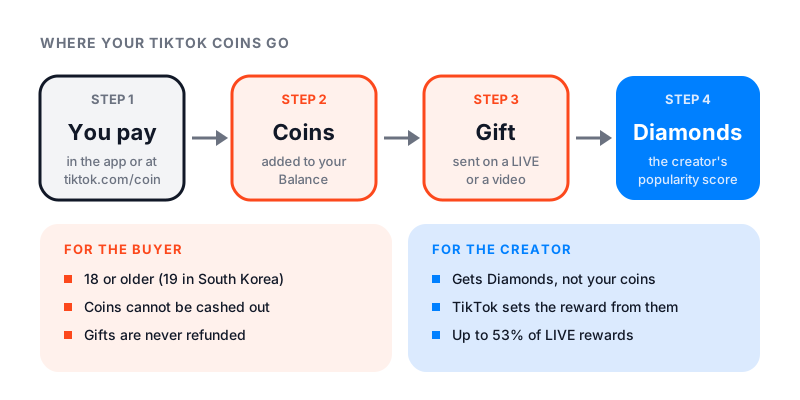
What TikTok coins can and cannot do
TikTok’s Gifts and Coins help page lists two uses. You can send gifts during a LIVE or on posts in your feed. You can also pay for Promote, TikTok’s own ad tool, or Star Comments. If you are thinking about Promote, read is TikTok Promote worth it first.
TikTok’s Virtual Items Policy for US users sets the limits:
- Coins can’t be swapped for cash or used as money.
- You can’t buy, sell or trade them with other users.
- If your account is banned or deactivated, unused coins are gone. There is no refund unless the law requires one.
Coins never turn back into cash, so there is no TikTok coins exchange for buyers.
How to recharge TikTok coins in the app
The current path from TikTok’s help page:
- In the TikTok app, tap Profile at the bottom.
- Tap the Menu button (three lines) at the top, then select Balance.
- Tap Get Coins, then choose a coins package.
- Tap Recharge. Finish paying through the App Store or Google Play.
You can also do a TikTok coin recharge in the middle of a LIVE. Tap the Gift button at the bottom, then tap Recharge and pick a package. No Gift button means that LIVE does not take gifts.
How to recharge TikTok coins on the website
- Go to tiktok.com/coin in any browser and log in.
- Choose a coins package, or pick Custom for another amount.
- Click Recharge.
- Pay with a method offered in your country.
Web coins land in the same balance you see in the app. Web recharge only works in some countries for now. Some countries also sell official TikTok gift cards. You redeem one at tiktok.com/coin/redeem by typing the PIN code from the card.
Why the website is the cheapest way to buy TikTok coins
In the app, the app store handles the payment. On the website, TikTok sells the coins itself.
We opened tiktok.com/coin on September 22, 2026. The banner read: “Save around 25% with a lower third-party service fee.” We could not see the app price next to it without logging in. Treat 25 percent as TikTok’s figure, not our own test.
TikTok’s policy also says the cost per coin changes with how many you buy and where. Your bank may add a currency or foreign transaction fee on top. The cheapest way to buy TikTok coins online is a TikTok recharge on the web, sized to what you will really spend.
How much are TikTok coins?
The TikTok coins price depends on your country, your currency and where you buy. The price always shows before you pay. The coin page even showed us prices before we logged in.
The website sells the same package sizes in every country. On September 22, 2026, tiktok.com/coin listed these:
| Package | Good for |
|---|---|
| 30 coins | Trying it out, a few small gifts |
| 350 coins | Regular small gifts |
| 700 or 1,400 coins | Gifting during most LIVEs you watch |
| 3,500 to 17,500 coins | Big gifts, or gifting often |
| Custom | Any amount you type in |
Bigger packages save very little. When we worked out the price per coin, the largest package was only about 2 percent cheaper than the 350-coin one. So buy the amount you plan to use, not the biggest bundle. In the US, coins bought on the web can’t be refunded.
TikTok coins to USD: do the math yourself
There is no fixed rate for TikTok coins to USD. Use the price in front of you.
- Open tiktok.com/coin or the Get Coins page in the app.
- Divide a package price by its number of coins. That is your price per coin.
- Multiply by the number of coins you need.
For 1,000 TikTok coins, take the 700 package price, divide it by 700, and multiply by 1,000. Do this once in the app and once on the web. The gap shows what buying in the app costs you extra.
Gift values: where to find the real number
Every gift has a coin cost, shown under each gift in the gift panel. TikTok’s help pages and policy do not list gift prices. The gift panel in the app is the one official place to see them, and TikTok can change them.
To check a gift before you send it:
- In a LIVE, tap the Gift button. On a video, tap Comments, then the Gift button next to Add comment.
- Read the coin number under the gift.
- Multiply it by your price per coin.
Other users can see your username and the gift you sent. If you gift often, set a daily limit. In the app, tap LIVE at the top, tap the Share button, then Settings. Tap Gift limit notification and follow the steps.
What the creator gets: Diamonds
TikTok’s US policy says a gift does not pass money or coins to the creator. Instead, TikTok gives the creator Diamonds.
Diamonds measure how popular a creator is. TikTok uses them as one factor when it pays rewards. Diamonds alone do not promise a payout.
For LIVE, TikTok’s Creator Academy explains Scaled LIVE rewards. Creators can collect up to 53 percent of LIVE rewards. Up to 40 percent comes from Per-LIVE Missions, and up to 13 percent from Weekly Missions. Only the top tier of every mission reaches 53 percent. The missions look at things like LIVE length, new followers and how often the creator goes LIVE.
Creators must be 18 or older and turn on LIVE Gifts. For the rules on going live, see how many followers you need to go live on TikTok. For other ways creators earn, see how much TikTok pays.
Who can buy coins and send gifts
- You must be 18 or older (19 in South Korea), or older if your country sets a higher age.
- Coins and gifts are only sold in some regions.
- On videos, only personal accounts can send or get gifts.
- Government, politician and political party accounts can’t send or get gifts.
- TikTok may pause your purchases after unusual transactions or rule breaks, or set spending limits.
Where it is safe to buy TikTok coins
You can only buy TikTok coins from TikTok: the app, the website, or an official TikTok gift card. That rules out “cheap recharge” sites. Watch for these red flags:
- A site that asks for your TikTok login. TikTok’s help center warns never to trust sites that promise free likes, fans, crowns or coins. They may get your login.
- “Free coins” offers. They fall under the same TikTok warning.
- Accounts sold with coins inside. Coins can’t be moved to another user, so the deal breaks TikTok’s rules.
- Gift card sellers you don’t know. A real TikTok gift card only needs a PIN that you type yourself.
TikTok says it will never ask for your password or login codes. Rule breaks with payments can also cost you the right to send gifts or get coins. If you already typed your password into one of these sites, change it now and turn on 2-step verification.
Payment problems, refunds and help
If a recharge fails, check these first:
- The card on your Google Play or App Store account is valid and has funds.
- You are not using a VPN.
- The TikTok app and your app store are up to date.
- Your internet connection is stable.
- You did not make several large purchases in a short time. TikTok may block your payment method to protect your account.
Orders can take a few minutes to show. Then restart the app and refresh the Balance page. If coins are still missing, tap Need more help? in the app’s help article and send a ticket. Add a receipt screenshot with the order ID, amount and payment time.
Refunds depend on where you bought:
| Where you bought | What happens |
|---|---|
| Apple App Store | Ask Apple. Its own refund rules apply. |
| Google Play, inside TikTok | Ask TikTok through Report a problem in your Profile settings. |
| tiktok.com/coin, in the US | No refund, unless the coins are faulty or the law requires one. |
| tiktok.com/coin, in the EEA, Switzerland or UK | 14 days to change your mind, for coins you have not used. |
| A gift you already sent | Never refunded. |
If a refund goes through, TikTok takes the matching coins back out of your balance.
Before your next recharge
Check the coin cost of the gift first, and buy only what you need. Compare the price per coin in the app and on the web. Never give your login to anyone who sells coins.
To see how fast a creator is growing, our free TikTok counter shows their live follower count.