The short answer
Here is how to get more likes on TikTok, in one paragraph. Stop the skip in the first two seconds by showing the result or saying the bold line. Keep one idea per video and put the payoff in the last three seconds. Ask for the like once, with a reason. Post about an hour before your viewers are most active. Reply to comments fast, and reply to the best one with a video. Fix anything that keeps the video out of the For You feed. Do that on every video for a few weeks and you will get likes on TikTok from people who watched, and more TikTok likes on every video after.
The rest of this guide takes each step in turn, with the rule from TikTok behind it.
Why a video gets likes
A like needs two things. Someone has to see the video. Then it has to pay off enough that they tap. So every video has a view count and a like rate, and likes are the two multiplied. Most people only work on the second number. Views are the bigger lever.
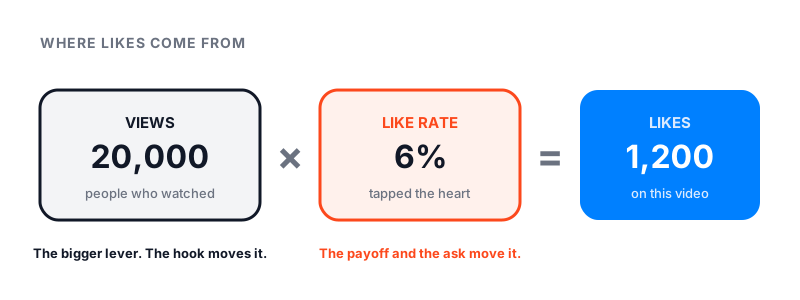
TikTok’s how TikTok recommends content page lists the signals its For You feed reads: what people like, share, comment on, and watch in full or skip. It says these interactions, including time spent watching, are weighted more than anything else. So a video that people finish is shown to more people, and more people means more likes. A video that people skip is shown to fewer, no matter how good the caption is.
Step 1: Stop the two-second skip
Most viewers decide in the first two seconds, and TikTok counts the skip. Fix the opening before anything else.
- The reveal. Show the finished thing first, then how you did it.
- The bold line. “You are folding towels wrong.” Then the fix.
- The list. “Three things I wish I knew.” People like lists they want to keep.
- The relatable moment. A small daily thing people recognize and want to send to a friend.
Movement in the frame and one line of on-screen text, at once. Never a logo, never “Hey guys”.
Step 2: Give a payoff, then ask once
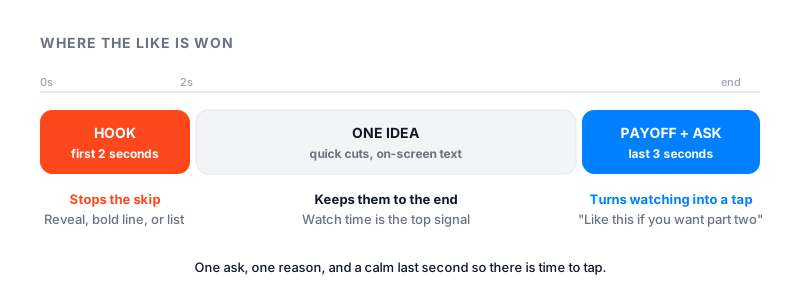
A like is a thank-you. Plan what the viewer gets before you film, and put it in the last three seconds so the video is worth finishing.
| Part of the video | What to do | Why it earns a like |
|---|---|---|
| First 2 seconds | Show the result, or say the bold line | Stops the skip |
| Middle | One idea, quick cuts, on-screen text | Keeps people to the end |
| Last 3 seconds | Deliver the payoff, then ask once | Gives a reason to tap |
The ask works when it comes with a reason. “Like this if you want part two.” “Like it so you can find it later.” One ask, one reason, and a calm last second so there is time to tap.
Step 3: Post when your viewers are online
Likes need viewers, and a video that reacts fast in its first hour goes further. TikTok Studio shows when yours are active.
- Open your profile, tap the menu, then TikTok Studio.
- Open Analytics, then Viewers.
- Find the most active hours and post about an hour before the peak.
Our best time to post on TikTok guide explains how to read the chart and gives a starting schedule if yours is still empty. TikTok’s own advice is to post good videos on a regular basis. Pick a pace you can keep.
Step 4: What to do right after posting
People search for “how to get more likes on TikTok after posting” for a reason. The first hour is when the small test group decides.
- Reply to every comment, and reply to the best one with a video. Replies keep people on the video and give the feed more to count.
- Pin the strongest comment. It sets the tone for the next viewers.
- Share it to your TikTok Story. Followers who never scroll the feed still tap Stories.
- Do not post again for a few hours. A second video pulls the test group away from the first.
Then leave it alone. Deleting and reposting a slow video resets it to zero and can look like spam.
Step 5: Use sounds and hashtags to get tested on the right people
TikTok lists sounds and hashtags as content signals. They do not push a video. They tell TikTok who to test it on, and the right test group likes more.
- Use a sound that is still rising, and only when it fits. Open the sound page: a few thousand videos means rising, millions means peaked.
- Put the topic in the caption and in on-screen text, in the words a person would search.
- Two or three hashtags that describe the video. Skip the “#fyp” family; it does nothing for reach.
Step 6: Reply with video and build a series
TikTok’s how to grow your audience page tells creators to engage with viewers through comments and LIVE, and to collaborate through Duet and Stitch. For likes, the reply video is the strongest move. Tap a comment, choose Reply with video, and the comment appears on screen as a ready-made hook. The person who asked likes it, and so do the people who wondered the same thing.
Comment insights in TikTok Studio sort your comments into topics and questions. Open a post, tap More insights, then Engagement. Turn the top question into part two. That is how a series starts, and a series gives people a reason to like and come back. Number the parts, end each one on the next question, and pin the comment that asked for it.
Step 7: Fix what blocks reach
If a video sits at almost no views, the problem is views, not likes. Check these in order.
- TikTok Studio notices. Look for a message that the post is under review or not eligible for the For You feed.
- Reposts and watermarks. TikTok holds back copied clips and low-quality uploads.
- A sudden drop across every video. Read our TikTok shadowban guide before you change your content.
- A single video stuck at zero. Our how to get more views on TikTok guide covers review holds and eligibility step by step.
Step 8: Post steady, in one lane
Three videos on Monday and nothing until Friday is the most common pattern on accounts that ask why likes dried up. TikTok tests each video on people who watched similar videos, so a clear topic gets a better test group, and a steady pace keeps the account in front of them. One video a day in one topic beats bursts. TikTok also suggests trying videos longer than one minute; short ones test well, longer ones build the habit that brings the same viewers back to like the next one.
How many likes is good?
A like count means nothing without the view count next to it. Divide likes by views to get a like rate, or use our TikTok engagement rate calculator to include comments and shares.
| Views on the video | Likes that are normal | Likes that are good |
|---|---|---|
| 1,000 | 30 to 60 | 100 or more |
| 10,000 | 300 to 600 | 1,000 or more |
| 100,000 | 3,000 to 6,000 | 10,000 or more |
These are our working ranges from the accounts we watch, not a published TikTok figure. Videos that reach the For You feed sit higher than videos seen mostly by followers, because strangers who stayed to the end chose to. Judge each video against your own last ten, not against a creator with a hundred times your reach.
Where to see your likes
Your profile shows total likes. TikTok adds up the likes on every post still on your profile, so a deleted post takes its likes with it, and the number can lag on a slow connection. For each post, open TikTok Studio, then Posts, to see likes, shares and views per video. Watch which hook got the most likes, and make the next video the same way.
Likes move fast. Followers move slower. If the likes are coming but the count is not, our guide on how to get more followers on TikTok picks up where this one ends, and the free TikTok counter shows your live follower number.
Paid options, honestly
Promote is TikTok’s own ad tool. It turns a public post into an ad. You must be 18 or older, have a Creator or Business account, and use an original sound or one cleared for commercial use. You pick a goal and a budget, and TikTok reports likes, followers and views. TikTok says results are not guaranteed, and a promoted video that people skip still gets skipped.
Famoid sells TikTok likes delivered through third-party ads. Delivery starts within minutes and is paced over a few hours. Use it to give a first push to a video people already finish. It will not fix a video that gets skipped, we do not promise a number, and we only need your username, never your password.