

Do you want to know how to change your age on TikTok?
If yes, this post is for you.
Social media is a great place to connect with friends and family, but it also can be a breeding ground for cyberbullying, graphic violence, and other inappropriate behavior.
And when we share those things online, it often goes viral and becomes more than just a one-time mistake—it stays there forever in cyberspace!
And that’s why TikTok took the initiative to protect underage users from age-inappropriate content. In 2021, TikTok removed over 7.3 million accounts that belonged to under 13s.
And also removed the option to change birth date within the app.
This initiative was much needed to protect the younger generation. However, young adults might find this initiative a bit intimidating.
While rushing through the sign-up process, if you’ve entered the wrong date of birth, there’s no way to change the mistake.
But is there a way out?
Yes, there is a way. But as easy as it seems.
That’s why to help you out, in this post, we’ll show you how to change your age on TikTok by following some steps.
So without much ado, let’s dive in.
Can You Change Your Age on TikTok?
Yes, you can change your age on TikTok. But the way to do that is not very simple as you might think.
Before, TikTok used to have a feature that anyone could change age with a blink of an eye. However, many minors were using this feature to access age-inappropriate content on the platform.
That’s why TikTok introduced a new privacy policy, where altering your age was no longer an option. So, the social media platform removed the feature to change your birth date.
If you somehow typed a wrong birthday, you have to contact customer support on TikTok and send them a request to change it. And this process might take longer to complete.
Keep reading to find out how you can contact TikTok customer support and whether any alternative method is available to change age.
TikTok Age Requirement
TikTok, the popular video-sharing platform, comes with age restrictions. The platform will ban the accounts of users under 13 years old.
Users who are 13 years old and older (13 to 16 years old) won’t get access to several features on TikTok. They will be able to share videos and contact other users. However, there will be limitations when it comes to accessing certain features.
For instance, they won’t be able to host LIVE, send direct messages, or comment on videos. They will only have access to filtered video content.
How to Change Your Age on TikTok
As TikTok doesn’t have any feature to change your age right away, it can be frustrating if you’ve mistakenly typed a wrong date of birth during registration.
Now to change your age on TikTok, you would have to contact the customer support team to prove your age. Here’s how you can do it:
Step 1: First, open the TikTok app and head to your profile page by tapping the Profile button in the bottom right corner of your screen.
Step 2: Tap on the three horizontal lines icon located in the upper right corner of your profile page.
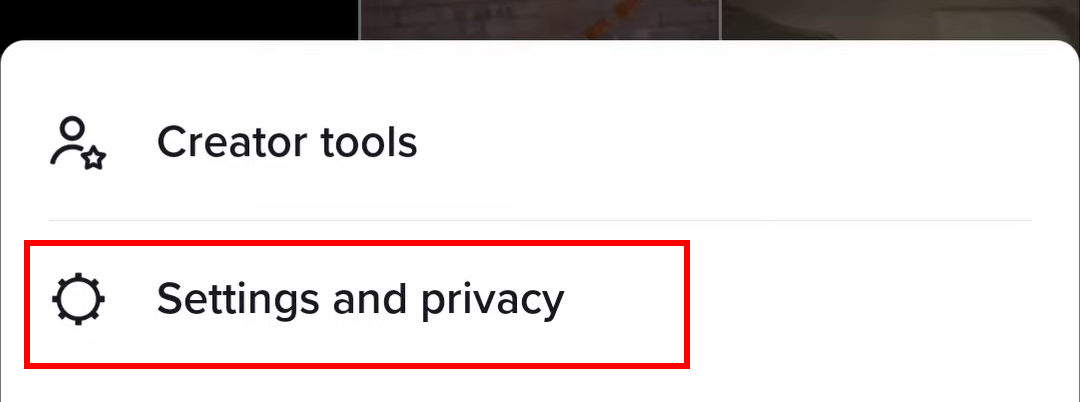
Step 3: Now, tap on the Settings and Privacy option from the menu.
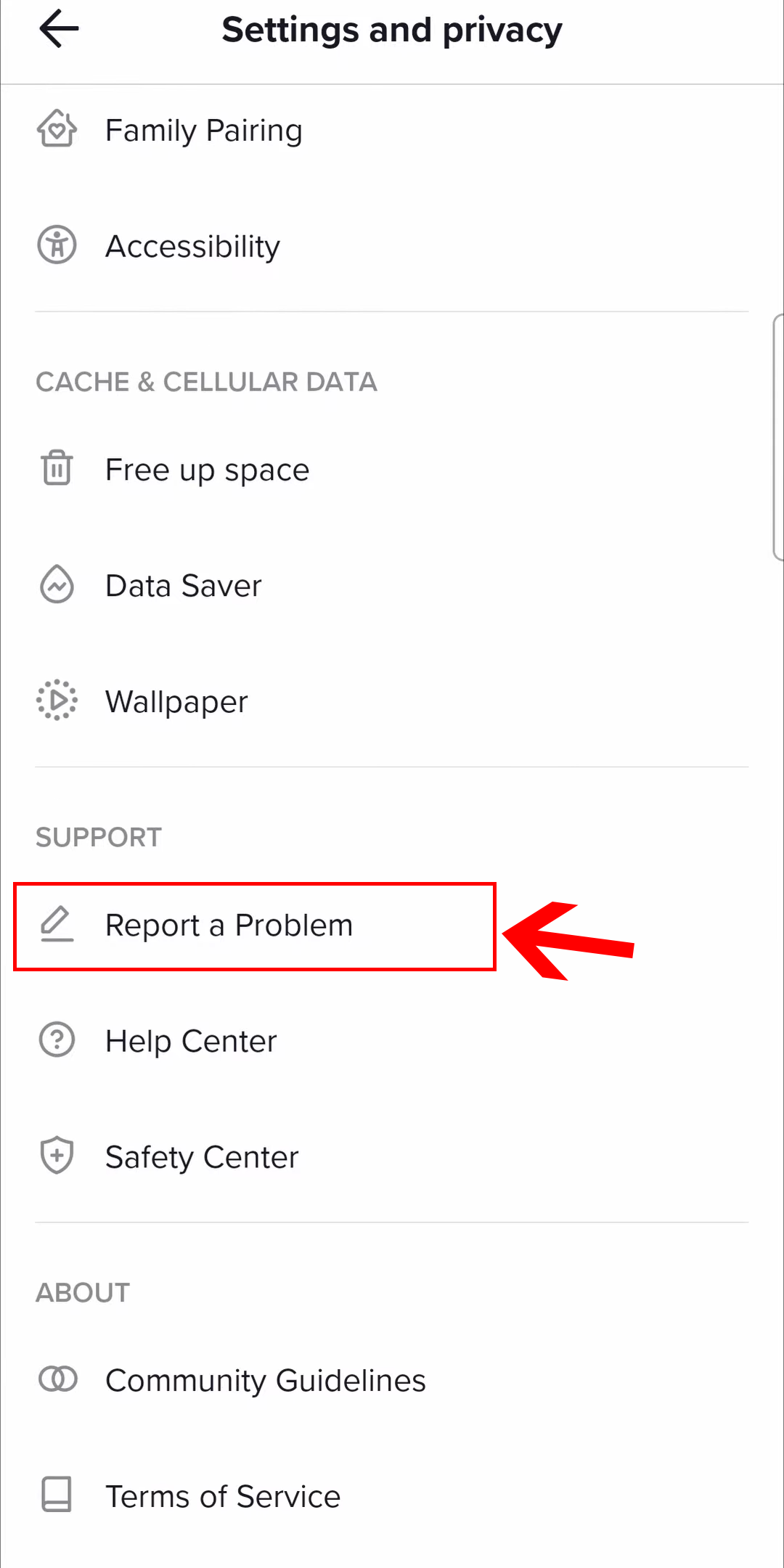
Step 4: On the Settings and Privacy page, scroll down until you find the option Report a Problem. Once you’ve found it, tap on it.
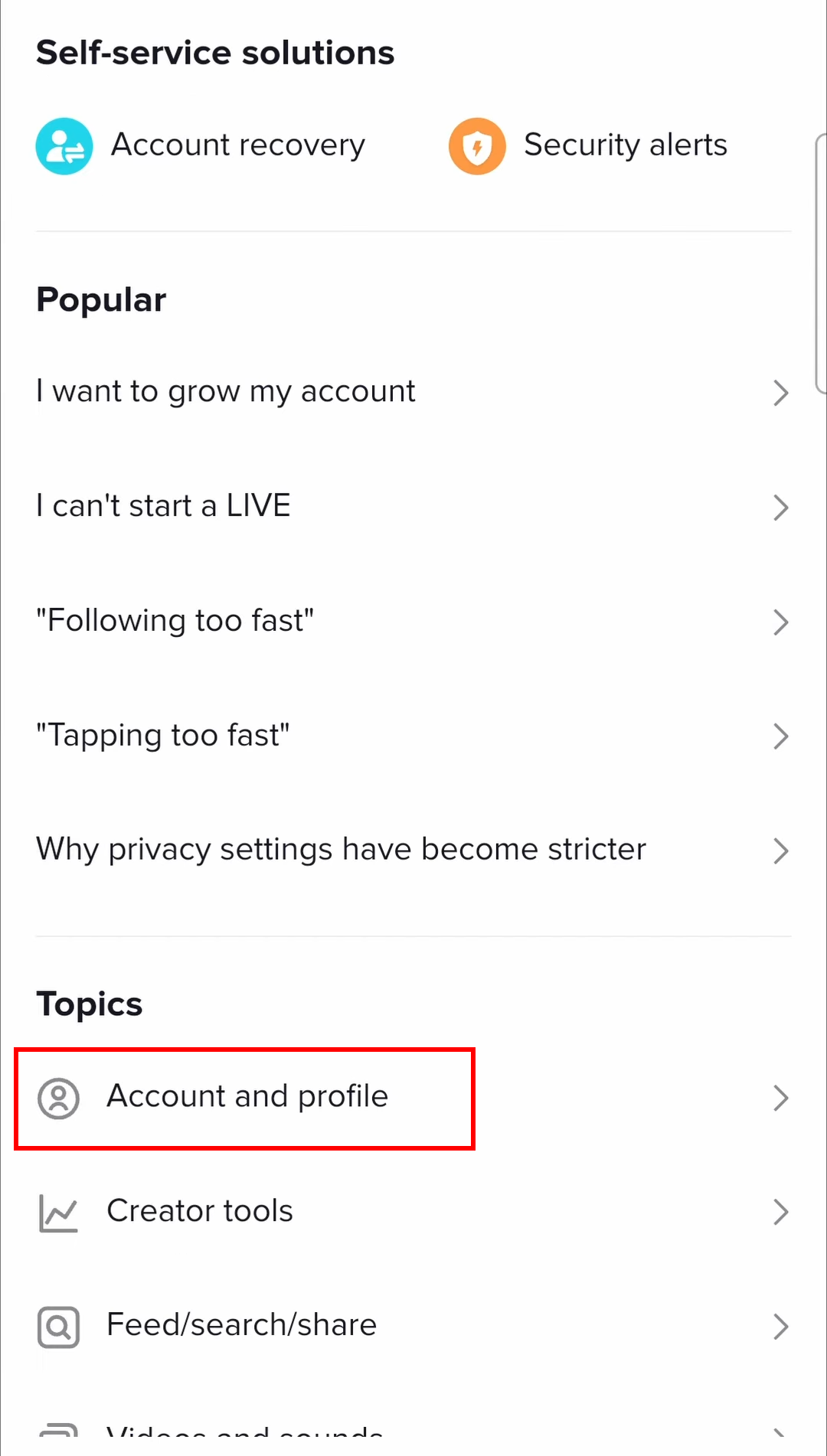
Step 5: On the next page, tap on Account and profile under Topics.
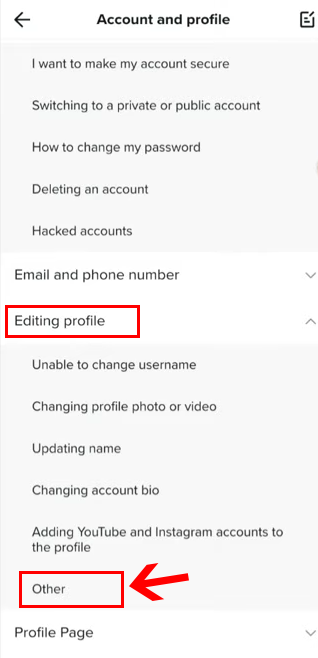
Step 6: Now, open the Editing profile menu and select the Other option.
Step 7: Next, tap on Need more help to contact the TikTok support team.
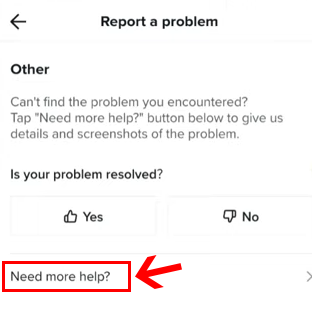
Step 8: On the Report a problem page, you have to write a message explaining that you’d like to change your birthday on your account.
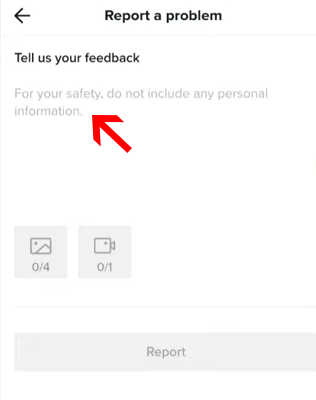
Step 9: Once you’ve written the message, tap on the Report button.
That’s it! Now, wait for the TikTok team to send you an email response after a few days. In the email, they’ll ask you to submit a government ID proof verifying your birth date.
Once you’ve sent the proof, they’ll update the date of birth on your account to your actual DOB.
Is There Any Other Way to Change Age on TikTok?
The TikTok support team probably receives millions of user requests daily to change their birth date. So, sometimes it might take longer than usual to accept your request.
That’s why the best way to change age on TikTok is to open a new account from scratch.
And while setting up the new TikTok account, make sure to enter the correct birth date to avoid any age restrictions.
Is it Necessary to Change Your Age on TikTok?
If you’re an adult user who entered the wrong birthdate during the signup process, then it is necessary to change your age. Otherwise, you won’t have the ability to access most features on the video-sharing platform.
However, if you’re an underage user, it’s not that necessary to change your age or fake it to access certain features.
Because, with millions of active users on TikTok, there’s no guarantee on what’s going viral. For instance, in 2021, a “Blackout challenge” with over 233,000 views on the platform encouraged a 12-year-old kid to suffocate to death.
That’s why TikTok’s age restriction measure is necessary to prevent such dangerous behavior.
If you’re underage and still want to access TikTok, we recommend you ask for your parent’s guidance.
Wrapping Up
We hope now you clearly understand how to change age on TikTok.
We understand that it sucks when you have limitations to posting videos or watching certain content. But, after all, the protection policies are for the greater good!
Still, if you believe that you’re mature enough to access age-inappropriate content, you can always fake your age by opening a new account.
However, if one of your friend or family member realize that you’ve opened an account with a fake age, they can report it. And eventually, TikTok will ban your profile.
2 Comments
Share your thoughts with us below
d_diack_off
Good app
unofficial402
Plz change my age is mistaken age login 13 but real 19+ age plz change my age