# Famoid
> Famoid is a social media growth service that has operated since 2017. It sells Instagram, TikTok and Facebook followers, likes and views, delivered through third-party ad campaigns shown to people on each platform. Orders need only a public username or post link, never a password. Famoid also runs free tools (follower counters and live "is it down" status checkers) and publishes short, plain-English help guides. Services are for personal use and self-entertainment.
Company: Famoid LLC, Delaware, United States, with an office in Dubai. Support is open 24/7. A 30-day refill guarantee covers drops; undelivered orders are refunded. Every page below also has a Markdown version at the same path with `.html.md` appended (for example https://famoid.com/insta.html.md). The full set is concatenated at https://famoid.com/llms-full.txt.
## Services
- [Buy Instagram Followers, Likes & Views](https://famoid.com/): the main service page, packages from $2.95, how delivery works, FAQ
- [Instagram Services: Packages, Pricing & How It Works](https://famoid.com/insta/): followers, likes, views; sizing rules; FAQ
- [Buy TikTok Followers, Likes & Views](https://famoid.com/tiktok/): TikTok followers, likes, views; the 5-15-30 sizing rule
- [Buy Facebook Followers, Post Likes & Group Members](https://famoid.com/facebook/)
- [Buy Instagram Reels Views & Likes](https://famoid.com/instagram-reels/)
- [Automatic Instagram Likes](https://famoid.com/buy-automatic-instagram-likes/): likes on every new post, one payment, no subscription
## Free tools
- [Is Instagram Down?](https://famoid.com/is-instagram-down/): live check from two vantage points, 24-hour monitor, day-by-day outage history
- [Is TikTok Down?](https://famoid.com/is-tiktok-down/): the same live check for TikTok
- [Instagram Follower Count Checker](https://famoid.com/instagram-follower-count-checker/): exact live follower count for any public account
- [TikTok Live Follower Counter](https://famoid.com/tiktok-counter/): real-time follower count for any public account
- [Instagram Engagement Rate Calculator](https://famoid.com/instagram-engagement-rate-calculator/): engagement rate by followers or by views, with plain-English benchmarks
- [TikTok Engagement Rate Calculator](https://famoid.com/tiktok-engagement-rate-calculator/): the same calculator for TikTok
- [Instagram Username Checker](https://famoid.com/instagram-username-checker/): see whether an account uses a name, and check it against Instagram's username rules
- [TikTok Username Checker](https://famoid.com/tiktok-username-checker/): the same check for TikTok, with TikTok's 2 to 24 character rules
- [Most Followed Instagram Accounts](https://famoid.com/most-followed-instagram-accounts/): live top 50 by follower count, read once a day, with the daily change
- [Most Followed TikTok Accounts](https://famoid.com/most-followed-tiktok-accounts/): the same live top 50 for TikTok
## Help guides
- [All guides](https://famoid.com/guides/)
### Instagram
- [Best Time to Post on Instagram](https://famoid.com/best-time-to-post-on-instagram/)
- [Can Someone See How Many Times You Viewed Their Instagram?](https://famoid.com/can-someone-see-how-many-times-you-viewed-their-instagram/)
- [Can You See Who Views Your Instagram Highlights?](https://famoid.com/can-you-see-who-views-your-instagram-highlights/)
- [Can You See Who Views Your Reels on Instagram?](https://famoid.com/can-you-see-who-views-your-reels/)
- [Does Instagram Notify When You Screenshot a Story?](https://famoid.com/does-instagram-notify-when-you-screenshot-a-story/)
- [Does Instagram Suggest Users Who Search for You?](https://famoid.com/does-instagram-suggest-users-who-search-for-you/)
- [How Many Followers on Instagram to Go Live?](https://famoid.com/how-many-followers-on-instagram-to-go-live/)
- [How Much Does Instagram Pay for Views?](https://famoid.com/how-much-does-instagram-pay/)
- [How to Add a Link to Your Instagram Story](https://famoid.com/how-to-add-link-to-instagram-story/)
- [How to Appear Offline on Instagram](https://famoid.com/how-to-appear-offline-on-instagram/)
- [How to Boost a Post on Instagram](https://famoid.com/how-to-boost-a-post-on-instagram/)
- [How to Clear Instagram Cache (iPhone and Android)](https://famoid.com/how-to-clear-instagram-cache/)
- [How to Contact Instagram Support](https://famoid.com/how-to-contact-instagram-support/)
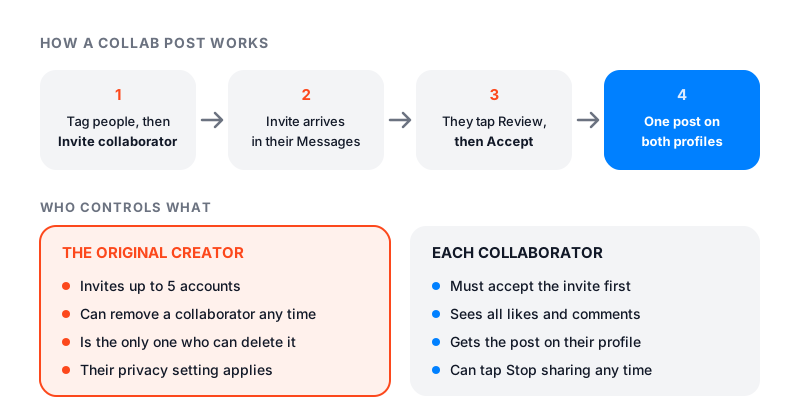
- [How to Do a Collab Post on Instagram](https://famoid.com/how-to-do-a-collab-post-on-instagram/)
- [How to Find Saved Reels on Instagram](https://famoid.com/how-to-find-saved-reels-on-instagram/)
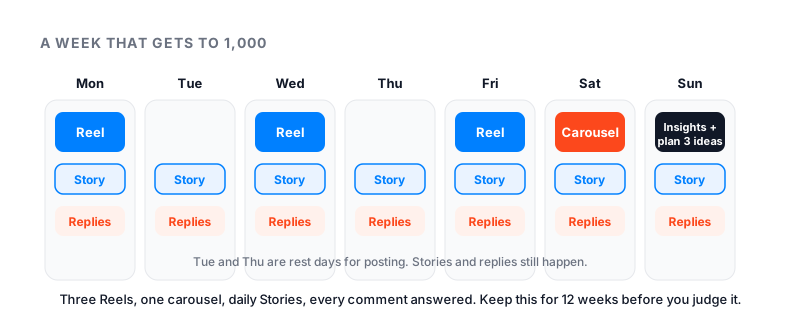
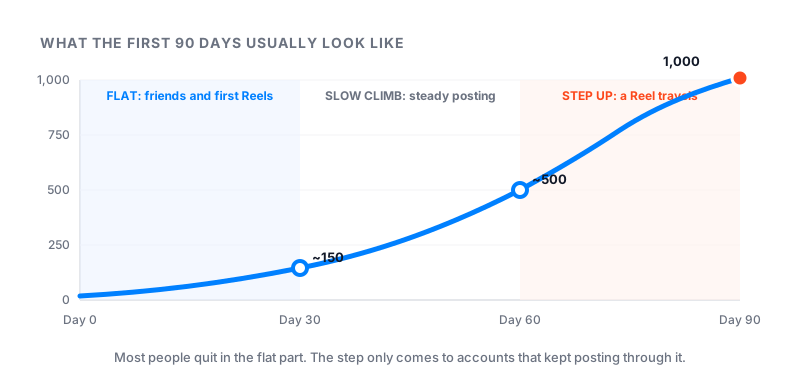
- [How to Get 1,000 Followers on Instagram](https://famoid.com/how-to-get-1000-followers-on-instagram/)
- [How to Get More Followers on Instagram](https://famoid.com/how-to-get-more-followers-on-instagram/)
- [How to Get More Likes on Instagram](https://famoid.com/how-to-get-more-likes-on-instagram/)
- [How to Get More Views on Instagram](https://famoid.com/how-to-get-more-views-on-instagram/)
- [How to Hide Followers on Instagram](https://famoid.com/how-to-hide-followers-on-instagram/)
- [How to Hide Likes on Instagram](https://famoid.com/how-to-hide-likes-on-instagram/)
- [How to Know If Someone Blocked You on Instagram](https://famoid.com/how-to-know-if-someone-blocked-you-on-instagram/)
- [How to Repost on Instagram](https://famoid.com/how-to-repost-on-instagram/)
- [How to Reset Your Instagram Algorithm](https://famoid.com/how-to-reset-instagram-algorithm/)
- [How to See Deleted Messages on Instagram](https://famoid.com/how-to-see-deleted-messages-on-instagram/)
- [How to See Insights on Instagram](https://famoid.com/how-to-see-insights-on-instagram/)
- [How to See Someone's Recent Followers on Instagram](https://famoid.com/how-to-see-recent-followers-on-instagram/)
- [How to See Who Liked a Post on Instagram](https://famoid.com/how-to-see-who-liked-a-post-on-instagram/)
- [How to See Who Unfollowed You on Instagram](https://famoid.com/how-to-see-who-unfollowed-you-on-instagram/)
- [How to See Who Viewed Your Instagram Profile](https://famoid.com/how-to-see-who-viewed-your-instagram-profile/)
- [Instagram Account Suspended: What to Do Now](https://famoid.com/instagram-account-suspended/)
- [Instagram Action Blocked: Why and How to Fix It](https://famoid.com/instagram-action-blocked/)
- [Instagram Couldn't Refresh Feed: How to Fix It](https://famoid.com/instagram-couldnt-refresh-feed/)
- [Instagram DMs Not Working? Here Is How to Fix It](https://famoid.com/instagram-dms-not-working/)
- [Instagram Image Size](https://famoid.com/instagram-image-size/)
- [Instagram Login Not Working? Here Is What to Do](https://famoid.com/instagram-login-not-working/)
- [Instagram Music Not Working: Why and How to Fix It](https://famoid.com/instagram-music-not-working/)
- [Instagram Not Loading? Find Your Symptom, Fix It](https://famoid.com/instagram-not-loading/)
- [Instagram Reels Not Working: Fix Reels Not Playing or Loading](https://famoid.com/instagram-reels-not-working/)
- [Instagram Shadowban: Am I Shadowbanned, and How to Fix It](https://famoid.com/instagram-shadowban/)
- [Instagram Something Went Wrong: Why You See It and How to Fix It](https://famoid.com/instagram-something-went-wrong/)
- [Instagram Statistics](https://famoid.com/instagram-statistics/)
- [Is Instagram Active Status Accurate?](https://famoid.com/is-instagram-active-status-accurate/)
- [Is It Safe to Buy Instagram Followers?](https://famoid.com/is-it-safe-to-buy-instagram-followers/)
- [What Counts as a View on Instagram?](https://famoid.com/what-counts-as-a-view-on-instagram/)
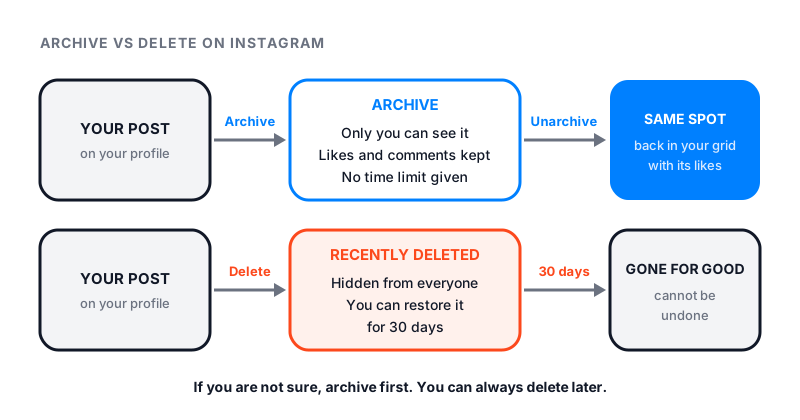
- [What Does Archive Mean on Instagram?](https://famoid.com/what-does-archive-mean-on-instagram/)
- [What Does CFS Mean on Instagram?](https://famoid.com/what-does-cfs-mean-on-instagram/)
- [What Does OBJ Mean on Instagram?](https://famoid.com/what-does-obj-mean-on-instagram/)
- [What Does PMO Mean on Instagram?](https://famoid.com/what-does-pmo-mean-on-instagram/)
- [What Happens If I Delete the Instagram App?](https://famoid.com/what-happens-if-i-delete-the-instagram-app/)
- [What Happens When You Restrict Someone on Instagram?](https://famoid.com/how-to-restrict-someone-on-instagram/)
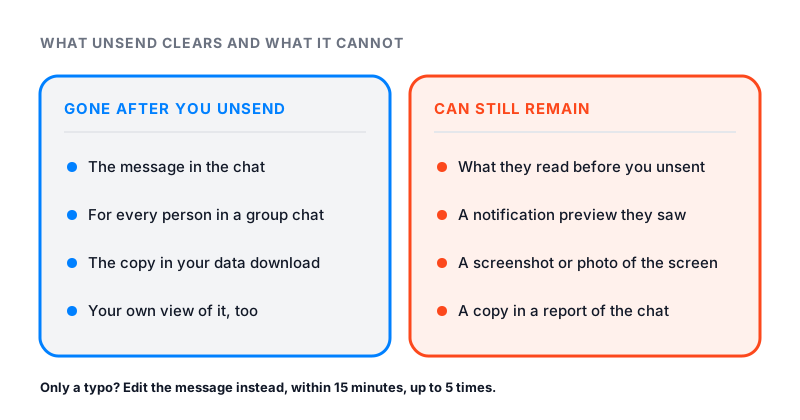
- [What Happens When You Unsend a Message on Instagram?](https://famoid.com/what-happens-when-you-unsend-a-message-on-instagram/)
- [What Is Add Yours on Instagram?](https://famoid.com/what-is-add-yours-on-instagram/)
- [What Is an Instagram Handle?](https://famoid.com/what-is-an-instagram-handle/)
- [What Is My Instagram URL?](https://famoid.com/what-is-my-instagram-url/)
- [Why Am I Losing Followers on Instagram?](https://famoid.com/why-am-i-losing-followers-on-instagram/)
- [Why Can't I Follow People on Instagram?](https://famoid.com/why-cant-i-follow-people-on-instagram/)
- [Why Does Instagram Keep Logging Me Out?](https://famoid.com/why-does-instagram-keep-logging-me-out/)
### TikTok
- [Best Time to Post on TikTok](https://famoid.com/best-time-to-post-on-tiktok/)
- [Can You Buy TikTok Followers? Is It Safe?](https://famoid.com/can-you-buy-tiktok-followers/)
- [How Many Followers on TikTok to Get Paid?](https://famoid.com/how-many-followers-on-tiktok-to-get-paid/)
- [How Many Followers on TikTok to Go Live?](https://famoid.com/tiktok-live-requirements/)
- [How Much Does TikTok Pay?](https://famoid.com/how-much-does-tiktok-pay/)
- [How to Clear TikTok Cache](https://famoid.com/how-to-clear-tiktok-cache/)
- [How to Get 1,000 Followers on TikTok](https://famoid.com/how-to-get-1000-followers-on-tiktok/)
- [How to Get More Followers on TikTok](https://famoid.com/how-to-get-more-followers-on-tiktok/)
- [How to Get More Likes on TikTok](https://famoid.com/how-to-get-more-likes-on-tiktok/)
- [How to Get More Views on TikTok](https://famoid.com/how-to-get-more-views-on-tiktok/)
- [How to Get Verified on TikTok?](https://famoid.com/how-to-get-verified-on-tiktok/)
- [How to Go Viral on TikTok](https://famoid.com/how-to-go-viral-on-tiktok/)
- [How to Hide Followers on TikTok](https://famoid.com/how-to-hide-followers-on-tiktok/)
- [How to Repost on TikTok (and Undo It)](https://famoid.com/how-to-repost-on-tiktok/)
- [How to Reset Your TikTok Algorithm](https://famoid.com/how-to-reset-tiktok-algorithm/)
- [How to See Who Viewed Your TikTok Profile](https://famoid.com/how-to-see-who-viewed-your-tiktok-profile/)
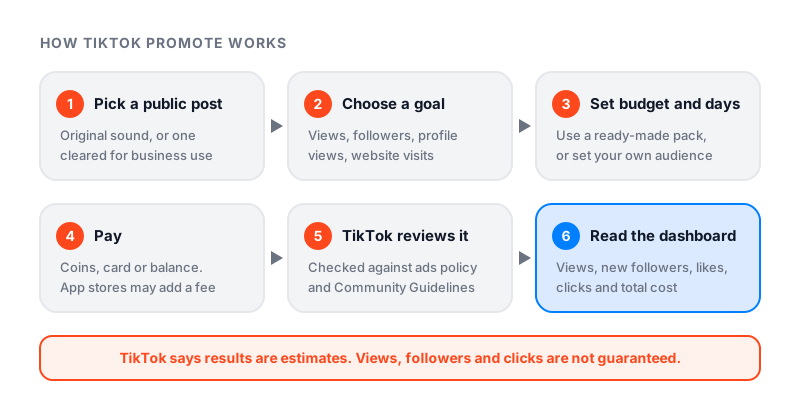
- [Is TikTok Promote Worth It?](https://famoid.com/is-tiktok-promote-worth-it/)
- [TikTok 'Something Went Wrong': How to Fix It](https://famoid.com/tiktok-something-went-wrong/)
- [TikTok Account Not Found: What It Means](https://famoid.com/tiktok-account-not-found/)
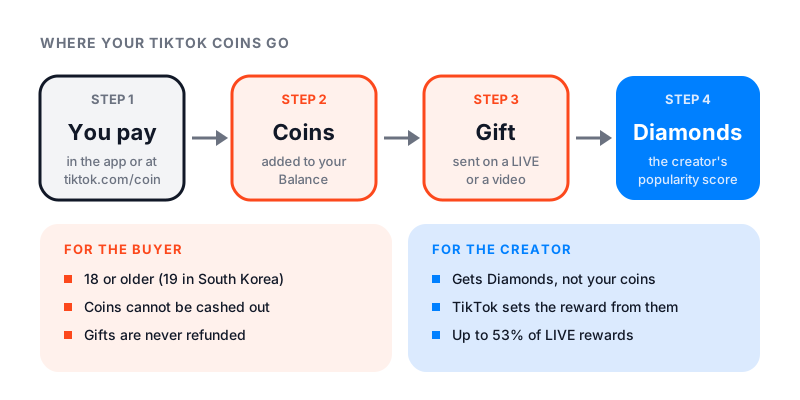
- [TikTok Coins Recharge: Prices, Gifts and the Cheaper Way](https://famoid.com/tiktok-coins-recharge/)
- [TikTok Not Working? Here Is How to Fix It](https://famoid.com/tiktok-not-working/)
- [TikTok Shadowban: Am I Shadowbanned and How Do I Fix It?](https://famoid.com/tiktok-shadowban/)
- [What Counts as a View on TikTok?](https://famoid.com/what-counts-as-a-view-on-tiktok/)
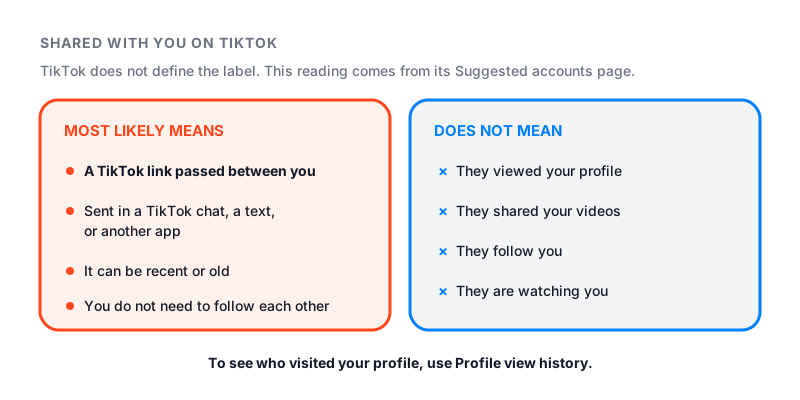
- [What Does 'Shared With You' Mean on TikTok?](https://famoid.com/what-does-shared-with-you-mean-on-tiktok/)
### Facebook
- [How to Contact Facebook](https://famoid.com/how-to-contact-facebook/)
- [How to Get More Followers on Facebook](https://famoid.com/how-to-get-more-followers-on-facebook/)
- [How to Get More Likes on Facebook](https://famoid.com/how-to-get-more-likes-on-facebook/)
- [How to Invite People to Like Your Facebook Page](https://famoid.com/how-to-invite-people-to-like-your-facebook-page/)
- [How to Recover a Hacked Facebook Account](https://famoid.com/how-to-recover-hacked-facebook-account/)
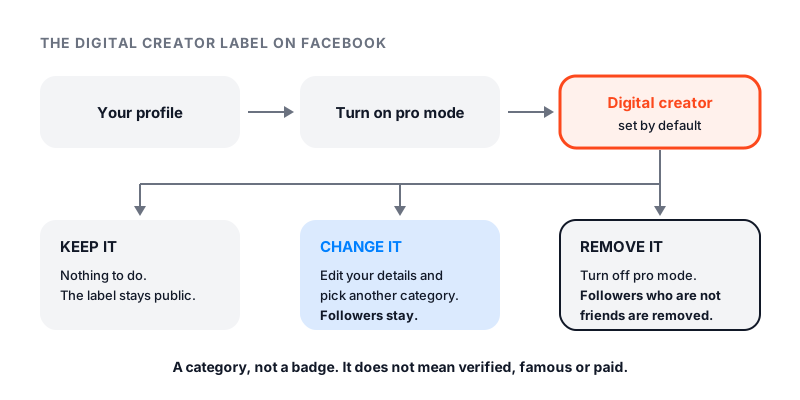
- [What Is a Digital Creator on Facebook?](https://famoid.com/what-is-a-digital-creator-on-facebook/)
## Company and policies
- [Frequently Asked Questions](https://famoid.com/frequently-asked-questions/)
- [The Story of Famoid](https://famoid.com/story-of-famoid/): founded 2017, Famoid LLC, Delaware
- [Returns & Refund Policy](https://famoid.com/returns-refund-policy/): 30-day refill guarantee; refunds for undelivered orders
- [Terms and Conditions](https://famoid.com/terms-and-conditions/)
- [Privacy Policy](https://famoid.com/privacy-policy/)
- [Contact](https://famoid.com/contact/)
---
# Buy Instagram Followers, Likes & Views, Famoid
Page: https://famoid.com/
Famoid sells Instagram followers, likes and views. We also sell TikTok and Facebook engagement. We have done this since 2017 under the same name. Packages start at $2.95. Delivery starts within minutes. We never ask for your password.
## How it works
1. Pick a service and a size.
2. Give us your public username, or a post link for likes and views.
3. Pay by card, Apple Pay, Google Pay or crypto.
4. Delivery starts within minutes. Bigger orders are spread over hours or days so the growth looks natural.
We show your profile or post to real people through third-party ads. Some of them follow, like or watch. We do not use bots or create fake accounts.
## What you can buy
- [Instagram followers, likes and views](https://famoid.com/insta/), from $2.95
- [Instagram Reels views and likes](https://famoid.com/instagram-reels/)
- [Automatic Instagram likes](https://famoid.com/buy-automatic-instagram-likes/), likes on every new post, one payment
- [TikTok followers, likes and views](https://famoid.com/tiktok/), from $2.95
- [Facebook page followers, post likes and group members](https://famoid.com/facebook/)
## Why people pick Famoid
- **Since 2017.** Same company, same name, nine years of orders. Famoid LLC is registered in Delaware, United States.
- **No password, ever.** A public username or a post link is all we need.
- **Real people from third-party ads.** Not bots. That is why the growth looks normal in your insights.
- **Paced delivery.** First orders are sized at 5% to 15% of your current count. Big jumps look fake; we do not send them.
- **30-day refill guarantee.** If a count drops below your order within 30 days, we top it up free.
- **Refunds when we miss.** Undelivered orders are refunded. The [policy](https://famoid.com/returns-refund-policy/) is written down.
- **24/7 support.** Most tickets get an answer within 15 minutes.
## Can you buy Instagram followers safely?
You can, if it is done with care. The risk comes from bot sellers and from apps that want your password. We deliver through third-party ads, size the order to your account, and refuse orders that would look fake. We have no verified ban tied to a Famoid order on record. We cannot make promises on Instagram's behalf, and nobody honest can.
## How much does it cost to buy Instagram followers?
Packages start at $3.95. The price you see is the price you pay. No subscription, no hidden fees. Not sure what size fits your account? Start small. You can always add more after 30 days.
## Free tools
- [Is Instagram down right now?](https://famoid.com/is-instagram-down/), live check with outage history
- [Is TikTok down right now?](https://famoid.com/is-tiktok-down/)
- [Instagram follower count checker](https://famoid.com/instagram-follower-count-checker/)
- [TikTok live follower counter](https://famoid.com/tiktok-counter/)
- [Help guides](https://famoid.com/guides/), short, plain-English answers
## More
- [Frequently asked questions](https://famoid.com/frequently-asked-questions/)
- [The story of Famoid](https://famoid.com/story-of-famoid/)
- [Contact](https://famoid.com/contact/)
Our services are for personal use and self-entertainment only. Page content updated August 21, 2026.
---
# Automatic Instagram Likes, Likes on Every New Post
Page: https://famoid.com/buy-automatic-instagram-likes/
Automatic Instagram likes send real likes to each new post you publish. You pay once for a set number of posts. No subscription, nothing renews. We only need your public username, never your password.
## How it works
1. Pick a plan: how many likes per post, and how many posts.
2. Type your public Instagram username.
3. Pay once.
4. Post as usual. Each new post gets its first likes within about 5 minutes, spread over the first hour.
We show each new post to real people through third-party ads. They choose whether to like it. Reels, photo posts and carousels are all covered. Stories have no like button, so they are not included.
## Why the first hour matters
Instagram watches what happens right after you post. Posts that get likes fast are shown to more people. Posts that do not get buried. Automatic likes give every post that strong start without you doing anything.
## Plan details
- Each plan covers a set number of posts. Your account page shows how many are left.
- Most people post once or twice a day, so it is hard to run out.
- When the covered posts are used up, the plan ends. Buy another whenever you like.
## Common questions
**Are automatic likes from real accounts?**
They come from third-party ads: real people who saw your post in an ad. We don't create accounts or use bots. We can't vouch for every account an outside ad network brings, so a 30-day refill covers any drop.
**Do I have to give you my password?**
Never. A public username is enough. We never log in to your account.
**What if some likes drop?**
If you notice a drop within 30 days, we top it up for free.
**Can I get a refund?**
If the plan does not deliver, or we cannot fix a problem, you get a full refund under our 30-day policy. Posts already covered are delivered and cannot be refunded; the refill guarantee still applies.
## Related
- [Instagram followers, likes and views](https://famoid.com/insta/)
- [Instagram Reels views and likes](https://famoid.com/instagram-reels/)
- [Refund policy](https://famoid.com/returns-refund-policy/)
Our services are for personal use and self-entertainment only. Page content updated August 21, 2026.
---
# Buy Facebook Followers, Post Likes & Group Members, Famoid
Page: https://famoid.com/facebook/
Buy Facebook page followers, post likes and group members from Famoid. Real people, reached through third-party ads. Delivery starts within minutes. We only need a public link, never your password.
## The packages
| Service | What we need | Starts |
|---|---|---|
| Facebook page followers | your page link | within minutes |
| Facebook post likes | the post link | within minutes |
| Facebook group members | the group link, and you approve our join requests | within minutes |
Standard packs are good value and start fast. Prestige packs come from our most active, most complete profiles, with smoother delivery and a longer refill guarantee.
## How to buy Facebook page likes or followers
1. Pick the service: post likes, page followers or group members.
2. Paste the public link.
3. Choose a size and pay.
Real people see your page or post in a third-party ad and choose whether to follow or like. Orders are spread over hours or days so the growth looks natural.
## Why people use it
- A page with followers looks established, so new visitors feel safe to follow and message.
- Early likes tell Facebook to show a post to more people.
- A group with members looks alive, and an active group grows on its own.
## Common questions
**Can you buy Facebook followers safely?**
Yes, if it is done with care. We never ask for your password. We deliver through third-party ads and spread the order out.
**Will people know I bought Facebook likes?**
Visitors see a busy page with real activity. Most accounts have photos, friends and posts, because they come from real people who saw your content in an ad.
**Can I buy members for a private group?**
Yes. Send the group link and approve the join requests, or set the group to open for a while.
**What if followers or likes drop?**
If your count drops below what you ordered within 30 days, we top it up for free.
**Do you offer refunds?**
Yes. If an order does not deliver, or we cannot fix a problem, you get a full refund under our 30-day policy. [Read the policy](https://famoid.com/returns-refund-policy/).
## Related
- [Buy Instagram followers, likes and views](https://famoid.com/insta/)
- [Buy TikTok followers, likes and views](https://famoid.com/tiktok/)
- [Frequently asked questions](https://famoid.com/frequently-asked-questions/)
Our services are for personal use and self-entertainment only. Page content updated August 21, 2026.
---
# Famoid, Frequently Asked Questions
Page: https://famoid.com/frequently-asked-questions/
Short, plain answers about how Famoid works. We sell Instagram, TikTok and Facebook followers, likes and views. We have done this since 2017.
## How does Famoid work?
You pick a service and a size. You give us a username or a post link. You pay. We then show your profile or post to real people through third-party ads. Some of them follow, like or watch. Delivery starts within minutes. Our services are for personal use and self-entertainment.
## Why choose Famoid?
We have done this since 2017. Prices are shown before you log in. We never ask for your password. Delivery is gradual, so it looks natural. Drops within 30 days are refilled for free. Support is open 24/7, even on holidays.
## How many Instagram followers should I buy the first time?
Start small. A good first order is 5% to 15% of the followers you already have. If you have 2,000 followers, order 100 to 300. Wait 30 days before you order again. Big jumps look fake to people and to Instagram. If an order looks too big for your account, we will suggest a smaller one.
## Why would I buy followers or likes?
People judge a profile in seconds. A page with very few followers or likes gets skipped. A stronger start makes new visitors stop, read your bio and follow. It does not replace good posts. It gives good posts a fair chance.
## Is buying followers or likes legal?
In most places it is legal when you follow the law and do not use them to mislead people. It may go against a platform's own rules. Our services are for personal use and self-entertainment only, not for business or commercial use.
## Is it safe? Can my account be banned?
We cannot make promises on Instagram's or TikTok's behalf. Nobody can. Here is how we lower the risk. We never log in to your account. We never ask for a password. We deliver through ads, not bots. We pace orders to your account size. We refuse orders that would look fake. We have no verified ban tied to a Famoid order on record.
## Are the followers and likes real?
We do not create fake or empty accounts. We run third-party ads. Real people see your profile or post and choose whether to act. Some may unfollow later, like any real audience. If your count drops within 30 days, we refill it for free.
## Do you need my password?
Never. A public username or a post link is enough. Do not give your password to any service.
## How fast is delivery?
Most orders start within 5 to 30 minutes. Small orders finish fast. Big orders are spread over hours or a few days on purpose. If your order seems stuck, message support.
## How much does it cost?
Packages start at $2.95. The price you see is the price you pay. No subscriptions, no hidden fees.
## How can I pay?
Credit or debit card through Nuvei. Crypto through Coinbase Commerce. You get an email receipt right after the order is approved.
## Can I get a refund?
Yes. If an order does not deliver, or we cannot fix a problem, you get a full refund under our 30-day policy. If a count drops, we usually refill it first because that is faster. Read the full [returns and refund policy](https://famoid.com/returns-refund-policy/).
## How fast does support answer?
Most tickets get an answer within 15 minutes. Support is open 24 hours a day, every day, holidays included.
## Can I use this for my business or brand?
No. Our services are for personal use and self-entertainment only. Do not use them for a business, a brand or another person. Commercial use breaks our Terms of Service and we can close your access.
## Do you sell bots?
No. We only run ad-based promotion. We do not sell bots or fake accounts.
## Can I trust Famoid?
Judge us by what you can check. Same name since 2017. Registered in Dubai, United Arab Emirates, with an office in the United States. Written refund and refill rules. No password, ever. Start with a small order and see.
## Do you have an affiliate program?
Yes: [affiliate.famoid.com](https://affiliate.famoid.com/).
## Services and tools
- [Instagram followers, likes and views](https://famoid.com/insta/)
- [TikTok followers, likes and views](https://famoid.com/tiktok/)
- [Facebook followers, post likes and group members](https://famoid.com/facebook/)
- [Instagram Reels views and likes](https://famoid.com/instagram-reels/)
- [Automatic Instagram likes](https://famoid.com/buy-automatic-instagram-likes/)
- Free: [Instagram follower count checker](https://famoid.com/instagram-follower-count-checker/), [TikTok live counter](https://famoid.com/tiktok-counter/), [Is Instagram down?](https://famoid.com/is-instagram-down/), [Is TikTok down?](https://famoid.com/is-tiktok-down/)
Page content updated August 21, 2026.
---
# Buy Instagram Likes, Views & Followers: Packages, Pricing & How It Works
Page: https://famoid.com/insta/
This is Famoid's Instagram page. It shows every Instagram package in one place: followers, likes, views, Reels and automatic likes. Prices start at $2.95. Delivery starts within minutes. We never ask for your password.
## The packages
| Service | What we need | Starts | From |
|---|---|---|---|
| Instagram followers | your public username | within minutes | $3.95 |
| Instagram likes | a post link | within minutes | $2.95 |
| Instagram views (Reels and video) | a Reel or video link | within minutes | $2.95 |
| Reels views and likes | a Reel link | within minutes | $2.95 |
| Automatic likes | your username | on each new post | see page |
## How to buy followers on Instagram
1. Pick the followers tab and a size.
2. Type your public Instagram username.
3. Pay.
That is it. Real people see your profile in a third-party ad and tap follow if they like it. Orders arrive in waves over time.
## How many followers should I buy?
Less than you think. A first order of 5% to 15% of your current followers looks natural. If you have 2,000 followers, order 100 to 300. Wait 30 days before you add more. We call this the 5-15-30 rule. If a package is too big for your account, we will suggest a smaller one.
| Your followers now | Followers order | Likes per post | Reel views |
|---|---|---|---|
| 0 – 500 | 500 – 1,000 | 50 – 100 | 1K – 2K |
| 500 – 2K | 1K – 3K | 100 – 300 | 2K – 5K |
| 2K – 10K | 2K – 5K | 300 – 800 | 5K – 10K |
| 10K – 50K | 5K – 10K | 800 – 2K | 10K – 25K |
| 50K+ | 10K+ | 2K+ | 25K+ |
Guidance only. Match the order to your account's normal pace.
## What we will do
- Send real engagement to a username, post link or Reel link. Never a password.
- Spread delivery over the first hours so the climb looks like discovery.
- Charge only the price shown. No add-ons, no subscriptions.
- Refill any drop within 30 days for free.
- Resize an order that does not fit your account before it runs.
## What we will not do
- Ask for your Instagram password.
- Run orders on private or restricted profiles.
- Drop 100,000 followers on a 200-follower account.
- Use fake accounts with blank avatars.
- Promise a verified badge, brand deals or payouts.
## Common questions
**Can Instagram ban you for buying followers?**
Instagram acts against bots and apps that log in to your account. We do none of that. We deliver through ads, with no password and no automation on your account. We have no verified ban tied to a Famoid order on record. We cannot make promises for Instagram, and nobody honest can.
**Can Instagram detect bought likes?**
Instagram flags bot patterns: empty accounts with no photo or posts. Our likes come from real people who saw your post in a third-party ad, so they look like normal engagement.
**Where is the best place to buy Instagram followers?**
Judge any seller on four things: do they ask for a password, where do the followers come from, is the refill guarantee written, and how long have they been around. Famoid has run on those four points since 2017.
**Are there hidden fees?**
No. The price on the package is the price you pay.
## Related
- [Buy Instagram Reels views and likes](https://famoid.com/instagram-reels/)
- [Automatic Instagram likes](https://famoid.com/buy-automatic-instagram-likes/)
- [Instagram follower count checker (free)](https://famoid.com/instagram-follower-count-checker/)
- [How to hide followers on Instagram](https://famoid.com/how-to-hide-followers-on-instagram/)
- [Refund policy](https://famoid.com/returns-refund-policy/)
Our services are for personal use and self-entertainment only. Page content updated August 21, 2026.
---
# Instagram Follower Count Checker, Free Live Count
Page: https://famoid.com/instagram-follower-count-checker/
Type any public Instagram username. The tool shows the live Instagram followers count, following count and post count. It is a free Instagram counter. You do not log in. You do not give a password. Nothing is stored. People also use it as a quick IG follower count lookup, or to check Instagram followers before and after a campaign.
## What you can check
- Your own account, to track growth day by day
- A creator or brand you follow
- A competitor's page
- A new account before you follow it
The numbers come straight from Instagram's public profile data at the moment you check. Instagram shows rounded numbers on profiles (like "12.4K"). This tool shows the exact count.
## Why the number can be different from what you see in the app
Instagram updates counts on a delay. The app, the website and this tool may be a few minutes apart. During an Instagram outage, counts can freeze or jump. That is a display issue, not real gains or losses. Check again later.
## Private accounts
Private accounts still show a follower count on their profile, so the tool can read it. It cannot show posts or followers of a private account. We do not offer any way to view private content.
## Common questions
**Can the account owner see that I checked?**
No. The tool reads public profile data. It does not visit the profile with an account, so there is nothing for Instagram to show them.
**Does it work for every username?**
It works for any account that exists and is not banned. If you see an error, check the spelling. Usernames have no spaces and no @ sign.
**How often can I check?**
As often as you like. Counts refresh each time you search.
## Tracking your own growth
If you are growing your account, check the same time each day and write the number down. Watch the follower-to-following ratio too. A healthy page follows far fewer people than follow it.
If you want help with growth, Famoid sells [Instagram followers, likes and views](https://famoid.com/insta/). Delivery starts within minutes, and we never ask for a password.
## Related free tools
- [TikTok live follower counter](https://famoid.com/tiktok-counter/)
- [Is Instagram down?](https://famoid.com/is-instagram-down/)
- [Is TikTok down?](https://famoid.com/is-tiktok-down/)
## About this tool
Built and run by Famoid, a social media growth service operating since 2017. Page content updated August 21, 2026.
---
# Buy Instagram Reels Views & Likes, Famoid
Page: https://famoid.com/instagram-reels/
Buy Instagram Reels views and Reels likes for one Reel. Real people, reached through third-party ads. The first batch lands within 5 to 20 minutes. We only need the Reel link, never your password.
## Why the first hour decides a Reel
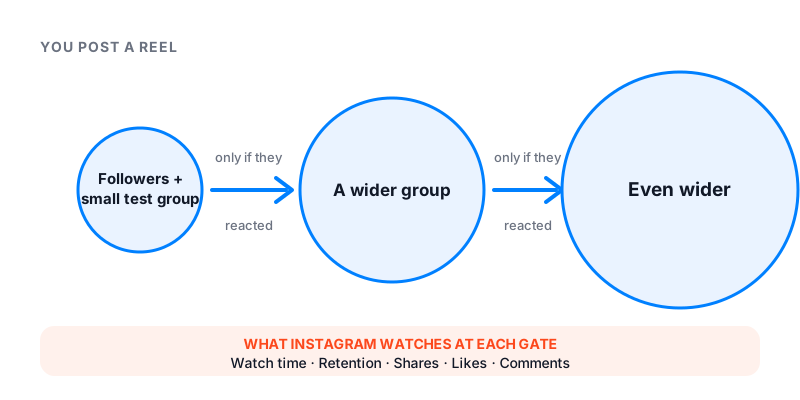
Instagram shows a new Reel to a small group first and watches what they do. If they watch and like, the Reel goes wider, to the Reels feed and the Explore page. If they scroll past, it stalls. Real views and likes early on give that first test a better result. The hook is still your part. We cannot fix a weak opening.
## The packages
| Service | What we need | Starts | From |
|---|---|---|---|
| Reels views | the Reel link | 5–20 minutes | $2.95 |
| Reels likes | the Reel link | 5–20 minutes | $2.95 |
Buy both for a big launch. Buy likes if your Reel has many views but few likes. Buy views if the views stopped early.
## How to order
1. Copy the Reel link from Instagram's share menu.
2. Pick views, likes or both, and a size.
3. Pay. Delivery starts within minutes and is spread over an hour or two.
Private accounts and restricted Reels do not work, because the ads cannot reach them.
## Sizing
Keep it believable. A 2,000-follower account with 50,000 views on one Reel looks staged. The same account with 8,000 views looks like a clip worth watching. We send the second kind, and we resize orders that are too big.
## Common questions
**Can buying Reels views get my account banned?**
We deliver through ads, never log in, and never ask for a password. We cannot make promises on Instagram's behalf. We have no verified ban tied to a Famoid Reels order on record.
**Can you see who views your Reels?**
No. Instagram shows the number of plays, not the names. Only Stories show a viewer list. Read our guide: [Can you see who views your Reels?](https://famoid.com/can-you-see-who-views-your-reels/)
**What if the views drop?**
If a number drops below your order within 30 days, we refill it for free.
**Any surprise fees?**
No. One payment, one push.
## Related
- [Instagram followers, likes and views](https://famoid.com/insta/)
- [Automatic Instagram likes](https://famoid.com/buy-automatic-instagram-likes/)
- [Instagram not loading? Fixes for Reels, sound and more](https://famoid.com/instagram-not-loading/)
Our services are for personal use and self-entertainment only. Page content updated August 21, 2026.
---
# Is Instagram Down Right Now? Free Live Status Check
Page: https://famoid.com/is-instagram-down/
Instagram not working? This free tool checks it for you. It tests Instagram from two places at once. One test runs from Famoid's servers. The other runs from your own connection. You get an answer in seconds. No login. No username. Nothing is stored.
## What the checker tells you
- **Instagram is up.** Both tests passed. If the app still fails, the problem is on your side. Use the fixes below.
- **Instagram is down.** Our servers could not reach Instagram. Other people have the same problem. Wait it out.
- **Only your test failed.** Your network, VPN or an ad-blocker is in the way. Instagram itself is fine.
The page also shows a 24-hour chart from our own monitor. It checks Instagram every three minutes. You can see if a problem is new or has been going on for hours.
## Outage history
Below the chart there is a day-by-day history. For each day you see how many checks ran, the uptime, and any outage windows we found, in UTC. Our monitor writes it, not a person.
## Is Instagram down, or am I blocked?
An outage hits everything: feed, Stories, DMs, search, for every account, and the checker goes red. A block is narrow. The rest of Instagram keeps working, but one profile shows "No posts yet" or will not load for you while a friend can see it fine. "User not found" is a third case: that account may be deactivated. One Story not loading proves nothing. Force-close the app first.
## Down for everyone, or just you?
1. Run the live check at the top of the page.
2. Turn Wi-Fi off and try mobile data. Or the other way around.
3. Open instagram.com in a private browser tab. If the website works but the app does not, the app is the problem.
4. Ask a friend on a different network.
5. Check X (Twitter). During a real outage many people post about it within minutes.
## Signs that Instagram is really down
- "Couldn't refresh feed" on every account and every network
- Stories and Reels spin forever while the rest works
- DMs stuck on "Sending…" for everyone
- "5xx Server Error" on the website
- A login loop with the right password
- Like and follower counts frozen or jumping
## Instagram is up but not working for you? Fixes in order
1. Close the app all the way and open it again.
2. Turn airplane mode on for ten seconds, then off.
3. Update the app.
4. Clear the cache. Android: Settings → Apps → Instagram → Storage → Clear cache. iPhone: delete and reinstall the app.
5. Turn off your VPN. Instagram blocks some VPN addresses.
6. Restart your phone.
7. If Instagram works on mobile data but never on one Wi-Fi, that network blocks it.
## What to do while Instagram is down
- Do not reset your password. Reset emails lag during outages.
- Never give your login to a "fix Instagram" app or site. No real status tool needs a password. This one included.
- Copy any unposted caption somewhere safe.
- Wait. Most outages end within a few hours.
## Will an outage affect your followers or likes?
No. Frozen or jumping numbers are a display problem, not a real loss. They come back after Instagram recovers. Check later with our [free follower count checker](https://famoid.com/instagram-follower-count-checker/).
## Read next
- [Instagram not loading? Fixes by symptom](https://famoid.com/instagram-not-loading/)
- [Instagram login not working](https://famoid.com/instagram-login-not-working/)
- [Instagram DMs not working](https://famoid.com/instagram-dms-not-working/)
- [Is TikTok down?](https://famoid.com/is-tiktok-down/)
- [All help guides](https://famoid.com/guides/)
## About this tool
Famoid runs this checker. We have sold Instagram and TikTok growth services since 2017, and we built this monitor to watch the platforms our orders run on. It never asks for your account. Page content updated August 21, 2026.
---
# Is TikTok Down Right Now? Free Live Status Check
Page: https://famoid.com/is-tiktok-down/
TikTok not working? This free tool checks it for you. It tests TikTok from two places at once. One test runs from Famoid's servers. The other runs from your own connection. You get an answer in seconds. No login. No username. Nothing is stored.
## What the checker tells you
- **TikTok is up.** Both tests passed. If the app still fails, the problem is on your side. Use the fixes below.
- **TikTok is down.** Our servers could not reach TikTok. Other people have the same problem. Wait it out.
- **Only your test failed.** Your network, VPN or an ad-blocker is in the way. TikTok itself is fine.
The page also shows a 24-hour chart. It comes from our own monitor. The monitor checks TikTok every three minutes. You can see if a problem is new or has been going on for hours.
## Outage history
Below the chart there is a day-by-day history. For each day you can see how many checks ran, the uptime, and any outage windows we found. Times are in UTC. The history is written by our monitor, not by hand.
## Is TikTok down, or is it just me?
Do these in order:
1. Run the live check at the top of the page.
2. Turn Wi-Fi off and try mobile data. Or the other way around.
3. Open tiktok.com in a private browser tab. If the website works but the app does not, the app is the problem.
4. Ask a friend on a different network.
5. Check X (Twitter). During a real outage, many people post about it within minutes.
## Signs that TikTok is really down
- "No network connection" on every account and every network
- Videos will not load, but profiles and comments still work
- Uploads stay stuck on "Posting"
- Likes, views or follower numbers freeze or jump
- A login loop with the right password
## TikTok is up but not working for you? Try these fixes
1. Close the app all the way and open it again.
2. Turn airplane mode on for ten seconds, then off.
3. Update the app.
4. Clear the cache. In TikTok: Profile → Settings and privacy → Free up space → Clear cache.
5. Turn off your VPN. TikTok blocks some VPN addresses.
6. Restart your phone.
7. If TikTok works on mobile data but never on one Wi-Fi, that network blocks it.
## Why does TikTok say "No network connection" when my internet works?
That message is TikTok's catch-all error. It shows up for many reasons: a real outage, a network that blocks TikTok, a VPN, or a broken app cache. It does not always mean your internet is down.
## Why won't videos load while the rest of the app works?
Videos come from a different set of servers than comments and profiles. If those video servers have a problem, videos stall but the rest keeps working. These partial outages usually fix themselves in a few hours.
## Are my drafts, followers and views safe during an outage?
Followers and views are safe. Frozen numbers are a display bug. They come back after TikTok recovers. Drafts are different. Drafts live only on your phone. Do not delete or reinstall the app while you fix things, or you lose them.
## Does TikTok have an official status page?
No. TikTok does not run a public status page for users. That is why tools like this one exist. The @TikTokSupport account on X posts during big incidents.
## Related free tools
- [Is Instagram down?](https://famoid.com/is-instagram-down/), the same live check for Instagram
- [TikTok live follower counter](https://famoid.com/tiktok-counter/), watch any public account's follower count update in real time
- [Instagram follower count checker](https://famoid.com/instagram-follower-count-checker/)
## About this tool
Famoid runs this checker. We have sold TikTok and Instagram growth services since 2017, and we built this monitor to watch the platforms our orders run on. It never asks for your account. Page content updated August 21, 2026.
---
# Famoid Returns and Refund Policy
Page: https://famoid.com/returns-refund-policy/
This page explains when we refill, when we refund, and when we cannot. Read it before you order.
## Our 30-day refill guarantee
If the followers, likes or views you bought drop below the amount you ordered within 30 days, we top up the difference for free. Send one message to support with your order number. No screenshots. No forms.
## When you get a full refund
You get a full refund if your order does not deliver, or if something goes wrong and we cannot fix it. Ask within 30 days of your order. The money goes back to the card or wallet you paid with.
## When we cannot refund
Our products are digital services. Once an order is delivered in full, we cannot take it back, so we cannot refund it. If a count drops later, the refill guarantee covers you.
We also cannot refund orders placed on the wrong username or on a private account, because the service still ran. Check the username before you pay.
## How to ask
Email support@famoid.com or use the [contact page](https://famoid.com/contact/). Include your order number. Support is open 24/7. Most requests get an answer within 15 minutes.
## Related
- [Frequently asked questions](https://famoid.com/frequently-asked-questions/)
- [Terms and conditions](https://famoid.com/terms-and-conditions/)
Page content updated August 21, 2026.
---
# The Story of Famoid
Page: https://famoid.com/story-of-famoid/
Famoid is a social media marketing agency. Since 2017 we have helped people grow on Instagram, TikTok and Facebook, under the same name and the same domain.
## The facts
- **Founded:** 2017
- **Legal entity:** Famoid, operating under the laws of Dubai, United Arab Emirates
- **Office:** Newark, Delaware, United States
- **Orders delivered:** more than 2 million
- **Payments:** card payments through Nuvei, Apple Pay, and crypto through Coinbase Commerce
- **Support:** 24 hours a day, 7 days a week, holidays included
- **Guarantee:** 30-day free refill on drops, refund if an order cannot be delivered
## How an order works
1. You pick a package and enter a public username or a post link. No password, no login.
2. We show your profile or post to real people through third-party ads.
3. Some of them follow, like or watch. Delivery starts within minutes and is paced so it looks natural.
4. If a number drops within 30 days, we refill it for free.
## What we do not do
- We do not use bots or fake accounts.
- We do not log in to your account.
- We do not run orders on private profiles.
- We do not sell comments, story views or Live viewers.
- We do not promise verification badges, brand deals or payouts.
- We do not serve business or commercial accounts. Our services are for personal use and self-entertainment only.
## How to check us before you pay
- Read the refund policy: https://famoid.com/returns-refund-policy/
- Read the terms: https://famoid.com/terms-and-conditions/
- Message support: https://famoid.com/contact/
- Try a free tool first: https://famoid.com/instagram-follower-count-checker/ or https://famoid.com/tiktok-counter/
- Read a guide: https://famoid.com/guides/
## Why the name
"Famoid" joins "famous" and the ending "-oid", as in "android" or "asteroid". It means "a thing that helps you get famous". Our motto since day one: being popular on social media is not that hard anymore.
## Milestones
- 2017: Famoid LLC is founded in Delaware, United States, with one rule from day one: growth through ads, never bots.
- Growth: from Instagram to TikTok, Facebook and Reels, plus automatic likes and a 30-day managed growth plan.
- Global: customers worldwide, in six languages. In a typical month, people from more than 190 countries use famoid.com.
- 2M+: more than 2 million orders delivered under the same name, domain and 30-day refill guarantee.
---
# Live TikTok Follower Counter, Real-Time Count, Free
Page: https://famoid.com/tiktok-counter/
Enter any public TikTok username. The counter shows the follower count and updates while you watch. It also shows total likes, following and video count. Free, no login, no password. Some people write it as one word, TikTokCounter, or shorten it to tok counter; a search for tik tok counter with a space lands on the same live tool. It shows the exact TikTok followers count in real time.
## What it is for
- Watching your own follower count climb in real time
- Counting down to a milestone like 10K or 100K
- Checking a creator's exact numbers, not the rounded ones TikTok shows
- Comparing two accounts side by side (open the page twice)
## How live is it?
The counter asks TikTok for fresh numbers every few seconds. TikTok itself updates counts on a short delay, so the app and this page can differ by a little. During a TikTok outage the numbers may freeze. That is TikTok, not the counter. Use our [Is TikTok down?](https://famoid.com/is-tiktok-down/) check if you are not sure.
## Common questions
**Does the account owner know I am watching?**
No. The counter reads public profile data. It does not log in or follow anyone.
**Why does the count go down?**
Real accounts lose followers all the time. People unfollow, delete their accounts, or get removed by TikTok. Small drops are normal.
**Can I check a private account?**
The follower count on a private account is still public, so yes. Videos and likes of private accounts are not shown.
**The username is not found.**
Check the spelling. Do not type the @ sign. New accounts can take a few minutes to appear.
## Growing on TikTok
Follower count matters less on TikTok than on other apps. The For You page decides what people see. Good first-hour views and likes help a video reach more people.
If you want a push, Famoid sells [TikTok followers, likes and views](https://famoid.com/tiktok/). Orders start within minutes. We only need your username or a video link, never a password.
## Related free tools
- [Instagram follower count checker](https://famoid.com/instagram-follower-count-checker/)
- [Is TikTok down?](https://famoid.com/is-tiktok-down/)
- [Is Instagram down?](https://famoid.com/is-instagram-down/)
## About this tool
Built and run by Famoid, a social media growth service operating since 2017. Page content updated August 21, 2026.
---
# Buy TikTok Followers, Likes & Views, Famoid
Page: https://famoid.com/tiktok/
Buy TikTok followers, likes and views from $2.95. Real people, reached through third-party ads. Delivery starts within minutes. We only need your username or a video link, never your password.
## The packages
| Service | What we need | Starts | From |
|---|---|---|---|
| TikTok followers | your public username | within minutes | $3.95 |
| TikTok likes | a video link | within minutes | $2.95 |
| TikTok views | a video link | within minutes | $4.95 |
## How to buy TikTok followers
1. Pick the followers tab and a size.
2. Type your public TikTok username.
3. Pay with a card, Apple Pay or PayPal.
Real people see your profile in a third-party ad and tap follow if they like it. Orders are spread over hours so the climb looks natural.
## Why the first hour matters on TikTok
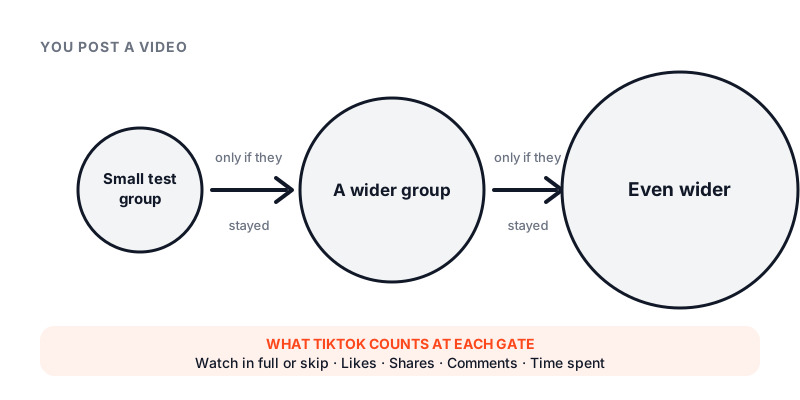
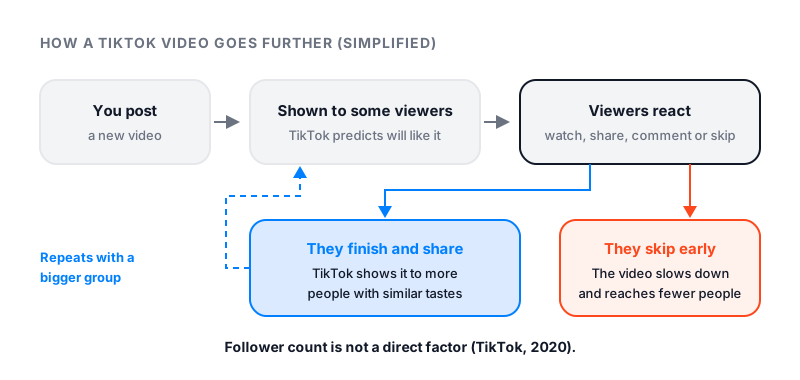
TikTok shows every new video to a small test group. If that group watches and likes, the video goes to a bigger group. Real likes and views early on give the video a better first test. The video still needs a good hook. We cannot fix that part.
## How many followers should I buy?
Start small. A first order of 5% to 15% of your current followers looks natural. Wait 30 days before you add more. We call this the 5-15-30 rule. Too-big orders get resized or refused.
| Your followers now | Followers order | Likes per video | Views per video |
|---|---|---|---|
| 0 – 500 | 500 – 1,000 | 50 – 100 | 1K – 2K |
| 500 – 2K | 1K – 3K | 100 – 300 | 2K – 5K |
| 2K – 10K | 2K – 5K | 300 – 800 | 5K – 10K |
| 10K – 50K | 5K – 10K | 800 – 2K | 10K – 25K |
## Follower milestones on TikTok
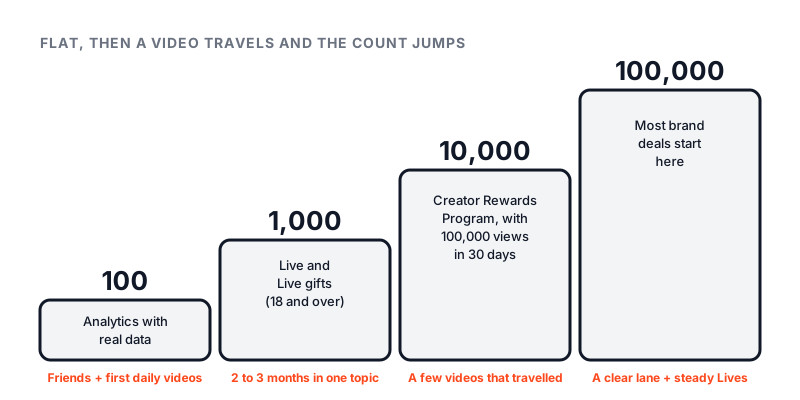
- **1,000 followers**, you can go live and receive gifts. See [how many followers to go live on TikTok](https://famoid.com/tiktok-live-requirements/).
- **10,000 followers**, you can join the Creator Rewards Program, with 100,000 views in the last 30 days. See [how many followers on TikTok to get paid](https://famoid.com/how-many-followers-on-tiktok-to-get-paid/).
## What we will and will not do
We will send real followers, likes and views through third-party ads, pace the delivery, refill drops within 30 days for free, and resize orders that are too big. We will not ask for your password, use fake accounts, run orders on private profiles, or promise a viral hit.
## Common questions
**Can you buy TikTok followers safely?**
Yes, if it is done with care. The risk comes from bot sellers and apps that want your password. We deliver through third-party ads and refuse orders that would look fake. We cannot make promises on TikTok's behalf, and nobody honest can.
**Are the followers and views from real people?**
They come from third-party ads. Real people see your video or profile and choose whether to follow, like or watch. We don't create accounts or use bots. We can't vouch for every account an outside ad network brings, so a 30-day refill covers any drop.
**What if my followers drop?**
If your count drops below what you ordered within 30 days, we refill it for free. One message to support with your order number.
**Are there hidden fees?**
No. The price on the package is the price you pay.
## Related
- [TikTok live follower counter (free)](https://famoid.com/tiktok-counter/)
- [Is TikTok down right now?](https://famoid.com/is-tiktok-down/)
- [TikTok not working? Fixes](https://famoid.com/tiktok-not-working/)
- [Refund policy](https://famoid.com/returns-refund-policy/)
Our services are for personal use and self-entertainment only. Page content updated August 21, 2026.
---
# Best Time to Post on Instagram
Page: https://famoid.com/best-time-to-post-on-instagram/
The best time to post on Instagram is when your own followers are online. For most accounts that means weekday mornings, lunch breaks and early evenings, in their local time zone.
## The quick answer
Post when your followers are awake and bored. For most accounts, that means three windows in their local time zone:
- **Weekday mornings, 7 to 9 am.** People scroll in bed and on the commute.
- **Lunch, 11 am to 1 pm.** A short break means a short scroll.
- **Evenings, 7 to 9 pm.** The longest sessions of the day.
On weekends, shift later. People sleep in, so 9 to 11 am works better than 7 am.
One honest note. Published "best time" charts do not agree with each other. Each one is based on a different set of accounts. Your own data beats all of them. We show you how to find it below.
## Best time to post on Instagram by day
Here is a good starting point for each day. Use your followers' time zone.
- **Monday:** 11 am to 1 pm. Mornings are busy, so lunch wins.
- **Tuesday:** 8 to 10 am. One of the strongest mornings of the week.
- **Wednesday:** 11 am and again at 7 pm. Midweek reach is steady all day.
- **Thursday:** 11 am to 1 pm, then 7 to 9 pm. Often the best day overall.
- **Friday:** 9 to 11 am. Attention drops off after 3 pm.
- **Saturday:** 9 to 11 am. Late morning beats early morning.
- **Sunday:** 6 to 8 pm. The quietest day. Evening is your best shot.
## Best days to post on Instagram
Tuesday, Wednesday and Thursday are the strongest days for most accounts. Monday is close behind. Friday fades in the afternoon. Saturday and Sunday are the weakest. If you post only three times a week, pick midweek.
## How to find your best time to post
Instagram tells you when your own followers are online. This is the only chart that matters for your account. You need a Professional account. Switching is free and takes a minute.
1. Open your profile and tap **Professional dashboard**.
2. Tap **Total followers**.
3. Scroll to **Most active times**.
4. Switch between **Hours** and **Days**.
The Hours view shows a bar for each hour of the day. The Days view shows which days your followers are most active. Post 30 to 60 minutes before the tallest bar. That way the post is fresh when the crowd arrives.
From our side, this is the pattern we see most often. Customers who post right before their followers' most active hour get more saves on the same video than those who post at midnight. Same content, different hour, different result.
You can read more about Insights in the [Instagram Help Center](https://help.instagram.com/). Our guide on [how to see Insights on Instagram](/how-to-see-insights-on-instagram/) shows where each number lives.
## Mind the time zone
Insights show times in your phone's time zone, not your followers'. If you live in London and most of your followers are in New York, a "9 am" bar means 9 am for you, which is 4 am for them. Check the **Top locations** section under Total followers. If a big share is abroad, shift your posting times to match them.
## Consistency beats the perfect hour
The algorithm rewards accounts that post on a steady schedule. Pick two or three slots a week and stick to them for a month. Your followers learn the rhythm. Your engagement rate in the first hour goes up. That first hour is what decides how far a post travels.
## Reels vs photos
Reels have a longer life than photos. A photo gets most of its reach in the first day. A Reel can keep picking up views for a week or more. So timing matters more for photos and carousels. For Reels, the hook and watch time matter more than the clock. Still, a strong first hour helps both.
## Small accounts
Timing helps less when you have very few followers. There is no crowd to show up. Focus on getting to your first few hundred followers first. Our guide on [how to get more followers on Instagram](/how-to-get-more-followers-on-instagram/) covers that. If you suspect your reach is stuck for another reason, check our [Instagram shadowban](/instagram-shadowban/) guide.
## Track what works
Check your follower count each week with our [free Instagram follower count checker](/instagram-follower-count-checker/). Note which posts brought growth and what time you posted them. After a month you will have a chart built on your own account, not someone else's.
## Quick answers
**Is it better to post on Instagram in the morning or at night?**
Morning, for most accounts. People check Instagram when they wake up and on the way to work. Late night posts often sit unseen until the next day, and by then the algorithm has moved on.
**What is the worst day to post on Instagram?**
Sunday is the weakest day for most accounts, followed by Saturday. People are out, and they open the app later and for shorter bursts. Your Insights may say otherwise, so check them first.
**What is the best day to post on Instagram?**
Tuesday, Wednesday and Thursday tend to do best. Midweek posts get steady reach across the whole day.
**Does the time you post on Instagram matter?**
Yes, but less than the post itself. A good Reel posted at a bad time still spreads. A dull post at the perfect time does not. Time of day gives you a head start in the first hour.
**How often should I post on Instagram?**
Three to five feed posts or Reels a week is a solid pace. Post at the same times each week so your followers learn when to expect you.
## Related
- [Instagram follower count checker (free)](https://famoid.com/instagram-follower-count-checker/)
- [How to get more followers on Instagram](https://famoid.com/how-to-get-more-followers-on-instagram/)
- [Best time to post on TikTok](https://famoid.com/best-time-to-post-on-tiktok/)
Written by the Famoid team. Updated 2026-08-21.
---
# Best Time to Post on TikTok
Page: https://famoid.com/best-time-to-post-on-tiktok/
The best time to post on TikTok is when your followers are online, which for most accounts means late morning and 7 to 10 pm. Your own Analytics tell you the exact hour.
## The quick answer
Post when your followers are on the app. For most accounts, that means two windows in their local time zone:
- **Late morning, 10 am to noon.** School breaks and early lunches.
- **Evening, 7 to 10 pm.** The longest scroll sessions of the day.
Early afternoon is slower. Late night works only if your audience is young or in another time zone.
One honest note. The "best time" charts you see online disagree with each other. They are built from different accounts in different countries. Your own Analytics beat any chart. We show you where to look below.
## Best time to post on TikTok by day
Use these as a starting point. Adjust after two weeks of checking your Analytics.
- **Monday:** 10 am to noon. A slow morning, then a steady lunch.
- **Tuesday:** 9 am and again at 7 pm. One of the best days overall.
- **Wednesday:** 7 to 9 pm. Evenings are strong midweek.
- **Thursday:** 7 to 10 pm. Often the busiest evening of the week.
- **Friday:** 5 to 8 pm. People wind down early and scroll longer.
- **Saturday:** 11 am to 1 pm. Late morning beats early morning.
- **Sunday:** 7 to 9 pm. The quietest day. Evening is your best shot.
## How to find your best time in TikTok Analytics
TikTok shows you when your own followers are active. You need a Business or Creator account, and Analytics may take a few days to fill in after you switch.
1. Open your profile and tap the **menu** in the top right.
2. Tap **Creator tools**, then **Analytics**.
3. Open the **Followers** tab.
4. Scroll to **Most active times**.
You will see a chart by hour and by day. Post about an hour before the peak. That gives TikTok time to run its first test while the crowd is arriving.
The [TikTok Creator Portal](https://www.tiktok.com/creators/creator-portal/en-us/) explains each part of Analytics in more detail.
## Why the first hour matters
TikTok does not show your video to all your followers at once. It shows it to a small group first. It watches how long they stay, whether they like it, and whether they share it. If those numbers are good, the video goes to a bigger group. Then a bigger one.
Your followers are part of that first group. If they are asleep, the test is weaker. If they are awake and scrolling, the test is stronger. That is why posting time matters more on TikTok than on most apps.
From the orders we run, we see this often. The same creator can post two similar videos, one at 2 pm and one at 8 pm, and the 8 pm video gets far more watch time in its first hour. The content did not change. The audience did.
## Mind the time zone
Analytics show times in your phone's time zone. The **Followers** tab also shows your **Top territories**. If a large share of your followers live abroad, shift your posting times to match their clock, not yours.
## Posting more than once a day
Many creators post one to three times a day. Space the videos a few hours apart. Each one then gets its own test group. Two videos posted back to back compete with each other.
## Timing is not everything
A strong hook in the first two seconds beats a perfect posting hour. So does a trending sound used early. Time of day is a multiplier on a good video. It will not save a weak one. Our guide on [how to get more followers on TikTok](/how-to-get-more-followers-on-tiktok/) covers the content side. If your views dropped to near zero, read our [TikTok shadowban](/tiktok-shadowban/) guide first.
## Track the results
Watch your follower count with our [free TikTok live follower counter](/tiktok-counter/) after each post. Note the hour. After a few weeks you will know your real best time, built from your own numbers.
## Quick answers
**When is the best time to post on TikTok?**
For most accounts, 10 am to noon and 7 to 10 pm in your followers' time zone. Check Analytics under Followers to see your own most active times.
**What is the best day to post on TikTok?**
Tuesday through Thursday tend to perform best. Friday evening is also strong. Sunday is usually the weakest day.
**Is it better to post on TikTok in the morning or at night?**
Evening, for most accounts. TikTok sessions are longest after dinner. Morning posts still work if your followers are in a different time zone.
**Does the time you post on TikTok matter?**
Yes. TikTok shows a new video to a small test group first. If that group is awake and engaged, the video spreads. A good video at a dead hour gets a weaker test.
**How many times a day should I post on TikTok?**
One to three times a day is a good pace. Space them out by a few hours so each video gets its own test audience.
## Related
- [TikTok live follower counter (free)](https://famoid.com/tiktok-counter/)
- [How to get more followers on TikTok](https://famoid.com/how-to-get-more-followers-on-tiktok/)
- [Best time to post on Instagram](https://famoid.com/best-time-to-post-on-instagram/)
Written by the Famoid team. Updated 2026-08-21.
---
# Can Someone See How Many Times You Viewed Their Instagram?
Page: https://famoid.com/can-someone-see-how-many-times-you-viewed-their-instagram/
No. Instagram does not show anyone who viewed their profile, or how many times. Profile visits are fully private. Story views, likes, comments and follows are the only visible actions.
## Can someone see how many times you viewed their Instagram profile?
No. Instagram has never offered this. There is no list of profile visitors. There is no count per visitor. You can open a profile once or a hundred times. The owner sees nothing.
This is true for every account type. A creator or business account gets a number in Insights called profile visits. It is a total, with no names. Even that total does not show repeat visits by one person.
The [Instagram Help Center](https://help.instagram.com/) has no feature for this. If a feature does not exist in the app, no outside app can unlock it.
## Can someone see that I viewed their Instagram?
Only through actions that leave a mark. Opening a profile is not one of them. Here is the full split.
**Hidden from the owner:**
- Opening their profile
- Scrolling their posts or Reels grid
- Watching a Reel or video (they see a count, not your name)
- Reading their bio or follower list
- Taking a screenshot of a post
- Searching their name
**Visible to the owner:**
- Viewing their story. Your name goes on the viewer list.
- Viewing a Live. Your name shows while you watch.
- Liking or commenting on a post.
- Following them. They get a notification.
- Sending a DM or replying to a story.
So a quiet visit stays quiet. A story view does not.
## Can someone see how many times you viewed their Instagram post?
No. Posts and Reels show the owner a view count. That count is a number only. It never lists names. And it does not show that one person watched five times.
Reels have one small catch. Instagram counts plays, and a replay can add to the total. But the owner still cannot tell it was you. See [can you see who views your Reels](/can-you-see-who-views-your-reels/) for the full picture.
## Can you see how many times someone viewed your Instagram story?
Not really. Story viewers show one list of names. Each name appears once. If a friend opens your story ten times, they still show once. Instagram does not count repeat story views per person.
The order of the viewer list changes. Many people think it ranks who views them most. Instagram has not confirmed how the order works. Do not read too much into it.
## Apps that claim to show profile viewers
These apps are scams. Every one of them. Instagram does not share visitor data with any app, so there is nothing for them to show. They make up names, or they copy your follower list and call it "stalkers".
The real cost is your password. Most of these apps ask you to log in. Then they use your account to follow spam pages, post ads, or lock you out. We have had customers come to us after this, with their account gone and a week of recovery ahead. Some never got it back.
Rules to keep your account safe:
1. Never type your Instagram password into another app or site.
2. Check **Settings and activity** → **Website permissions** → **Apps and websites** and remove anything you do not know.
3. Turn on two-factor login.
4. If you already used one of these apps, change your password now.
If you cannot log in after using one, see [Instagram login not working](/instagram-login-not-working/).
## If I visit someone's Instagram profile often
Nothing happens on their side. On your side, Instagram may show their posts and stories earlier in your feed. That is the only effect. They will not be told, and you will not appear in their suggestions just from visiting.
If their profile suddenly shows "No posts yet" or will not open, that is a different matter. It may be a block. Read [how to know if someone blocked you on Instagram](/how-to-know-if-someone-blocked-you-on-instagram/) to check.
And if you just want to watch a public follower number over time, use our [free follower count checker](/instagram-follower-count-checker/). It reads public counts only. No login, ever.
## Quick answers
**Can someone see how many times you viewed their Instagram profile?**
No. Instagram keeps no visible record of profile visits. Not the names, not the count. This applies to every account, personal, creator or business.
**Can you see how many times someone viewed your Instagram profile?**
No. Professional accounts can see a total number of profile visits in Insights, but never who visited or how often one person came back.
**Can someone see that I viewed their Instagram?**
Only if you watched their story, liked, commented, followed or sent a message. Just opening the profile or scrolling their posts leaves no trace.
**Can someone see how many times you viewed their Instagram post?**
No. Posts and Reels show a view count to the owner, but not who watched or how many times each person did.
**Does Instagram show how many times you view a profile if you visit often?**
No. Visiting a profile often does not trigger any alert. It may make Instagram show you that account more in your own feed, but the owner sees nothing.
## Related
- [Instagram follower count checker (free)](https://famoid.com/instagram-follower-count-checker/)
- [Can you see who views your Reels?](https://famoid.com/can-you-see-who-views-your-reels/)
- [How to know if someone blocked you on Instagram](https://famoid.com/how-to-know-if-someone-blocked-you-on-instagram/)
Written by the Famoid team. Updated 2026-08-23.
---
# Can You Buy TikTok Followers? Is It Safe?
Page: https://famoid.com/can-you-buy-tiktok-followers/
Yes, you can buy TikTok followers, and many sites sell them. But TikTok's rules ban fake engagement, and TikTok removes fake followers when it finds them. How safe it is depends on where the followers come from and what the seller asks you for.
## The short answer
Yes, you can buy TikTok followers. Many sites sell them. Whether it is safe to buy TikTok followers depends on what you buy.
TikTok's rules ban fake engagement. Their spam list names buying or selling followers for financial gain. They also ban services that add followers or likes in a fake way. When TikTok finds fake followers, it removes them. It can also restrict or ban the account behind them.
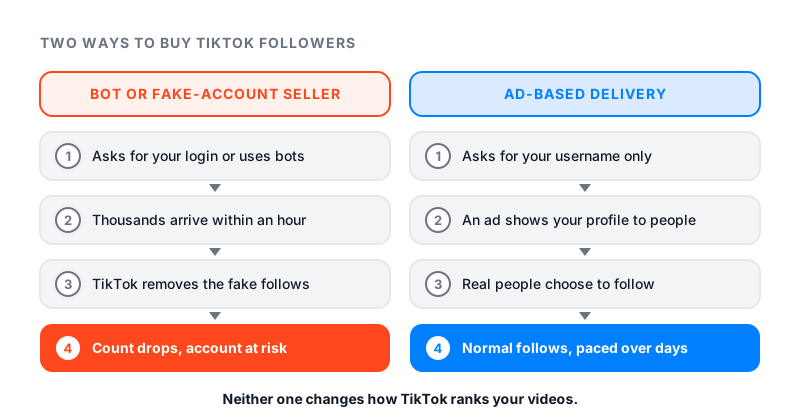
A package that adds thousands of followers in an hour cannot be real people. Those bot followers are the ones TikTok removes, and your count drops with them. Followers from third-party ads are different. The ad shows your profile to real people, and some of them choose to follow. Even then, bought followers only change a number. They do not change how TikTok ranks your videos.
Bot followers get removed and put your login at risk. Followers from third-party ads come from people who chose to follow, but they still do not change how TikTok ranks you.
## What TikTok's rules say about buying followers
TikTok covers this in its Community Guidelines, on the [Integrity and Authenticity](https://www.tiktok.com/safety/en/policies-and-engagement/integrity-authenticity) page. The part that matters is called "Deceptive Behaviors and Fake Engagement." In plain words, it says four things.
- TikTok does not allow "the trade of services that artificially boost engagement or trick the recommendation system."
- Its list of spam includes "buying or selling followers or engagement for financial gain." It also includes using bots or scripts to add likes or shares.
- TikTok bans automation tools and scripts made to get around its systems.
- When TikTok detects fake numbers, it removes the fake likes, followers or other inflated counts.
For accounts that break these rules, TikTok lists three outcomes. It may ban the account. It may ban new accounts you make. Or it may restrict the account. A restriction can limit posting, showing up in top search results, or reaching the For You feed.
TikTok updated its guidelines in September 2026. The fake engagement section did not change.
The Terms of Service add one more rule. They tell you to keep your password private and never share it with a third party. Any follower app that asks for your TikTok login is asking you to break that rule.
## How TikTok spots fake followers
Whether TikTok can tell if you bought followers depends on the followers. TikTok does not publish how it finds fake ones. It only says two things. It removes fake likes and followers when it detects them, and it bans the scripts that make them.
Bot followers are not hard to spot, even for a person. They tend to arrive by the hundreds in minutes. The accounts often have no videos, no photo and a random name. They never watch or like what you post. So your follower count climbs while your views stay flat.
Followers from an ad are a different case. A person sees the ad, taps through and follows, like any viewer would. TikTok does not say how it treats these follows, so no seller can honestly promise zero risk.
## Will TikTok ban you for buying followers?
It can. Its guidelines say it may ban or restrict accounts that use fake engagement. In practice, the risk comes from three places.
1. **Your password.** An app with your login can post, follow and send messages as you. TikTok sees that activity on your account, not on the app.
2. **Bots and scripts.** These are exactly what TikTok's rules name. When TikTok removes the fake accounts, every follow they gave goes with them.
3. **Your views.** A restricted account can lose its reach on the For You feed. That hurts far more than a lower follower count.
If your views dropped on every video at once, read our [TikTok shadowban](/tiktok-shadowban/) guide before you change anything else.
## Is buying TikTok followers illegal?
For a regular person, buying followers is not a crime in most countries. TikTok's rules are a contract between you and TikTok. Breaking them can cost you followers, reach or your account. It cannot get you arrested.
Business use is different. In many countries, advertising and consumer laws forbid using fake numbers to make a business look bigger to customers. The rules differ from place to place, so a business should check the law where it sells. Famoid's services are for personal accounts only, and our terms rule out business use.
## Bot sellers vs ad-based delivery
Most sellers fall into one of two groups. The table shows how they differ.
| | Bot or fake-account seller | Ad-based delivery |
|---|---|---|
| Where followers come from | Accounts run by scripts | Real people who saw a third-party ad |
| What they ask for | Often your password | Your username only |
| Speed | Thousands in an hour | Spread out over days |
| What TikTok says it does | Removes fake followers, may restrict the account | Nothing it has published |
| What the profiles look like | Empty, no videos | Mostly normal accounts |
| Price | Cheapest | Costs more |
Bot sellers look good for a week. Then the fake accounts get removed, and you have paid for a number that is gone. Ad-based delivery is slower and costs more, because each follow starts with someone seeing the ad and choosing to follow.
## Does buying TikTok followers work?
It depends on the job you want the followers to do.
Buying can:
- Raise the follower number on your profile.
- Make a new profile look less empty to a first visitor.
- Help you cross a number that a partner or a feature asks for.
Buying cannot:
- Put your videos on the For You feed.
- Make people watch, like, comment or share.
- Get you paid by TikTok on its own.
This is the point most people miss. TikTok's help page called "How TikTok recommends content" lists what shapes the For You feed. The list covers what people like, share, comment on, and watch in full or skip. It also covers sounds, hashtags and view counts. Your follower count is not on that list. A small account can have a big video, and a big account can have a flop.
## Bought followers and the Creator Rewards Program
Many people buy followers to reach TikTok's pay line. TikTok's Creator Academy lists the rules for the Creator Rewards Program. You need at least 10,000 followers and 100,000 video views in the last 30 days. You must be 18 or older and use a personal account. You must also live in one of the countries where the program runs.
Followers cover only one line of that list. The 100,000 views still have to come from people who watch. TikTok also reviews accounts and lists "artificial engagement" as a reason to reject one. And it pays on qualified views, which it says exclude fraudulent or paid views.
Our guide on [how many followers on TikTok to get paid](/how-many-followers-on-tiktok-to-get-paid/) lists every threshold side by side.
## What 1,000 TikTok followers are really worth
TikTok does not pay for followers. A thousand followers earn nothing by themselves. Money on TikTok comes from views, LIVE gifts, TikTok Shop and brand deals. Each one has its own rules.
What 1,000 followers are worth depends on who they are. A thousand people who watch your videos can lift every post you make. Ten thousand empty accounts cannot. Anyone who checks your profile can see the views on each video next to your follower count. A large gap between the two is easy to notice.
Prices for 1,000 followers vary a lot between sellers. A price far below the rest is a strong sign of bots.
## How to judge a seller
Run any seller through this list. Skip them if they fail one.
1. **Username only.** They should never ask for your password. TikTok's Terms tell you not to share it.
2. **Clear price.** You should see the price and the amount before you pay, with no surprise subscription.
3. **Paced delivery.** Real people do not arrive by the thousands per hour.
4. **A written refill or refund policy.** Read it before you order.
5. **Real support.** Send a question first and see if a person answers.
6. **Years in business.** Bot shops open and close fast.
7. **No promises about the For You feed.** Only TikTok decides who sees your videos. A seller who promises going viral is not being honest.
After any order, watch your count for a month. Our free [TikTok counter](/tiktok-counter/) shows your live follower number, so you can see if it holds.
## Where Famoid fits
Famoid has sold social media growth services since 2017. Our [TikTok followers](/tiktok/) come through third-party ads. We show your profile to real people, and some of them choose to follow. We don't create accounts or run bots ourselves. We ask for your username, never your password. Delivery starts within minutes and spreads out at a natural pace. If your count drops within 30 days, we refill it for free.
We do not promise views, reach or a spot on the For You feed. Buying followers does not change how TikTok ranks you, and TikTok's rules above apply to every account, whoever you buy from. If you want more people to see one video, TikTok's own Promote tool is the official route. Our guide on [whether TikTok Promote is worth it](/is-tiktok-promote-worth-it/) compares the two.
## Quick answers
**Is buying TikTok followers a good idea?**
Only if a bigger number on your profile is the goal. Bought followers do not watch, like or share, and follower count is not a For You feed signal. Bot followers also break TikTok's rules and get removed. If you want views, work on the video or use TikTok's own Promote tool.
**Can TikTok tell if you bought followers?**
TikTok says it removes fake likes and followers when it detects inauthentic metrics, and it bans scripts and automation tools. It does not publish how it detects them. Bot followers are easy to spot, even by eye. A follow from someone who saw an ad looks like any other follow.
**Is it legal to buy TikTok followers?**
For a regular person, it is not a crime in most countries. It can break TikTok's rules, which is a matter between you and TikTok. Using bought numbers to make a business look bigger can break advertising laws in many countries, which is why Famoid's services are for personal accounts only.
**How much is 1,000 TikTok followers worth?**
On their own, nothing. TikTok does not pay per follower. Money on TikTok comes from views, LIVE gifts, TikTok Shop and brand deals. 1,000 followers who watch your videos are worth far more than 10,000 who never do.
**Can bought followers get you into the Creator Rewards Program?**
Not by themselves. TikTok asks for 10,000 followers and 100,000 video views in the last 30 days, and it reviews accounts for artificial engagement. Rewards are paid on qualified views, and TikTok says those exclude fraudulent or paid views.
**What happens if you buy fake TikTok followers?**
Your count jumps, then TikTok may remove the fake accounts, and your count drops. The followers never watch your videos, so views stay flat. If the seller had your password, they could also post or follow from your account. TikTok can restrict or ban accounts behind fake engagement.
## Related
- [TikTok counter (free)](https://famoid.com/tiktok-counter/)
- [Is it safe to buy Instagram followers?](https://famoid.com/is-it-safe-to-buy-instagram-followers/)
- [Is TikTok Promote worth it?](https://famoid.com/is-tiktok-promote-worth-it/)
Written by the Famoid team. Updated 2026-09-22.
---
# Can You See Who Views Your Instagram Highlights?
Page: https://famoid.com/can-you-see-who-views-your-instagram-highlights/
Only for the first 48 hours after the story was posted. After that, Instagram shows no names for anyone who watches your highlights, and no app can add them back.
## The short answer
You can see who views your highlights on Instagram only for a short time. Instagram lets you see who watched a story for up to 48 hours after you post it. A highlight is made of your old stories, and that 48-hour clock starts when each story was posted.
After that, the highlight stays on your profile until you remove it. People can keep watching it. But Instagram shows you no names for those later views.
No setting changes this, and no outside app can add the names back.
The highlight lasts. The list of names does not.
## How to see who viewed your highlight in the first 48 hours
A story disappears from Feed and your profile after 24 hours. For one more day, you can still check who saw it. Instagram's page on [who has seen your story](https://help.instagram.com/202055156863605/) gives these steps.
1. Tap your profile picture in the bottom right to go to your profile.
2. Tap **Menu** in the top right.
3. Below **How you use Instagram**, tap **Archive**.
4. Find the story and tap it.
5. Swipe up on the screen.
You will see a view count and the usernames of people who watched. Only you can see this list. The count includes replays, so it can be higher than the number of names.
You can still see who viewed it after 24 hours, as long as the story is under 48 hours old. Once 48 hours have passed, Instagram no longer lets you see the names.
## Can you see who viewed your Instagram highlights after 48 hours?
No. After 48 hours, Instagram gives you no list of names to open.
What you can see is numbers. If your account is public, story insights stay for up to two years. You get **Views** (how many times it was played) and **Viewers** (how many different accounts saw it). To find them:
1. Go to your profile and tap **More** to open **Settings & activity**.
2. Tap **Insights** (professional account) or **Your dashboard** (personal account).
3. Tap **Content you shared**, then the story.
These are counts, not names. Instagram also does not say whether views that come later through a highlight are added to them. For the same kind of limit on Reels, see our guide on [who views your Reels](/can-you-see-who-views-your-reels/).
## Can someone see if you viewed their highlight?
Instagram says that when you see someone's story, they can tell you have seen it. So if the story in their highlight is less than 48 hours old, your name can show up in their list.
If the story is older, the owner has no viewer list for it. You can watch it without your name showing up. Our guide on [whether someone can see how many times you viewed their Instagram](/can-someone-see-how-many-times-you-viewed-their-instagram/) covers the other places people worry about.
## Instagram Plus and Story Preview
Instagram now sells a subscription called Instagram Plus. It is not available to everyone yet. One feature, **Story Preview**, lets a subscriber peek at a story without showing up in the viewer list. Instagram's help page on story viewers says the viewer list does not include subscribers who previewed a story this way.
Another feature, **Story Extend**, lets a subscriber keep a story up for 48 hours instead of 24. Instagram does not say whether either feature works the same way on highlights.
## Why "anonymous highlight viewer" sites are a bad idea
Some websites promise to show highlights anonymously, or to tell you who viewed yours. They are not part of Instagram.
A site that claims to list your highlight viewers is guessing, because Instagram keeps no such list for you to see. Many of these sites ask you to log in with Instagram. Instagram warns that apps with your login can gain complete access to your account, read your messages and post spam. Some of these tools are spyware. Never type your password into one.
The same logic applies to profile visits. Our guide on [who viewed your Instagram profile](/how-to-see-who-viewed-your-instagram-profile/) explains why no app can show that list either.
## How to control who sees your highlights
Instagram's page on [adding a story to your highlights](https://help.instagram.com/813938898787367/) gives the key rule. The people you allow to see your story can also see your highlights. So the controls for stories work for highlights too.
1. **Make your account private.** In **Menu**, tap **Account privacy**, then turn on **Private account**. Only followers you approve can see your content. Business profiles cannot be private.
2. **Hide your story from someone.** In **Menu**, tap **Story, live and location**, then **Hide your story and live videos from specific people**.
3. **Think before you highlight a Close Friends story.** It was meant for a small group. A highlight stays on your profile until you remove it.
4. **Remove one story from a highlight.** Open the highlight, tap **More** on that story, then **Remove from Highlight**.
5. **Delete a whole highlight.** On your profile, tap and hold the highlight, then tap **Delete Highlight**.
If you want to know who saw a story, check the list within 48 hours. After that, only the numbers remain.
Your follower count is easier to track, because it is public. Check it any time with our free [Instagram follower count checker](/instagram-follower-count-checker/).
## Quick answers
**Can I see who viewed my Instagram story highlights?**
Only while the story is less than 48 hours old. Open the story from your archive and swipe up to see the names. After 48 hours, Instagram shows no viewer names for it at all.
**How do you see who stalks your highlights on Instagram?**
You cannot. Instagram has no list of people who watch old highlights or keep coming back. Apps that promise a stalker list are guessing, and many ask for your password.
**Do highlight views show up in Instagram insights?**
Story insights on a public account show counts like views and viewers for up to two years. They are numbers, not names. Instagram does not say whether later views from a highlight are added to them.
**Can you anonymously view Instagram highlights?**
Once a story is more than 48 hours old, the owner has no viewer list to check. Inside that window, your name can show up like any story view. Skip outside viewer sites, which are not part of Instagram.
**Can you see who views your highlights on Facebook?**
Facebook shows who viewed your story, and only you can see that list. Its help pages do not describe a viewer list for older stories kept on your profile.
**Does hiding my story also hide my highlights?**
Yes. Instagram says the people you allow to see your story can also see your highlights. Someone you hide your story from is not one of them.
## Related
- [Instagram follower count checker (free)](https://famoid.com/instagram-follower-count-checker/)
- [Can you see who views your Reels?](https://famoid.com/can-you-see-who-views-your-reels/)
- [Does Instagram notify when you screenshot a story?](https://famoid.com/does-instagram-notify-when-you-screenshot-a-story/)
Written by the Famoid team. Updated 2026-09-22.
---
# Can You See Who Views Your Reels on Instagram?
Page: https://famoid.com/can-you-see-who-views-your-reels/
Short answer: no. Instagram shows you how many people watched a Reel, not who. Here is exactly what you can see, and what to ignore.
## What Instagram shows you
Instagram does not list the people who watched a Reel. It only shows numbers. That is true for every account type, and there is no setting that changes it.
What you can see on a Reel:
- **Views**, how many times it was played, including replays.
- **Likes, comments, shares, saves**, with the names of people who liked or commented, because those are public actions.
With a public account, personal or professional, you also get insights:
- **Accounts reached**, how many different people saw it.
- **Watch time and average watch time**.
- **Follows from this Reel**.
- **Where the plays came from**, followers or non-followers.
## Stories are different
Stories show a viewer list. Open your Story and swipe up. You can see every account that watched it, for 48 hours. This is why people assume Reels do the same. They do not. Highlights follow their own rule, which we explain in [can you see who views your Instagram highlights](/can-you-see-who-views-your-instagram-highlights/).
## How to see Reel insights
1. Switch to a professional account if you have not: Settings → Account type and tools → Switch to professional account. It is free.
2. Open the Reel.
3. Tap the three dots.
4. Tap **View insights**.
Instagram explains each metric on its [creators site](https://creators.instagram.com/). If the insights tab will not open, or Reels will not play at all, see our guide to [Instagram Reels not working](/instagram-reels-not-working/).
## Why "reel viewer" apps do not work
Instagram does not share viewer names with any outside app. There is no hidden list to unlock. Apps and websites that promise one are guessing, or they are after your login. Never enter your Instagram password anywhere but Instagram. If you already did, change it now. [Instagram's help center](https://help.instagram.com/) has the steps.
## What the numbers actually tell you
- **Many views, low reach**, the same people replayed it. Often friends or a loyal few.
- **High reach, low watch time**, people scrolled past. The first two seconds need work.
- **Plays from non-followers**, the Reel reached the Explore page or Reels tab. That is the goal.
## Getting more views on Reels
The first hour decides a lot. Instagram tests a new Reel on a small group. If watch time and likes look good, it widens the reach.
- Hook people in the first two seconds.
- Post when your audience is online (check Insights → Total followers → Most active times). Our guide to the [best time to post on Instagram](/best-time-to-post-on-instagram/) has more.
- Use a trending sound while it is still rising.
- Reply to early comments. Activity in the first hour helps.
If you want a stronger first hour, Famoid sells [Instagram Reels views and likes](/instagram-reels/). Delivery starts within minutes and is sized to your account. We only need the Reel link, never your password.
## Quick answers
**Can you see who viewed your Reels on Instagram?**
No. Instagram only shows the number of views and, through Insights on a public account, reach and engagement. It never shows the names of people who watched a Reel.
**Can you see who watched your Instagram Story?**
Yes. Stories are the one format that lists viewers. Open your Story and swipe up to see the names. The list is available for 48 hours.
**Do 'Instagram reel viewer' apps work?**
No. Instagram does not share viewer names with any app. Apps that claim to show them are guessing or lying, and many ask for your password. Never give it.
**What do Reel views mean on Instagram?**
Since 2024 Instagram counts 'views' as the number of times a Reel was played, including replays. 'Accounts reached' is the number of different people. Reach is the number that tells you how many humans saw it.
**How do I see my Reel insights?**
You need a public account. Insights works on personal and professional accounts, and switching is free. Open the Reel, tap the three dots, then View insights. You will see views, reach, likes, comments, shares, saves and watch time.
## Related
- [Instagram follower count checker (free)](https://famoid.com/instagram-follower-count-checker/)
- [Buy Instagram Reels views and likes](https://famoid.com/instagram-reels/)
- [Best time to post on Instagram](https://famoid.com/best-time-to-post-on-instagram/)
Written by the Famoid team. Updated 2026-09-02.
---
# Does Instagram Notify When You Screenshot a Story?
Page: https://famoid.com/does-instagram-notify-when-you-screenshot-a-story/
No. Instagram does not notify anyone when you screenshot a story, post, Reel, highlight or normal message. It only flags screenshots of disappearing photos, videos and messages in chats.
## The short answer
Instagram does not notify anyone when you screenshot their story. The same goes for posts, Reels, highlights, profiles, Live videos and normal chat messages. The person gets no alert. Nothing shows up next to your name.
There is one exception. If someone sends you a disappearing photo or video in a chat, Instagram can tell them you took a screenshot. The same is true in vanish mode and for disappearing messages.
So you can screenshot almost anything on Instagram in silence. But anyone can do the same to you. That is the part to think about before you post.
Only disappearing content in chats can tell the sender about a screenshot.
## Does Instagram notify when you screenshot? Every case
Here is the full list. It is based on Instagram's own Help Center. The only screenshot alerts it describes are for disappearing content in chats.
| What you screenshot | Is the owner told? |
|---|---|
| A story | No |
| A Close Friends or private story | No |
| A highlight | No |
| A post, carousel or Reel | No |
| A profile or bio | No |
| A Live video | No |
| A normal DM, voice note or shared post | No |
| A disappearing photo or video in a chat | Yes |
| A message in vanish mode | Yes |
| A disappearing message | Yes |
Screen recording follows the same split. For disappearing messages, Instagram says the sender gets a notification if it detects a screenshot or a screen recording. Its help pages say nothing about recording alerts for stories, posts or Reels.
## The one case that does notify: disappearing photos
In a chat, you can send a photo or video that vanishes after it is seen. Before you tap **Send**, you pick one of three options:
- **View Once**: the other person can open it one time.
- **Allow Replay**: they can open it and replay it one more time.
- **Keep in Chat**: a preview image stays in the chat.
The sender cannot open the photo again after it is sent. But they can see if it was viewed. Instagram's page on [the status of a disappearing photo or video](https://help.instagram.com/272077316522642) says one more thing. If Instagram detects a screenshot, the sender sees a dotted circle next to it.
In October 2024, Meta went further. It said it would stop people from taking a direct screenshot or screen recording of View Once and Allow Replay media in DMs. It also said these can no longer be opened on Instagram on the web. You can read this in [Meta's announcement](https://about.fb.com/news/2024/10/instagram-campaign-protect-teens-sextortion-scams/). On a current app, the screenshot may not work at all.
## Vanish mode and disappearing messages
Two chat modes work the same way. In **vanish mode**, messages disappear when someone leaves the chat. With **disappearing messages**, they vanish after a timer you choose.
Instagram says you get a notification if it detects a screenshot in vanish mode. For disappearing messages, it says the same for a screenshot or screen recording. Neither mode is offered in every country.
Instagram adds a fair warning here. Someone can still take a photo of the screen with a second phone. No app can detect that.
## Stories, Close Friends and highlights
When you watch a story, the owner can see your name in the viewer list. That list is the only trace. It shows that you watched, not what you did next. A screenshot adds nothing to it.
People often ask if others can see when you screenshot their Instagram story. They cannot. This holds for a Close Friends story with the green ring, too. It also holds for a private account's story. The Close Friends list only controls who can watch.
Highlights are old stories saved to a profile. They have no screenshot alert either. Our guide on [who views your Instagram highlights](/can-you-see-who-views-your-instagram-highlights/) explains what the owner can and cannot see there.
## Posts, Reels, profiles and Live
Instagram does not notify when you screenshot a post either. The owner sees likes and comments. A screenshot of a post, a carousel or a Reel does not show up for them.
A profile gives no alert either, even a private one you follow. Just opening a profile leaves no trace. Our guide on [who viewed your Instagram profile](/how-to-see-who-viewed-your-instagram-profile/) covers that myth in full.
A screenshot during a Live sends no alert to the host either.
## Regular DMs
Instagram does not notify when you screenshot a DM in a normal chat. That covers text, voice notes and posts or Reels someone shares with you. It also covers photos sent the normal way, not as View Once.
If you sent something you regret, a copy may already exist. Unsending removes a message from the chat. It does not remove it from someone's camera roll. Our guide on [what happens when you unsend a message](/what-happens-when-you-unsend-a-message-on-instagram/) covers what the other person still sees.
## Why people think Instagram tells
The rumor has a real root. The only Instagram screenshot notification lives in chats, not where most people look. The dotted circle on disappearing photos is real. People see it once, or hear about it, and assume stories work the same way.
Instagram changes features often. If you see a post saying stories now show screenshots, check the Help Center first. The pages linked above show the rules as they stand today.
## Apps that claim to show who took a screenshot
Instagram does not share story or post screenshots with anyone, not even the owner. That means there is no list for an app to read. An app that promises one is guessing.
Many of these apps ask for your Instagram password. Instagram warns that apps with your login can gain complete access to your account. They can see your personal messages and post spam on your profile. Some of these apps are spyware.
If you already gave one your password, change it now. Then remove any apps you do not know from your account.
## How to protect what you post
Anyone can screenshot a story without you knowing. The real control is who sees it in the first place.
1. **Share to Close Friends.** When you post a story, tap **Close Friends** at the bottom. Only people on that list see it.
2. **Hide your story from someone.** Go to your profile and tap **Menu**. Tap **Story, live and location**, then **Hide your story and live videos from specific people**.
3. **Stop reshares.** In **Menu**, tap **Sharing and reuse**. Turn off the toggle next to **Stories in messages**.
4. **Send private photos as View Once.** In a chat, pick **View Once** before you tap **Send**.
5. **Make your account private.** In **Menu**, tap **Account privacy**. Then only followers you approve see your photos and videos.
None of these stop a photo taken with a second phone. If a picture should never be shared, do not send it. If someone threatens to share a private image of you, report the account in the app right away.
Screenshots stay private, but follower counts do not. You can check any public account's live number with our free [Instagram follower count checker](/instagram-follower-count-checker/).
## Quick answers
**Does Instagram tell me who screenshotted my story?**
No. Your story viewer list shows who watched, not who took a screenshot. Instagram has no screenshot alert for stories. Anyone who can see your story can save a copy without you knowing.
**Does Instagram notify when you screenshot a DM in 2026?**
Not for normal messages. Text, voice notes, shared posts and photos sent the normal way give no alert. Instagram only says it detects screenshots of disappearing photos and videos, vanish mode and disappearing messages.
**Can I screenshot an Instagram post without notifying the person?**
Yes. Posts, carousels and Reels have no screenshot alert. The owner sees likes and comments. A screenshot does not show up anywhere for them.
**Is there an app to see who screenshots your Instagram story?**
No. Instagram does not tell anyone about story screenshots, so there is no list for an app to read. Apps that claim to show them are guessing. Many ask for your password, and some are spyware.
**Does Instagram notify when you screen record a story?**
No. Screen recording a story, post or Reel sends no alert. For disappearing messages, Instagram says the sender is told if it detects a screenshot or a screen recording.
**Does Instagram notify when you screenshot a Close Friends story?**
No. A Close Friends story works like any other story. The green ring only changes who can watch it. It does not add a screenshot alert.
## Related
- [Instagram follower count checker (free)](https://famoid.com/instagram-follower-count-checker/)
- [Can you see who views your Instagram highlights?](https://famoid.com/can-you-see-who-views-your-instagram-highlights/)
- [What happens when you unsend a message on Instagram?](https://famoid.com/what-happens-when-you-unsend-a-message-on-instagram/)
Written by the Famoid team. Updated 2026-09-22.
---
# Does Instagram Suggest Users Who Search for You?
Page: https://famoid.com/does-instagram-suggest-users-who-search-for-you/
No. Instagram does not tell anyone who searched for them, and searching a profile does not put you in their suggestions. Suggestions come from mutual follows, contacts and interactions.
## If I search someone on Instagram, will they know?
No. Instagram keeps searches private. The person you searched gets no alert. They have no list of who looked them up. Your search history lives on your own account only. You can clear it from **Settings and activity** → **Recent searches**.
The same goes for profile visits. You can open a profile 50 times. The owner will never see that. Instagram has said this many times in the [Help Center](https://help.instagram.com/).
## If I search someone on Instagram, will I be suggested to them?
Not because of the search. Many people worry about this. The fear is that one search puts your face on their "Suggested for you" list. It does not work that way.
Here is what Instagram uses to build suggestions:
- **Mutual follows.** You follow the same people, or their friends follow you.
- **Contacts.** One of you synced a phone contact list that includes the other.
- **Interactions.** You liked, commented on, or shared their posts. Or they did that to yours.
- **Similar accounts.** You post about the same topic, or follow the same kind of pages.
- **Shared groups and tags.** You were tagged together, or are in the same group chat.
So you can appear in someone's suggestions. But it takes a real link between the accounts. A search is not a link.
One more detail. If you search someone and then visit their profile a lot, Instagram may show you their content more. That changes your feed, not theirs.
## Can people see if you search them on Instagram?
No. But some other things are visible. Here is the honest list.
| Action | Can they see it? |
|---|---|
| Searching their name | No |
| Viewing their profile | No |
| Viewing their posts or Reels | No (only a view count) |
| Viewing their story | Yes, your name shows in story viewers |
| Liking or commenting | Yes |
| Following them | Yes, they get a notification |
| Screenshotting a post | No |
Story views are the common slip. Open a story and your name goes on the viewer list. So if you want to stay invisible, skip stories.
For Reels, Instagram shows the owner a number, not names. See [can you see who views your Reels](/can-you-see-who-views-your-reels/) for details.
## Do people know if you search them on Instagram? Why the rumor spreads
The rumor comes from one real thing. You search a person. A week later they show up in your suggestions. It feels like Instagram connected you.
What really happened is simpler. You both follow some of the same accounts. Or your phone number is in their contacts. Instagram found that link on its own. The search was a coincidence.
At Famoid, customers ask us about this when they order. They want to know if buying followers will reveal who searched them. It will not. Nothing reveals that. Your order only uses your public username, and the new followers show up like any others.
## Las sugerencias de Instagram son las personas que te buscan?
No. This is the same question in Spanish, and the answer is the same. Suggestions are not the people who search for you. They are accounts that share friends, contacts or interests with you.
## How to see fewer suggestions
You cannot turn off suggestions fully. You can trim them.
1. Open your profile and tap **Edit profile**.
2. Turn off **Show account suggestions on profiles**. This hides your account from the "similar accounts" strip on other profiles.
3. Go to **Settings and activity** → **Your app and media** → **Contacts syncing** and turn it off.
4. On any suggestion you dislike, tap the **X** to remove it.
To check that a missing person has not blocked you instead, see [how to know if someone blocked you](/how-to-know-if-someone-blocked-you-on-instagram/). And if you want to hide your follower list from view, read [how to hide followers on Instagram](/how-to-hide-followers-on-instagram/).
## Quick answers
**If I search someone on Instagram, will they know?**
No. Instagram does not show who searched for a profile. There is no search history shared with other users, and no notification is sent.
**If I search someone on Instagram, will I be suggested to them?**
Searching alone does not add you to their suggestions. You may still show up if you share mutual follows, are in their contacts, or interact with their posts.
**Can people see if you search them on Instagram?**
No. Profile visits and searches are private. The only things they can see are actions like a follow, a like, a comment or a story view.
**How often does Instagram suggest users who search for you?**
Never, as far as Instagram has ever said. Suggestions are built from connections and activity, not from search.
**Las sugerencias de Instagram son las personas que te buscan?**
No. Instagram suggestions are not the people who search for you. They are accounts with shared friends, contacts or similar interests.
## Related
- [Instagram follower count checker (free)](https://famoid.com/instagram-follower-count-checker/)
- [Can you see who views your Reels?](https://famoid.com/can-you-see-who-views-your-reels/)
- [How to know if someone blocked you on Instagram](https://famoid.com/how-to-know-if-someone-blocked-you-on-instagram/)
Written by the Famoid team. Updated 2026-08-23.
---
# How Many Followers on Instagram to Go Live?
Page: https://famoid.com/how-many-followers-on-instagram-to-go-live/
You need 1,000 followers and a public account to go live on Instagram. Instagram states this on its help page. Under 1,000, or on a private account, the Live option does not appear.
## The short answer
You need 1,000 followers to go live on Instagram. Your account must also be public. Instagram states this rule on its own help page. Private accounts and accounts under 1,000 do not get the Live option.
## The exact rule, in Instagram's words
Instagram's help page on [starting a live broadcast](https://help.instagram.com/292478487812558/) puts it in one line: "Only Instagram users who have a public account with 1,000 followers or more will be able to start a live broadcast".
That is the whole rule. It has two parts, and you need both:
- **1,000 followers or more.** Not 999. Not "about 1K".
- **A public account.** A private account cannot start a Live, no matter how many followers it has.
This is a change. For years, any account could go live from day one. Many older guides still say that. Instagram's help page no longer does. Instagram has not posted the date the rule changed, so we will not guess one.
The same rule covers Lives inside a broadcast channel. Instagram's page on [live videos in a channel](https://help.instagram.com/1386836475313335/) uses the same words: a public account with 1,000 followers or more.
## Other things that block Live
Passing 1,000 is not always enough. The same help page lists a few more blocks.
| Block | What Instagram says |
|---|---|
| Teen Account | Live is off by default. |
| Under 16 | A parent or guardian must turn Live on. |
| Age 16 to 17 | You can turn Live on yourself. |
| Removed post | A past post removed for breaking Community Standards can block Live. |
| New account | Brand new accounts may not be able to go live or join as a guest. |
Teen Accounts are the accounts Instagram gives to users under 18. Live is off there until someone turns it on. Who can flip the switch depends on age, as the table shows.
If your Live button is missing and you have 1,000 followers, look at your Account Status in the app. Instagram says that is where your permissions show. It will tell you if a past post is holding you back. Also make sure your account is set to public. That one is easy to miss.
## How to check your exact count
Some parts of the app round follower numbers. You may see "1K" when the real number is 980. That is not enough to go live.
Use our free [Instagram follower count checker](/instagram-follower-count-checker/) to see the real number.
1. Open the checker.
2. Type your username.
3. Read the exact count.
Check it again on the day you plan to go live. Counts move as people follow and unfollow. If you are at 1,003, a few unfollows can put you back under the line.
## How to go live once you qualify
These are Instagram's own steps.
1. Swipe right anywhere in Feed.
2. Scroll to **Live** at the bottom.
3. Tap **Add a title** if you want one. Type it, then tap **Done**.
4. Tap **Go live**.
The number of viewers shows at the top of the screen. Comments show at the bottom. You can tap a comment and pin it so viewers see it first. You can also turn comments off from **Options**.
To end, tap **Close** in the top right, then tap **End now**. Then tap **Share** to post the replay to your profile. Replays also go to your Live archive. A saved replay keeps the video only. Comments, likes and the viewer count are not saved.
## What to do if you are under 1,000
You have two real options.
**Join someone else's Live as a guest.** A host can invite up to three guests. Instagram's guest page lists no follower minimum for guests. You do need to follow the host. You can also tap **Send request** while watching a Live. You appear in the host's Live room next to them. One catch: Instagram says brand new accounts may not be able to co-broadcast. So a new account may still be blocked, even as a guest.
**Grow to 1,000.** This is the only way to host your own Live. Our guide on [how to get 1000 followers on Instagram](/how-to-get-1000-followers-on-instagram/) lays out a plan. Post short Reels often. Stick to one topic. Reply to every comment. Our broader guide on [how to get more followers on Instagram](/how-to-get-more-followers-on-instagram/) covers the rest.
If you want a paced push over the line, Famoid sells [Instagram followers](/insta/). Delivery is spread out over time. We only need your username, never your password. Followers get you past the number. They do not get people to watch your Live. That part is still on you.
One thing does not work: a Live in a broadcast channel. It needs the same 1,000 followers and a public account.
## Instagram vs TikTok
TikTok also needs 1,000 followers, and you must be 18 or older. Instagram has no age 18 rule, but it adds the public account rule. Our guide on [TikTok Live requirements](/tiktok-live-requirements/) has the TikTok side.
## Quick answers
**Can you go live on Instagram with 0 followers?**
No. Instagram's help page says only public accounts with 1,000 followers or more can start a Live. An account with zero followers cannot go live. Older guides that say any account can go live are out of date.
**Can you go live on Instagram with a private account?**
No. The rule has two parts: 1,000 followers and a public account. A private account cannot start a Live even with 1,000 followers. Switch to public first, then check again.
**Why can't I go live on Instagram with 1,000 followers?**
Check four things. Your account must be public. Teen Accounts have Live off by default, and teens under 16 need a parent to turn it on. A past post removed for breaking Community Standards can block Live. Brand new accounts may also be blocked. Instagram says to check your Account Status for the reason.
**Do you need 1,000 followers to be a guest on Instagram Live?**
Instagram's guest page lists no follower minimum for guests. You do need to follow the host. Instagram also says newly created accounts may not be able to co-broadcast. So a small, older account can usually join as a guest.
**How many followers do you need to go live on TikTok?**
1,000 followers, and you must be 18 or older. Instagram now uses the same 1,000 number but has no age 18 rule. Instagram adds a public account rule instead.
**Did Instagram change the Live follower rule?**
Yes. For years any account could go live from day one. Instagram's help page now says you need a public account with 1,000 followers or more. Instagram has not posted an exact date for the change.
## Related
- [Instagram follower count checker (free)](https://famoid.com/instagram-follower-count-checker/)
- [How to get 1,000 followers on Instagram](https://famoid.com/how-to-get-1000-followers-on-instagram/)
- [How many followers on TikTok to go live?](https://famoid.com/tiktok-live-requirements/)
- [How to get more followers on Instagram](https://famoid.com/how-to-get-more-followers-on-instagram/)
Written by the Famoid team. Updated 2026-09-02.
---
# How Many Followers on TikTok to Get Paid?
Page: https://famoid.com/how-many-followers-on-tiktok-to-get-paid/
There is no single number. TikTok has several ways to earn, and each one has its own rule. Here they are, side by side.
## The thresholds at a glance
| Way to earn | Followers needed | Other rules |
|---|---|---|
| Live gifts | 1,000 | Age 18+ |
| Creator Rewards Program | 10,000 | 100,000 views in last 30 days, age 18+, videos over 1 minute, eligible country |
| TikTok Shop affiliate | About 1,000 (varies by country) | Age 18+ |
| Brand deals | None | Brands look at views and niche |
| Selling your own product | None | You need something to sell |
Numbers come from TikTok's own [Creator Portal](https://www.tiktok.com/creators/creator-portal/en-us/) as of August 2026. TikTok changes them from time to time. Check the Creator tools in your app for your country.
## 1. Live gifts, 1,000 followers
Once you have 1,000 followers and are 18 or older, you can go live. Viewers can send you virtual gifts. Gifts turn into Diamonds. You can cash out Diamonds once you reach the minimum in your country. TikTok keeps a share. Viewers buy gifts with Coins. Our [TikTok Coins guide](/tiktok-coins-recharge/) explains what each gift is worth.
Full details on the Live rule are in our guide: [How many followers to go live on TikTok?](/tiktok-live-requirements/)
## 2. Creator Rewards Program, 10,000 followers
This is the program that pays for views. To join you need:
- 10,000 followers
- 100,000 video views in the last 30 days
- Age 18 or older
- An account in an eligible country (the US, UK, France, Germany, Japan, Korea, Brazil and Mexico are included)
- Videos longer than one minute that follow the rules
Pay is per 1,000 **qualified** views. Creators report somewhere between $0.40 and $1.00. Topics with high ad demand pay more. Videos people watch to the end pay more. For real examples by view count, see [how much TikTok pays](/how-much-does-tiktok-pay/).
## 3. TikTok Shop affiliate, about 1,000 followers
You add products from TikTok Shop to your videos and Lives. When someone buys, you get a commission. In most countries you need about 1,000 followers and to be 18 or older. Some regions set it lower. Open the Shop tab in your app to see the rule for you.
## 4. Brand deals, no minimum
A brand pays you to feature their product. There is no follower rule. Brands care about your views, your niche and how real your audience looks. Small accounts with a tight niche get deals all the time.
## 5. Your own product, no minimum
Sell a course, a preset pack, a print, a service. TikTok is the shop window. This is how most small creators actually earn.
## How to reach the numbers faster
- **Post every day.** More videos means more chances to land on the For You page.
- **Make the first two seconds count.** Watch time is what TikTok rewards.
- **Go longer than one minute** once you aim for Creator Rewards. Shorter videos do not count.
- **Reply to comments with video.** It feeds the algorithm and your audience.
- **Track your count.** Our [free TikTok follower counter](/tiktok-counter/) shows your live number so you know exactly how close you are.
- **Learn what works.** Our guide to [getting more followers on TikTok](/how-to-get-more-followers-on-tiktok/) goes deeper on each step.
A paced follower push can help you cross a line like 1,000 for Live or Shop. Famoid sells [TikTok followers, likes and views](/tiktok/) with gradual delivery and no password. But bought followers do not create watch time. Creator Rewards pays for real views, so the content still has to do the work.
## Quick answers
**How many followers do you need to make money on TikTok?**
It depends on the method. Live gifts need 1,000 followers. The Creator Rewards Program needs 10,000 followers and 100,000 video views in the last 30 days. Brand deals and affiliate links have no fixed minimum.
**How much does TikTok pay per 1,000 views?**
Creators report roughly $0.40 to $1.00 per 1,000 qualified views in the Creator Rewards Program. The rate changes by country, topic and watch time. TikTok does not publish a fixed rate.
**Can you make money on TikTok without followers?**
Yes, but not from TikTok itself. You can sell your own product, use affiliate links, or get paid by a brand to post. Those depend on views and trust, not on follower count.
**How many followers do you need for TikTok Shop affiliate?**
In most countries you need about 1,000 followers and to be 18 or older. The rule varies by region and changes over time, so check the Shop tab in your app.
**Does buying followers help you get paid?**
Only partly. Followers can open doors like Live and Shop. But Creator Rewards pays for real views and watch time, which bought followers do not create. Use a push to cross a threshold, then earn with content.
## Related
- [TikTok live follower counter (free)](https://famoid.com/tiktok-counter/)
- [How much does TikTok pay?](https://famoid.com/how-much-does-tiktok-pay/)
- [Buy TikTok followers, likes and views](https://famoid.com/tiktok/)
Written by the Famoid team. Updated 2026-08-21.
---
# How Many Followers on TikTok to Go Live?
Page: https://famoid.com/tiktok-live-requirements/
The rule is simple: 1,000 followers and an age of 18 or more. This page explains the details, the exceptions, and how to get there faster.
## The rule
To go live on TikTok you need two things:
1. **1,000 followers** on your account.
2. **Age 18 or older** in your account settings.
Both must be true. When they are, the **LIVE** option shows up next to Camera and Templates when you tap the plus button. Instagram now has a similar rule: a public account with 1,000 or more followers. See [how many followers on Instagram to go live](/how-many-followers-on-instagram-to-go-live/).
## The age rules in detail
- Under 16: no Live at all. You also cannot watch Lives.
- 16 and 17: you can watch Lives, but you cannot host one and you cannot send or receive gifts.
- 18 and older: you can host Lives and receive gifts, once you also have 1,000 followers.
TikTok uses the birthday on your account. If it is wrong, you can ask TikTok to change it, but you need proof of age.
## Exceptions
TikTok sometimes opens Live to accounts below 1,000 followers. This happens in some regions and for some accounts TikTok picks. There is no switch to turn it on. If you do not see the option, you are not in that group.
Be careful with videos that promise a trick to unlock Live early. They do not work. Some ask for your login. Never give your password to anyone.
## How to go live once you qualify
1. Tap the **plus** button at the bottom.
2. Swipe to **LIVE**.
3. Add a title and a cover image.
4. Tap **Go LIVE**.
You can add moderators, turn comments on or off, and end the Live at any time.
## Why the Live button is still missing
Check these in order:
- **Wait a day or two.** Access is not instant after you reach 1,000.
- **Check your age.** Profile → Settings and privacy → Account. It must be 18 or older.
- **Update the app.** Old versions hide new features.
- **Check for strikes.** Recent [Community Guidelines](https://www.tiktok.com/community-guidelines/en/) violations can block Live for a while.
- **Count again.** Use our [free TikTok follower counter](/tiktok-counter/) to see your exact live number. TikTok rounds numbers on profiles, so "1K" may still be 997.
- **Ask TikTok.** If all of the above check out, report the problem at [TikTok's help center](https://support.tiktok.com/en) or from Settings → Report a problem in the app.
## Getting to 1,000 followers
Most people reach 1,000 with steady posting. A few things that help:
- Post short videos often. Two or three a day beats one a week.
- Hook people in the first two seconds. That is what the For You page measures.
- Reply to comments. Replies count as engagement.
- Use a trending sound while it is still rising.
If you want a paced push to get over the line, Famoid sells [TikTok followers](/tiktok/). Delivery starts within minutes and is spread out so it looks natural. We only need your username, never your password. Orders that would look fake on a small account get resized or refused.
## After you go live
Followers matter less once you are live. What matters is how many people join and stay. Post a short video an hour before you start, and tell people when you will be live. A Live with many viewers early gets pushed to more people. Viewers send gifts with Coins. Our [TikTok Coins guide](/tiktok-coins-recharge/) explains what each gift is worth to you. For all the ways Live fits into earning, see [how much TikTok pays](/how-much-does-tiktok-pay/).
## Quick answers
**How many followers do you need to go live on TikTok?**
1,000 followers. You also need to be 18 or older. Once you pass both, the Live option appears in the create menu, usually within a day.
**Can you go live on TikTok without 1,000 followers?**
Usually not. TikTok sometimes gives early access to selected accounts or in test regions, but there is no setting you can turn on. Reports of tricks that unlock Live below 1,000 followers do not work and may get your account flagged.
**How many followers do you need to get gifts on TikTok Live?**
The same 1,000 followers, and you must be 18 or older. Viewers can then send gifts during your Live, which you can turn into Diamonds and cash out.
**Why is my Live button missing even though I have 1,000 followers?**
Give it 24 to 48 hours after you cross 1,000. Make sure your age in your account is 18 or more, the app is updated, and your account has no recent community guideline strikes. If it is still missing after a few days, contact TikTok support from the app.
**How many followers do you need to go live on Instagram?**
1,000 followers and a public account. Instagram added this rule, so the two apps now match on the number. TikTok also requires you to be 18 or older.
## Related
- [TikTok live follower counter (free)](https://famoid.com/tiktok-counter/)
- [How many followers on TikTok to get paid?](https://famoid.com/how-many-followers-on-tiktok-to-get-paid/)
- [Buy TikTok followers, likes and views](https://famoid.com/tiktok/)
Written by the Famoid team. Updated 2026-09-02.
---
# How Much Does Instagram Pay for Views?
Page: https://famoid.com/how-much-does-instagram-pay/
Instagram has no public rate per view. Views alone do not pay. Money comes from Gifts, Subscriptions, invite-only bonuses and brand deals, and each has its own rules.
## The short answer
Instagram does not pay a set rate per view. There is no price for 1,000 views and no price for 1 million views. A Reel can get a million views and earn nothing.
Money on Instagram comes from other tools. Gifts, Subscriptions, Badges, bonuses and brand deals all pay. Views help those tools work, but views are not the paycheck.
## Where the "$ per 1,000 views" numbers come from
You will see figures online like "$2 per 1,000 views" or "$500 for a million." None of these are Instagram rates. They are one creator's own report.
Most come from the bonus program. Instagram says it estimates bonus pay from qualified views, then adjusts it for audience location and engagement. So two creators with the same views get different amounts. And most creators never get a bonus offer at all.
Treat any per-view number as a story, not a price. Instagram has never published one.
## The bonus program: the only view-based pay
Bonuses are the closest thing to being paid for views. Here is what Instagram says about them:
- They are limited in time and invite-only.
- Only selected creators are invited. At the moment that means creators in Japan, South Korea and the United States.
- You need a professional account and must meet the Partner Monetization Policies.
- Pay is an estimate based on qualified views for the deal you were invited to.
- Instagram adjusts that estimate for where your audience lives and how they engage.
- Branded content, private posts and posts with fake engagement do not count.
You cannot apply. If you are invited, the offer shows in your professional dashboard. The full rules are on [Instagram's bonus program page](https://help.instagram.com/708013994693013).
## Gifts on Reels: the one published rate
Gifts are the only tool with a public number. Fans buy Stars and send them on your Reels. Instagram pays you USD 0.01 for every Star, once a month. That figure is from [Instagram's Gifts help page](https://help.instagram.com/738469380549477).
To turn on Gifts you need to:
- Have a professional account.
- Be 18 or older.
- Have at least 500 followers.
- Live in an eligible country.
- Meet the Partner Monetization Policies.
- Set up a payout account.
Gifts pay for support, not for reach. A Reel with 50,000 views and 2,000 Stars earns $20. A Reel with a million views and no Stars earns $0.
## Subscriptions, Badges and brand deals
The other tools have nothing to do with view counts.
| Tool | Who pays you | Main requirement |
|---|---|---|
| Subscriptions | Fans, monthly | 10,000 followers, professional account, 18+ |
| Badges in Live | Viewers during a Live | Available in some regions only |
| Gifts on Reels | Fans, with Stars | 500 followers, professional account, 18+ |
| Bonuses | Instagram | Invite only |
| Brand deals | The brand, directly | Professional account, an established presence |
**Subscriptions.** You set a monthly price. Fans pay it to see subscriber-only posts, Reels, Lives and stories. Instagram says its revenue share is currently 0%, but Apple and Google take 30% from in-app purchases. You need at least 10,000 followers. See [the eligibility page](https://help.instagram.com/478012211024479).
**Badges.** Viewers buy badges during your Live for $0.99, $1.99 or $4.99. Instagram caps this at $250 per Live and pays out once you reach $100.
**Brand deals.** A brand pays you to post about its product. You agree the price with the brand, not with Instagram. Instagram only requires the Paid Partnership label on the post. This is where most large creator incomes come from.
## How to estimate what you can earn
Since there is no per-view rate, work from the tools instead.
**For Gifts:** count Stars, not views. Multiply Stars by $0.01. If your fans send 5,000 Stars in a month, that is $50.
**For Subscriptions:** multiply subscribers by your price. Then take off the 30% app store fee for in-app sign-ups. 200 subscribers at $4.99 is about $998, or about $700 after that fee.
**For brand deals:** views matter here, but only as a selling point. Brands look at average views, saves and comments on your recent posts. Give them those numbers and set a price. Instagram's own advice is to bring your metrics to the talk and ask for more when the brand wants to run your post as an ad.
**For bonuses:** you cannot estimate ahead of time. If you have an offer, the bonuses screen shows the running total.
## Two things that stop you getting paid
**No payout account.** Without one, you can earn up to USD 500 per tool and USD 1,500 across three tools. After that, earnings stop until you add it.
**Fake engagement.** Instagram's monetization rules say creators may not artificially boost followers, views or engagement to earn more. Bought views on a Reel in a bonus deal do not count and can get the account removed from the program. Instagram also says it can pause or end any monetization tool at any time.
## What actually raises your pay
Since pay follows fans and deals, growth is the lever. A larger, active audience means more Stars, more subscribers and better brand offers.
Check your live number with our free [Instagram follower count checker](/instagram-follower-count-checker/). To reach the 500 or 10,000 follower lines, see [how to get more followers on Instagram](/how-to-get-more-followers-on-instagram/). Famoid also sells [Reels likes and views](/instagram-reels/) if you want a first push on a new Reel. Use that for reach, not for a bonus deal, since Instagram does not count paid views there.
Wondering how TikTok compares? TikTok also has no fixed rate, but its Creator Rewards program is open to apply. See [how much TikTok pays](/how-much-does-tiktok-pay/).
## Quick answers
**How much does Instagram pay for 1 million views?**
There is no set amount. Instagram does not pay a public rate per view. A million views can earn nothing on its own. It can also bring Gifts, a bonus if you were invited, or a brand deal. Those are what pay.
**How much does Instagram pay for 1,000 views?**
Nothing by default. Instagram has no per-1,000-views rate. Any dollar figure you see online is one creator's own report from a bonus deal, not an Instagram price list.
**Does Instagram pay for views at all?**
Only inside its bonus program, and only if Instagram invites you. Bonuses are limited in time and open to selected creators in a few countries. Everyone else earns through Gifts, Subscriptions and brand deals.
**How many followers do you need to get paid on Instagram?**
It depends on the tool. Gifts on Reels need at least 500 followers. Subscriptions need at least 10,000 followers. Both need a professional account and an age of 18 or more. Brand deals have no fixed follower number.
**How much is one Star worth on Instagram?**
Instagram pays creators USD 0.01 for every Star received through Gifts on Reels. So 1,000 Stars is $10 and 100,000 Stars is $1,000. Apple and Google take fees from the fan's purchase, not from your share.
**Do you need a payout account to earn on Instagram?**
Yes. Without one you can earn up to USD 500 per tool, and USD 1,500 across three tools. After that you must add a payout account or you stop earning.
## Related
- [Instagram follower count checker (free)](https://famoid.com/instagram-follower-count-checker/)
- [How much does TikTok pay?](https://famoid.com/how-much-does-tiktok-pay/)
- [How to get more followers on Instagram](https://famoid.com/how-to-get-more-followers-on-instagram/)
Written by the Famoid team. Updated 2026-09-02.
---
# How Much Does TikTok Pay?
Page: https://famoid.com/how-much-does-tiktok-pay/
TikTok pays per 1,000 qualified views in the Creator Rewards Program, and it does not publish a fixed rate. Creators report about $0.40 to $1.00 per 1,000. That is roughly $400 to $1,000 for 1 million views.
## The short answer
TikTok pays through the Creator Rewards Program. It pays per 1,000 **qualified** views, not per view or per like. TikTok does not publish a fixed rate. Creators report somewhere between $0.40 and $1.00 per 1,000.
| Qualified views | Creators report |
|---|---|
| 1,000 | $0.40 to $1.00 |
| 100,000 | $40 to $100 |
| 1,000,000 | $400 to $1,000 |
Those are ranges from creators' own reports, not TikTok numbers and not promises. Your number depends on where your viewers live, how long they watch, and how much ad value they bring.
## How much for 1 million views?
Creators report about $400 to $1,000 for 1 million qualified views. Some report less. Some report more. TikTok has never published a per-view or per-million rate, so no page can give you an exact figure.
Two things make the real number lower than people expect:
- Only **qualified** views pay. A view must come from the For You feed and last more than 5 seconds. A video with 1 million plays can have far fewer qualified views.
- Only videos over one minute count. Shorter videos earn nothing from the program.
The best estimate comes from your own numbers. TikTok shows them in the app:
1. Tap **Profile**, then the **Menu** button, then **TikTok Studio**.
2. Tap **Creator Rewards Program** to open the dashboard.
3. Find your estimated rewards and your qualified views. Estimates show up 1 to 3 days after the views.
4. Divide rewards by qualified views, then multiply by 1,000. That is your RPM.
5. Multiply your RPM by 1,000 to see what 1 million qualified views would pay you.
So if you earned $60 from 100,000 qualified views, your RPM is $0.60. A million qualified views would pay you about $600.
## What the Creator Rewards Program is
The Creator Rewards Program pays creators for original videos over one minute. To join you need:
- To be 18 or older (19 in South Korea)
- A personal account, not a business account
- 10,000 followers
- 100,000 video views in the last 30 days
- To post original videos at least one minute long
- An account in an eligible country. TikTok lists terms for the US, UK, France, Germany, Japan, South Korea, Brazil and Mexico
- A clean record under the community guidelines
You apply in the app through TikTok Studio. TikTok replies in about 3 days. The full rules live on the [TikTok Creator Rewards Program help page](https://support.tiktok.com/en/business-and-creator/creator-rewards-program/creator-rewards-program). Our guide on [how many followers on TikTok to get paid](/how-many-followers-on-tiktok-to-get-paid/) lists every threshold side by side.
## What counts as a qualified view
Not every view pays. A qualified view must:
- Come from the For You feed
- Last more than 5 seconds
- Be the first view from that account on that video
- Land on an original video over one minute that follows the rules
TikTok removes fake views, paid views, promoted views, and views from people who tapped "not interested". A video starts earning once it reaches 1,000 qualified views.
## How much does TikTok pay per view, really?
TikTok calls the rate RPM, the rewards per 1,000 qualified views. It says RPM depends on five things:
- **Video performance.** Average watch time and how many people finish the video.
- **Search value.** How much search traffic your video brings in.
- **Location.** Where you are based and where your viewers are.
- **Video engagement.** How many viewers interact with the video.
- **Advertising value.** How much ad time your viewers watch on TikTok.
On top of that, TikTok adds an Additional Reward for videos that are well made, engaging and focused on one topic. It asks for 1080p or better and clean editing.
Bought views do not count as qualified views. TikTok excludes paid views from the count. They can make a video look active, but they do not add to your payout. The content has to earn that on its own.
## How much do TikTokers make in total?
Views are the smallest piece for most creators. The bigger pieces are:
- **LIVE gifts.** Viewers send gifts during a LIVE. Gifts turn into Diamonds. You can withdraw Diamonds for money, and TikTok shows the rate when you withdraw. You need 1,000 followers to go LIVE. See [TikTok Live requirements](/tiktok-live-requirements/).
- **TikTok Shop.** You tag products and earn from sales. Some creators earn more here than from views.
- **Brand deals.** A brand pays you to feature a product. Small accounts with a tight niche get them too.
- **Your own product.** Courses, presets, prints, services. TikTok is the shop window.
You can use all of these while you are in the Creator Rewards Program. TikTok pays program rewards on the 15th of each month once you have at least $10.
## Do likes pay on TikTok?
No. Likes never turn into money on their own. TikTok counts them as a signal of quality, so a video with more likes tends to reach more people. More reach means more qualified views. So likes help you get paid, but they do not pay you.
## How to earn more per view
1. **Go past one minute.** Shorter videos earn nothing from Creator Rewards.
2. **Hook in the first two seconds.** Views under five seconds do not qualify.
3. **Make it searchable.** Search traffic raises your RPM, so use clear titles and words people search for.
4. **Post when your audience is online.** Our [best time to post on TikTok](/best-time-to-post-on-tiktok/) guide covers that.
5. **Keep it original.** Duets, Stitches, reposts and watermarked clips do not qualify.
If you want to check your own progress toward 10,000 followers, our [free TikTok counter](/tiktok-counter/) shows your live number. Famoid also sells [TikTok followers, likes and views](/tiktok/) with paced delivery and no password. Use it to cross a threshold, not to replace the work. TikTok pays for watch time, and only real viewers give you that. For the full rate rules, read [how rewards work](https://support.tiktok.com/en/business-and-creator/creator-rewards-program/how-rewards-work) on TikTok's help site.
## Quick answers
**How much does TikTok pay for 1 million views?**
TikTok does not publish a rate. Creators in the Creator Rewards Program report about $400 to $1,000 for 1 million qualified views. Views under 5 seconds and views outside the For You feed do not count. So a video with 1 million plays often has far fewer qualified views.
**How much does TikTok pay for 100k views?**
Creators report about $40 to $100 for 100,000 qualified views. Your real number depends on watch time, where your viewers are, and how much ad value your viewers bring. Check your own rate in the Creator Rewards dashboard in TikTok Studio.
**How much does TikTok pay per 1,000 views?**
TikTok calls this RPM, the rewards per 1,000 qualified views. It does not publish a number. Creators report about $0.40 to $1.00. That is well under a tenth of a cent per view.
**How many likes on TikTok do you need to get paid?**
None. TikTok does not pay for likes. Pay comes from qualified views, LIVE gifts, TikTok Shop and brand deals. Likes help your video reach more people, which brings more views.
**How much do TikTokers make?**
It ranges from nothing to a full income. A creator with 1 million qualified views a month might earn a few hundred dollars from Creator Rewards. Big earners make most of their money from brand deals, Shop and LIVE, not from views.
**What is the TikTok Creator Rewards Program?**
It is TikTok's program that pays for original videos over one minute long. You need 10,000 followers, 100,000 video views in the last 30 days, to be 18 or older, and a personal account in an eligible country.
## Related
- [TikTok live follower counter (free)](https://famoid.com/tiktok-counter/)
- [How many followers on TikTok to get paid?](https://famoid.com/how-many-followers-on-tiktok-to-get-paid/)
- [How many followers to go live on TikTok?](https://famoid.com/tiktok-live-requirements/)
Written by the Famoid team. Updated 2026-09-02.
---
# How to Add a Link to Your Instagram Story
Page: https://famoid.com/how-to-add-link-to-instagram-story/
To add a link to an Instagram story, open a story, tap the sticker icon, choose Link, and paste your URL. Any account can do this now, with no follower minimum.
## The short answer
Links in stories use the **link sticker**. You add it the same way you add a poll or a location tag. Tap the sticker icon, tap Link, paste the URL, and place the sticker on the story. Viewers tap it to open the page.
## How to add a link to your Instagram story
1. Open Instagram and swipe right, or tap the plus icon and choose **Story**.
2. Take a photo or video, or pick one from your camera roll.
3. Tap the **sticker icon** at the top. It looks like a square smiley face.
4. Tap the **Link** sticker.
5. Paste or type the URL.
6. Optional: tap **Customize sticker text** and type a label, like "Shop here."
7. Tap **Done**.
8. Drag the sticker where you want it, then share.
It takes about 20 seconds once you have done it twice.
## Do you need 10K followers to add a link?
No. The rule is gone. Until 2021, only verified accounts or accounts with 10,000 followers got the swipe-up link. In October 2021 Instagram opened the link sticker to everyone. Instagram covered the change on its [official blog](https://about.instagram.com/blog).
If you do not see the sticker, update the app. It is not a follower issue.
## How to customize the link sticker text
By default the sticker shows a shortened version of the URL. You can change that.
1. After pasting the URL, tap **Customize sticker text**.
2. Type a short label. "Read the post" or "Get tickets" work well.
3. Tap **Done**.
Tap the placed sticker to cycle through its styles. Pick one that stands out against your photo.
## How to resize and place the link sticker
Pinch with two fingers to make the sticker bigger or smaller. Drag it with one finger to move it. Keep it out of the top and bottom edges, where your name and the reply bar sit. From our own stories, a sticker near the subject of the photo gets tapped more than one pushed into a corner.
## Can you add multiple links to one story?
Yes. Repeat the sticker steps for each link. You can add several link stickers to one story, each with its own URL and label. Keep it to two or three, so the story does not look cluttered.
## Do story links stay in Highlights?
Yes. Save a story to a Highlight and the link sticker stays. It keeps working for as long as the story sits in the Highlight. Many shops keep a "Shop" Highlight with link stickers on every slide. To learn who can see those slides later, read [can you see who views your Instagram highlights](/can-you-see-who-views-your-instagram-highlights/).
## Why your Instagram story link does not work
A few things can stop a link sticker.
- **Old app version.** The sticker needs a recent version of Instagram. Update and try again.
- **Blocked domain.** Instagram blocks some sites it marks as spam or unsafe. Shortened links are sometimes flagged too. Try the full URL.
- **Wrong format.** The URL needs to start with http:// or https://. Check for typos.
- **Account limits.** New accounts, or accounts that broke a rule recently, can lose sticker access for a while. See our [Instagram shadowban](/instagram-shadowban/) guide if other features are limited too.
- **Instagram outage.** Stickers fail when the app is down. Check our [is Instagram down](/is-instagram-down/) page.
If nobody can tap the sticker, the story was likely shared from a scheduling tool. Post it from the Instagram app instead.
## Story link vs bio link
The two serve different jobs.
| | Story link | Bio link |
| --- | --- | --- |
| Where it lives | Inside one story | On your profile |
| How long | 24 hours, or longer in a Highlight | Until you change it |
| How many | Several per story | Up to five |
| Best for | Today's post, a sale, a new video | Your main site or shop |
Use the story link for anything timely. Use the bio link for your main page.
## Getting more taps on your link
A link only works if people see the story. Post it when your followers are online, using our guide on the [best time to post on Instagram](/best-time-to-post-on-instagram/). More followers means more story views, and more taps on every link. Our [free follower count checker](/instagram-follower-count-checker/) tracks it. Famoid also sells [Instagram followers](/insta/) with paced delivery, if you want a push.
## Quick answers
**How many followers do you need to add a link to your Instagram story?**
None. Since 2021 the link sticker is open to every account. The old 10,000 follower rule for swipe-up links is gone.
**Why can't I add a link to my Instagram story?**
Update the app first. If the sticker is still missing, log out and back in. If the link is rejected, the site may be blocked by Instagram or marked as spam.
**Can you add multiple links to one Instagram story?**
Yes. You can add more than one link sticker to the same story. Each one can point to a different URL.
**Do links in Instagram story Highlights still work?**
Yes. When you save a story to a Highlight, the link sticker stays and keeps working until you remove the story.
**What is the difference between a story link and a bio link?**
A story link lives inside one story and disappears with it after 24 hours, unless saved to a Highlight. A bio link sits on your profile all the time. Use both.
## Related
- [Instagram follower count checker (free)](https://famoid.com/instagram-follower-count-checker/)
- [Best time to post on Instagram](https://famoid.com/best-time-to-post-on-instagram/)
- [How to get more followers on Instagram](https://famoid.com/how-to-get-more-followers-on-instagram/)
Written by the Famoid team. Updated 2026-08-23.
---
# How to Appear Offline on Instagram
Page: https://famoid.com/how-to-appear-offline-on-instagram/
Turn off your activity status. Go to Settings and activity, then Messages and story replies, then Show activity status, and switch it off. The green dot and 'Active now' label vanish for everyone.
## How to appear offline on Instagram (iPhone and Android)
The setting is called activity status. Turn it off and you look offline to everyone.
1. Open Instagram and go to your profile.
2. Tap the menu (three lines) in the top right.
3. Tap **Settings and activity**.
4. Scroll to **How others can interact with you** and tap **Messages and story replies**.
5. Tap **Show activity status**.
6. Switch **Show activity status** off.
The change applies right away. You do not need to log out.
On a computer, open instagram.com, click **More**, then **Settings**, then **Messages and story replies**. The same switch is there.
## What people see when you show offline
Before, your friends saw a green dot next to your name in their inbox. They also saw "Active now" or "Active 2h ago" under your name. Once the switch is off, all of that goes away. Your name shows with no status at all.
Nobody gets a notice that you changed the setting. They just stop seeing the dot.
## The trade-off
When you hide your status, you lose the same view of others. You will not see who is active now. You will not see when a friend was last online. Instagram does this on purpose. You cannot hide and watch at the same time.
We turned this off on our own test accounts for a month. The only thing we missed was seeing if a friend was around before we sent a message. Most people never notice the difference.
## What appearing offline does not hide
This setting is small on purpose. It only hides the green dot and the last-active time. It does not:
- Stop people from sending you DMs.
- Hide your stories or posts.
- Hide read receipts. "Seen" still shows when you open a message.
- Hide you from search or from follower lists.
If you want to hide more, start with a private account. Our guides on [hiding your followers](/how-to-hide-followers-on-instagram/) and [hiding likes](/how-to-hide-likes-on-instagram/) cover the next steps.
## Is there an Instagram offline mode?
No. Many people search for "instagram offline mode", but Instagram has never shipped one. Some things still work with no internet:
- You can scroll posts the app already loaded.
- You can write a comment or tap like. The app sends it when you reconnect.
- You can draft a post. It uploads when you are back online.
You cannot load new posts, open stories, or send a DM without a connection. If the app hangs even with good internet, see [Instagram not loading](/instagram-not-loading/).
## Business accounts and multiple accounts
Activity status is set per account. If you run a personal and a business account, turn it off on each one. The setting lives in the same place for both.
## Does going offline affect your reach?
No. Activity status is a privacy setting. It has nothing to do with how Instagram ranks your posts. Your followers still see your content as before. Instagram's own [privacy settings page](https://help.instagram.com/) lists this next to the other options.
If your goal is a bigger account rather than a quieter one, steady posting matters more than any setting. Famoid also sells [Instagram followers](/) that are paced over time, and we only ever ask for your username.
## Quick answers
**Can you appear offline on Instagram?**
Yes. Turn off Show activity status in Settings and activity. Nobody will see a green dot or an 'Active' label next to your name.
**How do I show offline on Instagram but still use it?**
Just turn off activity status. You can scroll, post and send messages as normal. People only lose the 'Active now' signal.
**Does Instagram have an offline mode?**
No. There is no true offline mode. With no internet you can only see posts already loaded, and new likes or messages go out once you reconnect.
**If I appear offline, can people still message me?**
Yes. Activity status only hides when you were last online. Your DMs, stories and posts all work the same.
**How to be invisible on Instagram?**
Turn off activity status, set your account to private, and hide your story from chosen people. There is no way to browse Instagram with zero trace.
## Related
- [Instagram follower count checker (free)](https://famoid.com/instagram-follower-count-checker/)
- [How to hide followers on Instagram](https://famoid.com/how-to-hide-followers-on-instagram/)
- [How to hide likes on Instagram](https://famoid.com/how-to-hide-likes-on-instagram/)
Written by the Famoid team. Updated 2026-08-23.
---
# How to Boost a Post on Instagram
Page: https://famoid.com/how-to-boost-a-post-on-instagram/
To boost a post on Instagram, open it on a professional account and tap Boost. You pick a goal, an audience, a daily budget and a number of days. After a quick review, Instagram shows it as an ad to people who do not follow you yet.
## The short answer
Here is how to boost a post on Instagram. You need a professional account. Open the post on your profile and tap **Boost** below it. Pick a goal, an audience, a daily budget and a number of days. Then tap **Boost post**.
Meta reviews the ad first, and it says most ads start to run within the hour. Your post then shows to more people, with an Ad label under your name. You can pause it at any time.
A boost buys reach. It does not promise likes, follows or sales. Those still depend on the post.
Four settings, one simple cost rule, and what happens after you tap Boost post.
## What boost post means on Instagram
To boost a post means to pay to show it to more people. It is the same post, with the same photo and caption, in a paid spot.
Instagram's help page on how to [boost a post on Instagram](https://help.instagram.com/2090822074310288/) lists where it can show up. Boosted posts appear in Home Feed, Explore, profile feed and Stories. You can boost a feed post, a Reel or a Story.
A boost is the simple way to run Instagram ads. Meta's Ads Manager has far more settings. A boost has four: goal, audience, budget and duration.
## What you need before you boost
Check these first. Each one can hide the Boost button.
- **A professional account.** You cannot boost a post on Instagram with a personal account. Switch to a creator or business account in **Settings and activity**, under **Account type and tools**. If your account is private, switching makes it public.
- **Your age.** Instagram says you must be over 16 to create ads.
- **An ad account.** The first time, Instagram asks you to pick one. You can connect a Facebook ad account, or keep Facebook and Instagram apart.
- **A way to pay.** You add it when you create your first ad.
- **A post that meets the ad rules.** Every ad is checked before it runs.
Your first boost may also ask you to connect a Facebook Page. You can pick a Page or tap **Skip**.
Two rules only affect some people. In the EU, the EEA and Switzerland, ads are limited if you pay to use Meta without ads. In the US, ads about credit, jobs, housing, social issues or politics must pick a **Special Ad Category**.
## How to boost a post on Instagram, step by step
These steps follow Instagram's own help page for the app.
### Step 1: Open the post
Go to your profile and tap the post you want to boost. Below the photo, tap **Boost**.
To boost an already posted Instagram post from months ago, use the dashboard. Tap **Professional dashboard**, then **Ad tools**, then **Choose a post**.
### Step 2: Pick a goal
The goal is what you want people to do. Instagram offers three: more profile visits, more website visits, or more messages.
- Pick **profile visits** if you want new people to see your page and follow.
- Pick **website visits** if you sell on a website.
- Pick **messages** if people usually ask a question before they buy.
### Step 3: Pick an audience
You have two choices. The automatic option shows the ad to people like your followers. Your app may call it **Automatic** or **Suggested audience**.
Or tap **Create your own**. Then you choose places, interests, age and gender. A local shop should always set a location.
### Step 4: Set the budget and duration
The budget is the average amount you want to spend each day. The duration is how many days the ad runs. You can also let it run until you pause it.
As you set the budget, the app shows an estimate of how many people you may reach. Meta suggests at least seven days, so its system has time to find the right people.
### Step 5: Preview and boost
Tap **Next**. Then tap **Preview ad** to see the places your ad will run. When it looks right, tap **Boost post**.
On a computer, go to instagram.com, open your profile, select the post and click **Boost**.
## How much it costs to boost a post on Instagram
You set the price. The most you plan to pay is your daily budget times the number of days. Five dollars a day for seven days comes to about 35 dollars.
Here is what Meta itself says about cost:
- **Where to start.** Meta suggests at least 5 US dollars and more than six days.
- **The limit.** Meta aims to spend your budget evenly over the days. Typically, you won't be charged more than the budget you set.
- **How you are charged.** Usually by impressions, each time the ad is shown. Prices come from an auction, so Meta publishes no fixed price per view.
- **Minimums vary.** The lowest budget you can set depends on your country.
One cost catches iPhone users out. When you boost in the iPhone app, you pay by adding funds first. Apple may keep a 30% service fee on money you add there. Instagram's own tip is to boost on instagram.com instead, which avoids that fee.
## What happens when you boost a post
First comes the review against Meta's ad rules. You get a notice when it is under review, when it is approved or turned down, and when it ends.
Then the ad runs. People in your audience see your post with an **Ad** label under your name, in Feed, Stories and Explore. A boosted Reel can also show in the Reels tab. The post stays on your profile the whole time.
## How to see results, pause or stop a boost
To see results, tap **Professional dashboard**, then **Ad tools**. Under **Manage**, tap **Past ads**. Find the ad and tap **View insights**.
The results screen shows a few numbers:
- **Results:** how the goal you picked went, such as link clicks or messages.
- **Reach:** how many accounts saw the ad.
- **Impressions:** how many times it was shown. One person can see it more than once.
- **Engagement:** likes, saves, shares, comments and three-second video plays.
- **Profile activity:** profile visits and follows that came from the ad.
To pause a boost, open **Ad tools**, tap **Edit** on the ad, and tap **Pause ad**. You can't really edit a live boost. Meta says to delete it and boost the post again with new settings.
To delete a boosted post, delete the ad first. This is true even after the ad has ended. In **Ad tools**, tap **Edit** next to the ad, then **Delete ad**. Only then can you delete the post from your profile.
For the numbers on your normal posts, read our guide on [how to see insights on Instagram](/how-to-see-insights-on-instagram/).
## Why you can't boost a post on Instagram
If the Boost button is missing or greyed out, one of these is almost always why.
| What you see | Why | What to do |
|---|---|---|
| No Boost button at all | Personal account, or you are 16 or under | Switch to a professional account |
| A Reel will not boost | It uses licensed music | Use original audio or royalty-free music |
| A Reel will not boost | Face or camera effects, GIFs, product tags or interactive stickers | Boost a clean version instead |
| A Reel will not boost | Over 90 seconds, or not full screen 9:16 | Trim it or pick another Reel |
| A Reel will not boost | Already shared to Facebook, or posted before Oct 15, 2021 | Pick a newer Reel |
| "Resolution is too low" | The video is not sharp enough | Upload a better quality video |
| Boost does nothing | An app or ad account error | Try instagram.com or Meta Business Suite |
Instagram lists all the Reel rules on its page about how to [boost an Instagram Reel](https://help.instagram.com/570215404599013). Check them before you post, not after. A Reel with a popular song may be great for views, but you can't turn it into an ad.
## Can you boost a collab post?
Yes, but not from the normal Boost button. Meta calls it boosting partner content, and you do it on instagram.com or in Meta Business Suite.
Both of you must meet Meta's rules for partnership ads. You also need your partner's permission. If you don't have it yet, Instagram asks for it when you boost. The ad shows as **Pending partner approval** until they say yes. When it runs, your name comes first in the ad and theirs comes second.
Our guide on [how to do a collab post on Instagram](/how-to-do-a-collab-post-on-instagram/) covers the setup.
## Is boosting a post on Instagram worth it?
It can be, for the right job. A boost is good at one thing: putting a post in front of people who have not seen you.
Boosting is worth it when:
- The post already did well with your followers. Meta itself says to build an audience with normal posts first.
- You have a clear goal, like website visits or messages.
- You serve one area, like a salon or a shop, and can target it.
It is usually not worth it when:
- The post got little love from your own followers. Paying rarely saves a weak post.
- You only want a bigger number of likes or followers. A boost is not built for that.
To choose between two posts, open **Ad tools** and tap **Compare two posts**. It boosts both at once, so you can see which one works better.
| | Boost | Posting for free | Famoid likes or followers |
|---|---|---|---|
| What you pay | Your daily budget times the days | Your time | A set price for a set amount |
| What you get | Your post shown to people you pick | Reach, if people react well | Likes or followers from real people |
| Set number promised | No, results vary | No | Yes, the amount you order |
| Shows as an ad | Yes, with an Ad label | No | No |
| Best for | New people, clicks and messages | Building an audience that comes back | A fuller count on a post or profile |
## Paid options, if you want a head start
A boost buys reach. Some people want a fuller count instead, so a new post or profile does not look empty. Famoid has sold [Instagram likes and followers](/insta/) since 2017. Delivery runs through third-party ads, where real people see your post or profile and choose whether to act. We ask for your username, never your password.
Bought likes do not change how Instagram ranks you, and they do not bring sales. The plan is still good posts, plus a boost when a post deserves more reach.
## A simple first boost to try
If you have never boosted before, keep the first one small.
1. Open your Insights and find a post from the last month that your followers liked a lot.
2. Tap **Boost** and pick **profile visits** as the goal.
3. Use the automatic audience, or set your city if you are local.
4. Set 5 dollars a day for seven days, and leave it alone.
5. When it ends, check reach, profile visits and follows in **Past ads**.
Then compare the new follows with what the post earned for free. Our free [Instagram engagement rate calculator](/instagram-engagement-rate-calculator/) shows if the new followers engage. If the boost paid off, boost the next strong post. If not, put the money into better posts, and read our guide on [how to get more views on Instagram](/how-to-get-more-views-on-instagram/).
## Quick answers
**How do I boost an Instagram post I already shared?**
Open your profile, tap the post, and tap Boost below it. You can also go to Professional dashboard, then Ad tools, then Choose a post. The Boost button only works from a professional account.
**Why can't I boost posts on Instagram?**
The usual cause is a personal account. Switch to a creator or business account first. Reels also have rules: no licensed music, no GIFs or face effects, and 90 seconds or less. You also must be over 16.
**Does it cost money to boost a post on Instagram?**
Yes. You set a daily budget and a number of days, so you pick the price. Meta suggests starting with at least 5 US dollars a day for more than six days. On an iPhone, Apple may add a 30% fee when you add funds in the app.
**Does boosting a post on Instagram actually work?**
It works for reach. Your post is shown to more people, and you see exactly how many in the results. Likes, follows and sales are not promised. They depend on how good the post is and who you target.
**Can you boost a post on Instagram with a personal account?**
No. Instagram asks you to switch to a professional account before you can boost. Switch in **Settings and activity**, under **Account type and tools**. You can switch back later. A private account becomes public when you switch.
**Can you change a boosted post after it starts?**
Not really. Meta says that to change an ad, you delete it and boost the post again. You can pause the ad at any time from Ad tools. Meta advises against stopping early, since the ad needs time to find the right people.
**Do boosted posts say Sponsored or Ad?**
Meta's help page says ads have an Ad label under your username. Some also have a button at the bottom, if one was added. Apart from that, a boosted post looks like a normal post.
## Related
- [Instagram engagement rate calculator (free)](https://famoid.com/instagram-engagement-rate-calculator/)
- [How to get more views on Instagram](https://famoid.com/how-to-get-more-views-on-instagram/)
- [How to see insights on Instagram](https://famoid.com/how-to-see-insights-on-instagram/)
Written by the Famoid team. Updated 2026-09-22.
---
# How to Clear Instagram Cache (iPhone and Android)
Page: https://famoid.com/how-to-clear-instagram-cache/
On Android, go to Settings → Apps → Instagram → Storage → Clear cache. On iPhone there is no cache button, so you offload or reinstall the app. Both are safe.
## What the Instagram cache is
The cache is a folder of stored images, videos and data. Instagram keeps it so your feed opens fast. Over weeks it grows to hundreds of megabytes. Parts of it can break. A broken cache causes blank images, a feed that will not refresh, and the "Something went wrong" error.
Before you clear it, [check if Instagram is down](/is-instagram-down/). If the servers are down, clearing the cache changes nothing.
## How to clear Instagram cache on Android
1. Open your phone **Settings**.
2. Tap **Apps** (or Apps and notifications).
3. Find and tap **Instagram**.
4. Tap **Storage** (or Storage and cache).
5. Tap **Clear cache**.
Do not tap **Clear data** unless you know your password. Clear data wipes the app back to a fresh install and logs you out. Google explains the difference on its [Android storage help page](https://support.google.com/android/answer/9079646).
The exact menu names change by phone brand. Samsung, Pixel and Xiaomi all put it under Storage.
## How to clear Instagram cache on iPhone
iPhone has no cache button for any app. You have two options.
### Option 1: Offload the app
1. Open **Settings**.
2. Tap **General**, then **iPhone Storage**.
3. Scroll to **Instagram** and tap it.
4. Tap **Offload App**.
5. Tap the Instagram icon on your home screen to reinstall it.
Offloading removes the app and its cache but keeps your login and settings. Apple describes it on its [offload apps page](https://support.apple.com/en-us/102594).
### Option 2: Delete and reinstall
1. Hold the Instagram icon on your home screen.
2. Tap **Remove App**, then **Delete App**.
3. Open the App Store and install Instagram again.
4. Log in.
This is the full reset. Have your password ready. If you use two-factor, have your phone or codes nearby.
## Clear cache inside the Instagram app
Instagram does not have a true cache button inside the app. What it does have:
- **Clear search history.** Go to Settings and activity → Your activity → Recent searches → Clear all. This removes old searches, not the media cache.
- **Media quality.** Settings and activity → Your app and media → Media quality. Turning off "Upload at highest quality" makes the cache grow slower.
Some older Android builds of Instagram had a clear cache option under Settings. Most current versions do not. Use the phone settings instead.
## What clearing the cache does not do
This matters, because people clear the cache hoping to fix the wrong thing.
- It does **not** delete your posts, Reels, messages or followers. Those are on Instagram's servers.
- It does **not** log you out on Android. Clear data does.
- It does **not** fix an action block or a "try again later" limit. That is on your account, not your phone. See our [something went wrong guide](/instagram-something-went-wrong/).
- It does **not** remove a shadowban or restore reach.
- It does **not** change what Instagram recommends to you. For that, see [how to reset your Instagram algorithm](/how-to-reset-instagram-algorithm/).
- It does **not** fix an outage.
## When you should clear it
- Images or Reels show blank or grey.
- The feed says "Couldn't refresh feed" on a good connection.
- The app is slow to open or crashes.
- Your phone storage is almost full.
If the problem is the feed only, our [couldn't refresh feed guide](/instagram-couldnt-refresh-feed/) has more fixes.
## What happens after
Instagram rebuilds the cache as you scroll. The first open may be slower. Images load from the network again, so it uses more data for a day. That is normal.
If clearing the cache did not help, update the app, restart your phone, and check your connection. If nothing works, the [Instagram Help Center](https://help.instagram.com/) lists known issues.
## Quick answers
**How do I clear the cache on Instagram?**
Android: Settings → Apps → Instagram → Storage → Clear cache. iPhone: Settings → General → iPhone Storage → Instagram → Offload App, then reinstall. Nothing on your account is lost.
**Does clearing Instagram cache delete anything?**
No. Your account, posts, messages and followers live on Instagram's servers. You only lose stored images and unsaved drafts. On Android, Clear data is different. It logs you out.
**Why can't I clear cache on Instagram on iPhone?**
iPhone does not give apps a cache button. Offload the app or delete and reinstall it. Inside Instagram you can only clear search history.
**Does clearing cache fix Instagram not loading?**
Often, yes. A broken cache causes stuck feeds, blank images and the something went wrong error. Check if Instagram is down first, then clear the cache.
**How often should I clear the Instagram cache?**
Only when something breaks or your phone is full. Instagram rebuilds the cache as you scroll, so clearing it too often just uses more data.
## Related
- [Is Instagram down right now? (live check)](https://famoid.com/is-instagram-down/)
- [Instagram not loading](https://famoid.com/instagram-not-loading/)
- [Instagram couldn't refresh feed](https://famoid.com/instagram-couldnt-refresh-feed/)
Written by the Famoid team. Updated 2026-08-21.
---
# How to Clear TikTok Cache
Page: https://famoid.com/how-to-clear-tiktok-cache/
Open TikTok, tap Profile, tap the menu, then Settings and privacy → Free up space → Clear next to Cache. That is it. Your videos, drafts and account stay.
## What is cache on TikTok?
Cache is temporary data. Each video you watch leaves a small copy on your phone. So do thumbnails, sounds and profile pictures. TikTok keeps them so the next load is faster.
The problem is size. After a few weeks the cache can pass a gigabyte. Old or broken cache files also cause lag, blank feeds and the "something went wrong" error. Clearing it is the fix.
## How to clear TikTok cache in the app
This works the same on iPhone and Android.
1. Open TikTok and tap **Profile** in the bottom right.
2. Tap the **menu** (three lines) in the top right.
3. Tap **Settings and privacy**.
4. Scroll down and tap **Free up space**.
5. Tap **Clear** next to **Cache**.
The number next to Cache shows how much space you get back. On the same screen you can also clear **Downloads**. Those are videos you saved to watch offline. Clear them only if you do not need them.
We clear the cache on our test phones about once a week. It is the first thing we try when a feed stops loading. It fixes the problem more often than any other step.
## How to clear TikTok cache on Android
Android gives you a second way. It works even when TikTok will not open.
1. Open your phone **Settings**.
2. Tap **Apps**, then find **TikTok**.
3. Tap **Storage**.
4. Tap **Clear cache**.
Do not tap **Clear data** or **Clear storage**. That logs you out and deletes drafts. Google explains the difference in its [Android storage help page](https://support.google.com/android/answer/9079646).
## How to clear TikTok cache on iPhone
iPhone has no system cache button for single apps. Use the in-app steps above. If TikTok still takes too much space, you have two options.
**Offload the app.** Go to Settings → General → iPhone Storage → TikTok → **Offload App**. This removes the app but keeps its documents and data. Reinstall it from the same screen. Apple describes this in its [offload apps guide](https://support.apple.com/en-us/102594). Drafts usually survive an offload, but back them up first to be safe.
**Delete and reinstall.** This gives you a clean app. It also deletes every draft on the phone. Post or save drafts before you do it.
## What gets deleted and what stays
Clearing the cache removes:
- Cached video clips and thumbnails
- Cached images, sounds and profile data
- Search and feed data stored on the phone
It does not reset your For You feed. That lives on your account, not your phone. See [how to reset your TikTok algorithm](/how-to-reset-tiktok-algorithm/).
It does not remove:
- Your account, followers or settings
- Posted videos, likes and favorites
- Drafts
- Downloaded videos (those are under Downloads, not Cache)
Your first scroll after clearing may load a bit slower. That is normal. The cache refills as you use the app.
## Drafts: the one thing to protect
Drafts live only on your phone. TikTok does not store them on its servers. Clearing the cache is safe. Deleting the app is not. If you delete TikTok, your drafts are gone for good. Post them or save them to your camera roll first.
## How often should you clear it?
Once a month is enough for most people. Clear it sooner if:
- TikTok lags or freezes
- Videos stop loading
- Your phone warns you about storage
- You see "something went wrong" again and again
If clearing the cache does not fix your problem, check our [TikTok not working guide](/tiktok-not-working/). Start with the [live TikTok status check](/is-tiktok-down/). If TikTok itself is down, no cache fix will help.
## Quick answers
**What is cache on TikTok?**
Cache is a pile of temporary files. TikTok saves video clips, images and profile data on your phone so they load faster next time. It is safe to delete. The app rebuilds it as you scroll.
**Does clearing TikTok cache delete drafts?**
No. Clearing the cache only removes temporary files. Drafts, liked videos, saved sounds and your account stay. Deleting the app is different. That removes drafts for good.
**How do I clear TikTok cache on iPhone?**
Use the in-app path: Profile → menu → Settings and privacy → Free up space → Clear. iPhone has no system-level cache button for apps. If the app is still huge, offload it in iPhone Storage and reinstall.
**Why is TikTok taking so much storage?**
Cached videos add up fast. An hour of scrolling can store hundreds of clips. Downloaded videos and drafts also count. Clear the cache, then delete downloads you do not need.
**How often should I clear TikTok cache?**
Once a month is plenty for most people. Do it sooner if the app lags, videos will not load, or your phone warns about low storage.
## Related
- [TikTok live follower counter (free)](https://famoid.com/tiktok-counter/)
- [TikTok not working? Fixes](https://famoid.com/tiktok-not-working/)
- [TikTok 'something went wrong' fix](https://famoid.com/tiktok-something-went-wrong/)
Written by the Famoid team. Updated 2026-08-21.
---
# How to Contact Facebook
Page: https://famoid.com/how-to-contact-facebook/
Facebook has no public phone line and no support email for regular users. The real channels are Help Center forms, the Report a problem tool, and paid chat for Meta Verified users and advertisers.
## Is there a way to call or email Facebook?
No. The phone number listed for Meta plays a recording. Emails to old support addresses go unread. Regular accounts get help through forms, and that is all.
The forms do work. The trick is picking the right one. Each channel below is free unless we say otherwise.
## 1. The Facebook Help Center
The [Facebook Help Center](https://www.facebook.com/help/) is the main channel. It looks like a help site. But many articles end with a link like "let us know". Those links open the forms. Search your problem first. Then look for the link at the bottom.
Best for: login trouble, names, pages, and privacy.
## 2. Report a problem in the app
This is the fastest way to flag a bug.
1. Open Facebook and tap your profile picture or the menu.
2. Go to **Settings & privacy** → **Help & support** → **Report a problem**.
3. Describe what is broken in one or two lines. Add a screenshot.
You will rarely get a personal reply. Facebook uses these reports to spot bugs that hit many people.
## 3. Hacked account: facebook.com/hacked
If someone else is in your account, start here. Go to [facebook.com/hacked](https://www.facebook.com/hacked). It finds the account, resets the password and logs out other devices. Our [hacked Facebook account guide](/how-to-recover-hacked-facebook-account/) walks through each step in order.
## 4. Disabled account: the appeal form
A disabled account shows a message when you log in. Read it. If it offers a review button, use it. If it does not, search the Help Center for "disabled account" and open the appeal form. You will need your name, the email or phone on the account, and often a photo of your ID. Send it once.
## 5. Meta Verified chat support
Meta Verified is a paid plan. It includes live chat with a real agent. If your page matters to your income, this is the one way to reach a person on demand. Look under **Accounts Center** → **Meta Verified** for the price in your country.
Honest note: chat agents help with login, security and billing. They cannot undo a rule decision on the spot.
## 6. Business Help Center for ads and pages
If your problem is an ad account, a payment, or a business page, use the Business Help Center. Advertisers with active spend often get chat there. Personal accounts do not.
## 7. Official Meta social accounts
Meta posts outage news on its official accounts, such as @Meta and @facebookapp. They do not handle account cases in replies or DMs.
## Which form for which problem
| Problem | Where to go |
|---|---|
| Cannot log in, forgot password | Login screen → Forgot password |
| Someone else is in the account | facebook.com/hacked |
| Account disabled | Appeal form in the Help Center |
| Bug or broken feature | Report a problem in the app |
| Removed post or page | Support Inbox under Settings → Help & support |
| Ads, billing, business page | Business Help Center |
| Want a live person | Meta Verified chat (paid) |
## Fake "Facebook support" to avoid
This is the part we see go wrong most often. Someone searches "Facebook support number" and calls the first result. The person on the line asks for a login code or a gift card. Or a page gets a message from "Meta Business Support". It says the page will be deleted in 24 hours. There is a link. The link asks for the password.
Facebook does not work this way.
- Facebook does not publish a phone number for account help.
- Facebook does not message you from a random page about deletion.
- No real agent asks for your password, a login code, or a payment to "restore" an account.
If you already gave a code or password, change your password now. Turn on two-factor login. Then open **Where you're logged in** in Accounts Center. Remove devices you do not know.
The same rule applies to any service. Famoid sells Facebook page followers and post likes at [famoid.com/facebook](/facebook/). We only need the page or post link, never a login. No honest service needs your password.
## How long does Facebook take to reply?
There is no set time. Form replies can take days. Appeals can take hours or weeks. Submit once and keep your email and phone nearby. Repeat requests do not move you up the queue.
## Quick answers
**Does Facebook have a phone number for customer service?**
No. Meta's office number plays a recording and takes no calls about accounts. Any number on Google that promises Facebook support is a scam.
**Is there a Facebook support email?**
Not for regular users. Old addresses like support@facebook.com do not get replies. Real answers come from forms. They arrive from addresses ending in facebook.com or facebookmail.com.
**How do I talk to a real person at Facebook?**
Meta Verified subscribers get live chat with a person. Advertisers get chat through the Business Help Center. Everyone else uses forms. The first reply is usually automated.
**How do I contact Facebook about a hacked account?**
Go to facebook.com/hacked on any device. It helps you find the account, reset the password and log out other sessions. Our hacked account guide covers each step.
**How do I contact Facebook about a disabled account?**
Log in and read the screen. If it offers a review or appeal, use it. If not, search the Help Center for the disabled account form and send your ID when asked.
## Related
- [How to recover a hacked Facebook account](https://famoid.com/how-to-recover-hacked-facebook-account/)
- [How to contact Instagram support](https://famoid.com/how-to-contact-instagram-support/)
- [All guides](https://famoid.com/guides/)
Written by the Famoid team. Updated 2026-08-23.
---
# How to Contact Instagram Support
Page: https://famoid.com/how-to-contact-instagram-support/
Instagram has no phone line and no public support email for regular users. The channels below are the real ones. Pick the one that matches your problem.
## First, rule out an outage
Many "I need support" moments are just Instagram being down. Run our [live Instagram status check](/is-instagram-down/). If Instagram is down, no form will help. Wait it out. If it is up, find your problem below.
Each channel below is free unless we say otherwise.
## 1. The Instagram Help Center
The [Instagram Help Center](https://help.instagram.com/) is the main channel. It looks like a help site. But the forms inside it are how you reach a person. Search your problem. Then look for a link like "let us know" at the bottom of the article. Those open the forms.
Best for: hacked accounts, username issues, copyright, and problems with one feature.
## 2. Report a problem inside the app
This is the fastest way to flag a bug.
1. Open Instagram and shake your phone. A **Report a problem** box pops up.
2. Or go to your profile, tap the menu, then **Settings and activity** → **Help** → **Report a problem**.
3. Describe what is broken in one or two lines. Add a screenshot.
You will not usually get a reply. Instagram uses these reports to spot bugs that hit many people. For a bug that is only yours, see our guides on [Instagram not loading](/instagram-not-loading/) and [DMs not working](/instagram-dms-not-working/).
## 3. The login issue form
If you cannot log in at all, use the [login issue form](https://help.instagram.com/contact/606967319425038). It is built for accounts that are locked, hacked, or stuck at a screen. You give your username, email and a short note. Instagram replies by email. It may ask for a selfie video to prove the account is yours.
For a hacked account, also try instagram.com/hacked. It walks you through recovery step by step.
## 4. Appeal a suspension or removed post
Appeals do not go through a form. They start where the action happened.
- **Suspended account:** log in, read the screen, tap **Disagree with decision**. Our [suspended account guide](/instagram-account-suspended/) covers what to write and the 180-day deadline.
- **Removed post or reel:** go to **Settings and activity** → **Account status**. Each removed item has a **Request a review** button.
- **Reach limits:** also in Account status.
## 5. Meta Verified chat support
Meta Verified is a paid plan. It includes live chat with a real support agent. If your account matters to your income, this is the only way to get a person on demand. Go to **Settings and activity** → **Meta Verified** to see the price in your country.
Honest note: chat agents help with login, security and billing. They cannot overturn a Community Guidelines decision on the spot.
## 6. Meta Business Help Center for ads
If your problem is an ad account, a payment, or a business page, use the Meta Business Help Center at facebook.com/business/help. Advertisers with active spend often get live chat or email there. Regular accounts do not.
## Fake "Instagram support" to avoid
This is the part we see go wrong most often. A customer gets a DM from an account like "instagram_help_team". It says their account will be deleted for copyright. Or that they qualify for a blue badge. There is a link. The link asks for the password.
Instagram does not work this way.
- Instagram does not DM users about copyright, badges or deletion.
- Real notices show in **Account status** in the app. Real emails end in **@mail.instagram.com** or **@facebookmail.com**.
- No real agent asks for your password, a login code, or a payment to "restore" your account.
If you already clicked one, change your password now. Turn on two-factor login. Then check **Where you're logged in** under Accounts Center and remove devices you do not know.
The same rule applies to any service. Famoid only ever asks for a public username. We never ask for a password, and no honest service needs one.
## How long does Instagram take to reply?
There is no set time. Form replies can take days. Appeals can take hours or weeks. Submit once and keep your email and phone nearby. Repeat requests do not move you up the queue.
## Quick answers
**Does Instagram have a phone number?**
No. The number listed for Meta's office plays a recording and takes no calls about accounts. Anyone who offers a phone line for Instagram help is not Instagram.
**Is there an Instagram support email?**
Not for regular users. Emails to old addresses like support@instagram.com bounce or go unread. Real replies come from forms and appeals, sent from addresses ending in instagram.com or facebookmail.com.
**How do I get a human at Instagram?**
Meta Verified subscribers get live chat with a person. Advertisers get chat through the Meta Business Help Center. Everyone else uses forms, and the first reply is usually automated.
**How do I appeal an Instagram suspension?**
Log in, read the suspension screen, and tap Disagree with decision. Follow the prompts. If there is no button, use the login-issue form on the Help Center.
**Instagram support messaged me on Instagram. Is it real?**
Almost never. Instagram does not DM users about copyright strikes, verification or account deletion. Real notices show in Settings under Account status, or arrive from an official email address.
## Related
- [Is Instagram down right now? (live check)](https://famoid.com/is-instagram-down/)
- [Instagram account suspended](https://famoid.com/instagram-account-suspended/)
- [Instagram login not working](https://famoid.com/instagram-login-not-working/)
Written by the Famoid team. Updated 2026-08-21.
---
# How to Do a Collab Post on Instagram
Page: https://famoid.com/how-to-do-a-collab-post-on-instagram/
To do a collab post on Instagram, start a new post or Reel, tap Tag people, then tap Invite collaborator and pick the account. Once they accept, the post shows on both profiles and goes to both sets of followers.
## The short answer
Here is how to do a collab post on Instagram. Make a post or Reel as usual. Before you share it, tap **Tag people**, then **Invite collaborator**. Search for the account, tap it, and tap **Done**. Then share the post.
The other person gets the invite in their messages. When they accept, their name joins yours at the top of the post. The post shows on both profiles, and it goes to both sets of followers.
You can invite up to 5 collaborators. You can't add collaborators to a Story.
Four steps from invite to one shared post, and who controls what after it goes live.
## What an Instagram collab post is
A collab post is one post with two or more authors. Instagram calls it co-authoring. The header shows every account that accepted, and the post sits on each of their profiles.
It is not two copies. It is one post with one set of likes and comments. Instagram's page on [collab posts](https://help.instagram.com/291200585956732) explains that the original author owns it. The others are collaborators.
This is how two people share the same post on Instagram. It is also why creators and brands use collabs. One post reaches both audiences, and nobody has to repost anything.
## Collab vs tag: what changes
People often mix up a collab with a tag. Instagram treats them very differently.
| | Tag or mention | Collab |
|---|---|---|
| Shared with your followers | No | Yes |
| Listed as an author | No | Yes |
| Added to your profile | Yes, unless you approve tags by hand | Only after you accept |
| Works in Stories | Yes, as a mention | No |
## How to invite a collaborator on Instagram
These are the steps from Instagram's help page on [creating collaborative posts](https://help.instagram.com/5861247717337470), in the app.
### Step 1: Make your post
Start a new post, carousel or Reel. Add your photos or video, edits and caption as usual.
### Step 2: Open Tag people
Before you share, tap **Tag people**.
### Step 3: Invite the collaborator
For a post, tap **Invite collaborator**. For a Reel, the button says **Invite collaborators**. Search for the account and tap it.
### Step 4: Tap Done and share
Tap **Done**, then share the post as normal.
Collabs work in the iPhone, iPad and Android apps. Instagram says the feature is not available on computers.
To take someone off before you share, go back to **Tag people** and tap **Remove** next to their name.
## How to accept a collab invite
You get a message when someone invites you. To accept:
1. Tap **Messages** at the bottom of the app.
2. Open the chat with the invite.
3. Tap the collaboration invite.
4. Tap **Review**.
5. Tap **Accept**.
To say no, follow the same steps and tap **Decline**. Until you accept, the post does not show on your profile or go to your followers.
## How to add a collaborator after posting
Instagram's help page says the original author can add or remove a collaborator at any time. But it only gives the step by step for removing one after posting. Those steps open the post, tap **Options**, then **Edit**, then **Tag people**. That same screen is where to look for **Invite collaborator** on a post that is already live.
If you don't see it there, the safe fallback is to plan the collab before you share next time.
## How to remove a collaborator or yourself
If you made the post, you can remove a collaborator any time:
1. Open the post.
2. Tap **Options** in the top right.
3. Tap **Edit**, then **Tag people**.
4. Tap **Remove** next to their name.
5. Tap **Done**, follow the steps on screen, and tap **Done** again.
To remove yourself from a collab post someone else made:
1. Open the post.
2. Tap **Options** in the top right.
3. Tap **Stop sharing**, then confirm.
The post stays on the original creator's profile either way. Only the original creator can delete it. If they do, it disappears from every collaborator's profile too.
## Who controls a collab post
The original creator is in charge. Here is what that means in practice:
- **Privacy.** The creator's account settings decide who sees the post. If they switch to private, only their followers can see it.
- **Deleting.** Only the creator can delete the post.
- **Blocking.** If either side blocks the other, the collab ends. The post stays with the creator.
- **Deactivating.** If the creator deactivates their account, the post is gone from every profile. It comes back if they reactivate.
So think before you accept an invite from an account you don't know well. Their choices decide what happens to the post on your profile.
## Private accounts and collab posts
A public account can invite public or private accounts. A private account can invite either kind too, but only people who follow it.
There is a catch for private accounts. If a public account accepts, the post is shared publicly through that account. Instagram shows private accounts a notice about this the first time they invite someone.
When a private account accepts an invite, its name appears on the post. People who want to follow it still have to send a request.
## Why you can't do a collab post on Instagram
If the option is missing, check these:
- **You are on a computer.** Collabs work only in the app.
- **You are posting a Story.** Stories can't have collaborators.
- **You are private and they don't follow you.** Private accounts can only invite their followers.
- **You already added 5.** That is the limit on a post.
- **One of you blocked the other.** A block ends any collab between you.
- **The account broke the rules.** Instagram says accounts that went against its guidelines may lose access to Collabs.
If none of these fit, update the app and try again.
## How creators use collabs to grow
Once you know how to collab post on Instagram, the harder part is picking the partner. A collab is one of the few free ways to show your work to another person's followers, and it works best when both sides plan it. Our guide on [how to get more followers on Instagram](/how-to-get-more-followers-on-instagram/) covers the rest of the growth plan.
- **Pick a partner with a similar audience.** A baker and a coffee shop often share followers who care about the same things. Size matters less than fit.
- **Split the work.** Agree who films, who edits, and who writes the caption. Decide who posts, since that account owns the post.
- **Agree on a time.** Post when both audiences tend to be online. Our guide on the [best time to post on Instagram](/best-time-to-post-on-instagram/) shows how to find yours.
- **Both reply to comments.** Each of you sees every comment. Answer the people from your side.
- **Keep it fair.** Take turns being the original creator on the next collab.
Keep expectations modest. A collab puts your post in front of new people. Whether they follow you still depends on the post and your profile.
## After the collab goes live
Check the results a few days later. Open the post and tap **View insights** to see its views and interactions. Note your follower count on the day you post, using our free [Instagram follower count checker](/instagram-follower-count-checker/). Check it again a few days later to see if the collab brought anyone new.
If you want to share someone else's post without being a co-author, a collab is the wrong tool. Our guide on [how to repost on Instagram](/how-to-repost-on-instagram/) explains the other options.
## Quick answers
**Where is the collab button on Instagram?**
There is no separate collab button. Start a new post or Reel, and before you share it, tap Tag people. The Invite collaborator option is on that screen. Collabs work in the app, not on a computer.
**How many people can collab on one Instagram post?**
Instagram's help page says you can add up to 5 collaborators to a post. Each one has to accept the invite before the post shows on their profile.
**Can you add a collaborator after posting on Instagram?**
Instagram says the original author can add or remove a collaborator at any time. It only publishes step by step instructions for removing one after posting. Those go through Options, Edit, then Tag people, which is the screen to check.
**Can a private account do a collab post?**
Yes, with one limit. A private account can only invite people who follow it. If a public account accepts, the post becomes public through that account. The original creator's privacy setting decides who can see the post.
**Can you boost a collab post on Instagram?**
Yes. Meta calls it boosting partner content, and you do it on instagram.com or in Meta Business Suite. Your partner has to give permission first. Until they do, the ad waits as Pending partner approval.
**Do both accounts see the likes and comments on a collab post?**
Yes. It is one post, not two copies. Instagram says accounts that accept the invite can see all likes and comments on the post.
**Can you collab on an Instagram story?**
No. Instagram says you can mention other accounts in your Stories, but you can't add collaborators to them. Collabs work on feed posts, carousels and Reels.
## Related
- [Instagram follower count checker (free)](https://famoid.com/instagram-follower-count-checker/)
- [How to repost on Instagram](https://famoid.com/how-to-repost-on-instagram/)
- [How to get more followers on Instagram](https://famoid.com/how-to-get-more-followers-on-instagram/)
Written by the Famoid team. Updated 2026-09-22.
---
# How to Find Saved Reels on Instagram
Page: https://famoid.com/how-to-find-saved-reels-on-instagram/
Go to your profile, tap the menu (three lines), tap Saved, then open the Reels tab. Every Reel you bookmarked is there, newest first.
## Where to find saved reels on Instagram (iPhone and Android)
Saved Reels are not on the Reels tab. They sit inside your profile menu.
1. Open Instagram and tap your profile picture, bottom right.
2. Tap the menu (three lines) in the top right.
3. Tap **Saved**.
4. Tap **Reels** at the top.
The steps are the same on iPhone and Android. If you do not see a **Reels** tab, tap **All posts**. Your Reels are mixed in with saved photos there. A very old app build may lack the tab, so update from the App Store or Google Play.
## How to see saved reels on Instagram web
The desktop site works a little differently.
1. Open instagram.com and log in.
2. Click your profile picture, then **Profile**.
3. Click the **Saved** tab under your bio.
On web, Reels and posts share one grid. There is no separate Reels filter. Look for the small Reels icon in the corner of each tile.
## Saved reels and collections
Instagram sorts saves into **collections**. Think of them as folders. When you save a Reel, you can add it to a collection in the same tap.
To save into a collection:
1. Tap and hold the bookmark icon on a Reel.
2. Pick a collection, or tap **+** to make a new one.
To make a collection later:
1. Go to **Saved** and tap **+** in the top right.
2. Name it, then pick Reels from your saved list.
Collections show on the main Saved screen. **All posts** always holds everything, no matter the folder.
## How to save and unsave a reel
To save: open any Reel and tap the bookmark icon on the right side. To unsave: tap the same icon again. The Reel leaves your list at once. There is no confirm step.
You can also clear many at once. Open **Saved**, tap the three dots, tap **Select**, pick the Reels, then **Unsave**.
## Why a saved reel disappeared
This is the question we hear most. Saving is a bookmark, not a copy. Your list points to the creator's Reel. If that Reel goes away, so does your bookmark. The usual reasons:
- The creator deleted the Reel.
- The creator archived it. It comes back if they unarchive.
- The account went private and you do not follow it.
- The account was disabled or deleted.
- Instagram removed the Reel for a rule break.
- You were blocked by the creator.
If your whole Saved list is empty or will not load, the cause is different. It is usually a cache or connection issue. See [Instagram Reels not working](/instagram-reels-not-working/) for fixes. Clearing the cache helps more often than not. Our [clear cache guide](/how-to-clear-instagram-cache/) shows how.
## Is saving a reel private?
Yes. Nobody can see what you saved. Your Saved tab is visible only to you. The creator sees a total save count in their insights, with no names. That is the same way views work. Our guide on [whether you can see who views your Reels](/can-you-see-who-views-your-reels/) explains what creators actually see.
We checked this on our own creator accounts. Insights show a saves count and nothing more. No list, no profiles.
Instagram's [Help Center](https://help.instagram.com/) has the current notes on saving and collections if the buttons ever move.
## A note for creators
Saves are a strong signal. Instagram treats a save as a sign the Reel was worth keeping. If you make Reels, asking viewers to save for later is fair game. Famoid also sells [Reels views](/instagram-reels/) paced over time, with only a link to the Reel needed.
## Quick answers
**How to see saved reels on Instagram?**
Open your profile, tap the three-line menu, tap Saved, then tap Reels. On web, open your profile and click the Saved tab.
**Where are saved reels on Instagram if I cannot find the Reels tab?**
Tap All posts inside Saved. Reels are mixed in with photos there. Older app versions do not have a separate Reels tab, so update the app.
**Why did a saved reel disappear?**
The creator deleted or archived it, made their account private, or Instagram removed it. Saved is just a bookmark. If the Reel is gone, the bookmark is gone too.
**Can someone see that I saved their reel?**
No. Saves are private. Creators only see a total save count in their insights, never names.
**How do I unsave a reel?**
Open the Reel and tap the bookmark icon again. It leaves your Saved list right away.
## Related
- [Instagram follower count checker (free)](https://famoid.com/instagram-follower-count-checker/)
- [Can you see who views your Reels?](https://famoid.com/can-you-see-who-views-your-reels/)
- [Instagram Reels not working](https://famoid.com/instagram-reels-not-working/)
Written by the Famoid team. Updated 2026-08-23.
---
# How to Get 1,000 Followers on Instagram
Page: https://famoid.com/how-to-get-1000-followers-on-instagram/
Post short Reels often, stick to one clear topic, and reply to every comment. That is how most accounts reach 1,000. Instagram gives no set timeline, so plan on steady work.
## The short answer
To get your first 1,000 followers, do five things. Fix your profile so people know what you post. Pick one topic and stay on it. Post short Reels, and post them often. Reply to every comment. Team up with other small accounts.
There is no trick and no fixed timeline. Instagram says the accounts that grow fastest post 10 or more Reels a month, on average. That is the pace to aim for.
## What 1,000 followers actually gets you
Less than most people think. The link sticker in Stories is open to every account now. The old 10k swipe-up rule is gone. You can also go live from day one. See [how many followers you need to go live](/how-many-followers-on-instagram-to-go-live/) for details.
Here is what Instagram ties to a follower count today:
| Feature | Followers needed | Other rules |
|---|---|---|
| Link sticker in Stories | None | None listed |
| Instagram Live | None | Age and account standing |
| Gifts on Reels | 500 | Professional account, 18+, supported country |
| Meta Creator Marketplace | 1,000 | Professional public account, 18+ |
| Broadcast channels | More than 1,000 | Public account, still rolling out |
| Subscriptions | 10,000 | Professional account, 18+, supported country |
So 1,000 is the door to brand deals. Instagram's [Creator Marketplace rules](https://help.instagram.com/1389278101788752) ask for a professional, public account with at least 1,000 followers. Brands find you there. Instagram does not pay you for the number itself.
## Step 1: Fix your profile
New people see your profile for about two seconds. Make it clear fast.
- Use a real photo of your face or a clean logo.
- Put your topic in your name field. "Sam, budget meals" beats "Sam".
- Write one line in your bio that says what you post and for whom.
- Switch to a professional account. It is free. It opens trial Reels sooner and adds the Boost button. Insights already work on any public account.
- Pin three posts that show your best work.
Check your exact count any time with our free [Instagram follower count checker](/instagram-follower-count-checker/). Instagram rounds numbers on profiles, so "1K" can still be 998.
## Step 2: Pick one niche
Followers come from people who want more of the same thing. If you post food, then pets, then travel, no one knows why to follow.
Pick one topic you can post about for a year. Then narrow it once more. "Fitness" is too wide. "Home workouts in a small flat" gives people a reason to tap follow.
Instagram also says to put keywords in your captions and bio. Search uses them. A clear niche makes those keywords easy to pick.
## Step 3: Post Reels, and post often
Reels are how non-followers find you. Instagram's own [creator FAQ](https://creators.instagram.com/faq?locale=en_US) says the accounts with the best follower growth post 10 or more Reels a month. It also says Reels shown to non-followers should be 3 minutes or less.
A week that gets to 1,000. Three Reels, one carousel, daily Stories, every comment answered.
A simple plan that fits that advice:
- Post 3 Reels a week. Short is fine. Under 30 seconds is fine.
- Make the first second count. Say or show the point right away.
- Use your own clips. Instagram is less likely to recommend reposts or videos with watermarks.
- Turn on the Trial toggle for new ideas. A trial Reel goes to non-followers first. You see how it did after about a day.
- Post at a time your audience is online. Our guide to the [best time to post on Instagram](/best-time-to-post-on-instagram/) shows how to find it in Insights.
Do not panic if a Reel loses you a few followers at first. Instagram says this can happen, since your followers see it first. Growth comes as it reaches new people.
## Step 4: Talk to people
Instagram ranks Reels by engagement per viewer. Watch time, shares, likes, comments, follows and profile visits all count. Comments are the part you control most.
- Reply to every comment on your posts, the same day if you can.
- Ask one clear question in your caption.
- Leave real comments on bigger accounts in your niche. Not "nice", but a sentence that adds something.
- Answer DMs. People who chat with you tend to stay.
Ask your fans to add you to their Favorites. Instagram says your posts then show higher in their feed.
## Step 5: Collab and remix
Small accounts grow faster together. Use the Collabs feature to post one Reel to two audiences at once. Both sets of followers see it, and both accounts get credit.
Remix is the other easy route. Take a popular Reel in your niche and add your own take. Instagram says it prefers this to a plain repost.
Look for two or three accounts at your size and swap ideas each week. This is the part most people skip. It is also the part that works when posting alone stalls.
## How long it takes, and what comes next
Instagram does not publish an average time to 1,000. Anyone who gives you a number is guessing. What you can track is reach from non-followers, in Insights. When that line climbs week over week, followers follow.
What the first 90 days usually look like. The step only comes to accounts that kept posting through the flat part.
Once you pass 1,000, keep the same habits. The road to 10,000 is the same road, walked longer. At 10,000 you can turn on [Subscriptions](https://help.instagram.com/478012211024479) if you are 18 or older, have a professional account, and live in a supported country.
If you want a head start on the count while you build the habit, Famoid sells [Instagram followers](/insta/), delivered at a steady pace. There is also a 30-day [Instagram growth service](/instagram-growth-service/) that adds a set number every day. We only need your username, never your password. Bought followers do not replace the plan above. They just make a new profile look less empty while you work it. For more tactics, see our full guide on [how to get more followers on Instagram](/how-to-get-more-followers-on-instagram/).
## Quick answers
**How long does it take to get 1000 followers on Instagram?**
Instagram does not publish a timeline, and there is no fixed one. It depends on your niche, how often you post Reels, and how many non-followers see them. Check Insights each week to see if your reach from non-followers is going up. That number predicts follower growth.
**What happens at 1000 followers on Instagram?**
Two things open up. You can apply to the Meta Creator Marketplace, which connects creators with brands. You can also create a broadcast channel if your account is public, once the feature reaches you. Nothing else changes in the app at 1,000.
**Do you need 10k followers to add a link to your Instagram story?**
No. The link sticker is open to every account. The old 10k swipe-up rule is gone. Instagram's help page on link stickers lists no follower requirement at all.
**Do you get paid at 1000 followers on Instagram?**
Not by Instagram directly. Gifts on Reels need 500 followers, a professional account, an age of 18 or more, and a supported country. Subscriptions need 10,000 followers. Brand deals through the Creator Marketplace start at 1,000 followers, but the brand decides what it pays.
**How do you get 10k followers on Instagram?**
The same plan, kept up for longer. Post 10 or more Reels a month, keep them under 3 minutes, and watch which ones reach non-followers. Double down on those topics. At 10,000 you can turn on Subscriptions if you meet the other rules.
**Is it hard to get 1000 followers on Instagram?**
It takes work, but it is not a mystery. Most people stall because they post rarely, change topics often, or never reply to comments. Fix those three things and the first 1,000 becomes a matter of time.
## Related
- [Instagram follower count checker (free)](https://famoid.com/instagram-follower-count-checker/)
- [How to get more followers on Instagram](https://famoid.com/how-to-get-more-followers-on-instagram/)
- [How many followers on Instagram to go live?](https://famoid.com/how-many-followers-on-instagram-to-go-live/)
Written by the Famoid team. Updated 2026-09-02.
---
# How to Get 1,000 Followers on TikTok
Page: https://famoid.com/how-to-get-1000-followers-on-tiktok/
Pick one topic, post short videos every day, and give people a reason to follow at the end. At 1,000 followers you can go LIVE, but you do not get paid yet.
## The short answer
Pick one topic and post short videos every day. Start each video with a hook in the first two seconds. End it with a reason to follow. Reply to comments, and use Duet and Stitch to reach other people's viewers. At 1,000 followers TikTok lets you go LIVE, if you are 18 or older.
## What 1,000 followers gives you
TikTok's help page on [TikTok LIVE](https://support.tiktok.com/en/live-gifts-wallet/tiktok-live/what-is-tiktok-live) lists two rules. You must be at least 18. You must have 1,000 followers. TikTok adds that the follower rule may vary by region.
Once both are true, LIVE shows up when you tap the plus button. Our guide to [TikTok Live requirements](/tiktok-live-requirements/) covers the age rules and what to do if the button is missing.
LIVE Gifts need the same things, plus a region where Gifts are offered. Your account must also be in good standing.
## What does not change at 1,000
You do not get paid at 1,000 followers. TikTok's page for the [Creator Rewards Program](https://support.tiktok.com/en/business-and-creator/creator-rewards-program/creator-rewards-program) sets the bar much higher.
| Feature | Followers needed | Other rules from TikTok |
|---|---|---|
| Go LIVE | 1,000 | Age 18 or older |
| LIVE Gifts | 1,000 (you must be able to go LIVE) | Age 18 or older, Gifts offered in your region |
| Creator Rewards Program | 10,000 | 100,000 video views in the last 30 days, age 18 or older, videos at least one minute long, Personal Account |
| Brand deals | No fixed number | The brand decides |
So 1,000 is a door, not a paycheck. Our guide on [how many followers on TikTok to get paid](/how-many-followers-on-tiktok-to-get-paid/) lists every threshold side by side.
## How long it takes
TikTok does not publish a timeline. Nobody can promise one. Some accounts get there in a month. Some take a year. It depends on views, not on days.
The good news: new accounts are not held back. TikTok says follower count is not a direct factor in what the [For You feed](https://newsroom.tiktok.com/en-us/how-tiktok-recommends-videos-for-you) shows. A video from an account with 20 followers can still reach thousands of people. Your job is to make videos people watch to the end.
## Pick one topic, then post your first videos
TikTok learns who to show you to from what you post. If every video is about the same thing, it learns fast. If you jump around, it never does.
Pick a topic you can post about 100 times. Cooking on a budget. One video game. Small garden fixes. Narrow beats wide. Then keep it up for at least a month before you judge the results.
Your first ten videos are practice. Do not wait for the perfect one. Post them and watch which ones get watched longest.
A few hook ideas that work in the first two seconds:
- Show the result first, then how you got it.
- Put a bold line of text on the first frame.
- Start mid-action. No "hey guys". No logo.
- Ask a question your viewer already has.
End every video with a reason to follow. "Follow for part two." "Follow if you want the full list." Views without that line turn into likes. Views with it turn into followers.
## Posting rhythm and sounds
TikTok's own growth tips say to post good content on a regular basis. One video a day is a fine pace. Two or three a day is more tests on the For You feed, if you can keep the quality up.
Sounds help TikTok sort your video. Open the sound page and look at the video count. A sound with a few thousand videos is still rising. A sound with millions is already peaking. Use it early, while the feed for that sound is small.
## Comments, Duet and Stitch
TikTok lists comments and collaboration as ways to grow. Reply to every comment in your first weeks. The person who wrote it feels seen. Those people follow.
Duet puts your video side by side with someone else's. Stitch lets you use up to five seconds of another video, then add your own. Both put you in front of the other creator's viewers. Pick videos in your topic. Add something new: a reaction, a fix, a better version.
To Duet, tap Share on the video, then Duet. Not every video allows it. The same goes for Stitch.
## Make a series and track the count
Number your videos. "Part 1", "Day 3 of 30". A series gives people a reason to follow so they do not miss the next one. TikTok's Playlists tool groups them, but TikTok says it is not open to everyone yet. Check the posts tab on your profile for a Manage playlists button.
Watch your number with our [free TikTok follower counter](/tiktok-counter/). TikTok rounds numbers on profiles, so "1K" can still be 990. The counter shows the exact figure.
If you want a paced start, Famoid sells [TikTok followers, likes and views](/tiktok/). Delivery is spread over days. We only need your username, never your password. Know the limits: bought followers do not watch your videos, and they do not count toward views. Keep any order small next to your real audience, and keep posting. For more tactics past 1,000, read [how to get more followers on TikTok](/how-to-get-more-followers-on-tiktok/).
## Quick answers
**What happens when you get 1000 followers on TikTok?**
You can go LIVE, as long as you are 18 or older. TikTok's help page says the follower rule may vary by region. Nothing else changes. You are not paid at 1,000, and the Creator Rewards Program needs 10,000 followers.
**How long does it take to get 1000 followers on TikTok?**
TikTok does not publish a timeline. It depends on views, not on days. One video that people watch to the end can bring hundreds of followers. Many accounts that post daily get there within a few months, but there is no promise.
**How to get TikTok followers fast?**
Post one to three short videos a day on one topic. Start each one with a hook in the first two seconds. End with a line that asks for the follow. Reply to comments and use Duet or Stitch to reach other people's viewers.
**Do you get paid at 1000 followers on TikTok?**
No. The Creator Rewards Program needs at least 10,000 followers and 100,000 video views in the last 30 days. At 1,000 followers and age 18 you can go LIVE and turn on LIVE Gifts, if Gifts are offered where you live.
**Why am I stuck under 1000 followers on TikTok?**
Usually the videos get views but give no reason to follow. Add a call to action at the end. Make a series so people want the next part. Stick to one topic so TikTok knows who to show you to.
## Related
- [TikTok live follower counter (free)](https://famoid.com/tiktok-counter/)
- [How many followers on TikTok to go live?](https://famoid.com/tiktok-live-requirements/)
- [How to get more followers on TikTok](https://famoid.com/how-to-get-more-followers-on-tiktok/)
Written by the Famoid team. Updated 2026-09-02.
---
# How to Get More Followers on Facebook
Page: https://famoid.com/how-to-get-more-followers-on-facebook/
Turn on pro mode or use a Page, invite your friends to follow, post Reels that people outside your circle can find, and post when Insights says your audience is online. Skip engagement bait, since Facebook cuts its reach.
## The short answer
Make sure people can follow you. That means a Page, or a profile with pro mode on. Invite your friends. Post Reels, since Reels reach people who do not follow you yet. Post when Insights says your audience is online. Do not beg for follows, because Facebook cuts the reach of engagement bait.
## Followers vs likes: what counts now
On a Page, followers are the number that matters. Facebook replaced the Like button on Pages with a Follow button. If someone liked your Page and also followed it, they still follow it. If they only liked it, that link was removed.
So "Page likes" and "Page followers" now mean the same thing. This guide covers followers and reach. For reactions on single posts, see [how to get more likes on Facebook](/how-to-get-more-likes-on-facebook/).
## Step 1: let people follow you
Followers can only come from two places.
| Where | Who can follow | How to set it up |
| --- | --- | --- |
| A Page | Anyone | Create a Page. It has a Follow button by default. |
| A personal profile | Friends only, unless pro mode is on | Turn on pro mode |
To turn on pro mode: click your profile photo, then your name. Click **Options** under the cover photo. Click **Turn on professional mode**, then **Turn on**. Facebook's [pro mode page](https://www.facebook.com/help/2978174759158711) says this sets **Who can follow me** to Public. You also get insights and creator tools. It is also where the "Digital creator" label comes from; see [what a digital creator on Facebook is](/what-is-a-digital-creator-on-facebook/).
One warning. If you turn pro mode off later, that setting goes back to Friends. You lose every follower who is not your friend. Turning it back on lets public followers in again.
## Step 2: invite the people you already know
This is the fastest first hundred. Go to your Page. Click **Options** under the cover photo, then **Invite friends**. Pick names and click **Send invitations**. In the app, tap **Options**, then **Invite friends**, pick people, then tap **Send invitations**.
Facebook does not publish a daily invite limit. If the button stops working for a while, wait a day and try again.
## Step 3: post Reels to reach people who do not follow you
Reels are the main way strangers find you on Facebook. Since June 2025, every video you post on Facebook is shared as a Reel. Reels can be any length or orientation.
Facebook's [Reels tips page](https://www.facebook.com/business/help/1708053352711643) lists what gets Reels seen and what holds them back.
- Use vertical video. Facebook says horizontal video is harder for others to recreate.
- Use your own footage. Pages get the most reach when most content is filmed or made by you.
- Use music from the Facebook library or your own audio.
- Avoid blurry video, borders, and watermarks from other apps.
- Keep captions clean. Facebook says captions with no links, few capital letters, and five hashtags or fewer perform best.
To post a Reel on desktop: click your name, then **Reels**, then **Create a Reel**. Click **Add Video**, pick your file, choose your audience, and click **Publish**. Set the audience to **Public** so people outside your friends can find it.
Facebook's ranking system predicts whether a viewer will watch a video to the end. A short video with a clear start beats a long one that drifts.
## Step 4: post when your audience is online
Open your Page and go to **Professional dashboard**, then **Insights**. It shows when your audience is on Facebook. Age, gender and location only show up once Facebook has data from 100 or more people.
Pick the two busiest hours and post then for two weeks. Then check Insights again. Who posted and when are two of the signals Facebook uses to rank a post.
## Step 5: borrow reach from groups and Instagram
**Share to groups.** Switch into your Page. Under the post, click **Share**, then **Share in a group**. Pick the group, add a line of text, and click **Share**. Only share where the post fits the group's topic, or admins will remove it.
**Cross-post from Instagram.** Before you share a post on Instagram, scroll to **Share to** and turn on your Facebook Page. To make this automatic, open **Accounts Center**, then **Sharing across profiles**. Pick Instagram as the source and Facebook as the target. Then turn on **Instagram posts**.
Both tools put your post in front of people who have never seen your Page. Some of them will follow.
## What Facebook demotes
**Engagement bait.** Facebook's [engagement bait page](https://www.facebook.com/business/help/259911614709806) says posts and Pages that use it get less distribution. It names four kinds: react baiting, comment baiting, share baiting and vote baiting. "Follow for part two" and "Like if you agree" both count. Asking for help, advice or recommendations is allowed.
**Fake engagement.** Bots, exchange groups, and copies of the same content across many Pages all count. Facebook says accounts that do this get reduced distribution and lose access to monetization.
**Recycled content.** Reposting other people's videos, even with your watermark, is not enough. Facebook wants creative edits, voiceover or commentary.
## Why am I not getting followers?
Check these in order.
1. **Can people follow you?** If you post from a profile without pro mode, only friends can follow. Fix that first.
2. **Are you posting video?** Text and link posts do not travel outside your followers. Reels do.
3. **Are you posting at dead hours?** Compare your post times with Insights.
4. **Is the account restricted?** A restricted or hacked Page stops growing. Our guide on [how to contact Facebook](/how-to-contact-facebook/) covers the fixes.
5. **Are you tracking the right number?** Facebook rounds counts on Pages. If you run an Instagram account too, our free [Instagram follower count checker](/instagram-follower-count-checker/) shows the exact figure there.
## Paid options, honestly
Facebook's own tool is a boosted post. Switch into your Page, click **Ads center**, then **Advertise**, then **Boost Facebook content**. Click **Boost post** on the post you want. You pick a goal, an audience, a duration and a daily budget, then click **Publish**. One catch: boosting from the iPhone or iPad app may add a 30 percent Apple fee on top.
Famoid sells [Facebook Page followers and Page likes](/facebook/) delivered through third-party ads. We do not use bots. We only need your Page link, never your password. Paid reach gets your Page seen, but people still decide to follow based on what they find there.
## Quick answers
**How do I get followers on a Facebook Page?**
Open your Page, click Options under the cover photo, then Invite friends. Post Reels and photos, share posts to groups you belong to, and post when Insights shows your audience online. Pages now have a Follow button instead of Like, so every accepted invite is a follower.
**How do I get 1,000 followers on Facebook?**
Invite everyone you know first. Then post Reels most days, since Reels reach people who do not follow you yet. Cross-post from Instagram if you have one. Most Pages that reach 1,000 do it with steady posting over a few months, not one viral post.
**How do I let people follow my personal profile?**
Turn on professional mode. Click Options under your cover photo, then Turn on professional mode. Facebook sets Who can follow me to Public. If you turn pro mode off later, that setting goes back to Friends and you lose followers who are not friends.
**How do I get more views on Facebook?**
Post video as Reels, keep it vertical, and use your own footage. Facebook says blurry, watermarked or horizontal Reels are less discoverable. Post when your audience is online, and share the Reel to groups.
**Why am I not getting followers on Facebook?**
The usual causes are a profile that only friends can follow, text-only posts, engagement bait, or posting at the wrong time. Turn on pro mode or use a Page, switch to Reels and photos, and check Insights for the hours your audience is on Facebook.
**Can you buy Facebook followers?**
Facebook sells reach through boosted posts and ads. Its rules ban fake engagement from bots or exchange groups and cut reach for accounts that use them. Famoid sells Facebook Page followers delivered through third-party ads, not bots.
## Related
- [Instagram follower count checker (free)](https://famoid.com/instagram-follower-count-checker/)
- [How to get more likes on Facebook](https://famoid.com/how-to-get-more-likes-on-facebook/)
- [How to contact Facebook](https://famoid.com/how-to-contact-facebook/)
Written by the Famoid team. Updated 2026-09-02.
---
# How to Get More Followers on Instagram
Page: https://famoid.com/how-to-get-more-followers-on-instagram/
You get more followers on Instagram by reaching people who do not follow you yet, then giving them a reason to tap Follow. Reels do the reaching. Your profile does the convincing. Here is the whole process, in order, with Instagram's own rules behind each step.
## The short answer
Here is how to get more followers on Instagram, in one paragraph. Make your profile clear, so a stranger knows what you post in two seconds. Pick one niche. Post Reels that people watch to the end, three to five a week. Post them when your followers are online. Put the words people search for in your captions. Reply to every comment. Collab with accounts your size. Ask people to follow, and tell them what they get. Do this for 90 days and you will gain followers on Instagram. Do it for a year and you will grow your Instagram followers into an audience that lasts.
The rest of this guide explains each step, with the rule from Instagram behind it.
## How Instagram decides who sees you
Most advice on how to get followers on Instagram skips this part, and it is the part that matters. Instagram does not have one algorithm. Feed, Stories, Explore and Reels each rank posts their own way. Instagram [explains this on its own site](https://about.instagram.com/blog/announcements/instagram-ranking-explained), and the part that matters for growth is Reels.
When you post a Reel, Instagram shows it to your followers and to a small group of people who do not follow you. If that small group watches, likes, shares or comments, the Reel goes to a wider group. Then a wider one. Instagram says this is on purpose. It spreads content by how people react to it, not by how many followers the creator has. A new account with 80 followers can reach 80,000 people with one Reel. That is the door. Everything below is about walking through it.
The signals Instagram lists for Reels are watch time, retention, shares, likes and comments. Watch time is first for a reason. A Reel that people finish gets pushed. A Reel that people skip in two seconds does not, no matter how good the caption is.
How a Reel travels. Each wider group only opens if the last one reacted.
## Step 1: Make the profile worth following
Reach brings a stranger to your profile. The profile has two seconds to close the deal. Most new accounts lose the follow right here.
- **Photo.** A clear face or a clean logo. Not a scenery shot, not a group shot.
- **Name field.** Put your topic in it, like "Ana | Sourdough at Home". The name field is searchable. The username is not enough.
- **Bio.** One line on what you post. One line on who it is for. One line on what happens if they follow, like "New recipe every Tuesday".
- **Link.** One link. If you need more, use a link page.
- **Highlights.** Three to five, with covers, so the profile looks alive.
- **Public.** Reels from a private account only reach people who already follow you. A private account cannot grow.
- **Professional.** Switch to a Creator or Business account in Settings. It is free, and it adds Boost and other creator tools.
The six things a visitor checks in two seconds. Fix all six before you chase reach.
Then look at your last nine posts as a grid. That is what a visitor sees. If the nine posts do not show one clear topic, fix that before anything else.
## Step 2: Pick one lane
Instagram shows your Reels to people who reacted to similar Reels. That only works if your content is similar to itself. Food, then cars, then your dog gives the ranking nothing to hold on to.
Pick one topic and stay on it for at least three months. Narrow beats broad. "Weeknight dinners in 20 minutes" grows faster than "food", because Instagram can find the exact people who want it, and because those people know what they get when they follow.
A niche is not a cage. Once you pass a few thousand followers, you can widen it. At the start, it is the single biggest lever you have.
## Step 3: Post Reels that people finish
Reels make up more than half of all time spent on Instagram, by Instagram's own count. They are the only format that reaches people who do not follow you at scale. Here is what Instagram itself [says helps](https://creators.instagram.com/how-to-grow), and what hurts.
**What helps:**
- **Hook in the first three seconds.** Say or show the payoff at once. "This is the cheapest way to fix a cracked phone screen." Not "Hey guys, welcome back."
- **Keep it short until you have a reason not to.** Reels over three minutes are not recommended to non-followers.
- **Quality.** At least 720p and 30 frames per second, well lit, and shot by you.
- **Sound off.** Add captions or on-screen text. Many people watch with the sound off.
- **Trending audio that fits.** Instagram counts the popularity of audio when it ranks Reels. A trending sound on a matching video helps. A trending sound on the wrong video does not.
- **Relatable beats polished.** Instagram's own advice: if people think "that is literally me", they share it.
**What hurts:**
- Reposted content, or videos with another app's watermark. Instagram says these may not be recommended at all.
- Text-only Reels, muted Reels, borders, low resolution.
- Engagement bait, like "comment YES to see part two". Instagram lists it under content it will not recommend.
Aim for three to five Reels a week. One a week is hard to grow from. Ten in one day and then silence is worse. Steady wins, and the next step tells you why.
## Step 4: Test ideas with trial reels
This is the feature most people skip, and it is the safest way to find what grows. A [trial reel](https://creators.instagram.com/blog/instagram-trial-reels) is shown to non-followers first. Your followers do not see it in Feed, and it does not appear on your grid.
1. Make a Reel the normal way.
2. Before sharing, turn on the **Trial** toggle.
3. After about 24 hours, open the Reel and check views, likes, comments and shares.
4. If it did well, tap **Share with everyone**. You can also set Instagram to share it for you when it performs well in the first 72 hours.
Use trial reels to test a new hook, a new topic, or a new format without risking your grid. The ones that land tell you what non-followers want. That is exactly the audience you are trying to win.
## Step 5: Use each format for what it does
Reels reach new people. The other formats do other jobs, and a growing account uses all of them.
| Format | Who mostly sees it | What it is good for |
|---|---|---|
| Reels | Non-followers and followers | Reaching new people, getting the follow |
| Carousels | Mostly followers, some Explore | Saves, step-by-step guides, depth |
| Photos | Mostly followers | Keeping the grid clear and on topic |
| Stories | Followers only, ranked by closeness | Replies, polls, turning followers into fans |
| Live | Followers, needs a public account and 1,000 followers | Q&A, trust, long sessions |
Instagram ranks Stories by how often a person watches and replies to yours. So Stories do not bring new followers, but they keep the ones you have. Reply to every Story reply. Ask a question with a sticker. Those small talks are what make a follower stay.
## Step 6: Post when your followers are online
A Reel that gets a fast reaction in its first hour goes further. Instagram's Feed ranking counts how quickly people like, comment, share and save a post. So post when your people are awake.
1. Open your profile and tap **Insights**.
2. Tap **Total followers**.
3. Scroll to **Most active times**.
Post 30 to 60 minutes before the tallest bar. If you are new and Insights is empty, our [best time to post on Instagram](/best-time-to-post-on-instagram/) guide has a starting schedule for every day of the week.
## Step 7: Write captions people search for
Instagram search reads captions, names and bios. Someone who types "20 minute dinner" can find your Reel weeks after you posted it. So write the words a person would type, in plain language, in the first line of the caption.
Hashtags still have a job, but a small one. Three to five that describe the post help Instagram sort it. Thirty generic ones do nothing. Skip the "#followme" family. It marks the account as spam to viewers and adds nothing for ranking.
End the caption with one question. A question gives people a reason to comment, and comments are one of the signals Instagram counts.
## Step 8: Talk back
Instagram tells creators to like or reply to comments on a Reel within the first couple of days. Replies count as engagement on the post, and they bring people back. Reply to all of them while the account is small. Pin the best comment. Answer questions in a new Reel and say who asked.
Direct messages matter too. When someone shares your Reel or replies to a Story, send a short, real reply. People follow accounts that answer.
## Step 9: Collab and remix
The **Collab** feature posts one Reel to two accounts at once. Both audiences see it, and both accounts get the follows it earns. Pick a creator in your niche at roughly your size and offer a real idea, not "collab?". This is the fastest free way to reach a new audience that already likes your topic. Our guide on [how to do a collab post on Instagram](/how-to-do-a-collab-post-on-instagram/) has the steps.
**Remix** lets you react to someone else's Reel side by side. It is a fair way to ride a popular clip without reposting it. Reposting gets you less reach. Remixing does not.
## Step 10: Turn viewers into followers
Reach is not the same as followers. A Reel can get 50,000 views and 12 follows. Close the gap on purpose.
- **Ask.** "Follow for part two." "Follow so you do not miss the next one." Say it once, near the end.
- **Make a series.** Part one, part two, part three. A series gives people a reason to follow instead of just watching.
- **Pin three posts.** Pin your best Reel, your clearest intro, and your best result to the top of the grid. That is what a new visitor sees first.
- **Match the promise.** If the Reel promised weeknight dinners, the profile should show weeknight dinners. A mismatch is the most common reason a visitor leaves without following.
## Step 11: Stay eligible
None of the above works if Instagram has stopped recommending your account. Check this once a month.
- Open **Settings**, then **Account Status**. It shows whether your account is eligible for recommendations and lists any strikes.
- Avoid the things Instagram says it will not recommend: engagement bait, reposts, watermarked videos, and content that breaks its guidelines.
- If reach drops to almost nothing overnight, read our [Instagram shadowban](/instagram-shadowban/) guide. If Instagram stops you from following or liking, read [Instagram action blocked](/instagram-action-blocked/).
## Step 12: Track the number, not the feeling
Growth feels slow because you watch it every day. If you want to increase your Instagram followers and keep your nerve, measure once a week instead.
- Check your exact count with our free [Instagram follower count checker](/instagram-follower-count-checker/). It works for any public account, so you can watch a competitor too.
- Check whether the followers you have are real fans with the [Instagram engagement rate calculator](/instagram-engagement-rate-calculator/). A small account with a 6% rate is in better shape than a big one at 0.5%.
- Write the number down every Monday. After 90 days you will see the curve, and the curve is what tells you the plan is working.
## The milestones, and what changes at each one
Instagram growth is not a straight line. It is flat, then it steps up.
| Followers | What it usually takes | What changes |
|---|---|---|
| 100 | Friends, customers, your first Reels | Insights starts showing useful data |
| 500 | One to three months of steady Reels | Non-follower reach starts to matter more than friends |
| 1,000 | A few Reels that reached beyond your circle | You can go Live; brands start to notice |
| 10,000 | Months of a clear niche and a series or two | Most of your reach is from people who found you, not people you know |
Growth is flat, then it steps up. Each step changes what the account can do.
The 1,000 mark is the one people ask about most. We wrote a separate plan for it: [how to get 1,000 followers on Instagram](/how-to-get-1000-followers-on-instagram/). If the number is going the wrong way, see [why you are losing followers on Instagram](/why-am-i-losing-followers-on-instagram/), which is usually less alarming than it looks.
## What we see from the accounts we watch
Famoid has run social media growth orders since 2017, and we watch the accounts that come through. One pattern shows up more than any other. Accounts that post three Reels a week for two months almost always grow. Accounts that post ten photos in one week and then nothing for a month almost never do. The second pattern is close behind it: accounts with a clear name field and one topic convert visitors into followers at a far higher rate than accounts with a vague bio, at the same reach. Pace and clarity beat everything else, including budget.
## Buying followers as a starting push
A new account with 40 followers looks empty, and visitors hesitate to follow an empty room. Some people buy a small batch to get past that stage. You can [buy Instagram followers, likes and views](/insta/) at Famoid. Delivery is paced over days, so it looks natural, and we only need your username, never your password. For a slow daily plan that runs for 30 days, see the [Instagram growth service](/instagram-growth-service/).
Be clear about the limits. Bought followers do not watch your Reels or leave comments. They change the number, not the engagement rate, and Instagram does not rank you higher for them. If you buy, keep the order small compared to your real audience, and keep posting. The twelve steps above still have to do the work.
## Quick answers
**How to get 1,000 followers fast on Instagram?**
Not in a day, not with real people. The fastest honest route is three to five Reels a week in one clear niche, a profile that says who you are, and replies to every comment. Most accounts that do this pass 1,000 within a few months. Our 1,000 followers guide breaks it into steps. Any app that promises 1,000 followers in minutes sends bots or steals your login.
**What is the 5-3-1 rule on Instagram?**
It is a daily routine creators share, not an Instagram rule. Each day you like 5 posts, comment on 3, and send 1 direct message to accounts in your niche. The point is to be seen by people who post about the same things you do. It works as a habit, not as a hack. Ten thoughtful comments beat a hundred emoji ones.
**How do you get 30 followers a day on Instagram?**
Thirty a day is about 900 a month. A small account gets there with daily Reels that reach non-followers, a clear call to follow in each one, and steady replies. It is a normal pace for an account past 1,000 followers. Below that, expect fewer, then a jump once a Reel lands.
**How can I get 500 Instagram followers quickly?**
The first 500 come mostly from people who already know you, plus a few Reels that reach beyond them. Share your account with friends and customers, post a Reel every other day, and collab with one account of a similar size. Most new accounts that post steadily reach 500 in one to three months.
**How to gain followers on Instagram for free?**
Everything in this guide is free. Reels, trial reels, collabs, captions with keywords, replies, and posting at the right time cost nothing but time. The only paid options are Instagram's own Boost button and a follower order, and neither replaces the free steps.
**Why am I not gaining followers on Instagram?**
The usual reasons are a private account, no Reels, no clear niche, random posting times, or an account that is not eligible for recommendations. Open Insights and check non-follower reach. If it sits near zero, check Account Status in Settings, then read our shadowban guide.
**Do hashtags still help you get followers on Instagram?**
A little. Instagram says trending hashtags that fit the reel can help it reach people who care about that topic. Three to five that describe the post are enough. Keywords in the caption now matter as much, because Instagram search reads captions.
**Does buying Instagram followers work?**
It changes the number on your profile, and a fuller profile makes new visitors more likely to follow. It does not add real watch time or comments, and Instagram does not rank you higher for it. Use it as a small starting push, keep the order paced, and let the content do the rest.
## Related
- [How to get 1,000 followers on Instagram](https://famoid.com/how-to-get-1000-followers-on-instagram/)
- [Best time to post on Instagram](https://famoid.com/best-time-to-post-on-instagram/)
- [Instagram engagement rate calculator (free)](https://famoid.com/instagram-engagement-rate-calculator/)
Written by the Famoid team. Updated 2026-09-18.
---
# How to Get More Followers on TikTok
Page: https://famoid.com/how-to-get-more-followers-on-tiktok/
TikTok shows every new video to people who do not follow you. That is the whole opportunity. You get more followers on TikTok by making videos those strangers finish, then giving them a reason to tap Follow. Here is the full process, in order, with the rule from TikTok behind each step.
## The short answer
Here is how to get more followers on TikTok, in one paragraph. Pick one topic. Post one to three short videos a day. Start each one with the result or a bold line, because the first two seconds decide whether people stay. Use a sound while it is still rising. Put the words people search for in your caption. Reply to comments with video. Make a series, and end each part with a reason to follow. Post when your viewers are online. Do this for 90 days and you will gain followers on TikTok. Keep it up and you will grow on TikTok faster than on any other app, because TikTok keeps showing your videos to strangers.
The rest of this guide takes each step in turn, with TikTok's own rule behind it.
## How the For You feed decides who sees you
Most advice on how to get followers on TikTok skips the part that explains everything else. TikTok [describes its recommendation system](https://support.tiktok.com/en/using-tiktok/exploring-videos/how-tiktok-recommends-content) on its own site, and three things in it matter for growth.
First, every new video is shown to a small group of people, most of whom do not follow you. What they do decides what happens next. TikTok lists the signals it reads: whether people like, share, comment on, and watch in full or skip. It says these interactions, including time spent watching, are weighted more heavily than anything else.
Second, content signals help TikTok sort you: sounds, hashtags, and the words in your caption. They do not push a video. They tell TikTok who to test it on.
Third, a video only reaches the For You feed if it meets TikTok's eligibility rules. Reposts, very low quality, and content that breaks the guidelines are held back before anyone sees them.
Every video is a test. The small group decides whether the next group ever sees it.
So the job has two halves. Make videos that strangers finish. Then give those strangers a reason to follow. Everything below does one or the other.
## Step 1: Make the profile worth following
A viewer who likes your video taps your name. The profile has two seconds to close the deal.
- **Photo.** Your face or a clean logo, bright, close up.
- **Name.** Your topic next to your name: "Leo | Budget Meals". TikTok search reads it.
- **Bio.** One line on what you post. One line on what a follower gets, like "New recipe every day".
- **Pinned videos.** Pin your three best. That is what a new visitor watches first.
- **Public.** A private account never reaches the For You feed.
- **Playlists.** Group your series so a new follower can binge.
Then watch your own grid as a stranger. If the last nine videos do not look like one channel, fix that before anything else.
## Step 2: Pick one topic and stay on it
TikTok groups viewers by interest and shows your video to people who watched similar videos. That only works if your videos are similar to each other. Cooking, then cars, then your cat gives the system nothing to hold on to.
Narrow beats broad. "Budget meals for students" grows faster than "food", because TikTok can find the exact people who want it, and because those people know what they get when they follow. Stay in the lane for at least 90 days. You can widen it later.
## Step 3: Win the first two seconds
Most viewers decide to stay or skip in the first two seconds, and TikTok counts the skip. So the opening is the whole game.
- **Show the result first.** The finished dish, the before and after, the answer.
- **Or say the bold line.** "You are folding towels wrong." "This costs $3 and works better."
- **Movement and text at once.** Motion in the frame, one line of on-screen text.
- **Never open with a logo or "Hey guys".** That is a two-second invitation to swipe.
Then keep them to the end. One idea per video. Quick cuts. On-screen text for people watching with the sound off. Put the payoff in the last three seconds, so the video is worth finishing.
The four parts of a video that turns viewers into followers. The hook stops the skip, the ending earns the follow.
## Step 4: Post every day, at a pace you can keep
Every video is a new test on the For You feed. More tests, more chances. One to three videos a day is the pace most growing accounts use, spaced a few hours apart. If that is too much, one a day beats three on Monday and none until Friday.
TikTok's own [advice for growing an audience](https://support.tiktok.com/en/using-tiktok/growing-your-audience/how-to-grow-your-audience) is to upload high-quality content on a regular basis, and to try videos longer than one minute. Short videos are easier to finish, so they test well. Longer videos build a stronger bond and are the ones the Creator Rewards Program pays for. Use both. Short ones to reach, longer ones to keep.
## Step 5: Use sounds while they are rising
TikTok lists sounds as a content signal. A sound that is climbing puts your video into that sound's feed while the feed is still small.
Open the sound page and look at the video count. A sound with 5,000 videos is rising. One with 5 million has peaked. Use it early, and only when it fits the video. A trending sound on the wrong video does nothing, because the small test group skips it.
## Step 6: Write for TikTok search
People search on TikTok the way they search on Google. TikTok reads captions, on-screen text and hashtags to match those searches. Put the words a person would type in the first line of the caption: "budget meals for students", not "dinner vibes".
Two or three hashtags that describe the video are enough. They help TikTok sort it. Thirty generic ones, or the "#fyp" family, do nothing for reach. TikTok Studio has a Creator Search Insights tool that shows what people in your topic are searching for. Make a video for each question it shows.
## Step 7: Reply to comments with video
Tap any comment and choose Reply with video. The new video shows the comment on screen, which is a ready-made hook. TikTok's growth page tells creators to engage with viewers through comments and LIVE, and this is the highest-value form of it.
Reply videos do three things at once. They give the feed more engagement to count. They make the person who asked feel seen, and that person follows. And they hand you your next topic, because a question one viewer asked is a question hundreds have. Comment insights in TikTok Studio sort your comments into topics and questions, so you can pick the best one.
## Step 8: Make a series and ask for the follow
Views without a reason to follow become likes. Views with a reason become followers.
- **Number the parts.** "Part 1", "Day 3 of 30". A series tells viewers there is more coming, and tells TikTok the videos belong together.
- **End on the next question.** Each part sets up the next one.
- **Ask once.** "Follow for part two." Say it in the last line, not three times.
- **Pin the comment that asked for it.** New viewers see that people wanted more.
## Step 9: Duet, Stitch and collaborate
TikTok tells creators to reach out to similar creators and to collaborate through Duet, Stitch and LIVE. A Duet with an account your size puts your face in front of an audience that already likes your topic. A Stitch lets you answer or add to a popular video without reposting it, which TikTok would hold back.
Pick creators at roughly your size, in your lane, and bring a real idea. "Collab?" gets ignored. "I made the budget version of your recipe, want to Duet it?" gets a yes.
## Step 10: Post when your viewers are online
A video that gets a fast reaction in its first hour goes further, because the small test group reacts while the video is fresh. TikTok Studio shows when your viewers are active.
1. Open your profile, tap the menu, then **TikTok Studio**.
2. Open **Analytics**, then **Viewers**.
3. Find the most active hours and post about an hour before the peak.
If you are new and the chart is empty, our [best time to post on TikTok](/best-time-to-post-on-tiktok/) guide has a starting schedule for every day.
## Step 11: Go Live once you pass 1,000
At 1,000 followers, and age 18 or over, you can go Live. TikTok has a LIVE feed of its own, and it shows Lives to people who do not follow you. A Live viewer who stays ten minutes is far more likely to follow than someone who watched a 15-second video.
Go Live on a schedule, answer questions from your comments, and tell viewers what your videos are about. The exact rule, and why the button is sometimes missing, is in our [TikTok Live requirements](/tiktok-live-requirements/) guide. Watch your count climb toward 1,000 with the free [TikTok live follower counter](/tiktok-counter/).
## Step 12: Stay eligible and track the number
None of the above works if TikTok has stopped recommending your videos. Check this once a month.
- In TikTok Studio, look for any notice that a post is not eligible for the For You feed.
- Avoid what TikTok holds back: reposts, watermarked clips, very low quality, and anything against the guidelines.
- If views drop to almost nothing overnight, read [TikTok shadowban](/tiktok-shadowban/) before you change your content.
- Measure once a week, not once an hour. Check whether your followers are real fans with the [TikTok engagement rate calculator](/tiktok-engagement-rate-calculator/). A small account with a high rate is in better shape than a big one at 1%.
## The milestones, and what each one opens up
TikTok growth is not a line. It is flat, then a video travels and the count jumps.
| Followers | What it usually takes | What it opens up |
|---|---|---|
| 100 | Friends, your first daily videos | Analytics with real data |
| 1,000 | Two to three months of daily posting in one topic | Live and Live gifts (18 and over) |
| 10,000 | A few videos that travelled, a series people binge | Creator Rewards Program, with 100,000 views in 30 days |
| 100,000 | Months of a clear lane and steady Lives | Most brand deals start here |
What each milestone opens up. The 1,000 mark opens Live, which is the fastest free way to the next one.
The first thousand is the one people ask about most, so we wrote a separate plan: [how to get 1,000 followers on TikTok](/how-to-get-1000-followers-on-tiktok/). If the question is money, [how many followers on TikTok to get paid](/how-many-followers-on-tiktok-to-get-paid/) lists every threshold.
## What we see from the accounts we watch
Famoid has run social media growth orders since 2017, and we watch the accounts that come through. On TikTok one pattern beats every other. Accounts that reply to comments with video grow faster than accounts with the same views that do not. The reply videos get fewer views, but they turn far more of those views into followers, because the viewer already feels part of the conversation. The second pattern: accounts that post daily in one lane for two months almost always pass 1,000. Accounts that post ten videos in one week and then go quiet almost never do.
## Getting followers without paying, or by paying
People search both. Here is the honest answer to each.
**Without paying.** Every step above is free, and it is how almost every large account grew. It costs time, and the first month feels slow. The step up comes to the accounts that kept posting through it.
**By paying.** TikTok sells reach itself through Promote, which turns a public video into an ad for a budget you set. It buys views, not followers, and TikTok says results are not guaranteed. Famoid sells [TikTok followers, likes and views](/tiktok/), delivered through third-party ads and paced over days so it looks natural. We only need your username, never your password.
Know the limits. Bought followers do not watch your videos or send you to the For You feed. They change the number on your profile, not your watch time. A profile with 30 followers makes new viewers hesitate, and a small starting push can fix that. Keep any order small compared to your real audience, and keep posting. The twelve steps still have to do the work.
## Quick answers
**How do I gain 1,000 followers on TikTok?**
Pick one topic, post one to three short videos a day with a hook in the first two seconds, and end each one with a reason to follow. Reply to comments with video. Most accounts that keep this up for two to three months pass 1,000. Our 1,000 followers on TikTok guide has the week-by-week plan, and at 1,000 you can go Live.
**How can I get 1,000 followers on TikTok for free?**
Everything in this guide is free. Videos, sounds, replies, series, Duets, Stitches and posting times cost nothing but time. Apps and sites that promise 1,000 followers in a minute for free send bots or take your login. TikTok removes fake followers, so the number drops again anyway.
**How to gain 10,000 followers on TikTok fast?**
Ten thousand takes a few videos that travel far beyond your followers, which means a topic people search for, a hook that stops the skip, and a series that turns viewers into followers. Accounts that post daily in one lane usually reach it in four to eight months. At 10,000 followers and 100,000 views in 30 days you qualify for the Creator Rewards Program.
**Does TikTok pay $1 per 1,000 views?**
There is no fixed public rate. Creators in the Creator Rewards Program report about $0.40 to $1.00 per 1,000 qualified views on videos over one minute. You need 10,000 followers and 100,000 views in the last 30 days to join. Our how much does TikTok pay guide has the real numbers.
**How to get followers on TikTok without paying?**
Post daily in one topic, hook in two seconds, use a rising sound, reply to comments with video, make a series, and ask for the follow at the end. Then go Live once you pass 1,000. That is how almost every large account grew, and none of it costs money.
**Why am I not getting followers on TikTok?**
Usually the videos get views but give no reason to follow: no series, no call to action, a different topic every day. If views are near zero, the problem is reach. Check TikTok Studio for a notice that a post is not eligible for the For You feed, then read our TikTok shadowban guide.
**Do hashtags help you gain followers on TikTok?**
A little. TikTok lists hashtags and sounds as content signals for the For You feed and for search. Two or three that describe the video help TikTok sort it. Thirty generic ones do nothing. Watch time and shares matter far more.
**Does buying TikTok followers work?**
It raises the number on your profile, and a fuller profile makes new viewers more likely to follow. It does not add watch time, and TikTok does not rank you higher for it. Use a small paced order as a start, keep it small next to your real audience, and let the videos do the rest.
## Related
- [How to get 1,000 followers on TikTok](https://famoid.com/how-to-get-1000-followers-on-tiktok/)
- [TikTok live follower counter (free)](https://famoid.com/tiktok-counter/)
- [TikTok engagement rate calculator (free)](https://famoid.com/tiktok-engagement-rate-calculator/)
Written by the Famoid team. Updated 2026-09-18.
---
# How to Get More Likes on Facebook
Page: https://famoid.com/how-to-get-more-likes-on-facebook/
Invite your friends to follow your Page, post photos and video often, reply to every comment, and post when Insights says your audience is online. Skip engagement bait, since Facebook demotes it.
## The short answer
Invite your friends to follow your Page. Post photos and video, not just text. Reply to every comment. Post when your audience is online, which Insights shows you. Do not beg for likes, since Facebook demotes that. Paid reach exists too, and we cover it at the end.
## Likes, follows and followers: what counts now
Facebook has three things people mix up.
| Term | What it is | Where you see it |
| --- | --- | --- |
| Post like | A reaction on one post | Under the post |
| Page follow | Someone gets your Page's posts in their Feed | Your Page's follower count |
| Profile follow | Someone follows your personal profile | Needs pro mode turned on |
Page likes used to be a separate number. That changed. Facebook says Pages that had a Like button now only have a [Follow button](https://www.facebook.com/help/216630288356463). If someone liked and followed your Page, they still follow it. If they only liked it, that link was removed.
So when people say "get likes on my Page," they now mean followers. Facebook's Insights also dropped like data and shows follows only.
## Free ways that move the number
These come from Facebook's own tools, plus plain habits that work.
- **Invite your friends.** Go to your Page, click **Options** under the cover photo, then **Invite friends**. Pick people and click **Send invitations**. Facebook's [invite guide](https://www.facebook.com/help/174333482624856) has the steps for desktop and app, and our guide on [how to invite people to like your Facebook page](/how-to-invite-people-to-like-your-facebook-page/) covers what to send them.
- **Post photos and video.** Upload them straight to Facebook. A post with a picture gets more stops in the Feed than a bare link.
- **Ask one real question.** "Which one should we make next?" gets replies. Replies keep the post moving.
- **Reply to every comment.** Each reply is one more piece of engagement on that post. It also brings the commenter back.
- **Share to groups you are in.** On your Page post, click **Share**, then **Share to a group**. Pick the group and post. Some groups need admin approval for your first post.
- **Cross-post from Instagram.** Before you share a post on Instagram, tap **Also share on**, then turn on your Facebook Page. You can also turn on sharing for all posts in Accounts Center under **Sharing across profiles**.
- **Invite people who reacted.** Many Pages see an **Invite** button next to names in a post's reaction list. Facebook does not publish a help page on it, so check your own Page to see if you have it.
Working from a personal profile instead of a Page? Turn on pro mode. Click **Options** under your cover photo, then **Turn on pro mode**. Your follow setting switches to Public, and you get insights.
## Post when your audience is online
Facebook's Page Insights show when your audience is on Facebook. Open your Page, go to **Professional dashboard**, then **Insights**. You need data from 100 or more people before age, gender and location show up. See Facebook's [Insights help page](https://www.facebook.com/help/268680253165747) for the full list.
Pick your two best hours and post then. Then stick with it for two weeks before you judge.
## What hurts your likes
**Engagement bait.** This means asking for likes, shares, comments, tags or votes just to get reach. Lines like "Like if you agree" or "Comment YES to see part two" count. Meta reduces the reach of these posts. Pages that do it again and again get demoted more. Asking for help, like finding a missing pet or raising money, is allowed.
**Fake likes.** Meta's spam rules ban buying likes from bots or trading them in like-for-like groups. Those likes break the rules and bring no real people.
**Text-only posts and old links.** They give the Feed nothing to show. Add a photo at the very least.
**Posting at the wrong time.** A great post at 3 a.m. gets buried before anyone wakes up.
## Why am I not getting likes on Facebook?
Check these in order.
1. **Reach.** Open Insights. If reach is near zero, the problem is reach, not the content. Invite friends and share to groups first.
2. **Timing.** Compare your post times with the hours your audience is online.
3. **Format.** If your last ten posts were text or links, switch to photos and video.
4. **Account trouble.** If your Page was hacked, restricted or locked, likes stop. Our guides on [contacting Facebook](/how-to-contact-facebook/) and [recovering a hacked account](/how-to-recover-hacked-facebook-account/) cover the fixes.
5. **Your own count.** Facebook rounds numbers on Pages. There is no Facebook tool from us, but our [Instagram follower count checker](/instagram-follower-count-checker/) helps if you track your Instagram side too.
## Paid options, honestly
Facebook's own route is a boosted post. Click **Boost post** under a post, pick the audience, and set the budget and the number of days. You can aim the boost at people who follow your Page, their friends, or a new audience.
Famoid sells [Facebook post likes and Page likes](/facebook/) delivered through third-party ads. We do not use bots. We only need the post link or Page link, never your password. Paid reach helps a post get seen, but the post itself still has to be worth a like.
## Quick answers
**How do I get more likes on Facebook posts?**
Post photos and video, ask a real question, and reply to each comment. Post when your audience is online, which you can see in Insights. Share the post to groups you belong to.
**How do I get people to like my Facebook Page?**
Use the Invite friends option under your Page's cover photo. Pages now show a Follow button instead of Like, so people who accept become followers. Share your Page in groups and cross-post from Instagram.
**Why am I not getting likes on Facebook?**
The usual causes are low reach, posting when your audience is offline, text-only posts, and engagement bait. Check Insights to see when people are on Facebook, then post photos or video at that time.
**What is the difference between Page likes and followers?**
Following puts a Page's posts in your Feed. Facebook replaced the Like button on Pages with a Follow button. If someone only liked a Page and never followed it, that link was removed.
**Does Facebook punish asking for likes?**
Yes. Posts that ask for likes, shares, comments or votes just to get reach are called engagement bait. Facebook reduces their distribution, and Pages that do it often get demoted more.
**Can I buy likes on Facebook?**
Facebook sells reach through boosted posts and ads. Its spam rules ban fake engagement from bots or like-exchange groups. Famoid sells Facebook likes delivered through third-party ads, not bots.
## Related
- [Instagram follower count checker (free)](https://famoid.com/instagram-follower-count-checker/)
- [How to contact Facebook](https://famoid.com/how-to-contact-facebook/)
- [How to recover a hacked Facebook account](https://famoid.com/how-to-recover-hacked-facebook-account/)
Written by the Famoid team. Updated 2026-09-02.
---
# How to Get More Likes on Instagram
Page: https://famoid.com/how-to-get-more-likes-on-instagram/
Likes come from two things: how many people see the post, and how many of them tap the heart. Every step below moves one of those two numbers. The rules come from Instagram's own ranking pages, not from guesswork.
## The short answer
Here is how to get more likes on Instagram, in one paragraph. Post when your followers are online. Make the first hour count: reply to every comment and share the post to your Story. Post Reels people watch to the end, because Reels reach people who do not follow you. Put a face and one clear subject in photos. Write the words people search for in the caption, and end it with a question. Fix the settings that hide likes or keep your posts out of recommendations. Post on a steady schedule. Do that and you will get likes on Instagram from people who mean it, and more Instagram likes on every post after that.
The rest of this guide takes each step in turn, with the rule from Instagram behind it.
## Why a post gets likes
A like needs two things to happen. Someone has to see the post. Then they have to care enough to tap. So every post has a reach number and a reaction rate, and likes are the two multiplied. Most people only work on the reaction. Reach is the bigger lever.
Likes are reach times reaction. Reels move the first number. Faces, one subject and a question move the second.
Instagram has no single feed. Feed, Reels and Explore each rank posts their own way, and Instagram [explains the signals](https://about.instagram.com/blog/announcements/instagram-ranking-explained) on its own site.
| Where | What Instagram predicts before it shows your post |
|---|---|
| Feed | Will they spend a few seconds, comment, like, share, or tap your profile |
| Reels | Will they watch to the end, like it, find it fun, or open the audio |
| Explore | Will they like, save, or share |
Two details in that page matter for likes. First, Instagram counts how quickly people like, comment, share and save a post. Speed counts, which is why the first hour gets its own step below. Second, for Reels, Instagram shows a new Reel to a small group of non-followers first, then to a wider group if that small group reacts. That is how a post from a 300-follower account can reach 30,000 people.
## Step 1: Post when your followers are online
Insights shows the hours and days your followers are most active. It works on any public account, personal or professional.
1. Open your profile and tap **Insights**.
2. Tap **Total followers**.
3. Scroll to **Most active times**.
Find the tallest bar and post 30 to 60 minutes before it. The post is fresh when the crowd arrives, and the fast likes that follow tell Instagram to show it to more people. If Insights is still empty, our [best time to post on Instagram](/best-time-to-post-on-instagram/) guide has a starting schedule for every day of the week.
## Step 2: Win the first hour
What you do right after posting changes how far the post goes. People search for "how to get more likes on Instagram after posting" for a reason. Here is the routine.
1. **Share the post to your Story** at once. Followers who never scroll Feed still tap through Stories.
2. **Reply to every comment within the hour.** Instagram tells creators to like or reply to comments within the first couple of days. Doing it in the first hour is better. Each reply counts as engagement, and it brings the commenter back.
3. **Answer direct messages about the post.** People who message you are your most likely likers next time.
4. **Do not post again for a few hours.** A second post pulls attention from the first while it is still being tested.
Then leave it alone. Deleting and reposting a slow post resets it to zero and can look like spam.
The first-hour routine. Instagram counts how fast people react, so this hour decides the reach.
## Step 3: Make Reels people finish
Reels make up more than half of the time people spend on Instagram, by Instagram's count, and they are the format shown to non-followers. Watch time is the first signal Instagram lists for Reels. A Reel people finish gets pushed to more people, and more people means more likes. Instagram's own [growth page](https://creators.instagram.com/how-to-grow) says what helps and what hurts.
- **Hook in the first three seconds.** Show the result first, then how you got it.
- **Three minutes or less.** Longer Reels are not recommended to non-followers.
- **Good quality.** At least 720p, 30 frames per second, well lit.
- **Captions on screen.** Many people watch with the sound off.
- **Trending audio that fits.** Instagram counts audio popularity when ranking Reels.
- **Relatable.** Instagram's own words: if people think "that is literally me", they share it. Shares travel further than likes, and they bring likes with them.
What hurts: reposts, another app's watermark, muted or bordered video, and engagement bait like "comment YES for part two". Instagram says these are less likely to be recommended, or not at all.
## Step 4: Photos and carousels that earn the heart
Photos mostly reach people who already follow you, so the reaction rate is everything. A few things raise it, and they are the same things a good photographer would tell you.
- **A face.** Posts with a person in them get a warmer reaction than empty scenes. A face looking at the camera does best.
- **One subject.** A single clear thing, close up, well lit. Not a busy room.
- **First slide sells the swipe.** In a carousel, the first image has one job: make people swipe. Put the result or the question on it, and the steps behind it.
- **A reason to save.** Carousels with steps, lists or before-and-after get saved, and saves are one of the signals Instagram counts on Explore.
- **A real caption.** Two or three plain sentences, then a question. "Which one would you pick?" gets comments. Comments bring the post back into feeds.
## Step 5: Write captions people search for
Instagram search reads captions, names and bios. Put the words someone would type, in plain language, in the first line. "Easy sourdough for beginners" finds people for months. "Sunday vibes" finds no one.
Hashtags still help, but only when they match the topic. Instagram says trending hashtags that fit your Reel can reach people who care about that topic. Off-topic tags do nothing, and the "#likeforlike" family marks you as spam to the people you want. Three to five good tags beat thirty random ones.
## Step 6: Reply to comments, and get more of them
Comments and likes travel together. A post with a lively comment section gets shown to more people, and more people means more likes.
- Reply to all comments while the post is young. Ask a follow-up question in your reply.
- Pin the best comment. It sets the tone for the next people who arrive.
- Ask one question in the caption. One, not three.
- Reply with a Reel to the best question, and say who asked. That person, and their friends, will come back.
## Step 7: Trial reels, collabs and Favorites
Three features do more for likes than any trick.
- **Trial reels.** A [trial reel](https://creators.instagram.com/blog/instagram-trial-reels) is shown to non-followers first and does not appear on your grid. After about 24 hours you see its views, likes, comments and shares. If it did well, share it with everyone. Use trials to find the hook that gets likes from strangers, then make more of that.
- **Collab posts.** Invite another account as a collaborator. If they accept, the post shows on both profiles and reaches both audiences. One post, two audiences, one like count.
- **Favorites.** Ask your fans to add you to Favorites. Posts from Favorites show higher in their Feed, so more of your followers see each post.
## Step 8: Check the settings that hide likes
People search for "how to get more likes on Instagram settings", and there are real settings that matter. Check them once.
| Setting | Where | Why it matters |
|---|---|---|
| Account is public | Settings, Account privacy | Private posts are never recommended to non-followers |
| Like count is visible | Advanced settings on the share screen, and Settings, What you see | A hidden count makes a post look like it has zero likes |
| Professional account | Settings, Account type and tools | Turns on Boost and creator tools |
| Account Status | Settings, Account Status | Shows whether your posts are eligible for recommendations |
| Original content | Your own posting habits | Reposts and watermarked videos get less reach |
If the like count is hidden on a post you see, it is your own view setting, not the poster's. Our [how to hide likes on Instagram](/how-to-hide-likes-on-instagram/) guide has every step, in both directions.
## Step 9: Post steady, not in bursts
Ten posts in one day and then nothing for three weeks is the most common pattern on accounts that ask why they get no likes. Each post competes with the others, and the long gap tells followers to stop expecting you.
Pick a pace you can keep. Three Reels a week and one carousel is enough for most accounts. Put it on a calendar. Steady posting also gives Insights enough data to show your best hours, which makes Step 1 sharper every month.
## Why you are not getting likes
Check these in order.
1. **Is the like count hidden?** See Step 8. You still see your own totals.
2. **Is your reach low?** Insights splits reach into followers and non-followers. If non-follower reach is near zero, your posts are not being recommended.
3. **Check Account Status.** If it says your account is not eligible for recommendations, read our [Instagram shadowban](/instagram-shadowban/) guide. If Instagram blocks you from liking or commenting, read [Instagram action blocked](/instagram-action-blocked/).
4. **Are you reposting?** Reposts and watermarked videos get less reach. Use Remix instead.
5. **Is the audience just small?** Ten likes on a 100-follower account is normal. The fix is reach, which means Reels.
6. **Are your followers real?** Bought bot followers never like anything, and they drag the rate down. Check any account's real size with our free [Instagram follower count checker](/instagram-follower-count-checker/).
## How many likes is good?
A like count means nothing without the audience size next to it. Divide likes by followers to get a like rate, or use our [Instagram engagement rate calculator](/instagram-engagement-rate-calculator/) to include comments and saves.
| Followers | Likes per post that is normal | Likes per post that is good |
|---|---|---|
| 500 | 10 to 20 | 30 or more |
| 2,000 | 40 to 80 | 120 or more |
| 10,000 | 150 to 300 | 500 or more |
| 50,000 | 500 to 1,000 | 2,000 or more |
What normal and good look like at each audience size. Bars are on a log scale so small numbers stay visible.
Small accounts have higher rates because most of their followers are people they know. As the account grows, the rate drops and the count rises. Judge yourself against your own last ten posts, not against someone with a hundred times your audience. More Instagram likes come from a bigger reach and a steady rate, in that order. And if you want more followers to like from, our guide on [how to get more followers on Instagram](/how-to-get-more-followers-on-instagram/) picks up where this one ends.
## Paid options, honestly
Instagram sells reach itself. On a professional account, open a post and tap **Boost**. You set a goal, an audience, a daily budget and a duration. The ad goes through review, then runs. A boost buys views, not likes. Likes only come if the post earns them. Our guide on [how to boost a post on Instagram](/how-to-boost-a-post-on-instagram/) covers the cost and when it pays off.
Famoid sells [Instagram likes](/insta/) delivered through third-party ads. Delivery starts within minutes and is spread out at a natural pace. There is also an [automatic likes plan](/buy-automatic-instagram-likes/), which sends likes to each new post you share. We only need your username, never your password. Paid likes do not change how Instagram ranks you. They give a post an early push while the nine steps above do the real work.
## Quick answers
**How do you get likes on Instagram fast?**
Post right before your followers' most active hour, shown in Insights. Use a Reel with a strong first three seconds. Reply to every comment in the first hour. Share the post to your Story. These are the fastest levers, and they cost nothing. Any app that promises instant likes sends bots or wants your password.
**Why am I not getting likes on Instagram?**
Check four things in order: is the like count hidden, is your reach low, is your account eligible for recommendations, and are you reposting other people's content. Insights shows reach. Account Status in Settings shows eligibility. Most cases are low reach, which the steps in this guide fix.
**What is the 5-3-1 rule on Instagram?**
A daily routine creators share: like 5 posts, comment on 3, send 1 direct message, all to accounts in your niche. It is not an Instagram rule and it does not change ranking. It works because people you talk to come back and like your posts. Real comments only, no emoji spam.
**How to get the most likes on Instagram?**
Reach first, then reaction. Reels reach people who do not follow you. A face, one clear subject, and a caption that asks a question raise the reaction. Post at your peak hour and answer comments at once. The posts with the most likes are almost always the ones that reached the most people in the first hour.
**How to get 400 likes on Instagram?**
Likes are roughly reach times your like rate. At a 4% like rate you need about 10,000 people to see the post. A 2,000-follower account gets there with a Reel that reaches non-followers, not with a photo that only followers see. Check your rate with our engagement calculator.
**How to get 1K likes on Instagram?**
The same math, one step up. About 25,000 reach at a 4% rate, or 50,000 at 2%. That is Reels territory. A few Reels that travel beyond your followers will do more than months of photos. Use trial reels to find the hook that travels, then post that kind of Reel more often.
**Do hashtags help you get more likes on Instagram?**
A little, when they match the topic. Instagram says trending hashtags that fit your Reel can help it reach people who care about that topic. Off-topic tags do nothing. Keywords in the caption matter as much now, because Instagram search reads captions. Three to five good tags beat thirty random ones.
**Can you buy likes on Instagram?**
Yes. Instagram sells reach through its own Boost button on a professional account, which buys views, not likes. Famoid sells Instagram likes delivered through third-party ads, paced over a few hours. Neither changes how Instagram ranks you. Paid likes give a post an early push while the free steps do the real work.
## Related
- [Instagram engagement rate calculator (free)](https://famoid.com/instagram-engagement-rate-calculator/)
- [Best time to post on Instagram](https://famoid.com/best-time-to-post-on-instagram/)
- [How to get more followers on Instagram](https://famoid.com/how-to-get-more-followers-on-instagram/)
Written by the Famoid team. Updated 2026-09-18.
---
# How to Get More Likes on TikTok
Page: https://famoid.com/how-to-get-more-likes-on-tiktok/
A like on TikTok is a small thank-you for a video that paid off. Likes follow views, and views follow watch time. So every step below either gets more people to see the video, or gives more of them a reason to tap the heart. The rules come from TikTok's own help pages, not guesswork.
## The short answer
Here is how to get more likes on TikTok, in one paragraph. Stop the skip in the first two seconds by showing the result or saying the bold line. Keep one idea per video and put the payoff in the last three seconds. Ask for the like once, with a reason. Post about an hour before your viewers are most active. Reply to comments fast, and reply to the best one with a video. Fix anything that keeps the video out of the For You feed. Do that on every video for a few weeks and you will get likes on TikTok from people who watched, and more TikTok likes on every video after.
The rest of this guide takes each step in turn, with the rule from TikTok behind it.
## Why a video gets likes
A like needs two things. Someone has to see the video. Then it has to pay off enough that they tap. So every video has a view count and a like rate, and likes are the two multiplied. Most people only work on the second number. Views are the bigger lever.
Likes are views times like rate. The hook moves views. The payoff and the ask move the rate.
TikTok's [how TikTok recommends content](https://support.tiktok.com/en/using-tiktok/exploring-videos/how-tiktok-recommends-content) page lists the signals its For You feed reads: what people like, share, comment on, and watch in full or skip. It says these interactions, including time spent watching, are weighted more than anything else. So a video that people finish is shown to more people, and more people means more likes. A video that people skip is shown to fewer, no matter how good the caption is.
## Step 1: Stop the two-second skip
Most viewers decide in the first two seconds, and TikTok counts the skip. Fix the opening before anything else.
- **The reveal.** Show the finished thing first, then how you did it.
- **The bold line.** "You are folding towels wrong." Then the fix.
- **The list.** "Three things I wish I knew." People like lists they want to keep.
- **The relatable moment.** A small daily thing people recognize and want to send to a friend.
Movement in the frame and one line of on-screen text, at once. Never a logo, never "Hey guys".
## Step 2: Give a payoff, then ask once
A like is a thank-you. Plan what the viewer gets before you film, and put it in the last three seconds so the video is worth finishing.
| Part of the video | What to do | Why it earns a like |
|---|---|---|
| First 2 seconds | Show the result, or say the bold line | Stops the skip |
| Middle | One idea, quick cuts, on-screen text | Keeps people to the end |
| Last 3 seconds | Deliver the payoff, then ask once | Gives a reason to tap |
The ask works when it comes with a reason. "Like this if you want part two." "Like it so you can find it later." One ask, one reason, and a calm last second so there is time to tap.
Where the like is won. The hook keeps people watching. The payoff and the ask turn watching into a tap.
## Step 3: Post when your viewers are online
Likes need viewers, and a video that reacts fast in its first hour goes further. TikTok Studio shows when yours are active.
1. Open your profile, tap the menu, then **TikTok Studio**.
2. Open **Analytics**, then **Viewers**.
3. Find the most active hours and post about an hour before the peak.
Our [best time to post on TikTok](/best-time-to-post-on-tiktok/) guide explains how to read the chart and gives a starting schedule if yours is still empty. TikTok's own advice is to post good videos on a regular basis. Pick a pace you can keep.
## Step 4: What to do right after posting
People search for "how to get more likes on TikTok after posting" for a reason. The first hour is when the small test group decides.
1. **Reply to every comment**, and reply to the best one with a video. Replies keep people on the video and give the feed more to count.
2. **Pin the strongest comment.** It sets the tone for the next viewers.
3. **Share it to your TikTok Story.** Followers who never scroll the feed still tap Stories.
4. **Do not post again for a few hours.** A second video pulls the test group away from the first.
Then leave it alone. Deleting and reposting a slow video resets it to zero and can look like spam.
## Step 5: Use sounds and hashtags to get tested on the right people
TikTok lists sounds and hashtags as content signals. They do not push a video. They tell TikTok who to test it on, and the right test group likes more.
- Use a sound that is still rising, and only when it fits. Open the sound page: a few thousand videos means rising, millions means peaked.
- Put the topic in the caption and in on-screen text, in the words a person would search.
- Two or three hashtags that describe the video. Skip the "#fyp" family; it does nothing for reach.
## Step 6: Reply with video and build a series
TikTok's [how to grow your audience](https://support.tiktok.com/en/using-tiktok/growing-your-audience/how-to-grow-your-audience) page tells creators to engage with viewers through comments and LIVE, and to collaborate through Duet and Stitch. For likes, the reply video is the strongest move. Tap a comment, choose Reply with video, and the comment appears on screen as a ready-made hook. The person who asked likes it, and so do the people who wondered the same thing.
Comment insights in TikTok Studio sort your comments into topics and questions. Open a post, tap **More insights**, then **Engagement**. Turn the top question into part two. That is how a series starts, and a series gives people a reason to like and come back. Number the parts, end each one on the next question, and pin the comment that asked for it.
## Step 7: Fix what blocks reach
If a video sits at almost no views, the problem is views, not likes. Check these in order.
1. **TikTok Studio notices.** Look for a message that the post is under review or not eligible for the For You feed.
2. **Reposts and watermarks.** TikTok holds back copied clips and low-quality uploads.
3. **A sudden drop across every video.** Read our [TikTok shadowban](/tiktok-shadowban/) guide before you change your content.
4. **A single video stuck at zero.** Our [how to get more views on TikTok](/how-to-get-more-views-on-tiktok/) guide covers review holds and eligibility step by step.
## Step 8: Post steady, in one lane
Three videos on Monday and nothing until Friday is the most common pattern on accounts that ask why likes dried up. TikTok tests each video on people who watched similar videos, so a clear topic gets a better test group, and a steady pace keeps the account in front of them. One video a day in one topic beats bursts. TikTok also suggests trying videos longer than one minute; short ones test well, longer ones build the habit that brings the same viewers back to like the next one.
## How many likes is good?
A like count means nothing without the view count next to it. Divide likes by views to get a like rate, or use our [TikTok engagement rate calculator](/tiktok-engagement-rate-calculator/) to include comments and shares.
| Views on the video | Likes that are normal | Likes that are good |
|---|---|---|
| 1,000 | 30 to 60 | 100 or more |
| 10,000 | 300 to 600 | 1,000 or more |
| 100,000 | 3,000 to 6,000 | 10,000 or more |
These are our working ranges from the accounts we watch, not a published TikTok figure. Videos that reach the For You feed sit higher than videos seen mostly by followers, because strangers who stayed to the end chose to. Judge each video against your own last ten, not against a creator with a hundred times your reach.
## Where to see your likes
Your profile shows total likes. TikTok adds up the likes on every post still on your profile, so a deleted post takes its likes with it, and the number can lag on a slow connection. For each post, open **TikTok Studio**, then **Posts**, to see likes, shares and views per video. Watch which hook got the most likes, and make the next video the same way.
Likes move fast. Followers move slower. If the likes are coming but the count is not, our guide on [how to get more followers on TikTok](/how-to-get-more-followers-on-tiktok/) picks up where this one ends, and the free [TikTok counter](/tiktok-counter/) shows your live follower number.
## Paid options, honestly
**Promote** is TikTok's own ad tool. It turns a public post into an ad. You must be 18 or older, have a Creator or Business account, and use an original sound or one cleared for commercial use. You pick a goal and a budget, and TikTok reports likes, followers and views. TikTok says results are not guaranteed, and a promoted video that people skip still gets skipped.
Famoid sells [TikTok likes](/tiktok/) delivered through third-party ads. Delivery starts within minutes and is paced over a few hours. Use it to give a first push to a video people already finish. It will not fix a video that gets skipped, we do not promise a number, and we only need your username, never your password.
## Quick answers
**How to get TikTok likes fast?**
Open with the result or a bold line, keep the video short, put the payoff in the last three seconds, and ask for the like once with a reason. Post about an hour before your viewers' most active time, shown in TikTok Studio. Reply to the first comments right away. That is the fastest honest way. Apps that promise 1K likes in five minutes send bots.
**How do I get 1,000 likes on TikTok?**
Likes are roughly views times your like rate. At a 6 percent rate you need about 17,000 views, which means a video that reached the For You feed beyond your followers. A hook that stops the skip and a payoff people finish are what get a video there. Check your rate with our TikTok engagement rate calculator.
**Why am I not getting likes on TikTok?**
Most often people skip the video in the first two seconds. TikTok counts the skip, shows the video to fewer people, and fewer views means fewer likes. Fix the opening first. Then check timing, check that the video has a payoff and an ask, and check TikTok Studio for a notice that the post is not eligible for the For You feed.
**Does TikTok pay $1 for 1,000 views?**
There is no fixed rate, and likes do not pay at all. Creators in the Creator Rewards Program report about $0.40 to $1.00 per 1,000 qualified views on videos over one minute, and you need 10,000 followers and 100,000 views in 30 days to join. Our how much does TikTok pay guide has the real numbers.
**Do hashtags help you get more likes on TikTok?**
A little. TikTok lists hashtags and sounds as content signals for the For You feed and for search. Two or three that describe the video help TikTok test it on the right people. Thirty random ones do nothing. Watch time decides the rest.
**How do you get more likes on TikTok after posting?**
Reply to every comment in the first hour, and reply to the best one with a video. Pin the strongest comment. Share the video to your TikTok Story. Do not post again for a few hours, and never delete and repost a slow video, which resets it to zero.
**Why did my total likes go down on TikTok?**
TikTok only counts likes from posts still on your profile. If you delete a post, or TikTok removes one, its likes leave your total. The number can also lag on a slow connection. Compare the likes on each post with the profile total to check.
**Can you buy TikTok likes?**
Yes, in two ways. Promote is TikTok's own ad tool. It turns a public post into an ad and reports likes, but TikTok says results are not guaranteed. Famoid sells TikTok likes delivered through third-party ads, paced over a few hours. Neither one fixes a video that people skip, and neither changes how TikTok ranks you.
## Related
- [TikTok engagement rate calculator (free)](https://famoid.com/tiktok-engagement-rate-calculator/)
- [How to get more views on TikTok](https://famoid.com/how-to-get-more-views-on-tiktok/)
- [How to get more followers on TikTok](https://famoid.com/how-to-get-more-followers-on-tiktok/)
Written by the Famoid team. Updated 2026-09-18.
---
# How to Get More Views on Instagram
Page: https://famoid.com/how-to-get-more-views-on-instagram/
You get more views on Instagram by being shown to more people, and each format decides that in its own way. Reels can reach people who do not follow you. Feed posts and Stories mostly reach your followers. Here is what Instagram says it ranks in each one, and what to do about it.
## The short answer
Here is how to get more views on Instagram. Put most of your effort into Reels. Instagram says most Reels people watch come from accounts they do not follow. Hook viewers in the first three seconds and give them a reason to watch to the end or send it to a friend. Keep Reels under three minutes, sharp, and your own.
For Stories and feed posts, your audience is mostly your followers. Post when they are online, invite replies, and answer them. Then check two things in your settings: that your account is public, and that it is eligible for recommendations.
Views follow people's reactions, not tricks. Every step below makes a reaction more likely, or removes something that stops Instagram from showing your content at all.
## What counts as a view
Instagram counts a view each time your content is played or shown on a screen. For a Reel, that is each time it starts to play or replay. For a photo or a Story, it is each time it is displayed. One person can add many views.
We cover the details in our guide on [what counts as a view on Instagram](/what-counts-as-a-view-on-instagram/). The one point that matters here: views count repeats. The **Viewers** number counts each account once.
## Where your views come from
Instagram does not have one algorithm. Its ranking explainer says Feed, Stories, Explore and Reels each use their own. So the way to get more views is different for each format.
Reels can reach strangers. Feed posts and Stories mostly reach followers, so they win on timing and replies.
The table below uses Instagram's own words from [Instagram ranking explained](https://about.instagram.com/blog/announcements/instagram-ranking-explained).
| Format | Who mostly sees it | What Instagram predicts most |
|---|---|---|
| Reels | Your followers and people who do not follow you | Will they share it, watch to the end, like it, or open the audio page |
| Feed posts | Your followers, plus some suggested posts | Will they spend a few seconds, comment, like, share, or tap your profile photo |
| Stories | Only people who follow you | Will they tap into it, reply, or move on |
| Explore | People who do not follow you | Will they like, save, or share |
That table is the whole plan. Reels grow views by traveling. Posts and Stories grow views by getting more of your own followers to stop.
## How to get more views on Instagram Reels
When you post a Reel, Instagram shows it to your followers and to a small group of people who do not follow you. If that group reacts well, the Reel goes to a wider group, then a wider one. Instagram's creator site says this spreads Reels by engagement, not just by follower count. So a small account can get big views. The Reel just has to pass each round.
Here is what helps a Reel pass, from the how to grow page on Instagram's creator site:
- **A hook in the first three seconds.** Show the result or say the point at once.
- **Under three minutes.** Instagram says Reels over three minutes won't be recommended to new audiences.
- **Good quality.** At least 720p and 30 frames per second, and well lit.
- **Text on screen.** Instagram suggests making Reels work with the sound off.
- **Trending audio that fits.** Instagram says it counts how popular a sound is when it ranks Reels.
- **Made to share.** Shares come first in the list of things Instagram predicts in Reels. Instagram says a Reel that makes people think "that's literally me" is more likely to be passed along.
Two things matter for views in a special way. First, replays count. A short Reel that loops back to its start smoothly is easy to watch twice, and each replay is a view. Second, find where people leave. In Insights, compare **Average watch time** with the Reel's length. If people leave at second four, the hook is the problem, not the topic.
What stops a Reel from traveling: watermarks from other apps, clips already posted on Instagram, blurry video, muted Reels, borders, and Reels that are mostly text. Instagram says it makes all of these less visible.
## Test ideas on new people with trial reels
Trial reels let you test ideas on strangers without touching your grid. A trial reel goes to people who do not follow you. Your followers won't see it in Feed or Reels, and it stays off your profile unless you share it.
You can use trial reels if your account is public and:
- It is a professional account with at least 200 followers, or
- It is a personal account with at least 1,000 followers.
Your account also has to be eligible for recommendations. To post one, record a new Reel and tap **Trial** before you share. Instagram's page on [trial reels](https://help.instagram.com/1013292530224018) says insights show up within 24 hours. If it does well, open the Reel, tap **View insights**, then **Share to everyone**.
Three details from Instagram are worth knowing. Trial reels may take longer to get views, because they go to strangers. They do not affect how your normal Reels rank. And you should make a fresh Reel, since Instagram may limit a trial that repeats something you already posted.
## How to get more views on Instagram Stories
Stories are for your followers. Instagram says the Stories you see come from people you follow, plus ads. So you can't get Story views from strangers. You can get more of your followers to tap in.
Instagram ranks Stories on three things for each follower:
- **Viewing history:** how often they watch your Stories.
- **Engagement history:** how often they like your Stories or send you a message.
- **Closeness:** how close you seem to be, as friends or family.
So Story views grow from habits. Post Stories on a steady rhythm, so people get used to watching. Add a poll or a question sticker to give people an easy reason to respond. Answer every reply, because a conversation raises that person's engagement history with you. Share each new Reel or post to your Story too, so followers who skip Feed still see it.
One setting cuts views without people noticing. A Story shared to **Close Friends** only reaches that list. Use it on purpose, not by habit.
## How to get more views on Instagram posts
Feed posts reach your followers first, with some suggested posts mixed in for people who don't follow you. Instagram's Feed ranking looks at how many people react and how quickly they like, comment, share and save.
That makes timing the big lever. Post when your followers are online, so the early reactions come fast. Once you have 100 followers, Insights shows the times they are most active, and our guide to the [best time to post on Instagram](/best-time-to-post-on-instagram/) explains how to read it.
A few other moves help feed views:
- **Space your posts out.** Instagram says it tries not to show too many posts from the same person in a row. Five posts in an hour compete with each other.
- **Ask fans to add you to Favorites.** Instagram says new posts from Favorites appear higher in Feed.
- **Make a collab post.** A collab post shows on both profiles and goes to both sets of followers in Feed.
- **Invite a comment.** A comment is one of the five things Instagram predicts in Feed. Instagram suggests asking questions to start a conversation.
## How to get more views on Instagram after posting
The first couple of days matter most. Instagram tells creators to like or reply to comments on Reels within that window. Each reply is another interaction, and it brings the commenter back.
Share the new post or Reel to your Story right away. Then leave it alone. Do not delete a slow Reel and post it again. Instagram says it makes Reels that were already posted on Instagram less visible, so a repost starts worse than the first try.
## Why your Instagram Reels are not getting views
If your views dropped or never started, work down this list.
| Possible cause | Why it matters | Where to look |
|---|---|---|
| A private account | Only public accounts can be recommended to non-followers | Profile, Menu, then Account privacy |
| Not eligible for recommendations | None of your content is recommended, only shown to followers | Profile, Menu, then Account Status |
| Watermarks or reposts | Instagram makes copies and watermarked Reels less visible | Your last ten Reels |
| Reels over three minutes | Not recommended to new audiences | The Reel's length |
| Engagement bait or comment pods | Against the Recommendations Guidelines | Your captions and comment habits |
| Posting less often | Fewer Reels means fewer tests | Your posting calendar |
Account Status is the first check. Open your profile, tap **Menu** in the top right, then **Account Status** below **More info and support**. Instagram says that if your account is not eligible, your posts can still show to your followers, just not to new people. Being eligible does not guarantee reach, though. Our [Instagram shadowban](/instagram-shadowban/) guide walks through fixes step by step.
Instagram's Recommendations Guidelines list a few more things it avoids. They include unoriginal content with only minor edits, long captions unrelated to the post, and coordinated comment networks. They also include accounts that repeatedly use misleading tricks to build a following, such as buying likes. Our guide on [whether it is safe to buy Instagram followers](/is-it-safe-to-buy-instagram-followers/) explains what that means in practice.
## Read your views the right way
Open any Reel, post or Story and tap **View insights**. For Reels you see views, watch time, viewers, average watch time and follows. Our guide on [how to see insights on Instagram](/how-to-see-insights-on-instagram/) explains each number.
Two comparisons tell you more than the view count alone. Views against viewers shows how often the same people came back. For posts and Stories, accounts engaged is split into followers and non-followers, so you can see if you reached anyone new.
## Is 20,000 views on Instagram good?
Instagram publishes no benchmark, so the answer depends on your account. A fair test is to compare views with your follower count and with your own average.
- **Views far above your follower count** mean the Reel was recommended well past your followers. 20,000 views on a 2,000-follower account is a strong result.
- **Views near your average** mean a normal post. That is fine. Most posts are normal.
- **Views well below your average** point to the hook, the timing, or one of the checks above.
Judge each Reel against your last ten, not against a stranger's best. And look past views too. Our free [Instagram engagement rate calculator](/instagram-engagement-rate-calculator/) shows whether the people who watched also reacted.
## Paid options, if you want a head start
Instagram's own paid tool is the Boost button, which turns a post or Reel into an ad. Our guide on [how to boost a post on Instagram](/how-to-boost-a-post-on-instagram/) covers the cost. Famoid sells [Instagram Reels views and likes](/instagram-reels/), delivered through third-party ads, where real people see your Reel and choose whether to watch. Delivery starts within minutes and is paced. We only need the Reel link, never your password. We do not sell Story views.
Bought views do not improve how Instagram ranks your Reels. They give a new Reel a fuller count at the start. The steps above are what earn the next round of views.
## A simple weekly plan for more views
1. Post three to five Reels a week, each with a hook in the first three seconds.
2. Run at least one trial reel a week to test a new idea on strangers.
3. Share every new Reel and post to your Story, and add a question sticker.
4. Reply to comments within the first day or two.
5. Once a month, check Account Status and your ten best Reels.
Keep the Reels that got the most views as your model. Make the next one the same way, with a new topic.
## Quick answers
**How do I get more views on my Instagram Reels?**
Hook people in the first three seconds, keep the Reel under three minutes, and make it worth watching to the end or sharing. Post only your own content, with no watermark from another app. Test new ideas with trial reels, which go to non-followers first.
**Why are my Instagram Reels not getting views?**
Check Account Status first. If your account is not eligible for recommendations, only your followers see your Reels. Then check for watermarks, reposted clips, Reels over three minutes, and a private account. Instagram shows less of all of these to new people.
**How do I get more views on my Instagram story?**
Stories only reach your followers, so the goal is more of them tapping in. Instagram ranks Stories by how often each follower views and replies to yours. Post Stories on a steady rhythm, ask questions with stickers, and answer every reply.
**What is a good number of views on Instagram?**
Instagram publishes no benchmark, so judge it against your own account. On a Reel from an account with 2,000 followers, 20,000 views means it traveled well past your followers. On an account with a million followers, it is a quiet day. Compare each Reel with your last ten.
**How do you get 100k views on Reels?**
A Reel reaches 100,000 views when it keeps passing Instagram's tests. It goes to a small group of non-followers first, then to wider groups if they watch, share and like it. There is no setting that skips those tests. Trial reels help you find the kind of Reel that passes them.
**Do replays count as views on Instagram?**
Yes, for Reels. Instagram counts a view each time a Reel starts to play or replay. A short Reel that loops cleanly can collect more views from the same people, while the viewers count shows how many different accounts saw it.
**Does posting more often get you more views?**
More posts give Instagram more chances to test you, but posting many at once works against you. Instagram says it tries not to show too many posts from the same person in a row. A steady pace you can keep beats bursts.
## Related
- [Instagram engagement rate calculator (free)](https://famoid.com/instagram-engagement-rate-calculator/)
- [How to see insights on Instagram](https://famoid.com/how-to-see-insights-on-instagram/)
- [How to get more likes on Instagram](https://famoid.com/how-to-get-more-likes-on-instagram/)
Written by the Famoid team. Updated 2026-09-22.
---
# How to Get More Views on TikTok
Page: https://famoid.com/how-to-get-more-views-on-tiktok/
Views come from watch time. The For You feed pushes videos that people finish, like, share and comment on. Make those videos, then help the feed find them.
## The short answer
More views come from watch time. The For You feed looks at what people do with your video: watch it to the end, skip it, like it, share it, comment on it. So make videos people finish. Then add clear captions and a sound, and post often so the feed has more to show. If a new video sits at 0, it is most likely in review. Give it a day before you change anything.
## What counts as a view on TikTok
TikTok does not publish an exact rule for when a view is counted. Its help pages do not say if replays count. They also do not say if your own views count. So treat the view number as a rough count.
What TikTok does publish is what the feed cares about. It lists "watch in full or skip" and "time spent watching a video" as signals. A play that ends after one second helps you less than a play that runs to the end.
You can see your numbers in TikTok Studio. Tap **Profile**, then the **Menu** button, then **TikTok Studio**, then **Analytics**. Two things to know:
- Data can take 1 to 2 days to update.
- Analytics only covers videos posted after you turned it on.
## How the For You feed picks videos
TikTok explains its system on its [How TikTok recommends content](https://support.tiktok.com/en/using-tiktok/exploring-videos/how-tiktok-recommends-content) page. For the For You feed, it lists three groups of signals.
| Signal group | What TikTok lists |
| --- | --- |
| User interactions | Videos people like, share, comment on, watch in full or skip |
| Content information | Sounds, hashtags, number of views, country of posting |
| User information | Device settings, language, location, time zone and day, device type |
TikTok says user interactions, including time spent watching, usually weigh the most. Your follower count is not on the For You list. A small account can get a big video. TikTok also says it usually does not recommend content a person has already seen.
## Why a new video sits at 0 views
Check these in order:
- **It is under review.** TikTok's [content moderation page](https://support.tiktok.com/en/safety-hc/account-and-user-safety/content-violations-and-bans) says a video may be reviewed when you upload it, when it gains popularity, or when someone reports it. It can be removed or kept off the For You feed.
- **It is not eligible for the For You feed.** TikTok shows the reason in analytics. Open the post, tap **More insights** or the **More options** button, then **Analytics**. Tap the notice. You can appeal from there.
- **Analytics is behind.** Numbers can lag by 1 to 2 days.
- **The app has a problem.** Our [TikTok not working](/tiktok-not-working/) guide covers outages and app bugs.
TikTok says low views do not always mean you broke a rule. A video that is off the For You feed can still be found through search and your profile. If every post on your account has gone quiet, read our [TikTok shadowban](/tiktok-shadowban/) guide.
## The fixes, in order
Do these in order. The first two matter most.
1. **Hook in the first two seconds.** Start with the point, the result, or the question. No intro, no logo.
2. **Get people to the end.** Cut dead air. Keep the pace up. End with a reason to rewatch or to comment.
3. **Say what the video is about.** Put the topic in the caption and in on-screen text. TikTok uses hashtags and the sound for search and the feed. Use a few that match.
4. **Use a sound.** Sounds are a content signal. A sound that is rising still helps.
5. **Post when your viewers are online.** Analytics shows the activity times of your viewers. Our [best time to post on TikTok](/best-time-to-post-on-tiktok/) guide explains how to read it.
6. **Post on a schedule.** TikTok's own advice is to upload good videos on a regular basis. It also suggests trying videos longer than one minute.
7. **Reply to comments.** TikTok lists talking with viewers through comments and LIVE as a way to grow. Replies also add to the comment count.
8. **Post your own videos.** A clip reposted from another app with its logo on it gives the feed nothing new. TikTok says it tends not to show people content they have already seen.
## Paid options, honestly
**TikTok Promote** is TikTok's own ad tool. It turns a public post into an ad. You need to be 18 or older, use a creator or Business Account, and use an original sound or one cleared for commercial use. You pick a goal, set a budget, and pay in local currency or Coins. TikTok says on its help page that results are not guaranteed. Our guide on [whether TikTok Promote is worth it](/is-tiktok-promote-worth-it/) covers the costs and a small test plan.
Famoid sells [TikTok views](/tiktok/) delivered through third-party ads. It works the same way: paid reach for one video. Use it to give a first push to a video people already finish. It will not fix a video that gets skipped, and we do not promise a number. We only ask for your username, never your password.
## Track what changes
Views move fast, and followers move slower. Watch both. Our free [TikTok counter](/tiktok-counter/) shows your live follower number so you can see if a video that got views also brought people in. Then make the next one the same way. When one video takes off, our guide on [how to go viral on TikTok](/how-to-go-viral-on-tiktok/) covers what to do in the first hour.
## Quick answers
**Why are my TikTok views so low?**
Most often, people skip the video early. The For You feed watches whether viewers finish or skip, and it shows fewer people a video that gets skipped. Fix the first two seconds and keep videos tight. Also check TikTok Studio for a notice that says the post is not eligible for the For You feed.
**Why are my TikTok views stuck at 0?**
A new video can sit at 0 while TikTok reviews it. TikTok may check a video when you upload it, when it gets popular, or when someone reports it. Analytics can also lag by 1 to 2 days. Wait a day before you delete or repost anything.
**What counts as a view on TikTok?**
TikTok does not publish the exact rule. Its help pages do not say whether replays or your own views count. What TikTok does say is that the feed weighs time spent watching and whether people watch in full or skip. So aim for finishes, not just plays.
**How do you get on the For You page?**
There is no switch. TikTok picks videos for each person based on their interactions, the video's sound, hashtags and views, and their device and language settings. Videos that people finish and share get shown to more people. Original videos with a clear topic do best.
**Do hashtags help you get more views on TikTok?**
A little. TikTok lists hashtags and sounds as content signals for the For You feed and for search. Use a few that match the video. Hashtags will not save a video that people skip.
**Can you buy TikTok views?**
Yes, in two ways. TikTok Promote is TikTok's own ad tool and turns your post into an ad. Famoid sells TikTok views delivered through third-party ads. Neither one can promise a result, and TikTok says so about Promote on its own help page.
## Related
- [TikTok live follower counter (free)](https://famoid.com/tiktok-counter/)
- [Best time to post on TikTok](https://famoid.com/best-time-to-post-on-tiktok/)
- [TikTok shadowban: how to check and fix it](https://famoid.com/tiktok-shadowban/)
Written by the Famoid team. Updated 2026-09-02.
---
# How to Get Verified on TikTok?
Page: https://famoid.com/how-to-get-verified-on-tiktok/
You apply in the app under Settings and privacy > Account > Verification. TikTok checks if you are real, active and in the news. It does not count followers.
## The short answer
You apply inside the app. Go to Profile, tap the Menu button, then Settings and privacy, then Account, then Verification. TikTok checks if your account is active, real, notable and unique. Follower count is not part of the decision.
## What the badge means and what TikTok checks
The badge is a blue check mark next to a name. It shows in search results and on the profile. It means TikTok has reviewed the account and it is the real person, business or brand it claims to be.
The badge is not a prize for being popular. TikTok says it is not an endorsement. It is a trust signal for viewers.
TikTok's [help page on verified accounts](https://support.tiktok.com/en/using-tiktok/growing-your-audience/how-to-tell-if-an-account-is-verified-on-tiktok) lists four things it looks for:
- **Recognized.** Your account has a name, a profile photo, a bio and at least one public post.
- **Active.** You logged in within the past six months.
- **Authentic.** The account is a real person, business or institution. People confirm their identity. Businesses need a Verified Business Account or an Organization Account. Institutions need proof of who they are.
- **Notable.** You are featured in multiple news sources. Paid or sponsored media does not count. Social media posts do not count. Old or off-topic articles do not count.
TikTok also says the account must be unique, and it must follow the Community Guidelines. Strikes hurt your case.
## How many followers do you need?
None. TikTok says it does not look at follower or like counts when it grants a badge. There is no hidden number to reach.
This surprises people. Big accounts get rejected. Small accounts with real press get approved. What matters is news coverage and a real identity, not size. You can check any account's live number with our [free TikTok counter](/tiktok-counter/), but that number will not decide your case.
## How to apply, step by step
1. Open TikTok and tap **Profile** at the bottom.
2. Tap the **Menu** button at the top.
3. Tap **Settings and privacy**.
4. Tap **Account**.
5. Tap **Verification**.
6. Tap **Start** and follow the steps.
You will need proof. TikTok asks for written media coverage, such as news articles. Have your links ready before you start. Government and political accounts can only apply as institutions.
## What happens after you apply
TikTok says it sends the result within 30 days. It comes as a notification in the app, not as a DM.
If you are rejected, TikTok shows the reason and a waiting period. You can apply again once that period ends. TikTok does not publish how long the wait is, so check your notice for the date.
Most rejections come down to a few gaps:
- Your press links are paid, sponsored, or from your own social accounts.
- Your news mentions are old, or they are not about you.
- Your profile is missing a photo, a bio or a public post.
- Your business account does not have VBA or OA status.
- Your account has recent guideline strikes.
- Your growth came from fake or artificial activity. TikTok says it can deny or remove a badge for this.
| What helps | What does not help |
| --- | --- |
| Real news articles about you | Follower or like count |
| A complete profile with public posts | Paying someone for a badge |
| A confirmed identity or business status | Sponsored or paid articles |
| A clean record on the Community Guidelines | Your own social media posts |
Fix the gap, wait out the period, and apply again with better proof.
## You cannot buy the badge
TikTok does not charge for the badge. It says anyone selling verification is not linked to TikTok, and it asks you to report them. A "verification agent" who wants a fee is a scam. So is a seller who wants your login.
TikTok also does not contact people by email or DM to ask them to apply. The only exception is government and political accounts. If a message says "verify your account here," it is phishing. Do not tap the link. Report it in the app.
Instagram works in a different way. Meta Verified is a [paid subscription](https://help.instagram.com/733907830039577) that includes a badge, extra support and protection from impersonation. TikTok has no paid option. The only path is the free application above.
## Can TikTok remove the badge?
Yes, at any time and without notice. TikTok lists these reasons:
- You changed your username without sending a request to TikTok first.
- The account changed owners.
- A business account lost its VBA or OA status.
- Repeated or severe rule violations.
If you want to drop your own badge, open the Verification page and tap TikTok Support at the top.
## Growing while you wait
The badge follows notability, not the other way round. Work on the things that make news outlets write about you. Our guide on [how to get more followers on TikTok](/how-to-get-more-followers-on-tiktok/) covers what works, and [how many followers you need to get paid](/how-many-followers-on-tiktok-to-get-paid/) explains the money side.
Famoid sells [TikTok followers, likes and views](/tiktok/). That can raise your numbers, but it will not get you a badge. Followers do not cause verification, and TikTok can deny a badge for artificial activity. Buy for reach, not for the check mark.
## Quick answers
**How many followers do you need to get verified on TikTok?**
There is no follower minimum. TikTok says it does not consider follower or like counts when it grants a badge. It looks at whether you are a real person or business and whether news sources have covered you.
**How do you apply for verification on TikTok?**
Open the app and tap Profile. Tap the Menu button, then Settings and privacy, then Account, then Verification. Tap Start and follow the steps. You will need links to news articles about you.
**How long does TikTok verification take?**
TikTok says it sends the result within 30 days. It arrives as a notification in the app. If you are rejected, you see the reason and a waiting period before you can apply again.
**Can you buy a TikTok verification badge?**
No. TikTok does not charge for the badge, and it says anyone selling verification is not linked to TikTok. Paying an agent or a seller gets you nothing, and it may cost you your account or your money.
**Why did TikTok reject my verification?**
The usual reasons are weak press links, a thin profile, or fake activity. Paid articles and your own social posts do not count as news. Fix the gap, wait out the period TikTok shows you, then apply again.
**Does TikTok DM you about verification?**
No. TikTok says it does not reach out by email or DM to ask you to apply, except for government and political accounts. A message that asks you to verify through a link is phishing. Report it in the app.
## Related
- [TikTok live follower counter (free)](https://famoid.com/tiktok-counter/)
- [How to get more followers on TikTok](https://famoid.com/how-to-get-more-followers-on-tiktok/)
- [How many followers on TikTok to get paid?](https://famoid.com/how-many-followers-on-tiktok-to-get-paid/)
Written by the Famoid team. Updated 2026-09-02.
---
# How to Go Viral on TikTok
Page: https://famoid.com/how-to-go-viral-on-tiktok/
You cannot force a video to go viral on TikTok, but you can raise the odds a lot. TikTok shows a new video to some people first. If they watch to the end, share and comment, it shows the video to more people like them. Your follower count is not a direct factor, so a small account can break out.
## The short answer
Here is how to go viral on TikTok, as far as anyone honestly can. Make one clear video that people watch to the end and want to share. Open with the point in the first three seconds. Give a payoff that is worth sending to a friend. Post often in one topic, so TikTok learns who your videos are for. When one starts to move, reply fast and post a follow-up while people still care.
Nobody can promise a viral video, including TikTok. But the videos that break out tend to share the same parts. The rest of this page explains each part, with the rule from TikTok behind it.
## What is considered viral on TikTok?
TikTok has no official number. It does not label any video viral. So when people ask how many views is considered viral on TikTok, the honest answer is that it depends on the account.
The best test is your own history. A video has broken out when it gets far more views than your usual, and more views than you have followers. The second part matters. It means most viewers did not follow you, so TikTok carried the video to strangers.
TikTok uses the same idea. The separate TikTok Studio app has an "Outliers" tab in its Inspiration section. TikTok describes it as videos with views that "significantly exceed a creator's average level."
| Your usual views | Breaking out looks like |
|---|---|
| 300 | 3,000 or more |
| 2,000 | 20,000 or more |
| 50,000 | 500,000 or more |
These ranges are our rule of thumb, not a TikTok figure. About ten times your usual, and more than your follower count, is a fair line for a viral video on TikTok. A million views is viral by anyone's measure, but most breakouts are much smaller than that.
## How a TikTok video breaks out
TikTok explains its For You feed on its help page about how TikTok recommends content. For each person, it looks at what they like, share, comment on, and watch in full or skip. It says these actions, including time spent watching, usually weigh the most.
In practice, a new video goes to some people TikTok predicts will like it. If they watch to the end and act on it, TikTok predicts that more people with similar tastes will like it too. So it shows the video to more of them. If the first viewers skip, it slows down.
A simplified picture. What the first viewers do decides how far a video goes next.
Two more details from TikTok matter here. First, it may hold back videos that were just uploaded or are under review. Second, its safety teams may review a video as it rises in popularity. So a video that stalls for a few hours is not always dead. It may be in review.
## You do not need followers to go viral
In a 2020 post on [how TikTok recommends videos](https://newsroom.tiktok.com/en-us/how-tiktok-recommends-videos-for-you), TikTok said this plainly. Neither follower count nor past hit videos are "direct factors" in its For You system. It added that bigger accounts still tend to get more views, because more people follow them.
TikTok's Creator Academy says the same thing in simpler words. You do not need a million followers to reach the For You feed. That means if you want to know how to go viral on TikTok without followers, the answer is the same as for everyone. Make a video strangers finish.
This is also why videos sometimes go viral overnight. The For You feed can put a video in front of thousands of people who do not follow you. You cannot pick the night it happens. You can only post more videos worth sharing.
## What a shareable video looks like
Views come from watching. Going viral comes from sharing. A video spreads when people send it to someone, or tag a friend in the comments. Build every video with five parts.
| Part | What to do | Why it spreads |
|---|---|---|
| Hook | Show the result or say the bold line in the first three seconds | People stay instead of swiping |
| One idea | One point, one story or one joke | Easy to follow and easy to explain |
| Payoff | Deliver what the hook promised, near the end | People finish and feel it was worth it |
| Rewatch | End fast, or hide a detail worth a second look | Replays add watch time |
| Share trigger | Make it about someone the viewer knows | "This is so you" gets sent to a friend |
## The 3 second rule, explained
The 3 second rule is advice, not a rule TikTok enforces. It says you should hook viewers in the first three seconds. TikTok's Creator Academy uses that exact tip on its page about the [For You feed](https://www.tiktok.com/creator-academy/en/article/video-traffic-the-for-you-feed?lang=en). Another Creator Academy page says "ideally within the first 5 seconds." Either way, the opening does most of the work.
Good hooks are simple. Show the finished result first. Say the surprising line. Ask the question your viewer already has. Skip the greeting and the logo.
**Text and sound.** TikTok's Creator Academy says over 30% of people it surveyed watch videos on mute. Put the key line on screen as text. It also says videos with background music average about 98% more views than videos without. Pick a sound that fits the mood, or use your own voice with captions.
## Use trends and sounds without copying
TikTok's Creator Academy suggests mixing trends into your posts. It also says to add your own twist from your niche. Its example is a cake decorator who follows a red carpet trend by making a cake based on a famous outfit. That is the idea. Join the trend, but through your own topic.
To find trends inside the app:
1. Go to your profile and tap the **Menu** button.
2. Tap **TikTok Studio**.
3. Scroll to **Inspiration** and tap **View all**.
4. Open the **Trending** tab to see top posts, topics and creators. You can filter by topic and location.
Check a sound's page before you use it. A rough rule: a few thousand videos means it may still be rising, and millions means it may have peaked. Either way, a sound only helps when it fits the video.
## Hashtags to go viral on TikTok
Hashtags do not make a video go viral. They help TikTok understand what the video is about and who to show it to. TikTok lists hashtags as a content signal for the For You feed and for search.
TikTok's Creator Academy says "less is more" and suggests 2 to 3 relevant hashtags per video. Use them to describe the video. A cooking clip might use #pastarecipe and #easydinner. Tags like #fyp, #foryou and #viral describe nothing, so they give TikTok nothing to match.
## Post often, in one lane
TikTok's Creator Academy is direct about this. Post more often. Every video gives the system another chance to learn what you make and who likes it. It also says to pick a clear niche and use the topics, hashtags and sounds of your community.
Pick one topic, a steady pace you can keep, and times when your viewers are online. Our guide on the [best time to post on TikTok](/best-time-to-post-on-tiktok/) shows how to read your viewer activity in TikTok Studio. If you post on the web, TikTok Studio also lets you schedule posts.
## What to do in the first hour after a video takes off
When views start climbing fast, act. This is the window when a small spike can become a big one.
1. **Reply to comments quickly.** TikTok's Creator Academy tells creators to respond fast and to use comments as ideas for new videos.
2. **Answer the best comment with a video.** A video reply or a Stitch of the comment gives new viewers a reason to watch you again.
3. **Post a follow-up while people care.** If viewers ask for part two, make it the same day and say "part 2" in the first line. If they keep asking, turn it into a numbered series.
4. **Check your profile.** New visitors look at it before they follow. A clear bio and a few related videos help them stay.
5. **Leave the video alone.** Do not delete or repost it. If it stalls for a while, it may be in review.
Watch your follower count as it happens with our free [TikTok counter](/tiktok-counter/). If a viral video brings few new followers, look at your profile the way a stranger would.
## What never works
- **Deleting and reposting.** TikTok says it does not recommend duplicated content or videos people have already seen. You also lose the views, likes and comments the first post earned.
- **#fyp and #viral.** They describe nothing, so they do nothing.
- **Engagement bait.** TikTok's Community Guidelines say content that tricks people into engaging is not eligible for the For You feed. That includes "like for like" promises and false rewards for follows.
- **Reposting other people's clips.** Reused content with no creative edits, such as clips with someone else's watermark, is not eligible for the For You feed.
- **Buying views to force it.** Bought views do not make people watch to the end or share. TikTok's rules ban fake engagement and remove fake numbers. A paid push cannot turn a skipped video into a viral one.
## If your videos get almost no views
Going viral starts with a video being eligible at all. If new videos sit near zero, the problem is not your hook yet. Our guide on [how to get more views on TikTok](/how-to-get-more-views-on-tiktok/) covers review holds, notices that a post is not eligible for the For You feed, and how to appeal.
## Paid options, honestly
**Promote** is TikTok's own ad tool. It can show a strong video to more people, but TikTok says results are not guaranteed. Our guide on [whether TikTok Promote is worth it](/is-tiktok-promote-worth-it/) covers the cost and the rules.
Famoid sells [TikTok likes, views and followers](/tiktok/) delivered through third-party ads, where real people see your content and choose whether to act. Likes and views arrive over a few hours, and we only need the video link, never your password. Use it as a small push for a video people already finish. It will not make a skipped video viral, and it does not change how TikTok ranks you.
## Quick answers
**How many views do you need to go viral on TikTok?**
There is no official number. TikTok does not call any video viral. A useful test is your own history: a video with ten times your usual views, and more views than you have followers, has broken out. For a small account that can be a few thousand views. For a big one it can be millions.
**What's the 3 second rule on TikTok?**
It is advice, not a rule TikTok enforces. It means you should hook viewers in the first three seconds so they do not swipe away. TikTok's Creator Academy says the first three seconds on one page and the first five on another. Either way, the opening decides most of it.
**How can a person go viral on TikTok?**
Make one clear video that people finish and want to send to a friend. Open with the point, deliver a payoff, and give people a reason to share or comment. Post often in one topic so TikTok learns who to show you to. Then reply fast when a video starts to move.
**How to get 1000 views on TikTok fast?**
Fix the first three seconds, add on-screen text, use a sound that fits, and add two or three hashtags that describe the video. Post when your viewers are active. Reply to every early comment. Most small accounts reach 1,000 views on a video that people finish, not on one they skip.
**Can you go viral on TikTok without followers?**
Yes. TikTok has said that follower count is not a direct factor in its For You recommendations. A new account's video is judged by how the first viewers react to it. Followers help you get a first audience faster, but they are not required.
**Does deleting and reposting a TikTok help it go viral?**
No. TikTok says it does not recommend duplicated content or content people have already seen. Deleting also throws away the views, likes and comments the first post earned. If a video stalls, make a new and better version instead.
**Does #fyp help you go viral?**
No. TikTok reads hashtags to understand what a video is about. A tag like #fyp or #viral says nothing about your topic, so it gives TikTok nothing to match. Use two or three hashtags that describe the video.
## Related
- [TikTok counter (free)](https://famoid.com/tiktok-counter/)
- [How to get more views on TikTok](https://famoid.com/how-to-get-more-views-on-tiktok/)
- [Is TikTok Promote worth it?](https://famoid.com/is-tiktok-promote-worth-it/)
Written by the Famoid team. Updated 2026-09-22.
---
# How to Hide Followers on Instagram
Page: https://famoid.com/how-to-hide-followers-on-instagram/
You cannot fully hide your follower list on a public account. But you can hide a lot. This page shows what works, step by step.
## The short answer
Instagram does not have a "hide followers" button. The follower **number** always shows on your profile. The follower **list** can be hidden from strangers by going private. That is the only real way.
Below are all the things you can do, from biggest to smallest. TikTok works differently. It has a real switch for this. See [how to hide followers on TikTok](/how-to-hide-followers-on-tiktok/).
## 1. Switch to a private account
This is the one setting that hides your follower list from people who do not follow you.
1. Open Instagram and go to your profile.
2. Tap the menu (three lines) in the top right.
3. Tap **Settings and activity**.
4. Tap **Account privacy**.
5. Turn on **Private account**.
What changes:
- Strangers see your follower count, but they cannot open the list.
- Strangers cannot see your posts, Reels or Stories.
- New followers must send a request. You approve or ignore it.
What does not change:
- People who already follow you still see everything.
- Your follower count stays visible to everyone.
## 2. Remove followers you do not want
You can remove any follower. They are not told.
1. Go to your profile and tap **Followers**.
2. Find the person. Use the search bar if the list is long.
3. Tap **Remove** next to their name.
Do this on a private account and they lose access to your posts right away. On a public account they can still see your posts, but they stop seeing them in their feed.
## 3. Block one person
Blocking hides your whole profile from that one person. They cannot see your followers, your following list or your posts. They are not notified.
1. Open their profile.
2. Tap the three dots in the top right.
3. Tap **Block**.
Instagram also offers to block any new accounts that person makes. Turn that on. If you think someone did this to you, see [how to know if someone blocked you on Instagram](/how-to-know-if-someone-blocked-you-on-instagram/).
## 4. Hide like and view counts on posts
This does not hide followers, but people often mix the two up. You can hide how many likes a post gets.
- For one post: open the post, tap the three dots, then **Hide like count**.
- For all posts: **Settings and activity** → **Like and share counts** → turn on **Hide like and share counts**.
Full steps are in our guide to [hiding likes on Instagram](/how-to-hide-likes-on-instagram/).
## 5. Use Close Friends for Stories
You cannot hide your follower list with this. But you can share Stories with a small group only. Go to **Settings and activity** → **Close Friends** and pick people. Then post a Story to Close Friends.
## What you cannot do
- Hide the follower number on your profile.
- Hide the follower list on a public account.
- Hide your following list on a public account.
- Hide followers from one person without blocking them.
Apps that promise to "hide your followers" cannot do it either. Instagram does not give them that power. Every real privacy setting is listed in [Instagram's help center](https://help.instagram.com/). If it is not there, it does not exist. Many of those apps ask for your password. Never give it.
## Why people want to hide followers
- A small count on a new account feels embarrassing.
- They do not want family or coworkers to see who follows them.
- They are dealing with someone who watches their profile.
For the last two, a private account or a block solves it. For the first, the count cannot be hidden. It can only grow. Posting steady, good content is the long way. A small, paced push is the short way. Famoid sells [Instagram followers](/) that arrive over time, never in one fake jump, and we never ask for your password.
## Check any follower count
Want to see your exact number, or someone else's? Our [free Instagram follower count checker](/instagram-follower-count-checker/) shows the live count for any public username. No login needed.
## Quick answers
**Can you hide your followers on Instagram?**
Not fully. On a public account, anyone can open your follower list. On a private account, only people you approve can see it. The follower number itself always shows on your profile.
**Can I hide my follower count?**
No. Instagram does not let you hide the follower number on your profile. You can hide like and view counts on posts, but not followers.
**How do I hide my following list?**
Switch to a private account. People who do not follow you will not see who you follow. There is no other setting for this.
**Can I hide followers from one person only?**
Yes, in a way. Block that person. They will not see your profile, your followers or your posts. Restrict does not hide your followers.
**Does removing a follower tell them?**
No. Instagram does not send a message when you remove a follower. They just stop seeing your private posts.
## Related
- [Instagram follower count checker (free)](https://famoid.com/instagram-follower-count-checker/)
- [How to hide likes on Instagram](https://famoid.com/how-to-hide-likes-on-instagram/)
- [Buy Instagram followers, likes and views](https://famoid.com/insta/)
Written by the Famoid team. Updated 2026-08-21.
---
# How to Hide Followers on TikTok
Page: https://famoid.com/how-to-hide-followers-on-tiktok/
TikTok does not let you hide your follower count. You can hide your Following list and make your account private. That hides the names on both lists from everyone who does not follow you.
## What you can and cannot hide
Here is the honest answer, because most guides blur it.
| What | Can you hide it? |
|---|---|
| Your follower count | No |
| Your following count | No |
| Who you follow (Following list) | Yes, from everyone |
| Who follows you (Followers list) | From non-followers only, with a private account |
The numbers stay public no matter what. The names are what you control.
## How to hide your Following list
This setting hides the names of people you follow. Only you can see the list.
1. Tap **Profile** in the bottom right.
2. Tap the **menu** (three lines) in the top right.
3. Tap **Settings and privacy**.
4. Tap **Privacy**.
5. Tap **Following list**.
6. Choose **Only me**.
The other option is **Everyone**. There is no "followers only" choice for this list. After you switch it, anyone who taps your Following count sees a locked message instead of names. The count itself still shows.
## How to hide your Followers list
TikTok has no direct switch for this. The way to hide it is to make your account private.
1. Go to **Settings and privacy** → **Privacy**.
2. Turn on **Private account**.
Now people who do not follow you cannot open your Followers list, your Following list, or your videos. They still see your name, photo, bio, and all three counts.
## What your followers can still see
A private account hides things from strangers, not from followers. Anyone you have approved can:
- Open your Followers list and see every name
- Watch all your videos
- See your likes if you have not hidden them
If you have set your Following list to Only me, followers cannot see that one. That is the only list you can hide from everyone.
To hide your liked videos too: Settings and privacy → Privacy → Liked videos → Only me.
## Remove a follower you do not want
Hiding the list does not remove anyone. If one person is the problem, remove them.
1. Open your **Followers** list.
2. Tap the **three dots** next to their name.
3. Tap **Remove this follower**.
They are not told. They can follow again, so block them if you need to.
## Is there a TikTok following list viewer?
No. Some sites claim they can show a private Following list. They cannot. TikTok does not expose that data to anyone. Those sites do one of two things. They show fake data. Or they ask for your login and take your account.
We see this often with people who come to us after a hack. The story is almost always the same. They entered their TikTok password on a "viewer" site. Never give your password to any site that is not TikTok. If you already did, change it now and turn on two-step verification. TikTok has steps on its [support site](https://support.tiktok.com/en).
The only public tools that work read public numbers only. Our free [TikTok counter](/tiktok-counter/) shows a live follower count for any public username. It never shows names and never asks for a password.
## How this differs from Instagram
Instagram is the same on counts. You cannot hide those either. But Instagram has no setting to hide your Following list on its own. There, a private account is the only option. TikTok gives you one more switch. See our guide on [how to hide followers on Instagram](/how-to-hide-followers-on-instagram/) for the full comparison.
## If you want the count to change instead
Some people want to hide followers because the number feels low. You cannot hide it, but you can grow it. Our guide on [how to get more followers on TikTok](/how-to-get-more-followers-on-tiktok/) covers what works. Famoid also sells [TikTok followers, likes and views](/tiktok/) with paced delivery. We only need your username, never your password. For more on privacy settings, read the [TikTok Creator Portal](https://www.tiktok.com/creators/creator-portal/en-us/).
## Quick answers
**Can you hide your follower count on TikTok?**
No. The number under your name is public on every account, public or private. TikTok has no setting to hide it. You can only hide who the followers are.
**How do I hide my following list on TikTok?**
Go to Profile → menu → Settings and privacy → Privacy → Following list → Only me. Then only you can see who you follow. Your followers list still shows to your followers.
**Is there a TikTok following list viewer?**
No. There is no legit tool that shows a private Following list. Sites that claim to do it are scams or phishing pages. If a list is set to Only me, only that user can see it.
**Can my followers see my followers on TikTok?**
Yes. On a private account, your followers can still open your Followers list. TikTok hides it from non-followers only. There is no setting to hide it from followers.
**Can I remove a follower on TikTok?**
Yes. Open your Followers list, tap the three dots next to a name, and tap Remove this follower. They are not told. They can follow you again unless you block them.
## Related
- [TikTok live follower counter (free)](https://famoid.com/tiktok-counter/)
- [How to hide followers on Instagram](https://famoid.com/how-to-hide-followers-on-instagram/)
- [How to get more followers on TikTok](https://famoid.com/how-to-get-more-followers-on-tiktok/)
Written by the Famoid team. Updated 2026-08-21.
---
# How to Hide Likes on Instagram
Page: https://famoid.com/how-to-hide-likes-on-instagram/
You can hide the like count on your own posts and on posts you see in your feed. The steps take under a minute. Here is how, and what others still see.
## The short answer
Instagram has two separate settings. One hides the like count on **your** posts. The other hides like counts on **other people's** posts in your feed. Neither one hides the fact that you liked something. We cover all three below.
## How to hide your likes on Instagram (posts you already shared)
This hides the number on one post. You can still see it yourself.
1. Open the post on your profile.
2. Tap the three dots in the top right.
3. Tap **Hide like count**.
Want the number back? Open the same menu and tap **Unhide like count**. You can switch it as often as you like.
There is no single switch for every old post. You do it one post at a time.
## How to turn off likes before you post
You can set this on the share screen, so you never have to go back.
1. Make your post as usual.
2. On the last screen, tap **Advanced settings** at the bottom.
3. Turn on **Hide like and view counts on this post**.
4. Share.
For Reels the same option lives in the share screen under **More options**.
## How to hide like counts on other people's posts
This changes what you see in your own feed. It does not touch your posts.
1. Go to your profile and tap the menu (three lines).
2. Tap **Settings and activity**.
3. Scroll to **What you see** and tap **Like and share counts**.
4. Turn on **Hide like and share counts**.
Now posts in your feed show "Liked by name and others" with no number. Many people find their feed calmer this way.
## What others still see when you hide likes
People still see:
- The post, the caption and the comments.
- "Liked by" with one name and the word "others".
- Their own like, if they liked it.
People do not see:
- The total like count.
- The full list of who liked it. Only you can open that.
Hiding the count does not stop likes. It only hides the number. Instagram says the setting has no effect on reach.
## Can people see what I liked?
This is the question people often mean. The answer is no, not as a list.
Instagram once had a **Following** tab in Activity. It showed what your friends liked. That tab was removed in 2019. Today, nobody can pull up a list of posts you liked. Your own list is under **Settings and activity** → **Your activity** → **Likes**, and only you can see it.
The one way someone can spot your like is by opening a post and scrolling the likers. On a public post, anyone can do that. If the like count is hidden, only the post owner can open the list.
## Why hide your like count?
From working with accounts every day, we see three common reasons:
- A low number on a new post feels bad, so people delete the post. Hiding the count removes that pressure.
- Creators want viewers to judge the content, not the number.
- Some people just want a quieter feed.
If the real goal is more likes, not hidden likes, the long way is steady posting and good captions. Our guide on [how to get more followers on Instagram](/how-to-get-more-followers-on-instagram/) covers what works. Famoid also sells [Instagram likes](/insta/) that arrive paced over time. We only need your username, never your password.
## Related privacy settings
Hiding likes is one small part of your privacy settings. You might also want to [hide your followers](/how-to-hide-followers-on-instagram/), which works differently. For the full list of what Instagram lets you hide, see the [Instagram Help Center](https://help.instagram.com/).
## Quick answers
**If you hide likes on Instagram, can others see it?**
Others see 'Liked by name and others' instead of a number. They can still like the post. Only you can open the full list and see the count.
**Can you hide likes on Instagram for all posts at once?**
Yes, for posts in your feed. Go to Settings and activity, then Like and share counts. For your own posts, you hide the count per post, or set it once before you share.
**Can people see what I liked on Instagram?**
Not as a list. Instagram removed the public activity tab years ago. People only see your like if they open that post and scroll the likers.
**How do I turn off likes on Instagram before posting?**
On the final share screen, tap Advanced settings. Turn on Hide like and view counts on this post. Then share.
**Does hiding likes hurt my reach?**
No. Instagram has said the setting does not change how posts are ranked. It only changes what people see on screen.
## Related
- [Instagram follower count checker (free)](https://famoid.com/instagram-follower-count-checker/)
- [How to hide followers on Instagram](https://famoid.com/how-to-hide-followers-on-instagram/)
- [How to get more followers on Instagram](https://famoid.com/how-to-get-more-followers-on-instagram/)
Written by the Famoid team. Updated 2026-08-21.
---
# How to Invite People to Like Your Facebook Page
Page: https://famoid.com/how-to-invite-people-to-like-your-facebook-page/
Switch into your personal profile, go to your Page, tap Options, then Invite friends. Pick your friends and tap Send invitations. Pages now show a Follow button, so each accepted invite adds a follower.
## The short answer
To invite people to like your Facebook Page, first switch into your personal profile. Then go to your Page, tap **Options**, and tap **Invite friends**. Tick the friends you want and tap **Send invitations**.
One thing has changed. Pages that had a Like button may now only have a **Follow** button. So when a friend accepts, they become a follower. That is the number that counts now.
The invite tool lives under Options on your Page, and you must use it from your personal profile.
## Page likes vs followers
Facebook's [Follow a Facebook Page](https://www.facebook.com/help/216630288356463) help page explains the change. Pages that had a Like button may now only have a Follow button. If someone liked and followed your Page before, they still follow it. If they only liked it, that link was removed.
When someone follows your Page, your posts may show up in their Feed. That is why the follow matters more than the old like. People still say "invite people to like my Page," and they mean the same thing.
## How to invite friends on iPhone or Android
This is how to invite friends to like your Facebook Page from the app. Facebook's business help page says to switch into your profile first. If you are using Facebook as your Page, switch back before you start.
1. From your profile, search for your Page and open it.
2. Tap **Options** at the top of your Page.
3. Tap **Invite friends**.
4. Search for friends and tick the box next to each name.
5. Tap **Send invitations** at the bottom.
## How to invite friends on a computer
1. Go to your Page.
2. Click **Options** below the Page's cover photo, then select **Invite friends**.
3. If a pop-up asks you to switch profiles, click **Switch**.
4. Click the names of the friends you want to invite.
5. Click **Send invitations**.
These steps work for any Page you want to share. That answers a common question: you can invite friends to follow a Page you like but do not run.
## What your friends receive
Each friend you pick gets an invitation to follow the Page. They can accept it or ignore it.
Only invite people who would care. A friend who follows your bakery Page because they love cake is likely to react to your posts. A friend who follows to be polite will probably scroll past them.
## How many people you can invite
Facebook's business help page on [inviting friends to follow your Page](https://www.facebook.com/business/help/2707286436257418) has one short note. You can only invite up to 200 friends to follow your Page. It does not say if that is per day or in total.
Facebook does not document a "select all" button either. You tick friends one by one. If you want to invite all friends, start with the 200 most likely to care.
Facebook also has general feature limits based on speed and amount, to stop spam. It does not share the exact numbers. If you send a lot of invites fast, you may be blocked from the feature for a while.
## Why you can't invite people to like your Page
Check these in order.
1. **You are acting as your Page.** Switch back to your personal profile. Facebook says you need to be in your profile to invite friends.
2. **You hit the invite limit.** Facebook says you can only invite up to 200 friends.
3. **You hit a feature limit.** Sending many invites in a short time can trigger a temporary block. Wait and try later.
4. **The person is not your friend.** The invite tool only shows your friends. See the section below for everyone else.
5. **Your app is out of date.** Update the Facebook app and check again.
## Inviting people who reacted to your posts
Many Page owners ask how to invite people who liked a post to also follow the Page. Facebook has no help page for this today. If your Page shows an **Invite** button next to names in a post's reaction list, you can use it. If you do not see one, the feature is not available to your Page right now.
## How to reach people who are not your friends
The invite tool stops at your friends list. For everyone else, you need to put the Page where people already are.
- **Share your Page link.** Copy the web address of your Page and add it to your email signature, your website and your other social profiles.
- **Post in groups you belong to.** Share a Page post in a group only when it fits the group's topic. Our guide on [how to get more followers on Facebook](/how-to-get-more-followers-on-facebook/) has the steps.
- **Post steady.** People follow Pages that post things worth seeing. Photos and videos give people a reason to stop. Our guide on [how to get more likes on Facebook](/how-to-get-more-likes-on-facebook/) covers what to post.
- **Use a profile if it fits.** A profile in pro mode lets your followers invite their own friends to follow you. See our guide on [what a digital creator is on Facebook](/what-is-a-digital-creator-on-facebook/).
## A sample invite message
Facebook's invite steps do not include a message box. Send a short note of your own to close friends first, then send the invite.
> I just started a Page for my bakery. I post new cakes every Friday and share early deals there first. I would love it if you followed along.
Change the details to fit you. Say what you post and how often. Keep it to three lines, and never send it more than once.
## Paid options, honestly
Facebook's own paid route is to boost a post or run an ad from your Page. That puts your Page in front of people who are not your friends.
Famoid sells [Facebook Page likes and followers](/facebook/) delivered through third-party ads. Real people see your Page in the ad and choose whether to tap Follow. We only need your Page link, never your password. Paid reach gets your Page seen, but people still decide whether to stay based on what you post.
## Quick answers
**How do I invite non-friends to my Facebook business page?**
Facebook's invite tool only lists your friends. To reach other people, share your Page link, post it where your customers already are, and post often. Facebook's paid route is to boost a post or run an ad from your Page.
**How do you invite friends to like a Facebook page that is not yours?**
Use the same steps. Go to the Page, tap Options, then Invite friends, pick your friends and send the invitations. Facebook's help page says you can invite friends to follow any Page you want to share, even one that is not yours.
**How do I invite all my friends to like my Facebook Page?**
Facebook does not document a select all button. You tick friends one by one. Its business help page also says you can only invite up to 200 friends to follow your Page.
**Why is there no Invite friends button on my Page?**
You are most likely using Facebook as your Page. Facebook says you need to switch into your personal profile to invite friends. If the button is there but stops working, you may have hit a feature limit. Wait and try later.
**Do Facebook Page likes still count?**
Pages that had a Like button may now only have a Follow button. Facebook says people who liked and followed still follow. People who only liked a Page lost that link. Followers are the number that counts now.
**Can you give me a sample message to invite friends to like my Facebook page?**
Try this: I just started a Page for my bakery. I post new cakes every Friday and share early deals there first. I would love it if you followed along. Keep it short and personal, and send it only to people who would care.
## Related
- [How to get more likes on Facebook](https://famoid.com/how-to-get-more-likes-on-facebook/)
- [How to get more followers on Facebook](https://famoid.com/how-to-get-more-followers-on-facebook/)
- [What is a digital creator on Facebook?](https://famoid.com/what-is-a-digital-creator-on-facebook/)
Written by the Famoid team. Updated 2026-09-22.
---
# How to Know If Someone Blocked You on Instagram
Page: https://famoid.com/how-to-know-if-someone-blocked-you-on-instagram/
Instagram never tells you when someone blocks you. But the signs are clear once you know them. Here is what a block looks like and how to be sure.
## What it looks like when someone blocks you on Instagram
A block has a very specific look. Open the person's profile and check for these signs.
1. **Their profile says "No posts yet."** You know they post, but you see nothing. This is the clearest sign.
2. **The follower and following counts show, but you cannot open them.** The numbers may also show as 0.
3. **The Follow button does nothing.** You tap it, it flips back, or it shows "Follow" even though you followed them before.
4. **You cannot find them in search.** Typing their exact username returns nothing.
5. **Their DM thread is still there, but it looks off.** Their picture may be gray. New messages do not deliver.
6. **"User not found."** Sometimes this shows instead of the empty profile.
One or two of these alone can mean other things. All of them together means a block.
## How to see if someone blocked you, step by step
Here is the order we use when a customer asks us to check.
1. **Search their username.** Open search and type the full name. If it does not appear, go on.
2. **Open the profile from an old link.** Find them in a DM thread, a tagged post, or a comment. Tap the name. "No posts yet" or "User not found" is a strong sign.
3. **Check from a logged-out browser.** Go to instagram.com/username in a private tab. If the profile loads there, the account exists. You are blocked.
4. **Check from a second account.** A friend's account works too. If they can see posts and you cannot, you are blocked.
Step 3 is the one that settles it. A block only hides the account from you. A deleted account is gone for everyone.
## Blocked vs deactivated vs restricted
These three look alike at first. The table shows how to tell them apart.
| What you see | Blocked | Deactivated or deleted | Restricted |
|---|---|---|---|
| Profile opens | Yes, but empty | No, "User not found" | Yes, normal |
| Shows in search | No | No | Yes |
| Visible logged out | Yes | No | Yes |
| Old DMs | Stay, new ones fail | Stay, new ones fail | Work as normal |
| Your comments | Cannot comment | Cannot comment | Show only to you |
**Deactivated** means they turned the account off for a while. It may come back. **Restricted** is the quiet option. You can still see everything, but your comments hide from others and your DMs go to their requests. Many people mistake restrict for a block.
If no profile loads at all, Instagram itself may be down. Run our [live Instagram status check](/is-instagram-down/) before you assume anything.
## What "User not found" means on Instagram
"User not found" does not always mean you are blocked. Instagram shows it whenever a profile will not load for you. There are five common reasons.
1. **They deactivated the account.** The profile hides for everyone until they log back in.
2. **They deleted the account.** It is gone for good.
3. **They changed their username.** An old link, tag or mention now points to a name nobody uses.
4. **Instagram disabled the account.** Accounts that break the rules can be suspended or removed.
5. **They blocked you.** On some phones and app versions, a block shows "User not found" instead of an empty profile.
So does "User not found" on Instagram mean blocked or deactivated? It can be either. The logged-out test tells you which. Open instagram.com/username in a private browser tab. If the profile loads there, the account is live and you are blocked. If it says the page is not available there too, the account is deactivated, deleted, renamed or disabled.
To check for a new username, open an old DM thread with them. The thread shows their current name at the top. You can also search their real name instead of the old handle. A deactivated account often returns within days, so check again in a week before you decide.
## If you block someone on Instagram, will they know?
No. Instagram does not send any notification, in either direction. The only way they can tell is by noticing the signs above.
When you block someone:
- They cannot see your profile, posts, Stories or Reels.
- Their likes and comments on your posts are removed.
- They cannot message you. Old threads stay on both sides.
- If they make a new account, Instagram can block that too. Choose **Block them and new accounts they may create**.
You can unblock at any time from **Settings and activity** → **Blocked**. Unblocking does not refollow them. You both start from zero.
## "Who blocked me" apps and why to skip them
Instagram does not share block data with any outside app. So an app cannot know who blocked you. Apps that promise this either guess from follower drops, or ask for your password and then misuse your account.
We see the second case often. A customer comes to us after a "who viewed my profile" or "who blocked me" app took their account. Recovery takes days, and it does not always work. The [Instagram Help Center](https://help.instagram.com/) lists the official steps if this has happened to you.
If you only want to watch a follower number, use our [free follower count checker](/instagram-follower-count-checker/). It reads public counts. No login, no password.
## What to do if you were blocked
Nothing, really. You cannot undo it from your side. Making a new account to get around a block breaks Instagram's rules. If your DMs are failing with everyone, not just one person, see [Instagram DMs not working](/instagram-dms-not-working/).
## Quick answers
**What does it look like when someone blocks you on Instagram?**
Their profile opens but shows 'No posts yet', even though you know they post. The follower numbers may show, but the Follow button does nothing. Sometimes you see 'User not found' instead.
**If you block someone on Instagram, will they know?**
Instagram does not send them any notice. They can only work it out from the signs on this page. The same is true when someone blocks you.
**How can you tell if someone blocked you or deleted their account?**
Open their profile from a different account, or log out and search on instagram.com. If it loads there but not for you, you are blocked. If it is gone everywhere, the account was deleted or deactivated.
**Is there an app that shows who blocked me on Instagram?**
No safe one. Instagram does not share block data with any app. Apps that claim to show it ask for your password and often take over accounts.
**Does User not found on Instagram mean blocked or deactivated?**
It can mean either. It also shows when someone changed their username or Instagram disabled the account. Open instagram.com/username in a private browser tab. If the profile loads there, you are blocked. If it does not, the account is off for everyone.
**Can I still see old messages from someone who blocked me?**
Yes. The DM thread stays, and you can read old messages. New messages will not deliver, and their profile picture in the thread may go blank.
## Related
- [Instagram follower count checker (free)](https://famoid.com/instagram-follower-count-checker/)
- [Instagram DMs not working](https://famoid.com/instagram-dms-not-working/)
- [How to hide followers on Instagram](https://famoid.com/how-to-hide-followers-on-instagram/)
Written by the Famoid team. Updated 2026-09-22.
---
# How to Recover a Hacked Facebook Account
Page: https://famoid.com/how-to-recover-hacked-facebook-account/
Go to facebook.com/hacked first. It finds your account, resets the password and logs out every other device. Then work through the steps below in order.
## Signs your Facebook account was hacked
You may not be sure yet. These are the usual signs.
- You got an email that your password, email or phone was changed, and it was not you.
- Friends say they got strange messages or links from you.
- Posts or ads appear that you did not make.
- Your name or profile photo changed.
- You are logged out and your password no longer works.
- A page you own has a new admin you do not know.
One sign is enough to act. Do the steps below in order.
## Step 1: Secure your email first
The hacker may have your email too. That is the key to everything else. Log into your email. Change the password. Turn on two-factor authentication there. Check the settings for forwarding rules you did not add. Only then move to Facebook.
## Step 2: Go to facebook.com/hacked
Open [facebook.com/hacked](https://www.facebook.com/hacked) on a device you have used before. Pick the option that fits, such as "someone else got into my account". Facebook will ask you to find the account by email, phone, name or username.
Use a device and network you normally use. Facebook trusts a known phone more than a new one.
## Step 3: Reset the password
The flow sends a code to your email or phone. Enter it. Set a new password that you have not used anywhere else. Long and random beats clever.
If the code goes to an email or number you do not control, skip to the section on changed contact details below.
## Step 4: Log out all other sessions
Go to **Accounts Center** → **Password and security** → **Where you're logged in**. Review every device. Log out any you do not know. When in doubt, log out all of them. You can log back in.
## Step 5: Remove unknown apps and devices
Still under **Password and security**, check:
- **Apps and websites**: remove anything you do not use.
- **Business integrations**: remove tools you do not recognize.
- **Saved login** on shared computers: turn it off.
## Step 6: Turn on two-factor authentication
Under **Password and security**, open **Two-factor authentication**. Pick an authentication app if you can. A text message is fine if that is all you have. Save the recovery codes somewhere safe, not in a Facebook note.
## Step 7: Check your pages for added admins
This is the part many people miss. A hacker often adds themselves as admin of a page you run. Open each page. Go to **Settings** → **Page access**. Remove anyone you did not add. Do the same for groups you manage and for your ad account in Business settings.
We have helped page owners who did everything right on their profile, then lost the page anyway. The hacker was still an admin. They came to us weeks later to rebuild the audience on a new page. Check this step first, not last.
## What if the hacker changed my email or phone?
Facebook sends an email to your old address every time contact details change. That email has a link to undo the change. Search your inbox for "Facebook" from around the time of the hack. Click the link to get back to the account.
If that email is gone or expired, use the recovery form in the [Help Center](https://www.facebook.com/help/). It asks for a photo of your ID. The name and date of birth on the ID should match your profile. Upload it once and wait. Reviews can take a few days.
## How long does recovery take?
It depends on the path.
| Path | Typical wait |
|---|---|
| Code to your email or phone | Minutes |
| Undo link in Facebook's email | Minutes to hours |
| ID upload review | A few days, sometimes more |
There is no way to speed up an ID review. Sending it again can reset the queue. Keep your email and phone nearby and wait.
## How to stop it from happening again
- Use a password you use nowhere else.
- Keep two-factor authentication on.
- Never enter your Facebook login on a link from a message, even one from a friend.
- Do not give your password to any tool or service. Famoid, for example, only needs a public page or post link.
- Review **Where you're logged in** every few months.
- Keep your recovery email and phone up to date.
If you get stuck, our guide on [how to contact Facebook](/how-to-contact-facebook/) lists the real channels and the scams to avoid. If the same thing happened on Instagram, start with our [Instagram support guide](/how-to-contact-instagram-support/).
## Quick answers
**How do I get my hacked Facebook account back?**
Go to facebook.com/hacked, pick 'someone else got into my account', and follow the prompts. You will identify the account, reset the password and log out other sessions.
**What if the hacker changed my email and phone number?**
Find the email Facebook sent when the change happened. It has a link to undo it. If that email is gone, use the recovery form and upload a photo of your ID.
**How long does Facebook account recovery take?**
A password reset can take minutes. An ID review can take a few days, and sometimes longer. Send the form once and wait for the email.
**Can I recover a hacked Facebook account without email or phone?**
Sometimes. The hacked flow can use a device you have used before, or ID upload. Start from a phone or computer you have logged in from.
**Should I make a new Facebook account instead?**
Not yet. A new account loses your friends, photos and pages. Try the recovery flow first. It works in most cases where the hack is recent.
## Related
- [How to contact Facebook](https://famoid.com/how-to-contact-facebook/)
- [How to contact Instagram support](https://famoid.com/how-to-contact-instagram-support/)
- [All guides](https://famoid.com/guides/)
Written by the Famoid team. Updated 2026-08-23.
---
# How to Repost on Instagram
Page: https://famoid.com/how-to-repost-on-instagram/
Tap Repost on any public post or Reel. It goes to the Reposts tab on your profile, and your followers may see it in their feeds. Tap Repost again to undo it.
## The short answer
To repost on Instagram, open a public post or Reel and tap **Repost**. The repost goes to the Reposts tab on your profile, and your followers may see it in their feeds. Tap **Repost** again to undo it.
The older way still works too. Tap **Share**, then **Add to story**, and the post appears in your story. Use a repost when you want it on your profile. Use your story when you want it gone in a day.
Four ways to pass a post along, and where each one shows up.
## How to repost a post or Reel on Instagram
Instagram added its own Repost button on August 6, 2025. It works on public posts and Reels. Here are the steps from Instagram's help page on how to [repost a reel or a post](https://help.instagram.com/1743992069496286/).
1. Open the Instagram app.
2. Find a public post or Reel you want to share.
3. Tap **Repost**.
That is all. The post now sits in the **Reposts** section of your profile. Only the original post can be reposted. You cannot repost a repost.
### Add a note to your repost
You can add a short thought so your followers know why you shared it.
1. Tap the bubble by your profile picture, at the bottom left of the post or Reel.
2. Type your note.
3. Tap **Save**.
## Where is the repost button on Instagram?
The **Repost** button sits on the post or Reel itself. You will only see it on public posts and Reels whose creators allow reposts.
There is no setting to turn the button on for yourself. The **Reposts on posts and reels** switch in your settings controls something else: whether other people can repost your content.
Instagram's help page lists reposting in the Android, iPhone and iPad apps. It does not list a way to repost on the Instagram website, so use the app.
## Where your reposts show up and who can see them
Reposts are public in a few places. It helps to know them before you tap.
- **Your profile.** Reposts get their own tab on your profile.
- **Your followers' feeds.** Instagram says your repost may be recommended to your friends' and followers' feeds.
- **The Friends tab in Reels.** Friends can see reels you reposted there.
- **Comments come to your inbox.** When someone comments on your repost, it arrives as a direct message to you.
Credit stays with the creator. Instagram says reposts are credited to the original poster. Their post may then be recommended to your followers, even people who do not follow them. Instagram's help page does not say whether the creator gets a notification when you repost.
## How to see your reposts
1. Tap your profile picture in the bottom right.
2. Tap the reposts tab on your profile.
Your reposts are also part of your data. You can download them with the rest of your information.
## How to undo or delete a repost
To remove one repost, tap **Repost** again on the post or Reel you reposted.
To remove many at once:
1. Tap your profile picture in the bottom right.
2. Tap **Menu** in the top right.
3. Tap **Your activity**, then **Reposts**.
4. Select the posts you want to remove, then tap **Delete**.
## How to repost on Instagram story
Sharing to your story is the older way to repost. It is still useful for quick shares.
### Share a post or Reel to your story
1. Tap **Share** below the photo or video.
2. Tap **Add to story**.
3. Tap **Next** in the bottom right.
4. Tap **Share**.
This only works if the account is public and allows resharing. Instagram also says sharing posts to stories is not available to everyone. Anyone who views your story can see who posted the original and tap through to their account.
### Share someone's story to your story
1. Tap **Share** in the bottom right of their story.
2. Tap **Add to story**.
3. Tap **Next**, then **Share**.
The account must be public. Public accounts allow this by default. All teen accounts have story-to-story sharing turned off by default.
### Repost a story you are tagged in
When someone mentions you in their story, Instagram sends you a notification. You also get a direct message with a preview of their story. You can re-share it to your own story, unless they turned that off. Open that message to find the share option. The preview disappears from your messages after 24 hours, so share it soon.
If you want your story to send people somewhere, add a link sticker. Our guide on [how to add a link to your Instagram story](/how-to-add-link-to-instagram-story/) shows how.
## Why can't I repost on Instagram?
If the **Repost** button is missing, one of these is usually the reason.
1. **The account is private.** You can only repost public posts and Reels.
2. **The creator turned reposts off.** Instagram lets anyone turn off reposts of their own posts and Reels.
3. **It is already a repost.** Go to the original post and repost that one instead.
4. **The feature has not reached you.** Instagram says reposting may not be available to everyone.
5. **Your app is old.** Update Instagram from the App Store or Google Play and try again.
For stories, the rules are a little different. The account must be public and allow resharing. Teen accounts block story-to-story sharing unless they change the setting.
## Repost vs share to story vs collab vs remix
These four features all pass a post along, but they do very different jobs.
| Feature | What it does | Where it shows | Whose post it is |
|---|---|---|---|
| Repost | Shares a public post or Reel as it is | Your Reposts tab and followers' feeds | The original poster |
| Share to story | Puts the post in your story | Your story | The original poster, shown in your story |
| Collab | Two accounts share one post | Both profiles and both sets of followers | Both accounts, named in the header |
| Remix | Makes a new Reel using all or part of a video | Your own Reels | Yours, a new Reel |
A collab only shows on the other profile after that account accepts your invite. Our guide on [how to do a collab post on Instagram](/how-to-do-a-collab-post-on-instagram/) walks through it.
## Download and re-upload is not a repost
Some people save someone else's video and post it as their own. Instagram treats that as unoriginal content. Its page [About original content on Instagram](https://help.instagram.com/1800814370401535/) is clear on three points.
- Adding a watermark, a border or a credit in the caption does not make a copy original.
- Screen-recording someone else's video and posting it counts as unoriginal.
- Instagram says original content gets the best reach. For content you did not make, it recommends reposting or sharing to your story instead.
Instagram may also add an **Original by** label to a copy, linking back to the real creator. And you are responsible for getting permission before you use someone else's work. When in doubt, use the Repost button.
## How to repost your own post
Instagram's repost help page covers other people's public posts. It does not describe reposting your own. To bring an old post back in front of people, share it to your story. Tap **Share** below it, then **Add to story**, then **Share**.
## Tips for creators
- **Decide on reposts.** To stop others reposting your work, tap **Menu**. Below **How others can interact with you**, tap **Sharing and reuse**. Then turn off **Reposts on posts and reels**.
- **Leave it on if you want reach.** Instagram says a repost can show your post to the reposter's followers, even if they do not follow you.
- **Add notes to your own reposts.** A short reason makes the share feel personal, not random.
When others repost your work, new people may find your profile. To see if your count moves after a busy week of reposts, check it with our free [Instagram follower count checker](/instagram-follower-count-checker/).
## Quick answers
**Why can't I repost on my Instagram?**
The post may be private, the creator may have turned off reposts, or it may already be someone else's repost. Instagram also says the feature may not be available to everyone. Update the app and try another public post to check.
**Where is the new repost button on Instagram?**
It sits on the post or Reel itself, as a button labeled Repost. It only shows on public posts and Reels whose creators allow reposts. Instagram lists it for the Android, iPhone and iPad apps.
**How do I turn on the repost button?**
There is no switch to turn it on for yourself. The setting in Sharing and reuse controls whether other people can repost your posts and Reels. If you do not see the button, the post or your app is the reason.
**How do I repost my own post on Instagram?**
Share it to your story. Tap Share below the post, then Add to story, then Share. Instagram's repost help page covers reposting other people's public posts and does not describe reposting your own.
**Can people see what you repost on Instagram?**
Yes. Your reposts sit in a tab on your profile, and Instagram may show them in your followers' feeds. Friends can also see reels you reposted in the Friends tab in Reels.
**Does Instagram notify someone when you repost their post?**
Instagram's help page does not say. What it does say is that reposts are credited to the original poster, so their name stays on the post.
**How do I see my reposts on Instagram?**
Tap your profile picture in the bottom right, then tap the reposts tab on your profile. To manage many at once, go to Menu, then Your activity, then Reposts.
## Related
- [Instagram follower count checker (free)](https://famoid.com/instagram-follower-count-checker/)
- [How to do a collab post on Instagram](https://famoid.com/how-to-do-a-collab-post-on-instagram/)
- [How to add a link to your Instagram story](https://famoid.com/how-to-add-link-to-instagram-story/)
Written by the Famoid team. Updated 2026-09-22.
---
# How to Repost on TikTok (and Undo It)
Page: https://famoid.com/how-to-repost-on-tiktok/
To repost on TikTok, tap the Share button on a video, then tap Repost. It shows up on your profile's repost tab and in your friends' For You feeds. To undo it, tap Share again and tap Delete repost.
## The short answer
To repost on TikTok, open the video and tap the **Share** button. Then tap **Repost**. That is all it takes. TikTok does not ask you to confirm, so the video is reposted the moment you tap.
To delete a repost, open the same video, tap **Share**, then tap **Delete repost**. Any replies people left on your repost are deleted with it.
Repost and undo both live in the Share panel. Who sees your reposts depends on whether your account is public or private.
## How to repost on TikTok
The repost button sits inside the Share panel, so start with the **Share** button on the side of the video. TikTok's [Repost help page](https://support.tiktok.com/en/using-tiktok/exploring-videos/repost) lists three ways in total. Use whichever is easiest.
1. **From the Share panel.** Open the video, tap the **Share** button, then tap **Repost**.
2. **With a long press.** Press and hold on the video, then tap **Repost**.
3. **From a friend's repost.** If a friend already reposted it, tap their profile photo at the bottom of the video, then tap **Repost**.
That last one is handy when the Share panel is crowded and you cannot spot the option. Once you tap, the repost is live.
## Where your reposts show up
A repost does not make a copy. It shares the original video with your name on it. TikTok says reposts show up in two places.
- **Your profile.** Every video you repost sits under the repost tab on your profile.
- **Other people's For You feeds.** Your friends and community may see it in their feed. It looks like any other post, but it is labeled as a repost with your profile photo and nickname.
## Who can see your reposts
It depends on one setting: whether your account is public or private.
| Your account | Who can see your reposts |
|---|---|
| Public | Anyone who views your profile. They can also see any text on your reposts and the replies to them, and they can reply. |
| Private | Only your followers, on your profile and in their For You feed. |
One detail surprises people. On a public account, your comment privacy settings do not apply to repost replies. So even if you limit who can comment on your videos, others can still reply to your reposts.
## How to hide reposts on TikTok
If you want to make reposts private, know this first. TikTok's help page does not list a separate switch that hides reposts. The documented way to limit who sees them is a private account. Then only your followers can see them.
To make your account private:
1. Go to your profile and tap the **Menu** button at the top.
2. Tap **Settings and privacy**.
3. Tap **Privacy**.
4. Turn on **Private account**.
Keep the trade-off in mind. A private account also hides your own videos from people who do not follow you. If you only want a few reposts gone, deleting them is the smaller step.
## How to delete a repost on TikTok
To undo a repost, open the video you reposted. The fastest way to find it is the repost tab on your profile. Then use any of these three ways.
1. Tap the **Share** button, then tap **Delete repost**.
2. Press and hold on the video, then tap **Remove repost**.
3. Tap your profile photo at the bottom of the video, then tap **Remove**.
Deleting a repost also deletes every reply on it. If you want to keep the repost but lose one reply, open the video, tap your profile photo at the bottom, press and hold the reply, and tap **Delete**.
## How to remove all reposts on TikTok
TikTok's help page only shows how to remove reposts one at a time. It does not describe a way to clear them all at once. So open your repost tab and remove them one by one.
Skip any outside app that offers to clear your reposts for you. It would need your TikTok login, and TikTok's Terms of Service tell you not to share your password with anyone.
## How to reply to a repost
When a friend reposts a video, you can reply to their repost.
1. Open the reposted video.
2. Tap your friend's profile photo at the bottom.
3. Tap **Reply**, write your reply, then tap the **Send** button.
TikTok's help page also mentions repost text, which others can see on a public account. It does not list the steps for adding text, so treat anything you write on a repost as public.
## Can you see who reposted your TikTok?
Not as a full list. TikTok's help pages do not describe one. Its inbox filters cover likes and favorites, comments, Add Yours, and mentions and tags. Reposts are not on that list.
What you can see is smaller. When friends repost a video, their profile photos appear at the bottom of it. And reposts that reach the For You feed carry the reposter's photo and nickname. If you want to track how a video spreads, watch its shares and views instead.
## Why can't I repost on TikTok?
TikTok does not publish a list of reasons the option goes missing. Work through these steps in order.
1. **Try the other two ways.** Press and hold the video, or tap a friend's profile photo if they reposted it.
2. **Switch between Wi-Fi and mobile data.**
3. **Clear the app's video cache.** Our guide on [how to clear TikTok cache](/how-to-clear-tiktok-cache/) shows where it is.
4. **Restart the app and your phone.**
5. **Update TikTok** to the latest version.
Steps 2 to 5 come from TikTok's own advice for sharing problems. If the button is still gone, send feedback from the Help Center in the app.
## Repost vs Stitch vs Duet vs re-uploading
These four get mixed up, but they are very different.
| Option | What it does | Where it lives |
|---|---|---|
| Repost | Shares the creator's original video, labeled with your name | Your repost tab, and it can show in others' For You feeds |
| Stitch | Uses a part of their video inside a new video you record | Your profile, as your own new post |
| Duet | Plays your video side by side with theirs | Your profile, as your own new post |
| Download and re-upload | Posts a copy of their video as a new post | Your profile, as if it were yours |
Stitch and Duet only work when the creator allows them, and the creator needs a public account. Downloading only works on videos where the creator turned on download permissions.
Re-uploading is the one to avoid. TikTok's Community Guidelines say you should only post content you created or have the right to share. On the [Integrity and Authenticity](https://www.tiktok.com/safety/en/policies-and-engagement/integrity-authenticity) page, TikTok says reused clips with no creative edits, such as clips with someone else's watermark, are not eligible for the For You feed. A repost keeps the credit with the creator. A re-upload takes it away.
## Make your reposts work for you
Reposts are a quick way to show your followers what you like without making a new video. They are one way videos travel between friends, and our guide on [what "Shared with you" means on TikTok](/what-does-shared-with-you-mean-on-tiktok/) covers another. Reposts do not add views to your own posts, though. If you want your own videos to be the ones people repost, make something worth passing on. Our guide on [how to go viral on TikTok](/how-to-go-viral-on-tiktok/) covers what makes people share. You can watch your follower count move with our free [TikTok counter](/tiktok-counter/).
## Quick answers
**Why can't I repost stuff on TikTok?**
TikTok does not publish a list of reasons. Try the other ways first: press and hold the video, or tap a friend's profile photo at the bottom of a video they reposted. Then update the app, clear the video cache and restart your phone. If it is still missing, send TikTok feedback from the app's Help Center.
**How to repost on TikTok without a repost button?**
Press and hold on the video, then tap Repost. If a friend already reposted it, you can also tap their profile photo at the bottom of the video and tap Repost. Both are official ways listed on TikTok's help page.
**What does the repost button on TikTok look like?**
It is the option labeled Repost in the Share panel, which opens when you tap the Share button on a video. After you repost, the same spot reads Delete repost. You also see Repost when you press and hold on a video.
**How do I undo a repost on TikTok?**
Open the video you reposted, tap Share, then tap Delete repost. You can also press and hold the video and tap Remove repost. Any replies people left on your repost are deleted with it.
**Can the creator see that I reposted their TikTok?**
TikTok's help pages do not say that creators get a list or a notice of reposts. Your repost is public if your account is public, though. It shows on your profile and can show in other people's For You feeds with your photo and nickname.
**Does reposting on TikTok notify your followers?**
TikTok does not describe a notification for reposts. What it says is that reposts can appear in your friends' and community's For You feeds, labeled as a repost with your profile photo and nickname.
## Related
- [TikTok counter (free)](https://famoid.com/tiktok-counter/)
- [How to go viral on TikTok](https://famoid.com/how-to-go-viral-on-tiktok/)
- [What does \"Shared with you\" mean on TikTok?](https://famoid.com/what-does-shared-with-you-mean-on-tiktok/)
Written by the Famoid team. Updated 2026-09-22.
---
# How to Reset Your Instagram Algorithm
Page: https://famoid.com/how-to-reset-instagram-algorithm/
Instagram has a built-in reset. Go to your profile, tap Menu, then Content preferences, then Reset suggested content. It clears your suggestions in Explore, Reels and Feed, and they rebuild as you use the app.
## The short answer
Yes, you can reset your Instagram algorithm. Instagram has an official option called **Reset suggested content**. Here is how to reset Instagram algorithm suggestions in the app:
1. Go to your profile and tap **Menu** in the top right.
2. Below **What you see**, tap **Content preferences**.
3. Tap **Reset suggested content**, then tap **Next**.
4. Review who you follow if you want to, then tap **Reset suggested content**.
This clears what Instagram suggests to you in Explore, Reels and Feed. It does not unfollow anyone. Your suggestions then rebuild from what you like, share and interact with next.
Four taps clear your suggestions. Your follows and your data stay.
## How to reset Instagram algorithm step by step
These steps come from Instagram's help page, [Reset your suggested content](https://help.instagram.com/556617736965724/). They are the same on iPhone and Android.
### Step 1: Open your menu
Tap **Profile** or your profile picture in the bottom right. Then tap **Menu** in the top right.
### Step 2: Open Content preferences
Below **What you see**, tap **Content preferences**. Then tap **Reset suggested content**.
### Step 3: Review your follows
Tap **Next** and follow the steps on screen. Instagram gives you the option to review who you follow and your ads topics. This is the moment to unfollow accounts that fill your feed with things you no longer want.
### Step 4: Confirm
Tap **Reset suggested content**. The reset cannot be undone, so make sure you want a fresh start.
## What the reset clears and what it keeps
| Part of your account | After a reset |
|---|---|
| Suggestions in Explore, Reels and Feed | Cleared, so you start fresh |
| Accounts you follow | Kept, unless you choose to unfollow |
| Ads you see | Not changed by the reset |
| Your data, posts and messages | Not deleted |
| Undo button | None |
Instagram's help pages describe one reset for all three places. They do not list a separate reset for only Reels or only Explore. Instagram also says it will still use your data to shape your experience in other ways. So the reset is a clean slate for suggestions, not a blank account.
## What happens after you reset
At first you will see posts about topics you may not normally see. Instagram says they become more personalized again as you like, share and interact with posts.
It gives no timeline for this. Your next few days of use teach it the most. If you watch the same kind of Reels you wanted to escape, they will come back. Be picky about what you like, save and watch to the end.
## How to change your Instagram algorithm without a full reset
A full reset is a big step. Often a few small changes fix the problem. Each of these tools shapes one part of what you see.
### Tell Instagram your topics with Your Algorithm
Instagram added **Your Algorithm** in December 2025. By June 2026 it covered Feed, Reels and Explore, in English worldwide. It shows a summary of the topics shaping your suggestions. You can add topics you want more of and less of.
To open it, go to **Reels** or **Explore** and tap the icon in the top corner (two lines with hearts). You can also find it in **Content preferences**. Changes carry across Feed, Reels and Explore, as Instagram's [Your Algorithm announcement](https://about.instagram.com/blog/announcements/reels-algorithm-control) explains. Instagram's Help Center notes it may not be available to everyone yet.
### Tap Not interested or Interested
On any post you do not want, tap **Options**, then **Not interested**. This works in your feed, Reels, Explore and Search. In Explore you can also tap and hold a post. On posts you like in Explore, tap the three dots and choose **Interested**.
### Snooze suggested posts in Feed
On a suggested post, tap **Options**, then **Not interested**, then **Snooze**. That pauses all suggested posts in your Feed for 30 days.
### Hide posts with certain words
After you tap **Not interested**, choose **Don't suggest posts with certain words**. Type the words, phrases or emojis to hide. It can take up to 24 hours to work. You can edit the list in **Content preferences**, under **Specific words and phrases**. It only hides suggested posts, not posts from people you follow.
### Switch to Following or Favorites
Tap **Instagram** at the top left of your feed, then tap **Following** or **Favorites**. Following shows posts from people you follow, newest first. Favorites shows up to 50 accounts you pick, and they are not told you added them.
### Set your Sensitive content control
Go to **Menu**, then **Content preferences**, then **Sensitive content**. Pick **Less** or **More** and tap **Confirm**. It sets how much possibly upsetting content you see in Explore, Search, Reels and suggestions.
### Mute accounts you follow
Open their profile, tap **Following**, then **Mute**. Turn on **Posts** or **Stories**. Instagram does not tell them. You keep following, you just stop seeing them.
## Clear your search history too
Instagram saves your searches so you can find accounts and hashtags again quickly. If old searches keep reminding you of topics you want to leave, clear them. To do it, go to **Menu**, then **Your activity**, then **Recent searches**, and tap **Clear all**.
Keep one thing in mind. Instagram does not list searches among the signals on its page about suggested posts. So clearing your searches tidies things up, but do not expect it to reset your feed by itself.
## Teens and supervised accounts
Instagram says the reset is open to everyone, teens included. Teen Accounts start on the stricter **Ages 13+** content setting. When a parent supervises a Teen Account, they can see the general topics the teen added in **Your Algorithm** through Family Center.
## Why your feed may not feel reset
If the reset did not seem to work, check these.
- **Your follows are still there.** Posts from people you follow are not suggestions. Review your follows or mute them.
- **Threads counts.** Instagram lists your activity on Threads among the signals for suggestions.
- **Cache is not the algorithm.** Clearing the cache or reinstalling the app does not touch your account history. Our guide on [how to clear Instagram cache](/how-to-clear-instagram-cache/) explains what the cache is for.
- **Old habits return fast.** Like, save or comment on the old topic and it comes back.
If you use TikTok too, it has its own version. See [how to reset your TikTok algorithm](/how-to-reset-tiktok-algorithm/).
## A simple plan for the next few days
1. Run the reset and unfollow the accounts you no longer enjoy.
2. Open **Your Algorithm** and add three or four topics you want more of.
3. Search for those topics and follow a few good accounts.
4. Tap **Not interested** on the first off-topic posts you see.
5. Use the **Following** feed when you want a calm, in-order view.
If you post on Instagram, resetting your own feed does not change who sees your posts or your follower count. To keep an eye on that number, use our free [Instagram follower count checker](/instagram-follower-count-checker/).
## Quick answers
**How do I reset suggested Instagram content?**
Go to your profile and tap Menu. Below What you see, tap Content preferences, then Reset suggested content. Tap Next, follow the steps, then tap Reset suggested content again to confirm.
**How do I reset all my Instagram feed?**
The reset clears suggested posts in your Feed, Reels and Explore. Posts from people you follow stay. To change those, review who you follow during the reset, or mute accounts you want a break from.
**How long does it take to reset the IG algorithm?**
The reset happens when you confirm it. After that, Instagram says your suggestions become more personalized again as you like, share and interact. It gives no fixed timeline, so what you tap in the next few days matters most.
**Does resetting the Instagram algorithm unfollow people?**
No. Instagram says the reset does not change who you follow. You get the option to review your follows first, and you only unfollow accounts you choose.
**Can you undo an Instagram algorithm reset?**
No. Instagram says the reset cannot be undone. Your suggestions will adjust again as you use the app, but the old ones do not come back with a button.
**Does clearing the Instagram cache reset the algorithm?**
No. Suggestions are built from your account activity, such as what you follow, like, save and comment on. Clearing the cache removes files on your phone, not your account history.
**Does resetting my feed change who sees my posts?**
No. The reset only changes what Instagram suggests to you. It does not change how your own posts are shown to other people.
## Related
- [Instagram follower count checker (free)](https://famoid.com/instagram-follower-count-checker/)
- [How to reset your TikTok algorithm](https://famoid.com/how-to-reset-tiktok-algorithm/)
- [How to clear Instagram cache](https://famoid.com/how-to-clear-instagram-cache/)
Written by the Famoid team. Updated 2026-09-22.
---
# How to Reset Your TikTok Algorithm
Page: https://famoid.com/how-to-reset-tiktok-algorithm/
To reset your TikTok algorithm, go to Settings and privacy, tap Content preferences, then tap Refresh your For You feed. It restarts your For You picks and cannot be undone. Your follows, profile and inbox stay the same.
## The short answer
TikTok has a real reset button. It is called **Refresh your For You feed**. To reset your TikTok algorithm, tap **Profile**, then the **Menu** button, then **Settings and privacy**. Tap **Content preferences**, then **Refresh your For You feed**, and follow the steps.
This is also how you reset your FYP on TikTok, since FYP is short for the For You page. After a refresh, TikTok shows you popular posts. What you like and comment on then shapes a new For You feed. TikTok says you cannot undo it.
A refresh only changes your For You feed. Your follows, profile, inbox and settings stay as they are. If only one topic bugs you, a smaller fix may be better. The chart below shows which tool to use.
Refresh is for a feed that feels wrong as a whole. The other tools fix one part.
## How to refresh your For You feed
TikTok gives two ways in. Both are on its [Refresh your For You feed](https://support.tiktok.com/en/account-and-privacy/account-privacy-settings/refresh-your-for-you-feed) help page.
### From your settings
1. In the TikTok app, tap **Profile** at the bottom.
2. Tap the **Menu** button at the top.
3. Tap **Settings and privacy**, then **Content preferences**.
4. Tap **Refresh your For You feed** and follow the steps on the screen.
### From a video in your For You feed
1. Press and hold a post, or tap the **Share** button.
2. Tap **Why this video**. Some versions call it **Why this post**.
3. Tap **Adjust your For You**.
4. Tap **Refresh your For You feed** and follow the steps.
TikTok says the second way only works in some regions. TikTok gives one set of app steps for iPhone and Android. TikTok's help pages only give app steps, so use your phone even if you mostly watch on a computer.
## What a refresh changes and what it keeps
TikTok launched the feature in 2023. Its [newsroom post](https://newsroom.tiktok.com/en-us/introducing-a-way-to-refresh-your-for-you-feed-on-tiktok-us) said a refresh shows your For You feed "as if you just signed up" to TikTok. It also said a refresh won't override settings you already chose. It does not change the accounts you follow either.
| Part of TikTok | After a refresh |
|---|---|
| For You feed | Starts over with popular posts |
| Accounts you follow | Stay the same |
| Your profile and posts | Stay the same |
| Following feed and inbox | Stay the same |
| Keyword filters and settings | Stay the same |
| Ads | Not affected |
## What happens after you refresh
First you see popular posts, not posts picked for you. Then TikTok learns from what you do. Likes, shares, comments and full watches all count. So does scrolling past a video fast.
TikTok does not say how long a new feed takes to settle. It only says your likes and comments help reshape it. Every like and skip after a refresh is a new signal. So go slow. Like only what you truly enjoy, and skip what you do not.
Search helps too. TikTok names searching for topics you are curious about as one of the ways you shape your feed.
## Fine-tune your feed instead of a full reset
Most people do not need a full reset. They need less of one thing. To change your TikTok algorithm without starting over, TikTok has four tools.
**Not interested.** Press and hold a post, then tap **Not interested**. You can also tap **Share**, then **Not interested**. TikTok shows you fewer posts like it. Tap **Details** for more choices, such as filtering a hashtag from that post.
**Manage topics.** Go to **Settings and privacy**, then **Content preferences**, then **Manage topics**. Move the sliders for topics like sports or food, then tap **Save**. TikTok says this will not remove a topic fully. It changes how often you see it.
**Filter keywords.** Go to **Settings and privacy**, then **Content preferences**, then **Filter keywords**. Tap **Add keyword**, type a word or hashtag, pick the feeds, and tap **Save**. Turn on **Smart filter** to also catch similar words. TikTok says some keywords cannot be filtered.
**Unfollow.** Unfollowing an account can remove its posts from your Following feed and Friends tab.
Two more tools help in special cases. **Restricted Mode** limits content that may not be comfortable for everyone. It sits under **Content preferences** too, and you set a passcode to turn it on. While it is on, you lose the Following feed, going LIVE and LIVE gifts. To clear old searches, tap **Search**, then tap **Clear search** next to each one.
## Reset vs fine-tune: which one to use
| Your problem | Use this | Can you undo it? |
|---|---|---|
| The whole feed feels wrong | Refresh your For You feed | No |
| Too much of one topic | Manage topics | Yes, move the slider back |
| One kind of video you never want | Filter keywords | Yes, delete the keyword |
| One video or creator you dislike | Not interested | Not listed by TikTok |
| You want only people you chose | The Following feed | Yes, switch back |
In some regions, including the EU, you can also turn off personalized feeds. TikTok says your For You feed then becomes a Popular feed. It shows popular posts from your region and around the world.
## If you are a creator
Refreshing your feed changes what you watch. TikTok says a refresh does not affect your profile. It is not a fix for low views on your own videos.
If your own views dropped, start with our guide on [how to get more views on TikTok](/how-to-get-more-views-on-tiktok/). If every video stalled at once, read our [TikTok shadowban](/tiktok-shadowban/) guide before you change anything. To track your follower count while you fix things, use our free [TikTok counter](/tiktok-counter/).
## Tips for training your new feed
- Watch the videos you enjoy all the way through. Skip the rest fast.
- Like, favorite or comment on posts you want more of.
- Follow a few creators in the topics you like.
- Use **Not interested** early, before a topic takes over.
- Break old habits. If you watch the same videos as before, the old feed will likely drift back.
If your Instagram feed needs the same fix, see our guide on [how to reset your Instagram algorithm](/how-to-reset-instagram-algorithm/).
## Quick answers
**How do I reset suggested content on TikTok?**
Tap Profile, then the Menu button, then Settings and privacy. Tap Content preferences, then Refresh your For You feed, and follow the steps. TikTok then shows you popular posts, and what you like and comment on shapes the new feed.
**Can you reset your TikTok algorithm completely?**
Refresh is the closest thing. TikTok says it lets you see the For You feed as if you just signed up. It does not change your settings, your follows or other parts of the app. In some regions, including the EU, you can also turn off personalized feeds.
**How long does it take to reset the TikTok algorithm?**
TikTok does not give a time. The feed starts to change as soon as you watch, like and comment on new posts. TikTok says settings like Manage topics might take some time to show up in your feed.
**Does refreshing your For You feed delete your followers or videos?**
No. TikTok says a refresh only affects your For You feed. Your profile, your Following feed, your inbox and your ads are not changed, and it does not touch the accounts you follow.
**Can I undo a TikTok feed refresh?**
No. TikTok warns that once you refresh the feed, it cannot be undone. If you only want less of one topic, use Manage topics or Not interested instead.
**Does clearing the cache reset the TikTok algorithm?**
No. The cache is stored files on your phone that help videos load. TikTok does not list it among the things that shape your feed. Clearing it frees space and can fix glitches, but your recommendations stay.
**How do I reset my TikTok algorithm on a PC?**
TikTok's help pages only give app steps for Refresh, Manage topics and Filter keywords. Open the TikTok app on your phone to make the change.
## Related
- [TikTok live follower counter (free)](https://famoid.com/tiktok-counter/)
- [How to reset your Instagram algorithm](https://famoid.com/how-to-reset-instagram-algorithm/)
- [How to clear TikTok cache](https://famoid.com/how-to-clear-tiktok-cache/)
Written by the Famoid team. Updated 2026-09-22.
---
# How to See Deleted Messages on Instagram
Page: https://famoid.com/how-to-see-deleted-messages-on-instagram/
There is no button to see deleted messages on Instagram. Instagram says they cannot be restored, and unsent ones are gone for everyone. But a copy may still exist on the other person's side, on your phone or in an old export.
## The short answer
You cannot see deleted messages on Instagram from inside the app. Instagram's help page on [recovering deleted content](https://help.instagram.com/866270964166174/) says it plainly: deleted messages on Instagram cannot be restored. Unsent messages are gone for everyone in the chat.
That does not always mean the words are lost. If you deleted a message or a chat on your side, the other person still has it. Your phone may still show an old notification. And if you exported your data before the delete, that file still holds it.
If messages vanished and you did not delete them, they may not be deleted at all. Check your requests, your spam folder and your locked chats first.
Start with what happened to the message. That tells you where a copy could be.
## Why Instagram cannot bring them back
Instagram has a **Recently deleted** folder, and people often look there first. It only holds posts, Reels, videos and stories. Items stay there for 30 days. Stories that are not in your archive stay for up to 24 hours. Messages never go there.
Your data export will not help either. Instagram says your download file does not include messages you deleted or unsent. It also says some deleted information may be kept for a while for safety and security. That copy does not appear when you download your information.
This is the same on iPhone and Android. Instagram describes no message backup you can restore from on either phone.
## Where a deleted message may still exist
### 1. The other person's inbox
This is your best chance to retrieve deleted Instagram messages you removed yourself. **Delete for you** only removes a message from your side. Deleting a whole chat works the same way. Instagram says the chat still appears in the inbox of the other people in it.
So if you deleted a chat by mistake, ask the other person. They can send you a screenshot of the part you need. In a group chat, anyone in the group can.
### 2. Your phone's notifications
When a message arrives, your phone may show a preview. If you have not cleared it, the text may still be in your notification list. This depends on your phone, not on Instagram. It only works for messages that arrived while notifications were on.
### 3. An export you made earlier
If you downloaded your Instagram information before the message was deleted, that old file still has it. Open the file and look for the messages section. A new export will not have it.
### 4. Screenshots
Check your photos for screenshots you or a friend took of the chat. It sounds obvious, but it is easy to forget.
## Can you see unsent messages on Instagram?
No. When someone unsends a message, it is no longer visible to anyone in the chat. Instagram also says unsent messages are not in the sender's download file.
The only traces are what someone already saw. That means a notification preview, a screenshot, or your own memory of the chat. Our guide on [what happens when you unsend a message](/what-happens-when-you-unsend-a-message-on-instagram/) covers the rest.
One exception matters for safety. Instagram says that if a chat or a nearby message is reported, unsent and deleted messages could be included in the report. If someone sent you something harmful and then unsent it, report the chat anyway.
## How to download your Instagram messages
You cannot use an export to recover deleted messages. You can use it to save the chats you still have. The steps below follow Instagram's page on how to [export a copy of your information](https://help.instagram.com/181231772500920/).
1. Go to your profile and tap **Menu** in the top right.
2. Tap **Accounts Center** or **Meta Account**, then **Your information and permissions**. Instagram is moving people to Meta Accounts, so you may see either name.
3. Tap **Export your information**, then **Create export**.
4. Pick your Instagram profile and tap **Next**.
5. Choose **Export to device**.
6. Pick the types of information you want. You can choose messages only.
7. Tap **Start export**.
Instagram says it may take up to 30 days to send the link by email. Once the file is ready, you have 4 days to download it from **Available downloads**.
## Messages that vanished on their own
If a chat disappeared and nobody deleted it, it may have moved to another folder. Check these places in order.
1. **Message requests.** Tap **Messages**, then **Requests** in the top right. Chats from people you do not follow wait here until you accept them.
2. **Spam.** Inside **Requests**, tap **Spam**. Requests that may be offensive, spam or match your Hidden Words go here. You get no notification for them.
3. **Locked chats.** In **Messages**, swipe down from the top of your inbox and tap **Locked chats**. If you ever swiped left on a chat and tapped **Hide chat**, it moved there.
4. **Restricted accounts.** If you restrict someone, your chat with them moves to **Message Requests**. Our guide on [how to restrict someone on Instagram](/how-to-restrict-someone-on-instagram/) explains how to undo it.
If chats will not load at all, or show "failed to load," that points to a loading problem, not a deleted chat. Our guide on [Instagram DMs not working](/instagram-dms-not-working/) walks through the fixes.
## Encrypted chats ended in May 2026
Instagram ended end-to-end encrypted chats on May 8, 2026. If you had chats affected by this change, Instagram says the app shows steps to download the messages and media you want to keep. You may need to update the app first.
## Why recovery and spy apps are a trap
Search for how to recover deleted Instagram messages and you will find apps that promise to do it. They cannot. They have no access to anything Instagram hides from you, and Instagram says deleted messages cannot be restored.
Many of them want your login. Instagram warns that apps with your login details can gain complete access to your account. They can see your personal messages and post spam on your profile. Some so-called recovery tools are spyware that watches the phone they are installed on.
If you already typed your password into one of these apps, change your password now. Then remove any apps you do not know from your account.
## How to keep a copy next time
- **Hide instead of delete.** A locked chat leaves your main inbox but stays saved. You can open it later with your face, fingerprint or passcode.
- **Unsend with care.** Once you unsend, nobody can bring the message back, you included.
- **Export now and then.** A message export takes a few minutes to request. Save the file somewhere safe.
- **Screenshot what matters.** Receipts, addresses and promises are worth a quick screenshot.
Messages come and go, but your follower count is public. You can check any account's live number with our free [Instagram follower count checker](/instagram-follower-count-checker/).
## Quick answers
**Can you view deleted messages on Instagram?**
Not in the app. Instagram says deleted messages cannot be restored. If you only deleted them on your side, the other person may still have them. Ask them for a screenshot.
**Can you get chat history back on Instagram?**
Only the part that was never deleted. You can export chats that are still in your inbox from Accounts Center. Instagram says messages you deleted or unsent are not in that file.
**Does Instagram still show deleted messages?**
Not to you. Delete for you and deleting a chat remove it from your side only. The other person still sees it. An unsent message is gone for everyone in the chat.
**How do I undelete text messages on Instagram?**
There is no undelete for messages. Recently deleted only brings back posts, Reels, videos and stories, and only for a limited time. For messages, the other person's copy is your best hope.
**Is there a way to see unsent messages on Instagram?**
No. Once a message is unsent, it is no longer visible to anyone in the chat. Apps that promise to show unsent messages cannot reach them, and many ask for your password.
**Are deleted Instagram messages gone forever?**
From your view, yes. Instagram says some deleted information may be stored for a while for safety and security, but it does not show when you download your information. A reported chat can still include deleted messages.
## Related
- [Instagram follower count checker (free)](https://famoid.com/instagram-follower-count-checker/)
- [What happens when you unsend a message on Instagram?](https://famoid.com/what-happens-when-you-unsend-a-message-on-instagram/)
- [Instagram DMs not working? Fixes](https://famoid.com/instagram-dms-not-working/)
Written by the Famoid team. Updated 2026-09-22.
---
# How to See Insights on Instagram
Page: https://famoid.com/how-to-see-insights-on-instagram/
To see insights on Instagram, go to your profile and tap Professional dashboard, or Your dashboard on a personal account. Your account has to be public. For one post, Reel or Story, open it and tap View insights.
## The short answer
Here is how to see insights on Instagram. Go to your profile. If you have a professional account, tap **Professional dashboard**. If you have a personal account, tap **Your dashboard**. You will see your last 30 days: views, interactions, new followers and the content you shared.
For one post or Reel, open it and tap **View insights**. For a Story, open it, tap **Activity**, then the insights icon.
Your account must be public. Private accounts don't get insights.
Two places to look. The dashboard covers your whole account. View insights covers one piece of content.
## What does insights mean on Instagram?
Insights are the free stats Instagram gives you about your account and your content. They show how many times people saw your posts, how many different people that was, what they did, and who your followers are.
Instagram's help page [About Instagram insights](https://help.instagram.com/788388387972460) says these insights are free for public accounts. It also says some numbers are estimated and still in development. So treat small gaps between screens as normal.
## Who can see insights
You need a public account. Instagram's current help pages say this can be a personal or a professional account.
- **Personal and public:** you get **Your dashboard**, with insights on your account and content.
- **Professional (creator or business):** you get **Professional dashboard**. It adds ad insights from your boosts and insights on money tools, if you are eligible.
- **Private:** no insights. If you switch from public to private, you lose access. You get your past data back if you go public again within 90 days.
So you can see insights without a professional account, as long as your account is public. You also don't need a set number of followers to see insights on your content. Only the follower trends need at least 100 followers.
One odd thing: a few older Instagram help pages still say insights need a business or creator account. If your public personal account shows no dashboard, switching to a professional account gives you the Professional dashboard. Instagram's page on how to [set up a professional account](https://help.instagram.com/502981923235522) has the steps. Tap the menu on your profile, then **Account type and tools**, then **Switch to professional account**.
Two notes before you switch. If your account is private, switching makes it public. And if you recently went public, you may not see insights from before that.
## How to see insights on Instagram for your whole account
In the app:
1. Go to your profile.
2. Tap **Professional dashboard**, or **Your dashboard** on a personal account.
3. Tap the insight you want, such as **Views**, to see more detail.
4. Tap the date menu at the top, pick a range, then tap **Update**.
If you don't see the dashboard on your profile, tap **More** (the menu) to open **Settings and activity**. Then tap **Insights** under **For professionals**, or **Your dashboard** under **Your insights and tools**.
You can pick the last 7, 14, 30 or 90 days, or the previous month. You can also pick your own dates, as long as they are within the past 90 days. On any insight, tap the small (i) at the top right to see what each metric means.
On a computer, go to instagram.com and select **Dashboard** from the menu on the left. Then pick **Insights** or **Your dashboard**, and choose **Account** or **Content** from the dropdown.
## How to see insights on Instagram posts
1. Go to your profile and tap the post.
2. Tap **View Insights** below it.
For a post, you see three things:
- **Views:** how many times the post was shown.
- **Interactions:** likes, comments, saves and shares.
- **Profile activity:** what people did on your profile after seeing the post.
Post insights stay for up to two years.
## How to see insights on Instagram Reels
1. Go to your profile and open the **Reels** tab.
2. Tap the Reel.
3. Tap **View insights**.
Reels get the richest insights:
- **Views:** each time the Reel starts to play or replay.
- **Watch time:** total time it was played, including replays.
- **Viewers:** how many different accounts saw it on screen.
- **Average watch time:** watch time divided by first plays.
- **Follows:** accounts that followed you after watching.
Reel insights last two years and exist only for Reels posted on or after May 14, 2021. For how Instagram counts each view, see [what counts as a view on Instagram](/what-counts-as-a-view-on-instagram/).
## How to view insights on an Instagram Story
For a Story that is still live:
1. Tap your profile picture at the top of your feed to open your Story.
2. Tap **Activity**.
3. Tap the insights icon.
For an older Story, open your dashboard and tap **Content you shared**. Then tap the Story. Stories vanish after 24 hours, but their insights stay for up to two years.
Story insights show views, viewers, interactions, accounts engaged and profile activity. Interactions include replies, shares, sticker taps and link taps. Instagram notes that Story numbers may be delayed while they fill in.
## What each Instagram insight means
These are the names Instagram uses on its help pages today.
| Metric | What it means | What to do with it |
|---|---|---|
| Views | Times your content was played or shown, repeats included | Compare posts of the same type, not a Reel with a photo |
| Viewers | Different accounts that saw it at least once | Read it as your reach. Views far above viewers means people came back |
| Interactions | Likes, comments, saves and shares | Find the topics people act on, and make more |
| Accounts engaged | Different accounts that interacted, split into followers and non-followers | A rising non-follower share means you are reaching new people |
| Profile activity | What people did on your profile after seeing the content | High views with no profile visits means the content does not point to you |
| Follows (Reels) | Accounts that followed you after a Reel | Repeat the Reels that bring follows, not just views |
| Average watch time (Reels) | How long people watched on average | Short times point to a weak opening |
| Total followers | Growth, top places, ages and most active times | Post just before your followers are most online |
**Accounts reached** is an older name you may still see in guides. It meant how many different accounts saw your content. Today the closest number is **Viewers**.
## Where have Instagram insights gone?
People usually ask this after an update. Two things trip them up.
First, insights now sit inside your dashboard. The button on your profile is **Professional dashboard** or **Your dashboard**, not **Insights**.
Second, the names may not match what you remember. Instagram's help pages now use views and viewers for posts, Reels and Stories. Instagram says the views metric is being rolled out step by step, so some accounts may not see it yet.
## Why insights are missing or look wrong
Work through this list:
- **The account is private.** Only public accounts get insights.
- **You just went public or just switched account type.** Older data may not show.
- **The content is too old.** Account insights cover 90 days. Content insights last two years.
- **The Reel was posted before May 14, 2021.** Those Reels have no insights.
- **No follower data.** Follower trends need at least 100 followers.
- **No audience details.** Age and country need over 100 viewers or engaged accounts, and a preset time range. Try Last 30 days instead of Last 7.
- **Numbers still filling in.** Give new posts and Stories a day.
If the app itself won't load insights, update it or try instagram.com.
## How to use your insights
Numbers only help if they change what you post next. Here are three ways to use them.
**Find your best time to post.** Open **Total followers** and look at the times your followers are most active. Post a little before the busiest hour. Our guide to the [best time to post on Instagram](/best-time-to-post-on-instagram/) shows how to read this chart.
**Find the Reels to repeat.** In **Content you shared**, tap a content type to open your content library, then filter it. Filter it to Reels and find your top ones by views. Then check follows and average watch time on each. The ones that kept people watching and brought follows are your model. Our guide on [how to get more views on Instagram](/how-to-get-more-views-on-instagram/) covers what to change on the rest.
**Check your engagement rate.** Views alone can flatter you. Put your likes, comments and followers into our free [Instagram engagement rate calculator](/instagram-engagement-rate-calculator/) to see how much people react, not just how many saw.
## A 10-minute monthly check
Once a month, open your dashboard and do this:
1. Set the range to **Last 30 days**.
2. Write down views, viewers, interactions and new followers.
3. Open your three best and three worst posts. Note what the best ones had in common.
4. Check **Total followers** for your most active times.
5. Plan next month around what worked.
After three months you will have a clear trend. That beats checking every hour and guessing.
## Quick answers
**How do I turn on Instagram insights?**
There is no switch to turn on. Instagram gives insights to public accounts, so the only step is making sure your account is public. If you also want ads and the Professional dashboard, switch to a creator or business account in Settings and activity.
**How many followers do you need to see insights on Instagram?**
None for your posts, Reels and Stories. You need at least 100 followers to see follower trends, such as growth and when they are online. Audience details like age and country need more than 100 viewers or engaged accounts in the time range you pick.
**Can you see insights without a professional account?**
Yes, if your account is public. Instagram's current help pages say personal accounts can view insights through Your dashboard. A professional account adds ad insights and monetization insights. A few older help pages still say insights need a business or creator account.
**Why can't I see insights on my Instagram story?**
The most common reason is a private account. Insights also may not show for posts from before you went public, and new numbers can be delayed. Open the Story, tap Activity, then the insights icon. For older Stories, look under Content you shared in your dashboard.
**Why did my Instagram insights disappear?**
They now live in your dashboard. Tap Professional dashboard or Your dashboard on your profile. If you don't see it, tap the menu, then Insights under For professionals, or Your dashboard under Your insights and tools. The metric names may also differ from older guides, such as Viewers.
**What does accounts reached mean on Instagram?**
It means how many different accounts saw your content at least once. Instagram's current help pages use Viewers for this idea. Unlike views, each account counts only once.
**How far back do Instagram insights go?**
Account insights cover any time within the past 90 days. Insights for a single post, Reel or Story stay for up to two years. Reel insights only exist for Reels posted on or after May 14, 2021.
## Related
- [Instagram engagement rate calculator (free)](https://famoid.com/instagram-engagement-rate-calculator/)
- [How to get more views on Instagram](https://famoid.com/how-to-get-more-views-on-instagram/)
- [Best time to post on Instagram](https://famoid.com/best-time-to-post-on-instagram/)
Written by the Famoid team. Updated 2026-09-22.
---
# How to See Someone's Recent Followers on Instagram
Page: https://famoid.com/how-to-see-recent-followers-on-instagram/
There is no way to see someone's recent followers on Instagram in date order. Their lists have no dates, and Instagram shows them in its own mixed order. For your own account, new followers show up in your notifications.
## The short answer
You cannot see someone's recent followers on Instagram in date order. Open another person's **Followers** or **Following** list and you get names with no dates. There is no sort button. Instagram does not say how it orders the list.
Your own account is different. Instagram can send you a notification each time someone starts following you. That is the simple way to see your recent followers on Instagram.
Tracker sites and apps cannot get around this. They see the same lists you do. Many of them ask for your password, and that puts your account at risk.
Your own account gives you alerts. Someone else's account gives you a list with no dates.
## What order is someone's following list in?
Go to a public profile and tap **Followers** or **Following**. You see a long list of names. No name has a date next to it. You cannot sort the list.
So you cannot see someone's followers in chronological order. Accounts you already follow often show near the top. After that, the order is mixed. Instagram does not publish how it builds the list, so nobody outside Instagram can tell you for sure.
That makes the top of the list a weak clue. A name near the top may be someone they followed years ago. It may just be a friend you both have.
## Can you see who someone recently followed?
Not in the app. Years ago, the activity screen had a tab that showed some of what the people you follow were doing. It no longer does. Today, Instagram's help page for Activity says it shows likes and comments on your own posts.
People often ask this about a partner, an ex or a friend. The answer is the same for every account. Instagram gives no timeline of anyone's follows. If it matters to you, asking the person is the only reliable way to know.
## How to see your own recent followers
Your own account gives you more to work with.
### Check your notifications
Instagram can notify you when someone starts following you or asks to follow you. Tap the heart icon at the top right of your feed to open your notifications.
To choose which alerts you get:
1. Go to your profile.
2. Tap the **Menu** icon in the top right.
3. Below **How you use Instagram**, tap **Notifications**.
4. Turn on the alerts for new followers.
### Check the Flagged folder
Some new followers never reach your main list. Instagram may flag accounts that look like spam, bots or irrelevant. On a public account, a follow from a flagged account comes in as a request instead.
Tap **Followers** on your profile and look for the **Flagged** folder. You can confirm or delete each request there. If you do nothing for 30 days, Instagram declines it. Instagram notes that this feature may not be available to you yet.
### See who you followed last
Your own **Following** list may show a sort option at the top. If yours offers **Date followed**, pick the latest to see who you followed most recently. Instagram's Help Center does not describe this option, so your screen may look a little different.
### Compare two copies of your data
For a full record, export your information. Go to your profile, tap **Menu**, then **Meta Account** or **Accounts Center**. Tap **Your information and permissions**, then **Export your information**. The export has a **Connections** part that covers who you are connected with.
Save one export now and another one next month. Names in the new file that are not in the old one are your newer followers.
## Why tracker apps and sites cannot show more
Sites that sell a "recent followers checker" read the same lists you can open. They cannot see dates that Instagram does not show. At best, they save a copy of a public list today and compare it with a copy from later. You can do that yourself.
Many of these tools ask for your Instagram login. Instagram's page on [outside apps that ask for your login](https://help.instagram.com/263751177667145) says such an app can get complete access to your account. It can read your private messages and post spam as you. Some viewer and tracker apps are spyware. They take your data and give you nothing real back.
No honest tool needs your password to read a public list. If you already shared it with one of these apps, change your password now. That is also Instagram's advice.
## Private accounts: what you can see
You cannot open the lists on a private account until it approves you. Instagram's [public and private accounts table](https://help.instagram.com/517073653436611) sets out who sees what.
| What you want to see | Public account | Private account you do not follow |
|---|---|---|
| The follower and following counts | Yes | Yes |
| The Followers and Following lists | Yes | No (but see below) |
| The date each person followed | No | No |
| The last account they followed | No | No |
One thing still shows. Instagram's table says anyone can see which public accounts a private account follows, and which public accounts follow it. That is because the public accounts' own lists are open to everyone. A private account's name shows up on them, even though its own lists stay closed.
To keep your own lists away from strangers, switch to a private account. Our guide on [how to hide followers on Instagram](/how-to-hide-followers-on-instagram/) shows every step.
## What you can do instead
These are the honest ways to track follower changes without risk.
- **Watch the count.** Our free [Instagram follower count checker](/instagram-follower-count-checker/) shows the live follower count for any public username. Check it on a few different days to see when the number moves. It shows the number, not names.
- **Check one name.** To see if one account follows someone, open the list and type the name in the search bar at the top.
- **Turn on your own alerts.** Set your notifications as shown above, so each new follower pings you.
Counts also drop for reasons that have nothing to do with people. Instagram removes disabled and fake accounts on a regular basis. Its help page says your total can change even within a short time. If your own number is falling, our guide on [how to see who unfollowed you on Instagram](/how-to-see-who-unfollowed-you-on-instagram/) shows how to check.
## Quick answers
**Can I see someone's Instagram followers in chronological order?**
No. The Followers and Following lists on another account have no dates and no sort button. Instagram shows them in a mixed order and does not publish how it works.
**What is the order of someone's following list on Instagram?**
It is a mixed order that Instagram does not explain. Accounts you already follow often show near the top. So the first names are not always the newest ones.
**How do you tell someone's newest followers?**
You cannot tell for sure, because the list has no dates. You can watch their follower count over a few days with a free counter. That tells you when the count moves, not who joined.
**How do I see who my boyfriend has recently followed on Instagram?**
Instagram does not show this for any account, a partner's included. His Following list has no dates, and the order is mixed. Apps that claim to show more cannot see more than you can. If it matters, talking with him is the only reliable way to know.
**Can you see recent followers on a private Instagram account?**
Only after they approve your follow request. Until then you can see the counts on the profile but you cannot open the lists. Even after you follow them, the lists have no dates.
**Do recent follower checker apps work?**
They cannot see anything Instagram hides. At best they save a public list and compare it later. Many ask for your password, which gives a stranger full access to your account.
## Related
- [Instagram follower count checker (free)](https://famoid.com/instagram-follower-count-checker/)
- [How to see who unfollowed you on Instagram](https://famoid.com/how-to-see-who-unfollowed-you-on-instagram/)
- [How to hide followers on Instagram](https://famoid.com/how-to-hide-followers-on-instagram/)
Written by the Famoid team. Updated 2026-09-22.
---
# How to See Who Liked a Post on Instagram
Page: https://famoid.com/how-to-see-who-liked-a-post-on-instagram/
Tap the like count or the Liked by line under any post to open the list of names. Here is what you can and can't see, and how to find posts you liked.
## The short answer
Open the post and tap the like count under it. On many posts this line reads "Liked by name and others". Tap it. A list of every account that liked the post opens. This works on your own posts and on any post you can see.
## How to see who liked your post
Follow these steps in the app:
1. Go to your profile and open the post.
2. Look under the photo, next to the heart.
3. Tap the number, or the line that starts with **Liked by**.
4. Scroll the list to see every name.
There is a search bar at the top of the list. Type a username to check one person fast.
Instagram explains how this line works on its help page about [who can see likes](https://help.instagram.com/281388201973414). After 4 likes, a post shows the number of likes. It also shows the names of some people you follow who liked it.
## What you see when the like count is hidden
A post owner can hide the like count. You can also hide counts on every post you see. The two settings work in different ways.
- **Your own posts:** you always see the full count and the full list. Instagram says you'll still be able to see the total number of likes on your own posts.
- **Other people's posts:** if the owner hid the count, you do not see the number. You may still see "Liked by name and others". Tapping it shows some names, but not the total.
- **Your settings:** if you turned on **Hide like and share counts**, the numbers vanish on posts you see. Turn it off to see them again.
To turn your own setting off, go to **Settings**, then **Like and share counts** under **What you see**. Flip the switch. The steps are on Instagram's page about [hiding like counts](https://help.instagram.com/113355287252104).
## How to see posts you liked
Instagram keeps a list of the posts you liked. It shows the 300 most recent ones.
1. Go to your profile and open the menu.
2. Tap **Your activity**.
3. Tap **Interactions**, then **Likes** at the top.
4. Tap any post to open it.
The steps come from Instagram's page on [seeing posts you liked](https://help.instagram.com/367550509992787). From that same screen you can also remove your like from many posts at once.
## Can you see who liked someone else's post?
Yes, as long as you can see the post. Tap the like count and the list opens. It is the same list the owner sees, with one difference. If the owner hid the count, you do not get the total number.
You cannot see a list of everything another person liked. Instagram removed that feed years ago. The only way to know if someone liked a post is to open that post and look for their name.
This is different from views. Instagram does not show who watched a Reel. Our guide on [who views your Reels](/can-you-see-who-views-your-reels/) explains what it does show.
## Likes on private accounts
Private accounts change who can see likes. Here is the rule, based on Instagram's help page.
| Situation | Who can see the likes |
| --- | --- |
| Public account | Anyone who can see the post |
| Private account | Approved followers only |
| Private account likes a public post | Everyone, and the name is clickable |
| Like count hidden by owner | Owner sees the total; others see names only |
So if you like a public post, anyone can see your name under it. Being private does not hide that. It only hides your own posts and the likes on them.
One more thing. If you block someone, they can still see your likes on public posts. Instagram says blocked people see your likes on posts from public accounts or from accounts they follow.
## How to hide like counts
You can hide the number on your own posts. People can still like them. Here is the quick version.
- **Before you share:** on the last screen, tap **Advanced settings**. Turn on **Hide like and view counts on this post**.
- **After you share:** open the post, tap the three dots, and tap **Hide like count**.
- **On posts you see:** go to **Settings**, then **Like and share counts**. Turn on **Hide like and share counts**.
Our full guide on [how to hide likes on Instagram](/how-to-hide-likes-on-instagram/) covers each step with more detail. You can flip any of these back at any time.
## Why the like list matters
The like list is a small window into your audience. Names you see often are your core fans. Names you do not know are new reach. Both tell you which posts work.
Likes and followers move together. A post with strong early likes tends to reach more people. Check any account's size with our free [Instagram follower count checker](/instagram-follower-count-checker/). And if you want a head start on a new post, Famoid sells [Instagram likes](/insta/) delivered at a steady pace. We never ask for your password, only your username.
## Quick answers
**How do you see who liked your Instagram post?**
Open the post and tap the like count or the Liked by line under it. A list of every account that liked it opens. You can scroll it or search for one name.
**Can you see who liked someone else's post on Instagram?**
Yes, if you can see the post. Tap the like count to open the list of names. If the owner hid the like count, you may see a few names but not the total number.
**How do you see posts you liked on Instagram?**
Go to your profile, open the menu, and tap Your activity. Tap Interactions, then Likes. Instagram shows the 300 most recent posts you liked.
**Why can't I see the like count on a post?**
The owner hid it, or you turned on Hide like and share counts in your own settings. Owners always see the full count on their own posts.
**Can you see who liked a post on a private account?**
Only if the account approved you as a follower. Instagram says only approved followers can see a private account's posts, including the likes and comments on them.
**Does Instagram show how many times someone liked a post?**
No. An account can like a post once. If they unlike it and like it again, it still counts as one like and the name shows once in the list.
## Related
- [Instagram follower count checker (free)](https://famoid.com/instagram-follower-count-checker/)
- [How to hide likes on Instagram](https://famoid.com/how-to-hide-likes-on-instagram/)
- [Can you see who views your Reels?](https://famoid.com/can-you-see-who-views-your-reels/)
Written by the Famoid team. Updated 2026-09-02.
---
# How to See Who Unfollowed You on Instagram
Page: https://famoid.com/how-to-see-who-unfollowed-you-on-instagram/
Instagram does not show a list of who unfollowed you. You can still find out by checking one person's Following list, comparing your lists, or tracking your count over time. Here is how, without risky apps.
## The honest answer first
Instagram has no "who unfollowed me" page. It never has. The app does not send a notification either. All you get is a follower number that goes down. Any app that promises a neat unfollowers list is guessing from your data, and it needs your login to do it.
There are still safe ways to find out. They take a little effort, but they cannot get your account banned.
## How to check if one person unfollowed you
This is the fastest method when you already suspect someone.
1. Go to your profile and tap **Followers**.
2. Type their name in the search bar at the top.
3. If they do not show up, they unfollowed you (or never followed).
You can also check from their side.
1. Open their profile.
2. Tap **Following**.
3. Search for your own name.
If your name is missing, they no longer follow you. This second method only works if their account is public, or if you follow them. It also fails if they hide their following list.
A blocked account looks different from an unfollow. If you cannot find their profile at all, read our guide on [how to know if someone blocked you](/how-to-know-if-someone-blocked-you-on-instagram/).
## How to compare your followers and following lists
This finds people you follow who do not follow you back. It works on any account size, but it is slow above a few thousand.
1. Go to your profile and tap **Following**.
2. If the list shows a sort option, pick **Date followed: Earliest** to keep the order stable.
3. For each name, search it in your **Followers** list.
4. Note anyone who is missing.
On a desktop browser it goes faster. Open both lists in two tabs and scroll side by side. Some people export both lists with Instagram's **Download your information** tool and compare them in a spreadsheet. That tool is under **Settings and activity**, then **Your information and permissions**. The files list every follower and every account you follow. To see who followed you most recently, read [how to see recent followers on Instagram](/how-to-see-recent-followers-on-instagram/).
## How to track unfollows with a free follower counter
The simplest long-term method is to watch the number. Our [free Instagram follower count checker](/instagram-follower-count-checker/) shows your live count for any public username. Check it at the same time each day and write it down. A drop tells you someone left, and the date tells you which post may have caused it.
This does not name the person. It does tell you when it happened, which is often the real question. No login is needed, so there is nothing to risk.
## Why unfollower apps are risky
Apps that show unfollowers work by logging in as you and pulling your lists many times a day. That has three problems.
- They need your password. You are handing your account to a stranger.
- Instagram's rules ban third-party apps that act as you. Accounts get flagged for it.
- Many of them sell your data or push paid upgrades once they have your login.
We watch a lot of accounts at Famoid. We have seen accounts get locked out, hit with "suspicious activity" checks, or lose reach after connecting one of these apps. Instagram has also shut down the data access these apps relied on, so many of them now show wrong numbers. The [Instagram Help Center](https://help.instagram.com/) lists the rules on third-party apps. Our advice is simple. Never give your password to an app that is not Instagram.
## Is losing followers normal?
Yes. Every account loses a few followers a day. People clean up who they follow, delete their accounts, or lose interest. A loss of one to two percent a month is nothing to worry about.
A bigger sudden drop is usually a purge. Instagram removes fake, spam and inactive accounts in waves. When that happens, thousands of accounts lose followers on the same day. You will often see people talking about it online. It is not personal, and it does not hurt your reach.
Losing followers right after a post is different. That is feedback on the post. Check what you shared that day.
## What to do after losing followers
Do not chase the people who left. Focus on the next ones. Posting on a steady schedule matters more than any single unfollow. Our guide on [how to get more followers on Instagram](/how-to-get-more-followers-on-instagram/) covers the tactics that work. If you want a quick boost to the number, Famoid sells [Instagram followers](/insta/) with paced delivery. We only need your username, never your password.
## Quick answers
**Can you see who unfollowed you on Instagram?**
Not from a built-in list. Instagram never shows unfollows. You can check one person by opening your Followers list and searching their name. If they are gone, they unfollowed.
**Is there a free app to see who unfollowed you on Instagram?**
There are many, but they need your password and they break Instagram's rules. We have seen accounts locked or banned after using them. A free follower counter that only needs your username is the safe option.
**Does Instagram notify you when someone unfollows you?**
No. Instagram sends no alert when someone unfollows. The only sign is a lower number on your profile.
**Why did I lose followers on Instagram overnight?**
Sudden drops are usually Instagram removing fake or inactive accounts. Small daily drops of a few followers are normal for every account.
**How can I tell if someone unfollowed me or blocked me?**
If they unfollowed, you can still open their profile. If you search their name and nothing shows, or the profile says No posts yet, they may have blocked you.
## Related
- [Instagram follower count checker (free)](https://famoid.com/instagram-follower-count-checker/)
- [How to know if someone blocked you on Instagram](https://famoid.com/how-to-know-if-someone-blocked-you-on-instagram/)
- [How to get more followers on Instagram](https://famoid.com/how-to-get-more-followers-on-instagram/)
Written by the Famoid team. Updated 2026-08-23.
---
# How to See Who Viewed Your Instagram Profile
Page: https://famoid.com/how-to-see-who-viewed-your-instagram-profile/
You can't. Instagram does not show who viewed your profile, and no app can add that list. You can see story viewers, Live viewers and a profile visit count.
## The short answer
You cannot see who viewed your Instagram profile. Instagram does not keep a visitor list for any account type. No setting turns one on, and no outside app can get it. What you can see is who watched your story, who is in your Live, and a profile visit count in Insights.
## What Instagram shows and what it hides
Instagram's help pages describe every view metric the app has. None of them names profile visitors. Here is the split.
| Action | What you see | Names? |
|---|---|---|
| Someone opens your profile | Nothing, or a total count in Insights | No |
| Someone watches your story | Usernames and a view count | Yes |
| Someone joins your Live | Viewer count at the top of the screen | Partly |
| Someone watches a post or Reel | Views and viewers as numbers | No |
| Someone likes, comments or follows | Their username | Yes |
If you want the full list of what other people can and cannot see, read [can someone see how many times you viewed their Instagram](/can-someone-see-how-many-times-you-viewed-their-instagram/).
## How to see who viewed your Instagram story
Stories are the one place Instagram lists names. The steps come from Instagram's [story viewers page](https://help.instagram.com/202055156863605).
1. Open your story.
2. Swipe up on the screen.
3. You see the number of views and the usernames of everyone who watched each photo or video.
Only you can see this list. A few details help you read it:
- The list stays open for **48 hours** after you post.
- After 24 hours, go to your profile, tap **Menu**, then **Archive**. Open the story and swipe up.
- The view count includes replays. So the number can be higher than the list of names.
People often think this list is the profile viewer list. It is not. It only covers people who tapped on your story.
## Profile visits in Insights: a number, not a list
Instagram Insights include a metric called profile activity. It counts profile visits, follows and website clicks that came from a post or story. It is a total. It never shows who made those visits.
To view Insights you need a **public account**. Personal and professional accounts both qualify now. Here is the path in the app:
1. Go to your profile.
2. Tap **Professional dashboard** or **Your dashboard**.
3. If you don't see a dashboard, tap **More**, then **Settings & activity**, then **Insights** or **Your dashboard**.
4. Tap any post or story and choose **View insights**.
Instagram explains each metric on its [About insights page](https://help.instagram.com/788388387972460). The main ones are:
- **Views**: how many times your content was played or shown.
- **Viewers**: how many different accounts saw it at least once.
- **Interactions**: likes, comments, saves and shares.
- **Accounts engaged**: how many different accounts interacted.
Reels use the same idea. Views can include replays by the same person, and viewers counts each account once. Neither shows names. See [can you see who views your Reels](/can-you-see-who-views-your-reels/) for more.
## Live viewers
Live is the closest thing to a real-time viewer list. When you go live, the viewer count sits at the top of the screen. Instagram also warns viewers that the host and other viewers may see that they joined.
After the Live ends, Insights keep the numbers for 30 days. You get viewers, peak viewers at one time, comments, shares and accounts engaged. Again, these are counts. There is no saved list of every name.
One rule to know: Instagram's help page says you need a public account with 1,000 followers or more to start a Live.
## Why "profile viewer" apps do not work
Instagram does not share visitor data with any app or website. There is no hidden list to find. An app that shows you "stalkers" is guessing. Most just copy your follower list and give it a scary label.
The real problem is what they ask for. Instagram's page on [apps that offer likes and followers](https://help.instagram.com/263751177667145) explains the risk. If you give an app your login, it can:
- Read your private messages.
- Find information about your friends.
- Post spam from your account.
Instagram may also remove engagement those apps create. Accounts that keep using them can be limited, disabled or closed.
If you already typed your password into one of these apps:
1. Change your Instagram password now.
2. Go to **Settings & activity** and check the apps and websites connected to your account. Remove any you don't know.
3. Turn on two-factor login.
## Does someone know when you view their profile?
No. This works both ways. When you open a profile, the owner gets no alert and no record. They only know if you act: watch their story, join their Live, like, comment, follow or send a message.
So if you were hoping to check on someone in private, you already can. Just don't tap their story. Instagram's help page says story owners can always tell who watched.
Profile views are a mystery on Instagram, but follower counts are public. You can track any account's exact number with our free [Instagram follower count checker](/instagram-follower-count-checker/). And if you want more people visiting your profile in the first place, Famoid sells [Instagram followers, likes and views](/insta/). Orders need only your username, never your password.
## Quick answers
**Can you see who views your Instagram profile?**
No. Instagram has no list of profile visitors. It has never had one. This is true for personal, creator and business accounts. Apps that promise the list cannot get it from Instagram.
**How can I see who viewed my Instagram story?**
Open your story and swipe up. Instagram shows the number of views and the usernames of the people who watched. You can check this for up to 48 hours after posting. After 24 hours, find the story in your Archive first.
**What are Instagram profile views?**
It is a number in Insights, not a list. Instagram counts profile visits that come from your posts and stories and shows a total. It never shows who visited. You need a public account to see Insights.
**Does Instagram notify someone when you view their profile?**
No. Opening a profile leaves no trace. The owner only sees you if you watch their story, join their Live, like, comment, follow or send a message.
**Do Instagram profile viewer apps work?**
No. Instagram does not share visitor data with any app, so there is nothing for them to show. Most ask for your login. Instagram says these apps can read your messages, post spam and get your account limited or disabled.
**Can you see who viewed your Instagram Live?**
While you are live, the viewer count shows at the top of the screen, and people who join can appear on screen. After it ends, Live insights show the number of viewers and the peak viewer count, not a full name list.
## Related
- [Instagram follower count checker (free)](https://famoid.com/instagram-follower-count-checker/)
- [Can someone see how many times you viewed their Instagram?](https://famoid.com/can-someone-see-how-many-times-you-viewed-their-instagram/)
- [Can you see who views your Reels?](https://famoid.com/can-you-see-who-views-your-reels/)
Written by the Famoid team. Updated 2026-09-02.
---
# How to See Who Viewed Your TikTok Profile
Page: https://famoid.com/how-to-see-who-viewed-your-tiktok-profile/
Turn on Profile view history under Settings and privacy > Privacy > Profile views. You then see who visited your profile in the last 30 days, if they have it on too.
## The short answer
You can see who viewed your TikTok profile with a setting called Profile view history. Turn it on under Settings and privacy, then Privacy, then Profile views. TikTok then lists the accounts that visited your profile in the last 30 days. You only see people who also have the setting on, and they see you too.
## What Profile views shows and who can use it
Profile view history is a list of accounts that opened your profile. It is off by default. When it is on, TikTok shows you visits from the past 30 days.
There is a catch. You only see visitors who have the same setting turned on. If someone views you with it off, they do not appear.
It works both ways. When you visit a profile that has it on, that person sees your visit. Your name lands in their list. TikTok explains this in its [Profile view history](https://support.tiktok.com/en/account-and-privacy/account-privacy-settings/tiktok-profile-visit-history) help page.
TikTok sets two rules for this feature:
- You must be **16 or older**.
- You must have **fewer than 5,000 followers**.
Both rules must be true. If you pass 5,000 followers, the option goes away. Not sure of your exact count? TikTok rounds big numbers on profiles. Our free [TikTok follower counter](/tiktok-counter/) shows the exact figure.
The other person must also meet the rules and have the setting on. So a large account can never appear in your list, even if it visited you.
## How to turn on profile views on TikTok
Here is the path from your settings:
1. Open TikTok and tap **Profile** at the bottom.
2. Tap the **Menu** button at the top right.
3. Tap **Settings and privacy**.
4. Tap **Privacy**, then tap **Profile views**.
5. Turn **Profile view history** on.
There are two shortcuts. On your profile, tap the **Profile views** button at the top, then the Settings button. Or open **Inbox**, tap **Activities**, and find **Profile views**. Both lead to the same switch.
Once it is on, the Profile views button on your profile shows the list. New visits also show up as notifications in your Inbox.
## Profile views vs post views
TikTok has a second setting called Post view history. It covers your videos, not your profile. The two work differently.
| | Profile views | Post views |
|---|---|---|
| What it tracks | Visits to your profile | Views on your posts |
| Where to turn it on | Privacy > Profile views | Privacy > Post views |
| Who shows up | Accounts with the setting on | Followers with the setting on, plus anyone who liked or commented |
| How far back | 30 days | Posts from the last 7 days |
| Age rule | 16 or older | 16 or older |
| Follower limit | Under 5,000 | Under 5,000 |
| Off by default | Yes | Yes |
## How to see who viewed your TikTok video
Post view history is the closest thing TikTok offers. Turn it on in the same Privacy menu, under **Post views**.
TikTok's [Post view history](https://support.tiktok.com/en/account-and-privacy/account-privacy-settings/tiktok-post-view-history) page says the list shows three groups:
- Followers who have Post view history on and watched your post.
- People who do not follow you but liked or commented. They show up even if their setting is off.
- Only views on posts from the last 7 days.
This is not a full list of viewers. A stranger who watched and scrolled past does not appear. Your video's view count still counts them, but TikTok does not name them.
One more detail. If you like or comment on a post, that shows as a view to the owner. This happens even if you turn Post view history off. Story views are tracked on their own and are not part of this setting.
## Why you may not see the option
If Profile views is missing from your Privacy menu, check these:
- **Your age.** The account must be set to 16 or older.
- **Your follower count.** It must be under 5,000. Once you cross that line, the feature is gone.
- **Your app version.** Old versions may hide newer settings. Update the app.
- **An empty list.** The setting can be on and still show nobody. That means no one with the setting on visited you in the last 30 days.
The follower limit surprises people. Growing past 5,000 removes profile views for good. If you are close to that number, this is worth knowing. Most creators still take the trade, since bigger accounts get more, like the [1,000 followers you need for Live](/tiktok-live-requirements/).
## How to turn it off
Go back to the same switch. Tap **Profile**, then **Menu**, then **Settings and privacy**. Tap **Privacy**, then **Profile views**, and turn Profile view history off.
Once it is off, two things happen. You stop seeing who viewed your profile. And other people stop seeing that you viewed theirs. You can browse profiles without leaving a trace.
If privacy is your goal, you can also [hide your follower list](/how-to-hide-followers-on-tiktok/). The two settings are separate.
## Apps that promise to show your viewers
No app can show you more than TikTok shows you. TikTok has no public way for outside apps to read your viewer list. So any app or website that promises "see everyone who viewed your TikTok" cannot deliver.
These apps usually ask for your login or a payment. Never give your password to anyone. Use the two settings above and nothing else. The "Shared with you" label does not reveal viewers either; see [what "Shared with you" means on TikTok](/what-does-shared-with-you-mean-on-tiktok/).
Profile views and post views tell you who is curious about your account. Turning that interest into followers is a separate job. If you want a paced push, Famoid sells [TikTok followers, likes and views](/tiktok/), delivered gradually and with no password needed.
## Quick answers
**Can you see who viewed your TikTok profile?**
Yes, if you turn on Profile view history. TikTok then shows you accounts that visited your profile in the past 30 days. You only see people who also have the setting on. It is off by default.
**How do you turn on profile views on TikTok?**
Open your Profile, tap the Menu button, then Settings and privacy. Tap Privacy, then Profile views. Turn on Profile view history. You can also reach the same switch from the Profile views button on your profile.
**Why can't I see profile views on TikTok?**
The option only shows for people who are 16 or older and have fewer than 5,000 followers. If you meet both rules, update the app and check again. If the list is empty, nobody with the setting on has visited you in the last 30 days.
**Can you see who viewed your TikTok video?**
Partly. Post view history shows followers who have the setting on, plus anyone who liked or commented. It covers posts from the last 7 days. It does not show every viewer, and no app can add the missing names.
**Does TikTok notify someone when you view their profile?**
Only if you both have Profile view history on. Then your visit shows in their Profile views list. Turn the setting off and your visits stay private.
**How long does TikTok keep profile view history?**
30 days. TikTok only shows accounts that viewed your profile in the past 30 days. Older visits drop off the list.
## Related
- [TikTok live follower counter (free)](https://famoid.com/tiktok-counter/)
- [How to hide followers on TikTok](https://famoid.com/how-to-hide-followers-on-tiktok/)
- [How many followers to go live on TikTok?](https://famoid.com/tiktok-live-requirements/)
Written by the Famoid team. Updated 2026-09-02.
---
# Instagram Account Suspended: What to Do Now
Page: https://famoid.com/instagram-account-suspended/
A suspended account is not gone yet. You have 180 days to appeal, and most appeals are done in the app in a few taps. Start there, then read why it happened.
## Suspended vs disabled: what the message means
Instagram uses two words, and they matter.
- **Suspended** means Instagram has turned your account off, but you can still appeal. The login screen says your account is suspended and shows a button to disagree.
- **Disabled** used to be the main word for the same thing. You will still see it in older help articles. Treat it the same way. Appeal.
- **Permanently disabled** means the appeal was lost or the deadline passed. The account cannot come back.
If you only see "Something went wrong" or "Try again later", that is not a suspension. It is usually a short block or an outage. Check our [live Instagram status page](/is-instagram-down/) and the [login fixes](/instagram-login-not-working/) first.
## Why Instagram suspended your account
Instagram rarely names the exact post or action. The usual causes we see:
1. **Automation apps.** Follow/unfollow bots, auto-likers and auto-DM tools. This is the top cause we see.
2. **Giving your password to a third-party app.** Even a "harmless" analytics app. Instagram treats the logins as a takeover.
3. **Repeated Community Guidelines violations.** Posts removed more than once, often for nudity, hate or spam.
4. **Age.** Instagram thinks you are under 13, or under the local minimum. It asks for ID.
5. **Impersonation.** A name, photo or bio that looks like someone else, especially a brand or celebrity.
6. **A hacked account.** Someone else used your account to spam, and the spam got it suspended.
7. **Buying huge amounts of engagement at once.** A jump from 200 to 20,000 followers in a day looks fake because it is.
The full rules are in the [Instagram Community Guidelines](https://help.instagram.com/477434105621119). It is worth five minutes before you appeal.
## How to appeal an Instagram suspension
Most appeals start in the app.
1. Open Instagram and try to log in.
2. Read the suspension screen. Tap **Disagree with decision** or **Appeal**.
3. Follow the prompts. You may be asked for a selfie video, a photo of your ID, or a code sent to your email or phone.
4. If there is a text box, keep it short. Say who you are, that you believe it was a mistake, and that you have read the rules.
5. Submit and wait.
If the app gives no appeal button, use the forms on the [Instagram Help Center](https://help.instagram.com/). The login-issue form at help.instagram.com/contact/606967319425038 is the right one when you cannot get past the login screen at all.
Do not submit the same appeal many times. One clear appeal is better than ten angry ones.
## The 180-day window
The suspension screen often says you have 180 days. That is the deadline to appeal, not how long the ban lasts. If you do nothing for 180 days, Instagram deletes the account and everything in it. If you appeal inside the window, the account stays frozen until Instagram decides.
Appeal on day one. Waiting gains nothing.
## What to do while you wait
- Check the email and phone linked to the account every day. Instagram replies there.
- Remove every third-party app that has your Instagram login. Then change the password.
- Do not make a backup account with the same phone or email. It can get linked and suspended too.
Appeals can take hours or weeks. There is no phone line to speed it up. See [how to contact Instagram support](/how-to-contact-instagram-support/) for the real channels and the fake ones.
## How to avoid a suspension
The pattern is simple. Instagram suspends accounts that act like machines or that hand their login to someone else.
- Never give your password to any app, tool or service. None of them need it.
- Do not use bots for follows, likes or DMs. Not even "slow" ones.
- Use your real age and a name that is clearly yours.
- Turn on two-factor login so nobody can use your account to spam.
- Grow at a pace that looks human.
On that last point, we want to be honest. Buying a huge spike in one day can trigger a review. Famoid delivers [Instagram followers, likes and views](/) paced over time for that reason. We only need your username, never your password, so there is no login for Instagram to flag. Paced delivery is the safe way. A giant one-day jump is not.
Once you are back in, check **Settings and activity** → **Account status** now and then. It lists warnings before they turn into a suspension. Our [Instagram shadowban](/instagram-shadowban/) guide explains them.
## Quick answers
**Why did Instagram suspend my account?**
Most often for repeated rule breaks, use of automation apps, a fake age, pretending to be someone else, or spam sent after a hack. Instagram shows a reason on the login screen, but it is often vague.
**Instagram suspended my account for no reason. What can I do?**
Appeal right away from the login screen. Keep it short and honest. Many 'no reason' cases are false flags from automated systems, and those are the ones most often reversed.
**What does 'suspended for 180 days' mean on Instagram?**
It is the appeal window, not the ban length. If you do not appeal within 180 days, Instagram deletes the account for good. Appeal early.
**How long does an Instagram appeal take?**
Anywhere from a few hours to a few weeks. There is no fixed time. You may be asked to take a selfie video to prove you are a real person.
**Can I make a new account while suspended?**
It is risky. Instagram links accounts by device, phone number and email. A new account made to replace a suspended one often gets suspended too.
## Related
- [Is Instagram down right now? (live check)](https://famoid.com/is-instagram-down/)
- [How to contact Instagram support](https://famoid.com/how-to-contact-instagram-support/)
- [Instagram login not working](https://famoid.com/instagram-login-not-working/)
Written by the Famoid team. Updated 2026-08-21.
---
# Instagram Action Blocked: Why and How to Fix It
Page: https://famoid.com/instagram-action-blocked/
Action blocked means Instagram paused one action, like following or liking, because you did it too often. Stop, wait, and remove any app that has your password. It lifts on its own.
## The short answer
"Action blocked" means Instagram paused one thing you were doing. You followed, liked, commented or messaged too many times too fast. Instagram saw it as spam or a bot. The fix is to stop, wait, and remove any app that has your password. The block lifts on its own.
## What the message means
The block shows up in a few forms. They all mean the same thing.
- "Action blocked"
- "We limit how often you can do certain things on Instagram"
- "Try again later"
- "You're temporarily blocked from following"
Instagram has speed limits for actions. Meta says these limits exist to stop abuse and protect people from spam. Meta also says it will not share the exact rate limits. So no one outside Instagram knows the real numbers.
Only one action is paused. You can still log in, scroll and post. If the whole app is broken, that is a different problem. Check our [live Instagram status page](/is-instagram-down/) first.
## Why Instagram blocks actions
Meta's spam rules name the causes. The [spam policy](https://transparency.meta.com/policies/community-standards/spam/) lists these:
- Doing actions "at very high frequencies", by hand or with a tool.
- Buying, selling or trading likes, follows, views or comments.
- Posting the same thing over and over.
Instagram's own [help page on restricted accounts](https://help.instagram.com/740480200552298) adds three more:
- Using automation to act on Instagram without permission.
- Giving your username and password to a third-party app. Instagram names apps that offer likes or followers.
- Using any app or service to interact with Instagram in ways it does not allow.
In plain words: a follow app, a like bot or a growth tool with your login is the usual cause. Fast tapping by hand can do it too, but that is less common.
## How long an action block lasts
Instagram does not publish a time. Meta's help page for feature blocks says the length depends on how serious it was and on your history. A first block is shorter. Repeat blocks get longer.
Some block messages show a date. If yours does, trust it. Leave that action alone until the date passes.
There is no form to lift a block early. Some block messages show a "Tell us" button. Instagram's help pages do not explain it. Tap it once if you think the block is a mistake, then stop.
## How to fix an action block
Do these in order. Do not skip step one.
1. **Stop the action.** Do not tap Follow, Like or Send again. Each try can reset the clock.
2. **Wait.** Give it at least a day. Use the app as normal, but do not do the blocked action.
3. **Remove third-party apps.** On a computer, click **More**, then **Settings**. Click **Website permissions**, then **Apps and Websites**. Click **Active** and remove anything you do not trust. Delete any follow or like app from your phone too.
4. **Change your password.** Instagram says this logs you out of every device. That cuts off any tool that was using your login.
5. **Check where you're logged in.** Go to **Settings**, then **Accounts Center**, then **Password and security**. Open **Where you're logged in**. Log out of anything you do not know.
6. **Switch network.** Turn off your VPN. Move from Wi-Fi to mobile data, or the other way. If a shared network got flagged, this helps.
7. **Report it if it will not clear.** In the app, tap your profile, then the menu. Tap **Help**, then **Report a Problem**. Say what you saw and when.
If the block is only on following, our [follow block guide](/why-cant-i-follow-people-on-instagram/) covers that case in more depth.
## Do not make a new account to get around it
It is tempting. Do not do it. Instagram's Terms of Use say you can't do anything to get past measures that limit access to the service. The Terms also say Instagram must not have disabled you before. A new account made to dodge a block can get flagged with the first one. Waiting one day costs nothing. Losing both accounts costs a lot.
## Action block vs restriction vs suspension
These are three different things. The table shows how to tell them apart.
| What you see | What it is | What to do |
| --- | --- | --- |
| "Action blocked" or "Try again later" | One action is paused for a while | Stop, wait, remove apps |
| A feature is missing, or reach drops | A restriction on your account | Check Account Status |
| A message on the login screen | A suspension or disabled account | Appeal from that screen |
You can see restrictions in [Account Status](https://help.instagram.com/338481628002750). On a computer, click **More**, then **Settings**, then **Account Status**. It lists removed content and features you can't use. It also has a **Request a review** button.
Instagram says repeated rule breaks can cost you the account. In most cases you get a warning first. If you see a suspended message when you log in, read our [suspended account guide](/instagram-account-suspended/).
## How to avoid the next block
- Never give your password to any app. Instagram lists this as a cause of restrictions.
- Follow, like and comment at a human pace. Spread it across the day.
- Skip follow-for-follow loops. They trip the limits fast.
- Change your password after you remove a tool.
- Check Account Status once a month.
If you want to grow without bots, buy from a source that never asks for your login. Famoid sells [Instagram followers, likes and views](/insta/). We only need your username. Delivery comes through third-party ads, not through your account, so it does not trip action blocks.
## Quick answers
**What does 'We limit how often you can do certain things on Instagram' mean?**
It means you hit a speed limit. You followed, liked, commented or messaged too many times in a short window. Instagram paused that one action to stop spam. The rest of the app still works.
**How long does an Instagram action block last?**
Instagram does not publish a time. Meta says the length depends on how serious the problem is and on your account history. Some block messages show a date. If yours does, wait until that date.
**Why does Instagram say 'Try again later'?**
It is the same block with a shorter message. Instagram thinks the action looked like spam or a bot. Stop tapping. Each new try can keep the block going.
**Why am I temporarily blocked from following on Instagram?**
You followed or unfollowed too many accounts too fast. Follow apps and follow-for-follow loops are the usual cause. Delete the app, change your password, and stop following for a day or two.
**Can I get around an action block with a new account?**
Do not try. Instagram's Terms of Use ban getting around limits on the service. A second account made on the same phone can get flagged too. Waiting is faster and safer.
**Does an action block mean my account is suspended?**
No. A block pauses one action and you stay logged in. A suspension locks the whole account, and you see it on the login screen. Check Account Status if you are not sure.
## Related
- [Is Instagram down right now? (live check)](https://famoid.com/is-instagram-down/)
- [Why can't I follow people on Instagram?](https://famoid.com/why-cant-i-follow-people-on-instagram/)
- [Instagram account suspended: what to do](https://famoid.com/instagram-account-suspended/)
Written by the Famoid team. Updated 2026-09-02.
---
# Instagram Couldn't Refresh Feed: How to Fix It
Page: https://famoid.com/instagram-couldnt-refresh-feed/
The message means your app could not reach Instagram's servers. Most of the time the cause is your connection, an old app, or Instagram itself being down.
## First: check if Instagram is down
Run our [live Instagram status check](/is-instagram-down/). It tests Instagram from two places and shows the last 24 hours. When Instagram has a real server outage we see it on our monitor first. Every check fails at once, not just one user. If Instagram is down, wait. Nothing on your phone will fix it.
If Instagram is up, the problem is on your phone or your network. Work through the fixes below in order.
## Why Instagram can't refresh feed
The app sends a request for new posts. If no answer comes back, you get "Couldn't refresh feed". The usual causes are:
- A weak or blocked connection.
- A VPN that Instagram does not like.
- An old app version.
- A broken cache.
- Low data mode or a data saver setting.
- Wrong date and time on your phone.
- A temporary action block on your account.
## Fix 1: Restart the connection
1. Turn on airplane mode.
2. Wait ten seconds.
3. Turn it off again.
4. Open Instagram and pull down on the feed.
This forces your phone to get a fresh connection.
## Fix 2: Switch between Wi-Fi and mobile data
Turn Wi-Fi off and use mobile data. If the feed loads, your Wi-Fi is the problem. Schools, offices and some public networks block Instagram. Restart your router at home.
If mobile data fails but Wi-Fi works, check that Instagram is allowed to use mobile data in your phone settings.
## Fix 3: Turn off your VPN
Instagram blocks many VPN addresses. Turn the VPN off. Close the app fully. Open it again. If you need a VPN, try a different server location.
## Fix 4: Close and reopen the app
Swipe Instagram away from your recent apps. Wait ten seconds. Open it again. Pressing the home button does not restart it.
## Fix 5: Update Instagram
Old versions stop working after Instagram changes something on its side. Open the App Store or Play Store and update. Turn on automatic updates so this does not happen again.
## Fix 6: Clear the Instagram cache
A broken cache can stop the feed from loading even on a good connection.
- **Android:** Settings → Apps → Instagram → Storage → Clear cache.
- **iPhone:** There is no cache button. Delete the app and install it again.
Our [clear Instagram cache guide](/how-to-clear-instagram-cache/) has the full steps. You lose nothing but unsaved drafts.
## Fix 7: Check low data mode and background refresh
Low data mode on iPhone and data saver on Android can stop apps from loading in the background. Turn them off for a test. On iPhone, also check that Background App Refresh is on for Instagram.
## Fix 8: Fix your date and time
If your phone's clock is wrong, Instagram's servers reject the connection. Go to your phone settings and set date and time to automatic.
## Fix 9: Check for an action block
If you liked, followed or commented a lot in a short time, Instagram may rate limit your account. The feed can stop refreshing while the limit is on. Stop all activity for 24 to 48 hours. Our [something went wrong guide](/instagram-something-went-wrong/) covers the "try again later" block in detail.
## Still not working
Reinstall the app as a last step. If the feed still will not load, report the problem inside the app. Go to Settings and activity → Help → Report a problem. You can also check the [Instagram Help Center](https://help.instagram.com/) for known issues.
## One thing to know
Follower counts often freeze when the feed cannot refresh. The number is fine. It comes back when the connection does. You can confirm yours with our [free follower count checker](/instagram-follower-count-checker/).
## Quick answers
**Why does Instagram say couldn't refresh feed?**
The app asked Instagram's servers for new posts and got no answer. That happens when your connection drops, a VPN is on, the app is out of date, or Instagram is down.
**Why is my Instagram not refreshing but my internet works?**
Your network may block Instagram, or the app's cache is broken. Switch from Wi-Fi to mobile data. If that works, the Wi-Fi is the problem. If not, clear the cache and update the app.
**Does couldn't refresh feed mean I am blocked?**
No. Being blocked by a person hides their posts only. This error stops your whole feed. It is a connection or server problem, not a block.
**Can a VPN cause Instagram to not refresh?**
Yes. Instagram blocks some VPN addresses. Turn the VPN off, close the app fully, and open it again.
**How long does couldn't refresh feed last?**
If it is on your side, it ends as soon as you fix the connection. If Instagram is down, most outages end within a few hours.
## Related
- [Is Instagram down right now? (live check)](https://famoid.com/is-instagram-down/)
- [How to clear the Instagram cache](https://famoid.com/how-to-clear-instagram-cache/)
- [Instagram something went wrong error](https://famoid.com/instagram-something-went-wrong/)
Written by the Famoid team. Updated 2026-08-21.
---
# Instagram DMs Not Working? Here Is How to Fix It
Page: https://famoid.com/instagram-dms-not-working/
Messages stuck on 'sending', a chat that will not load, or the DM button that does nothing. First check if Instagram is down. Then try these fixes, top to bottom.
## Step one: rule out an outage
DMs run on their own part of Instagram. They can break while the feed still works. Run our [live Instagram status check](/is-instagram-down/). If our servers cannot reach Instagram, it is an outage. Wait it out. Your messages are safe on Instagram's side.
If Instagram is up, the problem is on your phone, your network, or that one chat.
## Fixes, in order
### 1. Pull down to refresh the inbox
Simple, but it fixes the "stuck" inbox more often than you would think.
### 2. Check your connection
Switch between Wi-Fi and mobile data. Open a website to confirm you are online. Turn off any VPN.
### 3. Close the app fully and reopen it
Swipe Instagram away from your recent apps. Wait ten seconds. Open it again and go back to the chat.
### 4. Update Instagram
DM features change often. Old versions break. Update from the App Store or Google Play.
### 5. Clear the cache
- **Android:** Settings → Apps → Instagram → Storage → **Clear cache**. Google's [Android storage page](https://support.google.com/android/answer/9079646) shows the same steps.
- **iPhone:** Delete and reinstall the app, or [offload it](https://support.apple.com/en-us/102594) from iPhone Storage. Your messages stay on Instagram's servers.
Our guide to [clearing the Instagram cache](/how-to-clear-instagram-cache/) has screenshots for both.
### 6. Check message requests
If a message you expect is missing, tap **Requests** at the top of your inbox. Messages from people you do not follow go there. Hidden requests sit in a second folder inside Requests.
### 7. Check if you were restricted or blocked
If one person's messages never arrive and yours to them show no "seen", they may have restricted or blocked you. There is no sure way to check. Instagram does not tell you. Our guide to [how to know if someone blocked you](/how-to-know-if-someone-blocked-you-on-instagram/) lists the signs.
### 8. Free up space
Instagram needs room to load media in chats. If your phone is nearly full, delete a few large videos and try again.
## Specific problems
**"Failed to load earlier messages."** A connection or cache issue. Do steps 2, 3 and 5.
**Message stuck on "Sending…".** Tap and hold the message, then choose retry. If it fails again, check the live status. If it fails for one person only, see step 7.
**DM button does nothing.** Usually an app bug. Update the app. If that fails, reinstall.
**"Something went wrong" in the inbox.** Instagram's catch-all error. Do steps 2 to 5. If it shows all over the app, see our [something went wrong guide](/instagram-something-went-wrong/).
**Voice messages or photos will not send.** Instagram needs microphone and photo permissions. Check them in your phone's settings for the Instagram app.
**Messages out of order or duplicated.** This happens after an outage ends. It sorts itself out within a few hours.
**A message vanished from the chat.** The sender may have unsent it. See [what happens when you unsend a message on Instagram](/what-happens-when-you-unsend-a-message-on-instagram/), and [how to see deleted messages on Instagram](/how-to-see-deleted-messages-on-instagram/) for what you can still get back.
## Things that do not help
- Logging out and in over and over. It can trigger a temporary block.
- Third-party "DM recovery" apps. They cannot see your messages. Many ask for your password. Never give it.
## Keep your inbox healthy
Turn on two-factor login. Review **Where you're logged in** in Accounts Center now and then. And never give your password to any service. Famoid, for example, only needs a public username or post link to run an order.
## Quick answers
**Why are my Instagram messages not loading?**
The usual causes are an Instagram outage, a weak connection, an old app version, or a broken cache. Check the live status first. Then update the app and clear its cache.
**What does 'failed to load earlier messages' mean?**
The app could not pull older messages from Instagram's servers. It is almost always a connection or cache problem. Force-close the app, switch networks, and open the chat again. On Android, clear the cache.
**Why won't my Instagram message send?**
Either your connection dropped, Instagram is having an outage, or the other person blocked or restricted you. Tap the message and choose retry. If every message fails for everyone, it is an outage.
**Why can't I see a message someone says they sent?**
Check your message requests. Messages from people you do not follow land there, not in your main inbox. Tap Requests at the top of your inbox.
**Are my messages lost during an outage?**
No. Messages sit on Instagram's servers. Once the outage ends, they show up. Do not delete the app in panic; that will not bring them back faster.
## Related
- [Is Instagram down right now? (live check)](https://famoid.com/is-instagram-down/)
- [Instagram login not working](https://famoid.com/instagram-login-not-working/)
- [Instagram not loading? Fixes by symptom](https://famoid.com/instagram-not-loading/)
Written by the Famoid team. Updated 2026-08-21.
---
# Instagram Image Size
Page: https://famoid.com/instagram-image-size/
The main Instagram image size is 1080 pixels wide. Use 1080×1350 for portrait posts, 1080×1080 for square, and 1080×1920 for Stories and Reels. The full table is below.
## Instagram image sizes at a glance
Every size below is in pixels, width by height. Instagram resizes anything wider than 1080, so 1080 is the number to remember.
| Format | Size (px) | Aspect ratio |
| --- | --- | --- |
| Profile picture | 320 × 320 | 1:1 (shown as a circle) |
| Square post | 1080 × 1080 | 1:1 |
| Portrait post | 1080 × 1350 | 4:5 |
| Landscape post | 1080 × 566 | 1.91:1 |
| Story | 1080 × 1920 | 9:16 |
| Reel | 1080 × 1920 | 9:16 |
| Reel cover | 1080 × 1920 | 9:16 (1:1 center shows on grid) |
| Carousel | same as first image | follows first slide |
Instagram accepts other sizes too. It will crop or pad them to fit. Using these exact sizes means no surprise crops.
## Instagram profile picture size
Upload a square at 320×320 pixels or larger. Instagram shrinks it to a small circle. Put the face or logo in the center and leave space around it. Anything in the corners gets cut off by the circle.
## Instagram post size
Feed posts come in three shapes.
- **Portrait, 1080×1350 (4:5)**. Tallest allowed. Takes up the most space in the feed.
- **Square, 1080×1080 (1:1)**. The classic shape. Still fine, but smaller on screen.
- **Landscape, 1080×566 (1.91:1)**. Widest allowed. Best for wide scenes, worst for attention.
As of 2025, Instagram shows profile grids as 3:4 rectangles instead of squares. A 4:5 portrait fits that preview with only a sliver cropped from the top and bottom. A square loses more on the sides. That makes 4:5 the safest post format right now. Instagram announced the grid change on its [official blog](https://about.instagram.com/blog).
## Instagram Story size and safe area
Stories are 1080×1920, a 9:16 ratio. That matches most phone screens. Two things to watch.
1. Keep text and faces out of the top and bottom 250 pixels. Your profile name sits at the top. The reply bar and stickers sit at the bottom.
2. Keep important detail out of the far left and right edges. Some phones crop them.
A photo shot in portrait on your phone usually fits without edits. A landscape photo gets big blank bars unless you crop it.
## Instagram Reel size and cover
Reels use the same 1080×1920 frame as Stories, with the same safe zones. The cover image matters more than people think. On your grid, only the middle of the cover shows. That crop is 3:4 as of 2025, and it was a square before. Keep the key part in the center square, about 1080×1080, and it is safe either way. On the Reels tab the cover shows in full.
## Instagram carousel size
All slides in a carousel use the ratio of the first slide. If slide one is 4:5, every slide is shown at 4:5. Mixed sizes get cropped to match. Make every slide the same size before you upload.
## Export tips that keep images sharp
- **Export at 1080 wide**. Instagram compresses everything. A 4000-pixel image gets shrunk and compressed, which looks worse than a clean 1080 export.
- **JPG for photos, PNG for text and flat color**. Instagram converts both to JPG, but a PNG with sharp text survives the change better.
- **Use sRGB color**. Other color profiles can look dull after upload.
- **Upload on Wi-Fi**. On mobile data, Instagram may upload a lower quality version. You can turn on **Upload at highest quality** under Settings, then Data usage and media quality.
- **Avoid thin lines and tiny text**. They blur first when compressed.
From our own testing, a 1080×1350 JPG at 80 percent quality looks the same after upload as a larger file. There is no gain from going bigger.
## Video size for Reels and Stories
For video, use the same 1080×1920 frame at 30 frames per second. Use MP4 with H.264. Keep files under a few hundred megabytes. If a Reel fails to upload or looks wrong, see our [Instagram Reels not working](/instagram-reels-not-working/) guide.
## Does image size affect reach?
Not directly. Instagram ranks posts by how people react to them, not by the file. But a taller image fills more screen, so people stop on it longer. That helps. Pair the right size with the [best time to post](/best-time-to-post-on-instagram/), and check your growth with our free [follower count checker](/instagram-follower-count-checker/).
## Quick answers
**What is the best image size for Instagram posts?**
1080×1350 pixels, a 4:5 portrait. It fills the most screen in the feed and fits the new 3:4 grid preview with little cropping.
**What is the Instagram Story size?**
1080×1920 pixels, a 9:16 ratio. Keep text and faces away from the top and bottom 250 pixels so the UI does not cover them.
**What is the Instagram profile picture size?**
Upload a 320×320 pixel square. Instagram shows it as a circle, so keep the subject in the middle.
**Does Instagram reduce image quality?**
Yes. Instagram compresses every upload and resizes anything wider than 1080 pixels. Export at 1080 wide so the app has less to change.
**Is Instagram grid 3:4 or 1:1 now?**
As of 2025, profile grids show 3:4 previews instead of squares. Posts are still shown at full size in the feed. A 4:5 image crops very little in the grid.
## Related
- [Instagram follower count checker (free)](https://famoid.com/instagram-follower-count-checker/)
- [Best time to post on Instagram](https://famoid.com/best-time-to-post-on-instagram/)
- [Instagram Reels not working](https://famoid.com/instagram-reels-not-working/)
Written by the Famoid team. Updated 2026-08-23.
---
# Instagram Login Not Working? Here Is What to Do
Page: https://famoid.com/instagram-login-not-working/
Start by checking if Instagram itself is down. If it is up, one of the fixes below almost always gets you back in. Work through them in order.
## First: is it you, or is it Instagram?
Before you change anything, run our [live Instagram status check](/is-instagram-down/). It tests Instagram from our servers and from your connection. If Instagram is down, nothing below will help. Wait it out. Most outages end within a few hours.
If Instagram is up, keep reading.
## The fixes, in order
### 1. Check your internet
Open any website in your browser. If it does not load, the problem is your connection, not Instagram. Switch between Wi-Fi and mobile data and try again.
### 2. Turn off your VPN
Instagram blocks some VPN addresses. Many "try again later" errors come from this. Turn the VPN off, close the app, and log in again.
### 3. Update the app
Old versions break after Instagram changes things on its side. Open the App Store or Google Play and update Instagram. Then try again.
### 4. Close the app all the way
Swipe it away from your recent apps. Wait ten seconds. Open it again. This clears a lot of stuck states.
### 5. Clear the cache
- **Android:** Settings → Apps → Instagram → Storage → **Clear cache**. Do not tap "Clear data" unless you know your password.
- **iPhone:** There is no cache button. Delete the app and install it again. Your account and posts are safe. They live on Instagram, not on your phone.
### 6. Log in on the website
Go to [instagram.com](https://www.instagram.com/) in a private browser tab. If the website lets you in but the app does not, the app is the problem. Reinstall it.
### 7. Reset your password
On the login screen tap **Forgot password?** Instagram can send a link by email, SMS or WhatsApp. Use the one you still have access to. Pick a password you have not used before.
### 8. Wait out a temporary block
If you see **"We limit certain things"** or **"Try again later"**, Instagram has slowed your account for a short time. This happens after a burst of follows, likes or login tries. Stop and wait 24 to 48 hours. It lifts on its own.
### 9. Check if the account is disabled or hacked
- **Disabled:** Instagram shows a message saying your account was disabled. You can appeal from the login screen. The appeal asks which [Community Guideline](https://help.instagram.com/477434105621119) you are said to have broken. Our guide to a [suspended Instagram account](/instagram-account-suspended/) walks through the appeal.
- **Hacked:** You get an email about changes you did not make. Go to [instagram.com/hacked](https://www.instagram.com/hacked/) and follow the steps. Do this fast.
## Error messages and what they mean
| Message | Likely cause | What to do |
|---|---|---|
| Something went wrong, please try again | Outage, old app, or rate limit | Check status, update, wait an hour ([full guide](/instagram-something-went-wrong/)) |
| Try again later | Short block on account or network | VPN off, change network, wait |
| We limit certain things | Too many actions too fast | Stop and wait 24-48 hours |
| Sorry, there was a problem with your request | Bad cached login or VPN | Clear cache, VPN off, log in on web |
| Incorrect password | Typo, or password was changed | Reset password; check for hacked signs |
| Your account has been disabled | Rule violation | Appeal from the login screen |
## Things that do not help
- Apps or sites that promise to "unlock" your account. They cannot. Many steal passwords.
- Making a new account to "reset" the old one. It does not free the old one.
- Logging in over and over. That can trigger a longer block.
## Keep your account safe after you get in
- Turn on two-factor login and save the backup codes somewhere safe.
- Check **Settings → Accounts Center → Password and security → Where you're logged in** and remove devices you do not know.
- Never give your password to any service. Famoid, for example, never asks for it. We only need a public username to run an order.
## Still locked out?
Instagram's own help center has the appeal forms: [help.instagram.com](https://help.instagram.com/). If you cannot get a login code or link, use Instagram's [login help form](https://help.instagram.com/contact/606967319425038). There is no phone number to call. Be patient; appeals can take days. Our guide to [contacting Instagram support](/how-to-contact-instagram-support/) lists every real channel.
## Quick answers
**Why does Instagram say 'Something went wrong, please try again'?**
It is Instagram's catch-all error. It shows during outages, when your app is out of date, when your connection is weak, or when Instagram has slowed your account down for a short time. Check the live status first, then update the app and try again in an hour.
**What does 'We limit certain things' mean on Instagram?**
Instagram thinks you did too much too fast, like following or liking many accounts in a row. It is a temporary block. Stop the activity and wait 24 to 48 hours. Do not use any app that promises to remove it.
**Why does Instagram say 'Try again later' when I log in?**
Usually a short block on your account or your network. Switch from Wi-Fi to mobile data, turn off any VPN, and wait an hour. If it keeps happening for days, reset your password from instagram.com.
**I lost access to my two-factor codes. What now?**
Use one of the backup codes you saved when you set up two-factor. If you have none, tap 'Try another way' on the code screen and choose the options Instagram offers, such as a code by SMS or WhatsApp.
**How do I know if my account was hacked?**
Signs are an email about a changed password or email you did not request, posts you did not make, or a username you do not recognize. Go to instagram.com/hacked right away and follow the steps.
## Related
- [Is Instagram down right now? (live check)](https://famoid.com/is-instagram-down/)
- [Instagram not loading? Fixes by symptom](https://famoid.com/instagram-not-loading/)
- [Instagram account suspended? What to do](https://famoid.com/instagram-account-suspended/)
Written by the Famoid team. Updated 2026-08-21.
---
# Instagram Music Not Working: Why and How to Fix It
Page: https://famoid.com/instagram-music-not-working/
Most of the time the cause is your account type, your country, or an old app version. Business accounts get a smaller music library. Check that first.
## First: check if Instagram is down
Run our [live Instagram status check](/is-instagram-down/). When Instagram is down, the music search comes back empty or spins forever. When our monitor shows a real outage, every check fails at once. If Instagram is down, wait. Music comes back when the servers do.
If Instagram is up, the cause is one of the five below.
## Cause 1: You have a business account
This is the big one. Instagram licenses popular music for personal use only. Business accounts are treated as commercial. They get a smaller library of royalty-free tracks. Popular songs are hidden.
If your music library looks small, check your account type:
1. Go to your profile and open **Settings and activity**.
2. Look under **Account type and tools**.
3. If it says Business, you can switch to **Creator** or **Personal**.
Creator accounts keep most business tools and get the full music library in most countries. The switch is free and takes a minute. Meta explains the music rules in its [Help Center](https://www.meta.com/help/).
## Cause 2: Your region
Music rights are sold by country. A song may be licensed in the US but not where you are. The app says "This song is not available in your region" or just does not show it.
There is no fix except picking another song. A VPN does not change your region for music. It can cause the "Something went wrong" error instead.
## Cause 3: An old app version
Instagram adds and removes tracks often. Old app versions stop loading the music sticker at all. Update from the App Store or Play Store. Then close the app fully and open it again.
## Cause 4: Reels and Stories use different rules
Reels music and Stories music do not always match.
- A song can be allowed in Reels but blocked in Stories, or the other way.
- Some tracks only allow a short clip. The slider stops early and you cannot drag it further.
- Original audio from another Reel may be disabled by its owner.
If a song does not show in Stories, try it in Reels. If it is missing in both, it is a licensing limit.
## Cause 5: A broken cache or a bad connection
The music search needs a live connection. On a weak network it shows nothing. Switch between Wi-Fi and mobile data. Turn off any VPN. If that fails, clear the cache. Our [clear Instagram cache guide](/how-to-clear-instagram-cache/) has steps for iPhone and Android.
## How to fix Instagram music not working: step by step
1. Check if Instagram is down.
2. Check your account type. Switch from Business to Creator if needed.
3. Update the app.
4. Close the app fully and reopen it.
5. Switch networks and turn off your VPN.
6. Clear the cache, or reinstall on iPhone.
7. Try the song in Reels instead of Stories.
8. Log out and back in.
## Why Instagram music not showing all songs happens to some people
Two friends in the same room can see different libraries. One has a personal account. The other has a business account. Or one has the newest app and the other does not. It looks random, but it is not.
## Music and your reach
Music does not change who sees your posts. A Reel with a trending sound can ride that sound's page. That is the only boost. A Reel with no sound is not punished. If you want more eyes on a Reel, Famoid sells [Reels views and likes](/instagram-reels/). We only need the post link, never your password.
## When to report it
If you have a personal account, a current app, and a good connection, and music still does not show, report it. Go to Settings and activity → Help → Report a problem. The [Instagram Help Center](https://help.instagram.com/) lists countries where music is not offered.
## Quick answers
**Why is Instagram music not working on my account?**
The most common cause is a business account. Business accounts only get royalty-free music. Switch to a creator or personal account to get the full library.
**Why is Instagram music not showing all songs?**
Music is licensed by country and by account type. A song your friend sees may not be licensed where you are, or for business accounts. Update the app too, since old versions hide new tracks.
**Why is there no music sticker on my Instagram story?**
Either your account is a business account, the feature is not available in your country, or the app is out of date. Check your account type first.
**Does Instagram music work on business accounts?**
Only partly. Business accounts get a limited royalty-free library. Popular songs are hidden because of licensing rules for commercial use.
**Why does Instagram say this song is not available in your region?**
The music label has not licensed that song for your country. There is no fix except a different song. A VPN does not help and can cause other errors.
## Related
- [Is Instagram down right now? (live check)](https://famoid.com/is-instagram-down/)
- [Instagram Reels not working](https://famoid.com/instagram-reels-not-working/)
- [Instagram not loading](https://famoid.com/instagram-not-loading/)
Written by the Famoid team. Updated 2026-08-21.
---
# Instagram Not Loading? Find Your Symptom, Fix It
Page: https://famoid.com/instagram-not-loading/
Instagram breaks in small ways: a feed that will not refresh, a Reel with no sound, Stories that spin forever. Check if Instagram is down first. Then find your symptom below.
## First: check if Instagram is down
Run our [live Instagram status check](/is-instagram-down/). It tests Instagram from two places and shows the last 24 hours. If Instagram is down, none of the fixes below will work. Wait. Most outages end within a few hours.
If Instagram is up, find your symptom.
## The three fixes that solve most problems
Do these before anything else:
1. **Close the app fully and reopen it.** Swipe it away from recent apps.
2. **Switch networks.** Wi-Fi to mobile data, or the other way around. Turn off any VPN.
3. **Update the app.** Old versions break quietly after Instagram changes something.
Still broken? Find your symptom.
## Feed will not refresh ("Couldn't refresh feed")
- Turn airplane mode on for ten seconds, then off.
- Turn off your VPN. Instagram blocks some VPN addresses.
- Clear the cache (steps below).
- If it only happens on one Wi-Fi network, that network blocks Instagram. Schools and offices often do.
- Still stuck? Our guide to [Instagram's "Couldn't refresh feed" error](/instagram-couldnt-refresh-feed/) covers the rarer causes.
## Stories not loading or stuck
- Stories load one at a time. A weak connection makes them spin. Switch networks.
- Force-close the app.
- If one person's Story will not load but others do, that Story may have just been deleted. Pull down to refresh.
## Reels not playing or not working
- Free up phone storage. Reels need room to buffer.
- Turn off data saver in Instagram: Settings → Data usage and media quality.
- Update the app. Reels features change often.
## No sound on Reels or videos
- **iPhone:** flip the silent switch on the side of the phone. Reels follow it.
- **Android:** turn up media volume, not ring volume.
- Some music is not licensed in your country. Instagram mutes those clips. Nothing is wrong with your phone.
- If every video is silent, close and reopen the app.
## Music not working in Stories
Music stickers are not available on business accounts in some regions, and some songs are limited by country. Switch to a personal or creator account if you need the full library. If the sticker is missing or songs will not play, see our guide to [Instagram music not working](/instagram-music-not-working/).
## Pictures or posts not loading
- Check storage. A full phone cannot save images for display.
- Clear the cache.
- If only old posts fail, wait. Instagram's servers are slow to send them during busy hours.
## App keeps crashing
- Update Instagram.
- Restart your phone.
- Free up storage.
- Reinstall the app as a last step.
## How to clear the Instagram cache
- **Android:** Settings → Apps → Instagram → Storage → **Clear cache**. Leave "Clear data" alone unless you know your password. Google's [Android storage page](https://support.google.com/android/answer/9079646) shows the same steps.
- **iPhone:** There is no cache button. Delete the app and install it again, or [offload it](https://support.apple.com/en-us/102594) from iPhone Storage. Your account, posts and messages are on Instagram's servers. You lose nothing but drafts that were never posted.
Our guide to [clearing the Instagram cache](/how-to-clear-instagram-cache/) has screenshots for each phone.
## How to restart Instagram properly
1. Open your recent apps.
2. Swipe Instagram away.
3. Wait ten seconds.
4. Open it again.
Just pressing the home button does not restart it.
## When it is not you
If the checker shows Instagram is down, or friends on other networks have the same problem, it is Instagram. Do not reset your password during an outage. Reset emails lag, and you can lock yourself out after everyone else is back in.
## One more thing
Follower and like counts often freeze or jump while Instagram is struggling. That is a display glitch. The real numbers come back. You can confirm yours later with our [free follower count checker](/instagram-follower-count-checker/).
## Quick answers
**Why is my Instagram not loading?**
Either Instagram is down, your connection is weak, your app is out of date, or the app's cache is broken. Run the live status check, then update the app and clear the cache. One of those fixes it most of the time.
**Why does my Instagram feed say 'Couldn't refresh feed'?**
The app could not reach Instagram's servers. Check your connection, turn off your VPN, and check if Instagram is down. If it keeps happening, clear the cache and update the app.
**How do I clear the Instagram cache?**
On Android: Settings → Apps → Instagram → Storage → Clear cache. On iPhone there is no cache button. Delete the app and reinstall it. Your account and posts are stored by Instagram, so nothing is lost.
**Why do Instagram Reels have no sound?**
Check the silent switch on iPhone and the media volume on Android. Some songs are not licensed in every country, so Instagram mutes them. If every Reel is silent, close and reopen the app.
**Why does Instagram keep crashing?**
Usually an old app version or a full phone. Update Instagram, free up storage, and restart your phone. If it still crashes, reinstall the app.
## Related
- [Is Instagram down right now? (live check)](https://famoid.com/is-instagram-down/)
- [Instagram login not working](https://famoid.com/instagram-login-not-working/)
- [Instagram 'Couldn't refresh feed' fixes](https://famoid.com/instagram-couldnt-refresh-feed/)
Written by the Famoid team. Updated 2026-08-21.
---
# Instagram Reels Not Working: Fix Reels Not Playing or Loading
Page: https://famoid.com/instagram-reels-not-working/
Reels stop working for four main reasons: Instagram is down, your phone is full, a data saver setting is on, or the app is out of date. Check them in that order.
## First: check if Instagram is down
Run our [live Instagram status check](/is-instagram-down/). Reels are often the first thing to break during an outage. They need more from the servers than photos do. When Instagram has a real outage we see it on our monitor first. Every check fails at once, not just one user. If Instagram is down, wait. Most outages end within a few hours.
If Instagram is up, find your symptom below.
## Instagram Reels not playing
The Reel opens but stays black, spins, or stops after a second. Do these in order.
1. **Switch networks.** Go from Wi-Fi to mobile data or the other way. Turn off any VPN.
2. **Free up storage.** Reels buffer to your phone. A full phone cannot store them. Delete a few videos or apps.
3. **Turn off data saver in Instagram.** Go to Settings and activity → Your app and media → Media quality. Turn off the data saver option.
4. **Turn off low data mode or data saver on your phone.** These settings stop video from loading in the background.
5. **Close the app fully and reopen it.**
6. **Update the app.** Reels change often, and old versions break.
## Instagram Reels not loading
The Reels tab opens but stays blank or shows grey boxes.
1. Pull down to refresh.
2. Check your connection. Run a speed test or open a video elsewhere.
3. Clear the cache. On Android: Settings → Apps → Instagram → Storage → Clear cache. On iPhone, delete and reinstall. Our [clear Instagram cache guide](/how-to-clear-instagram-cache/) has full steps.
4. Restart your phone.
5. Log out and back in.
If the feed also says "Couldn't refresh feed", the problem is your connection, not Reels. See our [couldn't refresh feed guide](/instagram-couldnt-refresh-feed/).
## Instagram Reels not showing at all
The Reels tab is missing, or Reels do not show in your feed.
- **New account.** Instagram can hide some features for the first days.
- **Old app.** Update it. The Reels tab moved more than once.
- **Region.** Reels is not offered in a few countries.
- **Restricted account.** A recent action block or a warning can hide Reels for a while.
If you see a "try again later" message, read our [something went wrong guide](/instagram-something-went-wrong/).
## Reels with no sound
- **iPhone:** flip the silent switch on the side. Reels follow it.
- **Android:** turn up media volume, not ring volume.
- **One Reel only:** its music is not licensed in your country. Nothing is wrong with your phone.
- **Every Reel:** close and reopen the app.
If the music sticker is missing when you make a Reel, see our [Instagram music not working guide](/instagram-music-not-working/).
## Reels not uploading
1. Check your connection. Uploads need a steady signal.
2. Make sure the video is under the limit. Reels can be up to three minutes long on a current app. Old app versions cap lower, so update first.
3. Save the Reel as a draft. Close the app. Open it and post the draft.
4. Turn off "Upload at highest quality" in Media quality for a test.
## Reels not getting views
This is not a bug most of the time. New Reels can take hours to be shown to people. Reach also drops for a day or two after a big outage. If your views are zero for days, check our [Instagram shadowban guide](/instagram-shadowban/). If you want a steady push on a Reel, Famoid sells [Reels views and likes](/instagram-reels/). We only need the post link. No password needed.
## When to report it
If you have a current app, a good connection, free storage, and Reels still fail, report it. Go to Settings and activity → Help → Report a problem. The [Instagram Help Center](https://help.instagram.com/) lists known Reels issues. Meta posts notes about feature rollouts on the [Instagram blog](https://about.instagram.com/blog).
## Quick answers
**Why are my Instagram Reels not working?**
Most often Instagram is down, your connection is weak, or the app is out of date. Run the status check, switch networks, and update the app. Then clear the cache.
**Why are Instagram Reels not playing?**
Reels need room to buffer. A full phone or a data saver setting stops them. Free up storage and turn off data saver in Instagram and on your phone.
**Why are Reels not showing on my Instagram?**
The Reels tab can be missing on very new accounts, on old app versions, or in a few countries. Update the app and wait a few days if the account is new.
**Why do Reels load but have no sound?**
On iPhone, check the silent switch on the side. On Android, turn up media volume. If one Reel is silent, its music may not be licensed in your country.
**Why do my Reels not get views?**
New Reels can take hours to be shown. Reach also drops for a day or two after a big outage. If views are zero for days, check for a shadowban.
## Related
- [Is Instagram down right now? (live check)](https://famoid.com/is-instagram-down/)
- [Instagram music not working](https://famoid.com/instagram-music-not-working/)
- [Instagram not loading](https://famoid.com/instagram-not-loading/)
Written by the Famoid team. Updated 2026-08-21.
---
# Instagram Shadowban: Am I Shadowbanned, and How to Fix It
Page: https://famoid.com/instagram-shadowban/
A shadowban is a quiet drop in reach. Your posts stop showing on hashtags and Explore, and nobody tells you. Here is how to check and how to recover.
## What a shadowban is
"Shadowban" is not Instagram's word. Instagram calls them **account limits** or **reach limits**. They show in **Account status**. The effect is the same. Your posts stop reaching people who do not follow you. Hashtag pages skip you. Explore skips you. Your followers may still see you, but fewer of them.
The tell-tale sign is that nothing feels broken. You can post, comment and DM. The numbers just fall off a cliff.
## Am I shadowbanned? How to check
Do these three checks in order.
1. **Open Account status.** Go to your profile, tap the menu, then **Settings and activity** → **Account status**. It lists removed content, features you cannot use, and whether your posts can be recommended. If anything is listed there, that is your cause.
2. **Look at the reach pattern.** Open Insights on your last ten posts. A shadowban looks like a sudden drop of half or more in reach from non-followers, starting on one day. A slow slide over months is not a shadowban. That is just the algorithm.
3. **Test a hashtag.** Post with one small, clean hashtag. Ask a friend who does not follow you to open that hashtag and look for your post under Recent. If it is not there after an hour, your reach is limited.
From the accounts we work with, the pattern is very consistent. Follower reach stays close to normal. Non-follower reach falls to almost zero on the same day. That sharp, same-day split is the shadowban signature.
## What causes an Instagram shadowban
Instagram does not publish a list. These are the triggers we see most.
- **Banned or spammy hashtags.** Some tags are hidden because people abused them. Using one can get the whole post hidden. Using the same 30 tags on every post also looks like spam.
- **Spam-like behavior.** Following, unfollowing, liking or commenting in bursts. Anything that looks like a machine.
- **Automation and third-party apps.** Bots and schedulers that log in with your password. This is the cause we see most often.
- **Reported content.** Posts that other users report, even if they are not removed.
- **Community Guidelines violations.** Posts that were removed, or that sit close to the line, such as borderline nudity or health claims.
- **Sudden fake-looking spikes.** Thousands of followers or likes in an hour.
The [Instagram Community Guidelines](https://help.instagram.com/477434105621119) set the line Instagram uses to decide what gets shown.
## How to get unshadowbanned on Instagram
There is no reset button. Recovery is about removing the cause and waiting.
1. **Stop the trigger.** If you were using a bot or an app with your password, log out of it and change your password. If you were doing mass follows, stop.
2. **Remove flagged posts.** Delete or archive anything listed in Account status. Remove banned hashtags from recent posts.
3. **Appeal what was wrong.** In Account status, each removal has a **Request a review** button. Use it if the removal was a mistake. Skip it if it was fair.
4. **Post normally for one to two weeks.** Two to four posts a week, a few fresh hashtags, real comments. Do not go silent and do not flood.
5. **Check Account status again.** It often shows when the limit ends. When that date passes, reach comes back.
Do not delete your account and start over. A new account on the same phone often inherits the problem.
## Shadowban vs suspension vs outage
These get mixed up. A shadowban limits reach but lets you use the app. A [suspension](/instagram-account-suspended/) locks you out. An outage breaks the app for everyone, and your reach is fine once it ends. If your feed will not load at all, check our [live Instagram status page](/is-instagram-down/) first.
## How to avoid a shadowban
- Never give your password to any app or tool.
- Mix your hashtags and keep them on topic. Five good ones beat thirty random ones.
- Follow and like at a human pace.
- Read the removal notice if a post gets taken down, and do not repeat it.
- Grow steadily.
On that last point, we will be direct. Buying a huge batch of likes or followers in one day can trigger a review. Famoid delivers [Instagram followers, likes and views](/) paced over time for that reason. We only need your username, never your password. Paced delivery keeps you inside the normal pattern. A one-day flood does not.
For steady growth, see [how to get more followers on Instagram](/how-to-get-more-followers-on-instagram/). Instagram explains how ranking works on the [Instagram blog](https://about.instagram.com/blog).
## Quick answers
**Am I shadowbanned on Instagram? How do I check?**
Open Settings and activity, then Account status. If it lists content that was removed or features you cannot use, that is your answer. No warning there plus a reach drop of more than half points to a shadowban too.
**How long does an Instagram shadowban last?**
Most lift in one to two weeks once you stop the cause. Account status often shows when a limit ends.
**How do I get unshadowbanned on Instagram?**
Stop the behavior that caused it, delete the flagged posts and hashtags, log out of any third-party app, and post normally. Appeal from Account status if a removal was a mistake.
**Does a shadowban mean my account is banned?**
No. A shadowban limits reach. A suspension turns the account off. If you can still post and log in, you are not suspended.
**Can buying followers get you shadowbanned?**
A sudden, huge spike can trigger a review. A slow, paced delivery from a real provider that never asks for your password is much less likely to. Never mix it with bots.
## Related
- [Instagram follower count checker (free)](https://famoid.com/instagram-follower-count-checker/)
- [Instagram account suspended](https://famoid.com/instagram-account-suspended/)
- [How to get more followers on Instagram](https://famoid.com/how-to-get-more-followers-on-instagram/)
Written by the Famoid team. Updated 2026-08-21.
---
# Instagram Something Went Wrong: Why You See It and How to Fix It
Page: https://famoid.com/instagram-something-went-wrong/
There are two different errors here. 'Something went wrong' is a generic connection or app problem. 'Try again later' is Instagram limiting your account. The fixes are different.
## First: check if Instagram is down
Run our [live Instagram status check](/is-instagram-down/). When Instagram's servers fail, "Something went wrong" shows up on every screen at once. Our monitor catches this first. Every check fails together, not just one user. If Instagram is down, wait it out. Most outages end within a few hours.
If Instagram is up, read on. Find the exact message you see.
## Something went wrong, please try again
This is the generic error. It means the app hit a problem it cannot name. It can show up on the feed, on a profile, in DMs, or when you post. Try these in order.
1. **Close the app fully.** Swipe it away from recent apps. Open it again.
2. **Switch networks.** Go from Wi-Fi to mobile data or the other way. Turn off any VPN.
3. **Update Instagram.** Old versions break after Instagram changes something.
4. **Clear the cache.** On Android: Settings → Apps → Instagram → Storage → Clear cache. On iPhone, delete and reinstall. Our [clear cache guide](/how-to-clear-instagram-cache/) has the full steps.
5. **Restart your phone.**
6. **Log out and back in.** Only do this if you know your password.
7. **Reinstall the app** as a last step.
If the error only shows on one profile or one post, that content may have been deleted. Nothing is wrong on your side.
## Instagram try again later: the action block
This message is different. The full text is often "We limit how often you can do certain things on Instagram". This is a rate limit. Instagram thinks your account acted too fast or too much like a bot.
Common triggers:
- Liking or following many accounts in a short time.
- Using the same comment over and over.
- Too many failed login attempts.
- Third-party apps that log in with your password.
- Logging in from a new country or a VPN.
## How to fix the try again later block
1. **Stop everything.** Do not like, follow, comment or post. Each try can reset the timer.
2. **Remove third-party apps.** Go to Settings and activity → Website permissions → Apps and websites. Remove anything you do not use.
3. **Change your password** if you ever gave it to a growth app.
4. **Turn off your VPN.**
5. **Wait 24 to 48 hours.** Most blocks clear on their own.
6. **Tap "Tell us"** if the message offers it. This tells Instagram you are a real person.
Do not make a new account to get around the block. That can get both accounts flagged. If you think the block is a mistake, you can [report a login issue to Instagram](https://help.instagram.com/contact/606967319425038).
## Something went wrong at login
If the error shows on the login screen, the cause is usually one of these:
- Wrong password or username.
- A VPN or a new device that Instagram does not trust.
- A weak connection during the login.
Turn off the VPN. Use mobile data. Try again. If it still fails, see our [Instagram login not working guide](/instagram-login-not-working/).
## When to worry
An action block is not a ban. It clears on its own. A real suspension shows a clear message about your account being disabled. If you see that, read our [account suspended guide](/instagram-account-suspended/) instead.
## How to avoid the block in future
Instagram limits are not public. From running orders every day, we see that accounts get flagged for speed, not size. Like and follow at a human pace. Use the app, not tools that need your password. If you want to grow faster, our [Instagram followers, likes and views](/insta/) are sent in paced batches. We never ask for your password.
Keep the app updated. Most "Something went wrong" errors are an old app talking to a new server.
## Quick answers
**Why does Instagram keep saying something went wrong?**
The app hit an error it cannot explain. Most often it is a bad connection, an old app version, a broken cache, or Instagram being down. Check the status first, then update and clear the cache.
**What does try again later mean on Instagram?**
Instagram has put a temporary limit on your account. It usually follows a burst of likes, follows, comments or login attempts. Stop all activity and wait 24 to 48 hours.
**How long does the Instagram try again later block last?**
Most blocks last from a few hours to two days. Repeat blocks can last longer. Using the app normally after the block ends keeps it from coming back.
**Why does Instagram say something went wrong when I log in?**
Your connection dropped, your password is wrong, or Instagram is blocking the login from a VPN or a new device. Turn off the VPN and try again on mobile data.
**Does something went wrong mean I am banned?**
No. A ban shows a clear message about your account being disabled or suspended. Something went wrong is a temporary error.
## Related
- [Is Instagram down right now? (live check)](https://famoid.com/is-instagram-down/)
- [Instagram login not working](https://famoid.com/instagram-login-not-working/)
- [Instagram account suspended](https://famoid.com/instagram-account-suspended/)
Written by the Famoid team. Updated 2026-08-21.
---
# Instagram Statistics
Page: https://famoid.com/instagram-statistics/
Instagram has about 2 billion monthly active users. Reels now take up about half of the time people spend in the app. Here are the key numbers, with sources, as of 2025.
## Instagram statistics at a glance
All figures are approximate, as of 2025. The source type sits next to each number. Where Meta does not publish a figure, we say so.
| Statistic | Figure (approx.) | Source type |
| --- | --- | --- |
| Monthly active users | about 2 billion | Meta announcement, 2022 |
| Launch date | October 6, 2010 | Instagram |
| Bought by Facebook (now Meta) | 2012, about $1 billion | Meta |
| Reels share of time in app | about half | Meta earnings calls |
| Largest country | India, around 360 to 400 million | DataReportal |
| Second largest | United States, around 170 million | DataReportal |
| Users aged 18 to 34 | around 60 percent | Statista, DataReportal |
| Daily Stories users | over 500 million | Instagram announcement, 2019 |
| Ad revenue | roughly $50 to 70 billion a year | Analyst estimates |
| Time per day | around 30 minutes | Third-party app data |
| Most-followed account | Instagram, around 690 million | Instagram |
## How many people use Instagram?
Instagram has about 2 billion monthly active users. Meta confirmed that number in late 2022. It has not given a newer Instagram-only count since. So 2 billion is still the figure to quote. The [Meta investor site](https://investor.atmeta.com/) now reports one number for all its apps. That "family daily active people" figure passed 3.4 billion in 2025.
In 2019, Instagram said 500 million people used Stories each day. Third-party estimates now put daily users well above 1 billion.
## Instagram users by country
India has the largest audience, at around 360 to 400 million users. The United States is second, at around 170 million. Brazil and Indonesia come next. Each has well over 100 million. These numbers come from DataReportal, which uses Meta's own ad reach data.
Growth is fastest in India, Indonesia and parts of Africa. In the US and Europe, the user count is mostly flat.
## Instagram age and gender
Around 60 percent of users are aged 18 to 34. The 25 to 34 group is the largest slice, at roughly 30 percent. People over 45 make up under 20 percent. These splits come from Statista and DataReportal. Gender is close to even. Worldwide there are slightly more men. In the US there are slightly more women.
## Instagram Reels statistics
Reels launched in August 2020. By 2024, Meta said Reels made up about half of all time spent on Instagram. Meta also reported over 200 billion Reels plays a day. That count covers Facebook and Instagram together. Reels is the main reason time in the app keeps growing.
We track a lot of accounts at Famoid. The ones that post Reels three times a week grow far faster than the ones that post photos only.
## Instagram ad revenue
Meta does not break out Instagram revenue. Analyst estimates put it at roughly 50 to 70 billion dollars a year. That is around half of Meta's total. Meta's own reports show total ad revenue above 160 billion dollars in 2024. Instagram's share rises each year because Reels ads keep growing.
Instagram has also said about 90 percent of users follow at least one business.
## Time spent on Instagram
Third-party app data puts average use at around 30 minutes a day. Teens spend more, often over an hour. That is behind TikTok but ahead of Facebook.
## Posts per day
Instagram stopped sharing this number years ago. Its last public figures pointed to about 100 million photos and videos a day. Treat any exact daily count you read as an estimate.
## Most-followed Instagram accounts
Figures are approximate, 2025.
| Account | Followers (approx.) |
| --- | --- |
| Instagram (official) | around 690 million |
| Cristiano Ronaldo | around 660 million |
| Lionel Messi | around 500 million |
| Selena Gomez | around 420 million |
| Kylie Jenner | around 390 million |
Ronaldo was the first person to pass 500 million followers, in 2023. For the full top 50 with today's exact counts, see our live list of the [most followed Instagram accounts](/most-followed-instagram-accounts/), updated every day. You can check any other public account's live count with our [free follower count checker](/instagram-follower-count-checker/).
## Instagram company facts
- Launched October 6, 2010, by Kevin Systrom and Mike Krieger.
- Reached 1 million users in about two months.
- Bought by Facebook in April 2012 for about 1 billion dollars. It had 13 employees.
- Facebook renamed itself Meta in 2021. See [about.meta.com](https://about.meta.com/) for the full family of apps.
- Stories came in 2016, Reels in 2020, Threads in 2023.
## What the numbers mean for you
Reels carry the app now, so video is where reach comes from. The audience is young and global, so timing matters. Our [best time to post on Instagram](/best-time-to-post-on-instagram/) guide shows when your followers are online. For growth tactics, see [how to get more followers on Instagram](/how-to-get-more-followers-on-instagram/).
## Quick answers
**How many users does Instagram have?**
About 2 billion monthly active users. Meta confirmed the 2 billion mark in late 2022. It has not published a newer Instagram-only figure since.
**Which country uses Instagram the most?**
India has the most users, around 360 to 400 million. The United States is second at around 170 million. Both figures come from DataReportal.
**Who has the most followers on Instagram?**
Instagram's own account leads with around 690 million. Cristiano Ronaldo is the most-followed person at around 660 million. Lionel Messi is next at around 500 million. Figures are approximate, 2025.
**How much of Instagram is Reels?**
Meta has said Reels makes up about half of the time people spend on Instagram. That share has grown every year since Reels launched in 2020.
**How much money does Instagram make?**
Meta does not report Instagram alone. Analyst estimates put Instagram ad revenue at roughly 50 to 70 billion dollars a year. That is around half of Meta's total.
## Related
- [Instagram follower count checker (free)](https://famoid.com/instagram-follower-count-checker/)
- [Best time to post on Instagram](https://famoid.com/best-time-to-post-on-instagram/)
- [How to get more followers on Instagram](https://famoid.com/how-to-get-more-followers-on-instagram/)
Written by the Famoid team. Updated 2026-08-23.
---
# Is Instagram Active Status Accurate?
Page: https://famoid.com/is-instagram-active-status-accurate/
Mostly yes, but it tracks the app, not the person. Active now means the app was open a moment ago. It does not mean someone is looking at their phone.
## The short answer
Instagram active status is accurate about one thing: when the app was last open. It is not accurate about what the person was doing. Active now can mean they are reading your chat. It can also mean the app sat open in a pocket. Treat the time as real and the meaning as a guess.
## What active status shows
Instagram calls this feature Activity Status. When it is on, a green dot or a time stamp appears next to your profile picture in messages. [Instagram's help page](https://help.instagram.com/906123729538696) lists these examples:
| Label | What Instagram says it means |
| --- | --- |
| Green dot / Active now | The app is open right now |
| Active 25m ago | The app was last open 25 minutes ago |
| Active yesterday | The app was last open the day before |
| Seen | The person opened your message |
| Typing... | The person is writing a reply |
You may also see other wording, like Active today. Instagram does not list every label. They all come from the same clock: the last moment the app was open.
Inside an open chat, you can see more. Instagram gives the examples In the chat and In the camera. Those tell you what the person is doing right now, but only while you both have the chat open.
## Who can see your status
Not everyone. Instagram says two groups can see it:
- People you follow.
- Anyone you send direct messages to.
Both of you must have Activity Status on. If either one turns it off, neither sees the other. Instagram's launch post also says the dot appears in the direct inbox and in your friend list when you share a post from your feed.
Instagram's help pages only describe activity status inside messaging. The Notes row sits at the top of the same inbox. Instagram does not say the dot shows there, so don't count on it.
## Why the status looks wrong
Instagram does not publish how the clock works. So these are the usual reasons it looks off, not rules from Instagram.
- **The app is open in the background.** Someone switches to another app without closing Instagram. Their status may still say active.
- **More than one device.** A person logged in on a phone and a laptop looks active when either one has the app open.
- **The status is cached.** Your inbox may show an older label until it refreshes. Pull down to reload and check again.
- **The other person turned it off.** If you see no dot and no time, they may have hidden their status. You'll also see nothing if you turned off your own.
- **A shared account.** Two people using one login look like one very active person.
None of these mean Instagram is lying. It is reporting the app, not the human.
## What active status cannot tell you
People read a lot into that green dot. Here is what it does not show:
- Whether the person saw your message. Only Seen shows that.
- Whether they are in your chat. Active now covers the whole app.
- Whether they are ignoring you. A dot is a dot, not a mood.
- Who they are talking to. Instagram never shows that.
If you are trying to work out if someone blocked you, active status is the wrong tool. Our guide on [how to know if someone blocked you on Instagram](/how-to-know-if-someone-blocked-you-on-instagram/) walks through the real signs.
## How to turn off active status
The setting is called Show activity status. These are the steps from [Instagram's help page](https://help.instagram.com/1164377657035425):
1. Go to your profile.
2. Tap the **menu** in the top right.
3. Below **How others can interact with you**, tap **Messages and story replies**.
4. Tap **Show activity status**.
5. Switch **Show activity status** off.
The change is instant. You can still send and get messages. The only difference is the dot and the time stamp are gone.
One trade-off to know: once it's off, you can't see when anyone else is active either. Instagram is clear on this. There is no setting that hides you while showing everyone else.
For the full picture on going quiet, including private accounts and hiding your story, see [how to appear offline on Instagram](/how-to-appear-offline-on-instagram/).
## How to read it well
Use active status as a rough clock, not a lie detector.
- Active now plus Seen means they read your message recently.
- Active now alone means the app is open. That's all.
- A time stamp from hours ago is safe to trust as "not around."
- No status at all means one of you has it off.
If you check someone's status a lot, they will not get an alert. Instagram lists no feature that shows who looked at your status. It also does not show who searched for you. Our guide on [whether Instagram suggests users who search for you](/does-instagram-suggest-users-who-search-for-you/) covers that worry.
If you'd rather watch numbers than dots, our free [Instagram follower count checker](/instagram-follower-count-checker/) shows any public account's exact follower count. And if you want a paced start on growth, Famoid sells [Instagram followers, likes and views](/insta/) delivered at a natural speed.
## Quick answers
**How accurate is Instagram active status?**
It is accurate about the app. It shows when the Instagram app was last open on any device. It cannot tell if the person was reading, typing or just had the app open in the background. So the time is right, but the story you build from it may be wrong.
**What does Active now mean on Instagram?**
It means the person's Instagram app is open right now, or was open moments ago. You see it as a green dot or the words Active now next to their profile picture in messages. It does not mean they are in your chat.
**What does Active today mean on Instagram?**
It means the person opened Instagram at some point today, but not in the last few hours. Instagram's help page gives examples like Active 25m ago and Active yesterday. Active today sits between those two.
**Why does Instagram say active when I'm not?**
Your app was probably open in the background, or you were logged in on another phone or computer. Instagram counts the app being open, not you touching the screen. Turn off Show activity status if you want it gone.
**How do I turn off active status on Instagram?**
Go to your profile, tap the menu, then Messages and story replies, then Show activity status. Switch it off. You'll stop showing your status, and you'll stop seeing everyone else's status too.
**Can someone see I'm active if I turned my status off?**
No. With the setting off, nobody sees a green dot or a time next to your name. The trade is that you can't see theirs either. Instagram does not let you see others while hiding yourself.
## Related
- [Instagram follower count checker (free)](https://famoid.com/instagram-follower-count-checker/)
- [How to appear offline on Instagram](https://famoid.com/how-to-appear-offline-on-instagram/)
- [Does Instagram suggest users who search for you?](https://famoid.com/does-instagram-suggest-users-who-search-for-you/)
Written by the Famoid team. Updated 2026-09-02.
---
# Is It Safe to Buy Instagram Followers?
Page: https://famoid.com/is-it-safe-to-buy-instagram-followers/
It depends on what you buy. Fake and bot followers break Instagram's rules and get removed. Followers from third-party ads come from real people who saw your profile and chose to follow.
## The short answer
Buying Instagram followers is safe or risky depending on what you buy. Bot and fake-account followers break Instagram's rules. Instagram removes those accounts, and your count drops with them. Followers who arrive through third-party ads come from real people who chose to follow, and Instagram treats them like any other follow.
For a regular person, neither one is a crime in most countries. The risk is with Instagram, not the law. Business use is a different story, covered below.
## What Instagram's rules actually say
Instagram has a Help Center page called [Why you should not use apps that offer likes and followers](https://help.instagram.com/263751177667145). It says three things clearly.
- Apps that give you likes or followers in exchange for your login are not endorsed by Instagram. With your password they can read your messages and post spam as you.
- Accounts that generate inauthentic activity go against the Community Standards. Instagram may remove the likes and follows those apps created.
- Accounts that keep using these apps may have parts of their account limited. In the worst case the account may be disabled or terminated.
Meta's [Spam policy](https://transparency.meta.com/policies/community-standards/spam/) adds one more line. It does not allow "selling, buying, or exchanging for engagement, such as likes, shares, views, follows, clicks." That policy applies to Instagram.
There is also a softer penalty. Instagram's [Recommendations Guidelines](https://help.instagram.com/313829416281232) say it tries not to suggest accounts that repeatedly used misleading practices to build a following, such as purchasing likes. That means less reach in Explore, Reels and Suggested. If your reach has already dropped, see our guide to the [Instagram shadowban](/instagram-shadowban/).
## Is it illegal?
For a regular person, not in most countries. Instagram's Terms of Use are a contract between you and Meta. Breaking them can cost you reach or your account. It cannot get you arrested.
Business use is different. In many countries, advertising and consumer laws forbid using fake numbers to make a business look bigger to customers. The rules differ from place to place, so a business should check the law where it sells. Famoid's services are for personal accounts only, and our terms rule out business use.
The Terms do ban some related things. You cannot create accounts by automated means. You cannot buy or sell an account. You cannot create an account for someone else without their permission. Bot sellers break these rules, not the buyer.
## Why fake followers disappear
Instagram removes fake and disabled accounts on a routine basis. Its Help Center says your follower total can change "even within a short time" because of this. When a fake account is deleted, every follow it ever gave is deleted too.
So a bot order works like this. Your count jumps by 1,000. Weeks later it falls by 600. The profiles that remain have no photos, no posts and strange names. Anyone who checks your followers can tell.
## Two kinds of sellers
| | Bot or fake-account seller | Ad-based delivery |
|---|---|---|
| Where followers come from | Accounts made by scripts | Real people who see a third-party ad |
| Asks for your password | Often yes | No, only your username |
| Speed | Hundreds in an hour | Spread over days |
| What Instagram does | Removes the accounts | Nothing it has published |
| Profiles | Empty, no posts | Mostly normal accounts |
| Risk to your account | Limits, disable, ban | Lower, but no seller can promise zero |
Bot sellers are the cheap ones. They look good for a week. Then the removal wave hits, and you have paid for a number that no longer exists.
Ad-based sellers promote your profile through third-party ads. People who like what they see tap follow. Nobody logs in as you, and no script touches your account. The trade-off is that this costs more and takes longer.
This is how Famoid works. We ask for your username, never your password. Delivery is spread out at a natural pace. If the number drops within 30 days, we refill it for free.
## What buying can and cannot do
Be clear about this before you spend money.
Buying can:
- Raise your follower number.
- Make your profile look established to a new visitor.
- Help you cross a line that a brand or a feature needs.
Buying cannot:
- Make people like or comment on your posts.
- Make Instagram show your Reels to more people.
- Turn followers into customers.
Followers are a number on your profile. Engagement comes from your posts. If you buy 5,000 followers and your posts get 20 likes, the gap is visible to anyone. Grow both at once. Our guide on [how to get more followers on Instagram](/how-to-get-more-followers-on-instagram/) covers the posting side.
## How to judge a seller
Run any seller through this list. Skip them if they fail one.
1. **No password.** They should only ask for your username. Anyone who wants your login is a risk, and Instagram says so.
2. **Clear pricing.** You should see the price and the amount before you pay. No hidden fees or surprise subscriptions.
3. **Gradual delivery.** Real people do not arrive 2,000 at a time. A seller that promises instant bulk delivery is using bots.
4. **A refund policy.** It should be written down. Read it before you order.
5. **Real support.** Send a question before you buy. See if a human answers.
6. **Years in business.** Bot shops open and close fast. A seller that has been around for years has customers who came back.
One more check. Watch your count for a month after any order. Use our free [Instagram follower count checker](/instagram-follower-count-checker/) to see the exact number. Instagram rounds numbers on profiles, so "5K" may hide a drop of a few hundred. A count that holds is the real test.
## Where Famoid fits
Famoid has sold [Instagram followers](/insta/) since 2017. Delivery runs through third-party ads. We show your profile to real people, and some of them choose to follow. We don't create accounts or run bots ourselves. We never ask for a password, and we do not promise likes, sales or reach. The slowest option is the 30-day [Instagram growth service](/instagram-growth-service/), which adds the same number every day. If that is what you want to buy, that is what we sell. If you want engagement, you still have to earn it with your posts. Buying for TikTok instead? Our guide on [whether you can buy TikTok followers](/can-you-buy-tiktok-followers/) covers TikTok's own rules.
## Quick answers
**Does buying Instagram followers work?**
It raises your follower number. That is all it does by itself. Followers do not create likes, comments or sales on their own. A bigger number can make new visitors more likely to follow, but your posts still have to earn the engagement.
**Can you get banned for buying Instagram followers?**
You can if you use apps that ask for your password or send bot followers. Instagram says accounts that keep using those apps may be limited, disabled or terminated. Followers from third-party ads are ordinary follows, but no seller can promise that every account will stay.
**Is buying Instagram followers illegal?**
For a regular person, it is not a crime in most countries. It can break Instagram's Terms of Use when the followers are fake or automated. Using bought numbers to make a business look bigger can break advertising laws in many countries, which is why Famoid's services are for personal accounts only.
**What happens when you buy Instagram followers?**
With a bot seller, your count jumps, then Instagram removes the fake accounts and the number drops. With an ad-based seller, the count rises over a few days as real people see the ad and follow. Either way, your likes only rise if your posts are good.
**Can Instagram tell if you buy followers?**
Instagram can spot fake and automated accounts and removes them on a regular basis. It can also see when you share your login with a third-party app. It has not published any rule against a follow from someone who tapped an ad.
## Related
- [Instagram follower count checker (free)](https://famoid.com/instagram-follower-count-checker/)
- [Instagram shadowban: what it is and how to fix it](https://famoid.com/instagram-shadowban/)
- [How to get more followers on Instagram](https://famoid.com/how-to-get-more-followers-on-instagram/)
Written by the Famoid team. Updated 2026-09-22.
---
# Is TikTok Promote Worth It?
Page: https://famoid.com/is-tiktok-promote-worth-it/
TikTok Promote is worth it when a video already holds viewers and you want more people to see it. It cannot fix a video people skip, and TikTok says results are not guaranteed. Start small, pick one goal, and judge it by what each result costs.
## The short answer
TikTok Promote is worth it for one job: showing a video that already works to more people. If viewers finish your video without an ad behind it, Promote can put it in front of more people like them. If people skip it, paying only buys more skips.
Promote is TikTok's own ad tool, so it is legit and within TikTok's rules. It does not pay you anything. TikTok says results are estimates, and it does not promise a set number of views, followers or clicks. Treat your first promotion as a small test, not a growth plan.
How TikTok Promote works, in the order the app asks for it.
## What is TikTok Promote?
TikTok calls Promote an advertising tool that helps more people see your posts, "typically as an ad." You pay TikTok, and it shows your post to more people for the days you choose.
It works on short videos, long videos and photo posts. It does not work on Stories. You can promote the same post more than once, and you can also promote a LIVE. On some posts, the **Share** menu even lets you promote another creator's video.
One line on TikTok's help page is worth reading twice. It says Promote "only improves your content's visibility on TikTok." It does not make the video better. That part is still on you.
## Who can use TikTok Promote
TikTok's [Promote help page](https://support.tiktok.com/en/using-tiktok/growing-your-audience/use-promote-to-grow-your-tiktok-audience) lists the rules. You must:
- Be at least 18 years old.
- Have a creator account or a Business Account. Government, politician and political party accounts cannot use it.
- Post public content with an original sound, or a sound cleared for commercial use. TikTok's Commercial Music Library lists those sounds.
- Agree to the Promote Terms of Service.
To promote a LIVE, you also need at least 1,000 followers.
The sound rule stops a lot of promotions. If your video uses a song that is not cleared for business use, Promote may ask you to change it before it runs.
## How does TikTok Promote work?
Here is the path as TikTok's help page describes it today.
1. Tap **Profile**, then the **Menu** button at the top. Pick **TikTok Studio**, or **Business suite** if you have a Business Account. You can also tap the **More options** button on the post itself.
2. Tap **Promote**.
3. Choose a promotion goal.
4. Pick a promotion pack, or choose a custom one and set the details yourself.
5. Tap **Pay**. TikTok lets you know when the post is approved.
Promote also works in a web browser, as well as in the app. That matters for fees, which come up below.
## The goals you can pick
TikTok's [Business Help Center](https://ads.tiktok.com/help/article/about-promote-on-tiktok?lang=en) lists four kinds of goals.
| Goal | What it aims for |
|---|---|
| Boost account | More video views, followers and profile views |
| Get leads | More TikTok messages, phone calls, form leads, or messages in other apps |
| Get sales | More website visits, website conversions or product purchases |
| Boost LIVE | More LIVE views and LIVE followers |
For a creator, Boost account is the one that matters. Pick followers if you want people to stay. Pick video views if you only want the video seen. A shop will usually want Get sales.
## What TikTok Promote costs
TikTok does not publish one fixed price. The cost depends on the budget and the number of days you set. TikTok says it can also change with market demand.
You have two ways to set it up. A promotion pack comes with a suggested budget and an estimated result. A custom promotion lets you set your own budget, days and audience. With a custom one, you can pick interests such as pets, food, beauty or games, or use the audience Promote suggests.
You can pay with TikTok Coins, a credit or debit card, or your Promote balance. Options vary by country. TikTok says that paying with Coins, Apple Pay or Google Pay in the app can add a service fee set by Apple or Google. It says this is "typically around 30%," plus tax. TikTok's payment page lists no extra mobile fee for Promote on the web. Our [TikTok Coins guide](/tiktok-coins-recharge/) explains where Coins cost less.
A few more money rules from TikTok's help pages:
- You can stop a promotion at any time. The unused budget goes back to your Promote balance.
- You cannot delete a post while its promotion is active.
- A coupon used on an order is not returned, even if you stop early.
## The review step
Every promotion is reviewed before it runs. TikTok checks the post against its Community Guidelines and its ads policy. If it passes, it runs for the days you chose. If it fails, TikTok rejects it, lets you know, and returns the unused money to your Promote balance. The help page does not say how long review takes, so do not plan a promotion for the last minute.
## What the results screen shows
To see your results, tap **Profile**, then **Menu**. Pick **TikTok Studio** or **Business suite**, tap **Promote**, then tap **Dashboard**. It works while the promotion runs and after it ends. It shows:
- **Engagement:** post views, profile views, new followers, likes, comments and website clicks.
- **Audience:** the gender, age and regions of the people you reached.
- **Status:** pending review, active, paused or rejected.
- **Length and cost:** how long it ran and what you spent.
The number that matters most is cost per result. Divide what you spent by the new followers, or by the website clicks. Then compare it to your next test.
## Does TikTok Promote work?
It shows your post to more people, and TikTok is open about the limits. Its help page says the results of a promotion pack "are estimates based on past performance." It also says TikTok "can't guarantee" a set number of views, clicks or other results. The Promote Terms say the same thing.
Whether it works for you depends on the video. Promote buys the chance to be seen. What people do next depends on the first two seconds and on whether the video pays off. A video that does not hold viewers for free will not hold them when you pay. Our guide on [how to go viral on TikTok](/how-to-go-viral-on-tiktok/) covers what makes people stay.
## Does TikTok Promote ruin your account?
TikTok's help pages do not say that promoting a post lowers your reach. They do not say it raises your free reach either. Think of promoted views as paid views. They stop when the budget does.
The real risks are more boring. A promotion can be rejected. You can spend money on a video people skip. And you can lose part of the budget to app store fees.
## Does Promote earn you money?
No. You pay TikTok, and TikTok does not pay you back for those views. TikTok's Creator Academy says qualified views for the Creator Rewards Program "exclude any fraudulent or paid views." So promoted views do not count toward your rewards.
People often ask if TikTok pays $1 for 1,000 views. TikTok does not publish a fixed rate. It says pay per 1,000 qualified views depends on where your viewers are, the language of the video and how long people watch. Our guide on [how much TikTok pays](/how-much-does-tiktok-pay/) has the details.
## When Promote is worth it, and when it is not
Promote is worth it when:
- The video already holds viewers. Check it first with our free [TikTok engagement rate calculator](/tiktok-engagement-rate-calculator/).
- You have one clear goal, like followers for a creator or website visits for a shop.
- The sound is original or cleared for commercial use.
- You will track cost per result and stop if it is too high.
Skip it when:
- People skip the video in the first seconds.
- You hope a promotion will make the video go viral.
- You want Creator Rewards money from the views.
- You can only pay in the app and would lose part of the budget to fees.
## Promote vs TikTok Ads Manager
Promote is the light version, inside the TikTok app. TikTok Ads Manager is the full ad platform. It adds deeper audience targeting, budget control across ad groups, more detailed reports and conversion tracking with the TikTok Pixel. You can link the two and see your Promote campaigns inside Ads Manager. For a creator boosting one video, Promote is enough. A shop that runs ads every week gets more control in Ads Manager.
## Promote vs buying followers
These two buy different things. Promote buys reach for one post. Buying followers buys a number on your profile.
| | TikTok Promote | Buying followers from an ad-based seller |
|---|---|---|
| What you pay for | Reach for one post, for the days you set | A set number of followers on your profile |
| Result | An estimate, not guaranteed | A count you can check |
| Where people come from | TikTok users shown your post as an ad | Real people who saw a third-party ad |
| Best for | Getting a good video seen | Making a new profile look established |
| What TikTok's rules say | TikTok's own tool | Fake engagement is banned; pick a seller whose followers are real people |
| Changes how TikTok ranks you | Nothing TikTok has published | No |
Neither one fixes a weak video. Our guide on [whether you can buy TikTok followers](/can-you-buy-tiktok-followers/) explains the rules and risks in full.
## Test Promote with a small budget
1. **Pick your best recent video.** Choose one people already finish.
2. **Check the sound.** It must be original or cleared for commercial use.
3. **Choose one goal.** Followers or views for a creator, website visits for a shop.
4. **Pay on the web if you can** to skip the app store fee.
5. **Go custom and small.** Use the smallest budget and shortest run the app offers.
6. **Note your followers and profile views** before it starts.
7. **Read the dashboard when it ends.** Divide what you spent by the result.
8. **Repeat on a second video.** Keep the kind of video with the lower cost per result.
Two or three small tests tell you more than one big spend.
## Paid options, honestly
If you want a head start on the numbers, not reach for one video, Famoid sells [TikTok followers, likes and views](/tiktok/). Delivery runs through third-party ads: real people see your profile or video, and some of them choose to follow or like. We ask for your username or the video link, never your password. Likes and views arrive over a few hours, and followers spread out at a natural pace. If your follower count drops within 30 days, we refill it for free.
It does not change how TikTok ranks you, and TikTok's rules on fake engagement apply to every account. Promote is TikTok's own route to reach. Pick the one that fits the job.
## Quick answers
**Does promoting a TikTok really help?**
It helps a video get seen by more people while the budget lasts. It does not make people watch longer or like it more. If a video already holds viewers, Promote can bring more of them. If people skip it, you pay for more skips.
**Is TikTok Promote worth it for followers?**
It can be. The Boost account goal can aim for new followers, and the dashboard shows how many you got. TikTok does not guarantee a number, so run a small test and divide what you spent by the new followers. Keep going only if that cost makes sense to you.
**Do you make money from TikTok promoting?**
No. Promote costs you money, and TikTok does not pay you for promoted views. The Creator Rewards Program also says qualified views exclude paid views. So promoted views do not count toward your rewards.
**Does TikTok pay $1 for 1000 views?**
There is no fixed rate. TikTok's Creator Academy says pay per 1,000 qualified views depends on things like where viewers are, the video's language and how long people watch. Our how much does TikTok pay guide has real numbers.
**Is TikTok Promote legit?**
Yes. Promote is TikTok's own ad tool, built into the app and run by TikTok. Your post goes through a review, and TikTok shows your results on a dashboard. The real tool only runs inside the TikTok app or on TikTok's own website.
**How much does TikTok Promote cost?**
TikTok does not publish one price. You choose the budget and the number of days, or pick a ready-made pack with a suggested budget. TikTok says the total can change with market demand. Paying in the app can add an app store fee.
**Why was my TikTok promotion rejected?**
TikTok reviews every promotion against its Community Guidelines and its ads policy. A post that breaks either one gets rejected. A sound that is not cleared for commercial use can also stop a promotion. Unused money from a rejected order goes back to your Promote balance.
## Related
- [TikTok engagement rate calculator (free)](https://famoid.com/tiktok-engagement-rate-calculator/)
- [How to go viral on TikTok](https://famoid.com/how-to-go-viral-on-tiktok/)
- [Can you buy TikTok followers?](https://famoid.com/can-you-buy-tiktok-followers/)
Written by the Famoid team. Updated 2026-09-22.
---
# TikTok 'Something Went Wrong': How to Fix It
Page: https://famoid.com/tiktok-something-went-wrong/
Check if TikTok is down first. If it is up, the error comes from your connection, a VPN, a wrong clock, or a broken cache. Work down the list below until the feed loads.
## Step 1: check if TikTok is down
Run our [live TikTok status check](/is-tiktok-down/). It tests TikTok from our servers and from your connection. If TikTok is down, nothing on your phone will fix it. Wait it out. Most outages end within a few hours.
We monitor TikTok all day because our orders run on it. When "something went wrong" spikes for our staff and our customers at the same time, it is almost always an outage. Check first, then fix.
## Step 2: close and reopen the app
Swipe TikTok away from your recent apps. Wait ten seconds. Open it again. This clears a stuck session, which causes a lot of these errors.
## Step 3: switch networks
Turn Wi-Fi off and use mobile data. Or the other way round. If the feed loads on one and not the other, the network is the problem.
"No internet connection" and "no network connection" are not always about your internet. TikTok shows them for any failed request. Some school, office and hotel networks block TikTok. If it fails on one Wi-Fi network only, that network is blocking it.
## Step 4: turn off your VPN
TikTok blocks many VPN addresses. A VPN can also place you in a region where TikTok limits content. Turn it off and reopen the app. If you need a VPN, try a different server.
## Step 5: check date and time
A wrong clock breaks TikTok's secure connection. Go to your phone settings and set date and time to automatic. Then reopen TikTok. This one catches a lot of people after travel.
## Step 6: clear the TikTok cache
A broken cache is the most common cause that lives on your phone.
1. Tap **Profile**, then the **menu** (three lines).
2. Tap **Settings and privacy**.
3. Tap **Free up space**.
4. Tap **Clear** next to **Cache**.
It removes temporary files only. Your drafts and account stay. Full details are in our guide on [how to clear TikTok cache](/how-to-clear-tiktok-cache/).
## Step 7: update TikTok
Old versions break after TikTok changes something on its side. Open the App Store or Play Store, search TikTok, and tap Update if you see it. Also update your phone's system if an update is waiting.
## Step 8: restart your phone
Simple, but it works. A restart clears memory and resets the network stack. Do it before you reinstall.
## Step 9: reinstall TikTok
Delete TikTok and install it again. Your account and posted videos are safe on TikTok's servers. **Drafts are not.** They live only on your phone. Post or save them first.
## TikTok crashing or not loading
If the app opens and then closes, the fix list is the same. Focus on these three:
1. **Free up storage.** TikTok needs room to run. Delete old videos and apps you do not use.
2. **Update the app.** Crashes often follow a broken version. The next update fixes it.
3. **Clear the cache.** A damaged cache file can crash the app every time it opens.
If videos will not load but comments and profiles work, it is often a partial outage. Check the status page. Otherwise turn off Data Saver in Settings and privacy.
## When it is your account, not the app
Sometimes TikTok works for everyone but you. Signs of an account problem:
- The error shows on every device and network
- You see "too many attempts" after logging in or following fast
- A message names your account or a rule
For "too many attempts", wait an hour. For anything that names a rule, read the [TikTok Community Guidelines](https://www.tiktok.com/community-guidelines/en/) and appeal in the app. For other account issues, go to [TikTok support](https://support.tiktok.com/en).
## After it works again
Follower and view counts can freeze or jump during a TikTok problem. That is a display glitch. Check your real number with our [free TikTok counter](/tiktok-counter/). For other errors, see our full [TikTok not working guide](/tiktok-not-working/).
## Quick answers
**Why does TikTok keep saying something went wrong?**
It is TikTok's catch-all error. It shows during outages, on weak networks, with a VPN on, and when the cache is broken. Check the status page, switch networks, and clear the cache.
**Why does TikTok say no internet connection when I have internet?**
TikTok shows that message for any failed request, not only a dead connection. An outage, a VPN, or a Wi-Fi network that blocks TikTok can all cause it. Switch to mobile data to test.
**Why is TikTok not loading videos?**
Videos come from different servers than comments and profiles. A partial outage can stop videos alone. Also check for a VPN, Data Saver, and a full cache.
**Why does TikTok keep crashing?**
The usual causes are low storage, an old app version, or a bad cache. Free up space, update TikTok, clear the cache, then restart your phone.
**Does 'something went wrong' mean I am banned?**
Almost never. A ban shows a clear message about your account. 'Something went wrong' is a loading error. If only your account fails on every device, contact TikTok support.
## Related
- [Is TikTok down right now? (live check)](https://famoid.com/is-tiktok-down/)
- [How to clear TikTok cache](https://famoid.com/how-to-clear-tiktok-cache/)
- [TikTok not working? All fixes](https://famoid.com/tiktok-not-working/)
Written by the Famoid team. Updated 2026-08-21.
---
# TikTok Account Not Found: What It Means
Page: https://famoid.com/tiktok-account-not-found/
Account not found means TikTok cannot show the profile you asked for. The account was deleted, banned or renamed, the person blocked you, or the app is glitching.
## The short answer
The message means TikTok has no profile to show at that address. Five causes explain nearly every case: the owner deleted the account, TikTok banned it, the owner changed the username, the owner blocked you, or the app hit a temporary glitch. The fix depends on whose account it is.
## When it is someone else's profile
Work through the causes in order. Each has its own tell.
- **They changed their username.** The old link and old search results stop working. Search their display name or nickname instead. If they follow you, your follower list has the new handle.
- **They deleted or deactivated the account.** Deleted profiles show the message for everyone. TikTok keeps deleted accounts for 30 days before removal, so a friend who left may come back.
- **TikTok banned the account.** Banned profiles also show as not found for everyone. From the outside you cannot tell a ban from a deletion.
- **They blocked you.** This is the case people miss. To test it, open the profile from a browser where you are logged out, or from a second account. If it loads there and fails only for you, you were blocked.
A quick test settles most of it. Loads nowhere: deleted or banned. Loads elsewhere but not for you: block.
## When it is your own account
Seeing the message on your own profile, or at login, points to a glitch or an enforcement action.
1. **Log out and log back in.** Session errors cause a surprising share of these.
2. **Clear the app cache.** Old cached data confuses the app. Our [TikTok cache guide](/how-to-clear-tiktok-cache/) shows the exact taps.
3. **Update the app.** Old versions lose contact with parts of TikTok over time.
4. **Switch networks.** Try mobile data instead of wifi, and turn off any VPN. Regional blocks can hide profiles.
5. **Look for a ban notice.** If TikTok suspended your account, a notice appears at login with an appeal button. You can also appeal through Settings, then Report a problem. TikTok explains bans in its [Help Center](https://support.tiktok.com/).
If none of that works and other apps load fine, wait an hour. Short TikTok outages produce this message too, and our [TikTok troubleshooting guide](/tiktok-not-working/) covers those wider failures.
## Getting an account back
Your own deleted account can be reactivated within 30 days by logging in. A banned account needs a successful appeal, and TikTok does not promise one. That is why warnings in the app deserve attention before anything escalates.
If a creator you followed is gone, you can watch whether they return. Track any profile's numbers with our free [TikTok counter](/tiktok-counter/). And if you are rebuilding your own audience after a lost account, Famoid sells [TikTok followers](/tiktok/) delivered gradually.
## Quick answers
**Does account not found mean I was blocked on TikTok?**
Sometimes. A profile can show as not found when its owner blocked you. Check from another account or from a logged-out browser. If the profile loads there but not for you, a block is the likely reason.
**Does account not found mean the account was deleted?**
Often, yes. Deleted and banned accounts both show the message for everyone. If the profile fails to load from every account and every browser, it is gone or hidden platform-wide.
**Why does my own TikTok say account not found?**
Either a glitch or an enforcement action. Log out and back in, clear the app cache, and update the app first. If a ban notice appears when you log in, use the appeal option on that notice.
**Can I get my TikTok account back after account not found?**
If you deleted it yourself, you have 30 days to log in and reactivate it. If TikTok banned it, submit an appeal from the ban notice or through Settings, then Report a problem. Recovery is not guaranteed.
**Does the person know I searched for them?**
No. TikTok does not tell anyone who searched for their name or viewed the error page. Profile view history only works when both people turned it on, and it never covers searches.
## Related
- [TikTok counter (free live follower count)](https://famoid.com/tiktok-counter/)
- [How to clear your TikTok cache](https://famoid.com/how-to-clear-tiktok-cache/)
- [TikTok not working? Fixes that help](https://famoid.com/tiktok-not-working/)
Written by the Famoid team. Updated 2026-08-28.
---
# TikTok Coins Recharge: Prices, Gifts and the Cheaper Way
Page: https://famoid.com/tiktok-coins-recharge/
TikTok coins are virtual items you buy to send gifts and pay for Promote. You can recharge TikTok coins in the app or at tiktok.com/coin. TikTok says the website costs less.
## The short answer
TikTok coins are virtual items you buy with real money. You spend them on gifts for creators, during a LIVE or on videos. You can also use them for Promote and Star Comments. You must be 18 or older to buy them (19 in South Korea).
A TikTok coins recharge works in two official places. In the app, go to **Profile**, tap the **Menu** button (three lines), then **Balance**. In a browser, go to **tiktok.com/coin**. The website is usually the cheaper way. TikTok's own coin page says it saves you around 25 percent.
Coins only go one way. You cannot cash them out, and gifts are never refunded. The only safe seller is TikTok itself.
Your money buys coins, coins buy a gift, and the gift gives the creator Diamonds. Nothing comes back to you as cash.
## What TikTok coins can and cannot do
TikTok's [Gifts and Coins help page](https://support.tiktok.com/en/live-gifts-wallet/gifts/gifts) lists two uses. You can send gifts during a LIVE or on posts in your feed. You can also pay for Promote, TikTok's own ad tool, or Star Comments. If you are thinking about Promote, read [is TikTok Promote worth it](/is-tiktok-promote-worth-it/) first.
TikTok's [Virtual Items Policy for US users](https://www.tiktok.com/legal/page/us/virtual-items/en) sets the limits:
- Coins can't be swapped for cash or used as money.
- You can't buy, sell or trade them with other users.
- If your account is banned or deactivated, unused coins are gone. There is no refund unless the law requires one.
Coins never turn back into cash, so there is no TikTok coins exchange for buyers.
## How to recharge TikTok coins in the app
The current path from TikTok's help page:
1. In the TikTok app, tap **Profile** at the bottom.
2. Tap the **Menu** button (three lines) at the top, then select **Balance**.
3. Tap **Get Coins**, then choose a coins package.
4. Tap **Recharge**. Finish paying through the App Store or Google Play.
You can also do a TikTok coin recharge in the middle of a LIVE. Tap the **Gift** button at the bottom, then tap **Recharge** and pick a package. No Gift button means that LIVE does not take gifts.
## How to recharge TikTok coins on the website
1. Go to **tiktok.com/coin** in any browser and log in.
2. Choose a coins package, or pick **Custom** for another amount.
3. Click **Recharge**.
4. Pay with a method offered in your country.
Web coins land in the same balance you see in the app. Web recharge only works in some countries for now. Some countries also sell official TikTok gift cards. You redeem one at **tiktok.com/coin/redeem** by typing the PIN code from the card.
## Why the website is the cheapest way to buy TikTok coins
In the app, the app store handles the payment. On the website, TikTok sells the coins itself.
We opened tiktok.com/coin on September 22, 2026. The banner read: "Save around 25% with a lower third-party service fee." We could not see the app price next to it without logging in. Treat 25 percent as TikTok's figure, not our own test.
TikTok's policy also says the cost per coin changes with how many you buy and where. Your bank may add a currency or foreign transaction fee on top. The cheapest way to buy TikTok coins online is a TikTok recharge on the web, sized to what you will really spend.
## How much are TikTok coins?
The TikTok coins price depends on your country, your currency and where you buy. The price always shows before you pay. The coin page even showed us prices before we logged in.
The website sells the same package sizes in every country. On September 22, 2026, tiktok.com/coin listed these:
| Package | Good for |
|---|---|
| 30 coins | Trying it out, a few small gifts |
| 350 coins | Regular small gifts |
| 700 or 1,400 coins | Gifting during most LIVEs you watch |
| 3,500 to 17,500 coins | Big gifts, or gifting often |
| Custom | Any amount you type in |
Bigger packages save very little. When we worked out the price per coin, the largest package was only about 2 percent cheaper than the 350-coin one. So buy the amount you plan to use, not the biggest bundle. In the US, coins bought on the web can't be refunded.
## TikTok coins to USD: do the math yourself
There is no fixed rate for TikTok coins to USD. Use the price in front of you.
1. Open **tiktok.com/coin** or the **Get Coins** page in the app.
2. Divide a package price by its number of coins. That is your price per coin.
3. Multiply by the number of coins you need.
For 1,000 TikTok coins, take the 700 package price, divide it by 700, and multiply by 1,000. Do this once in the app and once on the web. The gap shows what buying in the app costs you extra.
## Gift values: where to find the real number
Every gift has a coin cost, shown under each gift in the gift panel. TikTok's help pages and policy do not list gift prices. The gift panel in the app is the one official place to see them, and TikTok can change them.
To check a gift before you send it:
1. In a LIVE, tap the **Gift** button. On a video, tap **Comments**, then the **Gift** button next to **Add comment**.
2. Read the coin number under the gift.
3. Multiply it by your price per coin.
Other users can see your username and the gift you sent. If you gift often, set a daily limit. In the app, tap **LIVE** at the top, tap the **Share** button, then **Settings**. Tap **Gift limit notification** and follow the steps.
## What the creator gets: Diamonds
TikTok's US policy says a gift does not pass money or coins to the creator. Instead, TikTok gives the creator Diamonds.
Diamonds measure how popular a creator is. TikTok uses them as one factor when it pays rewards. Diamonds alone do not promise a payout.
For LIVE, TikTok's Creator Academy explains Scaled LIVE rewards. Creators can collect up to 53 percent of LIVE rewards. Up to 40 percent comes from Per-LIVE Missions, and up to 13 percent from Weekly Missions. Only the top tier of every mission reaches 53 percent. The missions look at things like LIVE length, new followers and how often the creator goes LIVE.
Creators must be 18 or older and turn on **LIVE Gifts**. For the rules on going live, see [how many followers you need to go live on TikTok](/tiktok-live-requirements/). For other ways creators earn, see [how much TikTok pays](/how-much-does-tiktok-pay/).
## Who can buy coins and send gifts
- You must be 18 or older (19 in South Korea), or older if your country sets a higher age.
- Coins and gifts are only sold in some regions.
- On videos, only personal accounts can send or get gifts.
- Government, politician and political party accounts can't send or get gifts.
- TikTok may pause your purchases after unusual transactions or rule breaks, or set spending limits.
## Where it is safe to buy TikTok coins
You can only buy TikTok coins from TikTok: the app, the website, or an official TikTok gift card. That rules out "cheap recharge" sites. Watch for these red flags:
- **A site that asks for your TikTok login.** TikTok's help center warns never to trust sites that promise free likes, fans, crowns or coins. They may get your login.
- **"Free coins" offers.** They fall under the same TikTok warning.
- **Accounts sold with coins inside.** Coins can't be moved to another user, so the deal breaks TikTok's rules.
- **Gift card sellers you don't know.** A real TikTok gift card only needs a PIN that you type yourself.
TikTok says it will never ask for your password or login codes. Rule breaks with payments can also cost you the right to send gifts or get coins. If you already typed your password into one of these sites, change it now and turn on 2-step verification.
## Payment problems, refunds and help
If a recharge fails, check these first:
1. The card on your Google Play or App Store account is valid and has funds.
2. You are not using a VPN.
3. The TikTok app and your app store are up to date.
4. Your internet connection is stable.
5. You did not make several large purchases in a short time. TikTok may block your payment method to protect your account.
Orders can take a few minutes to show. Then restart the app and refresh the **Balance** page. If coins are still missing, tap **Need more help?** in the app's help article and send a ticket. Add a receipt screenshot with the order ID, amount and payment time.
Refunds depend on where you bought:
| Where you bought | What happens |
|---|---|
| Apple App Store | Ask Apple. Its own refund rules apply. |
| Google Play, inside TikTok | Ask TikTok through **Report a problem** in your Profile settings. |
| tiktok.com/coin, in the US | No refund, unless the coins are faulty or the law requires one. |
| tiktok.com/coin, in the EEA, Switzerland or UK | 14 days to change your mind, for coins you have not used. |
| A gift you already sent | Never refunded. |
If a refund goes through, TikTok takes the matching coins back out of your balance.
## Before your next recharge
Check the coin cost of the gift first, and buy only what you need. Compare the price per coin in the app and on the web. Never give your login to anyone who sells coins.
To see how fast a creator is growing, our free [TikTok counter](/tiktok-counter/) shows their live follower count.
## Quick answers
**How much is 1,000 TikTok coins?**
It depends on your country and where you buy. Divide a package price by its number of coins, then multiply by 1,000. Bigger packages only save about 2 percent per coin. The website usually costs less than the app.
**What is the cheapest way to buy TikTok coins?**
Buy on tiktok.com/coin instead of inside the app. TikTok's coin page says the website saves around 25 percent through a lower third-party service fee. Bigger packages cost only a little less per coin. Never buy from resellers.
**Can you turn TikTok coins back into money?**
No. TikTok's policy says coins cannot be exchanged for cash, and gifts cannot be turned back into coins or cash. Only creators can earn rewards, and those come from TikTok, based on the Diamonds they collect.
**How much is a Lion or a Universe gift on TikTok?**
TikTok does not list gift prices on its help pages. Open the gift panel in a LIVE, and the coin cost shows under each gift. Multiply that number by your price per coin to get the cost in your own money.
**Why can't I recharge TikTok coins?**
You must be 18 or older, and coins are only sold in some regions. TikTok may also pause purchases after unusual transactions or rule breaks. Turn off any VPN, update the app and check your payment method.
**Do TikTok coins expire?**
TikTok's US policy sets no expiry date for coins in an active account. But if your account is deactivated or terminated, you lose any unused coins. You get no refund unless the law requires one.
**Why don't my web coins show in the TikTok app?**
Coins bought on tiktok.com go to the same balance as the app. Check that the app is logged in to the same account. Restart the app or refresh the Balance page. If they still do not show, send TikTok a screenshot of both balances.
## Related
- [TikTok live follower counter (free)](https://famoid.com/tiktok-counter/)
- [How many followers to go live on TikTok?](https://famoid.com/tiktok-live-requirements/)
- [How much does TikTok pay?](https://famoid.com/how-much-does-tiktok-pay/)
Written by the Famoid team. Updated 2026-09-22.
---
# TikTok Not Working? Here Is How to Fix It
Page: https://famoid.com/tiktok-not-working/
A blank For You page, 'something went wrong', videos that will not load. First check if TikTok is down. If it is up, the fixes below get it working again.
## First: is TikTok down?
Run our [live TikTok status check](/is-tiktok-down/). It tests TikTok from our servers and from your connection, and shows the last 24 hours. If TikTok is down, wait. Most outages end within a few hours. Your account, videos and drafts are safe.
If TikTok is up, the problem is on your side. Keep going.
## The three fixes to try first
1. **Close the app fully and reopen it.** Swipe it away from recent apps, wait ten seconds, open it again.
2. **Switch networks.** Wi-Fi to mobile data or the other way. Turn off any VPN.
3. **Update TikTok.** Old versions break after TikTok changes something server-side.
## Clear the TikTok cache
This fixes more problems than anything else.
1. Open TikTok and tap **Profile**.
2. Tap the menu (three lines) in the top right.
3. Tap **Settings and privacy**.
4. Scroll to **Free up space**.
5. Tap **Clear** next to Cache.
It deletes temporary files only. Your videos, drafts, likes and account stay. Our guide to [clearing the TikTok cache](/how-to-clear-tiktok-cache/) shows each screen, plus the phone-level steps for Android.
## Fix by error message
**"Something went wrong."** TikTok's catch-all. Do the three fixes above, then clear the cache. If it keeps coming back, see our [TikTok "something went wrong" guide](/tiktok-something-went-wrong/).
**"No network connection."** Not always about your internet. It also shows when TikTok is down, when a network blocks TikTok, or with a VPN. Switch networks and turn the VPN off.
**"Too many attempts, please try again later."** You did something too fast, like logging in or following many times. Wait an hour.
**"This video is currently unavailable."** The video was deleted, set to private, or blocked in your country. Nothing is wrong with your app.
## Fix by symptom
**Videos will not load but the rest works.** Videos come from different servers than comments and profiles. It is often a partial outage. Check the status page. Otherwise turn off data saver: Settings and privacy → Data Saver.
**Comments will not load or post.** Refresh the video. If comments fail on every video, clear the cache. TikTok also turns off comments on some videos by the creator's choice.
**Search returns nothing.** Clear the cache and check your date and time settings. A wrong clock breaks TikTok's search.
**Camera or upload not working.** Check that TikTok has camera, microphone and photo permissions in your phone settings. Free up storage. Restart the phone.
**Notifications not arriving.** Check TikTok's notification settings in the app and in your phone settings. Battery saver modes can block them.
**App lagging or freezing.** Free up storage, close other apps, and restart your phone. If it still lags, reinstall.
## TikTok and VPNs
TikTok blocks many VPN addresses. A VPN can also put you in a region where some videos or features are not available. If TikTok acts strange, turn the VPN off first.
## When TikTok is blocked where you are
Some schools, offices and countries block TikTok. If it works on mobile data but never on one Wi-Fi network, that network is blocking it. There is nothing wrong with the app.
## Reinstall as a last step
Delete TikTok and install it again. Your account and posted videos are on TikTok's servers. **Drafts are not.** Drafts live only on your phone and are gone if you delete the app. Post or save them first. If a reinstall does not fix it, report the bug at [TikTok's help center](https://support.tiktok.com/en).
## After it works again
Counts can freeze or jump during a TikTok problem. That is a display glitch. Check your real follower number any time with our [free TikTok counter](/tiktok-counter/).
## Quick answers
**Why is my TikTok not working?**
The usual causes are a TikTok outage, a weak connection, a VPN, an old app version, or a broken cache. Run the live status check first. Then switch networks, update the app and clear the cache.
**What does 'something went wrong' mean on TikTok?**
It is TikTok's catch-all error. It shows during outages, on weak connections, with some VPNs, and when the app cache is corrupted. Close the app, switch networks, and clear the cache.
**How do I clear the TikTok cache?**
In TikTok: Profile → menu → Settings and privacy → Free up space → Clear cache. It removes temporary files only. Your videos, drafts and account are not touched.
**Why does TikTok say 'no network connection' when my internet works?**
TikTok shows that message for any failed request, not only a dead connection. It can mean an outage, a network that blocks TikTok, or a VPN. Switch between Wi-Fi and mobile data and turn the VPN off.
**Why is TikTok lagging or loading slowly?**
Low storage, many apps open, or a slow connection. Free up space, close other apps, and turn off data saver in TikTok settings.
## Related
- [Is TikTok down right now? (live check)](https://famoid.com/is-tiktok-down/)
- [TikTok 'Something went wrong' fixes](https://famoid.com/tiktok-something-went-wrong/)
- [TikTok live follower counter (free)](https://famoid.com/tiktok-counter/)
Written by the Famoid team. Updated 2026-08-21.
---
# TikTok Shadowban: Am I Shadowbanned and How Do I Fix It?
Page: https://famoid.com/tiktok-shadowban/
A shadowban means TikTok quietly stops showing your videos on the For You page. Views drop to near zero and you vanish from search. It usually lifts in about two weeks if you stop the cause.
## What is a TikTok shadowban?
A shadowban is a hidden limit on your reach. TikTok does not tell you. Your account looks normal. But your videos stop going to the For You page. They also drop out of search and hashtag pages.
Your followers may still see your posts. People who do not follow you will not. Views get stuck at 0 or at a low number, often around 200.
TikTok does not use the word "shadowban". It talks about videos that are "not eligible for recommendation". Same thing from your side.
## Am I shadowbanned? How to check
Do these three checks before you panic. One bad video is not a ban. Three or four in a row is a pattern.
1. **Open Analytics.** Tap Profile → menu → TikTok Studio → Analytics. Open your last few videos and look at **Traffic sources**. If **For You** sits at 0% on several videos, that is the main sign.
2. **Search for your video logged out.** Use a second phone or log out. Search a unique phrase from your caption or your hashtag. If your video never shows, it is hidden.
3. **Compare the numbers.** A normal small account gets a few hundred For You views per video. A shadowbanned one gets almost none. Views come only from Following and Profile.
Our free [TikTok counter](/tiktok-counter/) shows your live follower count. If followers stop growing at the same time views fall, that backs up the pattern.
## Why am I shadowbanned on TikTok?
These are the causes we see most often on accounts that come to us.
- **A community guideline hit.** A video got removed or flagged. Even one can limit reach for a while. Read the [TikTok Community Guidelines](https://www.tiktok.com/community-guidelines/en/) to see what counts.
- **Duplicate or reposted content.** Videos with another app's watermark, or the same clip posted many times, get filtered.
- **Spammy hashtags.** Tags like #fyp in bulk, or tags that do not match the video.
- **Mass follow and unfollow.** Following hundreds of people fast looks like a bot.
- **Under-13 flags.** If TikTok thinks the account owner is a child, reach is cut. Wrong birthdays at signup cause this.
- **Sudden fake-looking growth.** A huge spike of followers on a tiny account in one hour can trip spam filters.
On that last point, we run TikTok orders every day. A 20-follower account that gains 10,000 in one night looks wrong to any filter. That is why Famoid paces delivery over time. It looks like normal growth. We only need your username, never your password. You can see the options on our [TikTok page](/tiktok/).
## How long does a TikTok shadowban last?
Most creators report about two weeks. Some lift in three or four days. Accounts with repeat hits can stay limited longer. TikTok does not publish a timeline, so treat two weeks as a rough guide.
## How to get unshadowbanned on TikTok
Work through these steps in order. Then give it time.
1. **Find and delete the problem video.** Check your inbox for any notice from TikTok. Remove any video that was flagged or that sits close to a rule.
2. **Stop the behavior.** No mass following, no repeated hashtags, no reposts with watermarks.
3. **Fix your birthday if it is wrong.** Go to Settings and privacy → Account. If TikTok will not let you change it, contact [TikTok support](https://support.tiktok.com/en).
4. **Clear your cache and update the app.** It does not lift a ban, but it rules out a loading bug. See [how to clear TikTok cache](/how-to-clear-tiktok-cache/).
5. **Post original videos on a normal schedule.** Two or three a week is fine. Keep them clean and on topic.
6. **Appeal if a video was removed.** Tap the notice and use the appeal button. Appeals that win often restore reach fast.
7. **Wait two weeks.** Check Traffic sources again. When For You views return, you are out.
## What not to do
- **Do not delete the account.** You lose everything and the device can still carry the flag.
- **Do not make a new account on the same phone right away.** It often starts limited too.
- **Do not spam "unshadowban" tricks.** Posting 20 videos a day or switching to a business account does not reset anything.
## Is it a shadowban or a slow week?
Reach on TikTok swings a lot. A video can get 200 views one day and 20,000 the next. Before you call it a ban, check that TikTok is not having an outage on our [status page](/is-tiktok-down/). Then look at three or four videos, not one. If For You traffic is still there, even small, you are not banned. You just need a better video. Our guide on [how to get more followers on TikTok](/how-to-get-more-followers-on-tiktok/) covers that.
## Quick answers
**How do I know if I am shadowbanned on TikTok?**
Check Analytics for your last few videos. If For You page traffic is 0% on several in a row, and your videos do not show in search while logged out, you are very likely shadowbanned.
**Why am I shadowbanned on TikTok?**
The common causes are a community guideline hit, reposted or duplicate content, spammy hashtags, mass following and unfollowing, and a flag that you may be under 13. Sometimes it is just a bad streak, not a ban.
**How long does a TikTok shadowban last?**
Most creators report about two weeks. Some lift in a few days. Repeat offenses can last longer. TikTok does not publish a fixed length.
**How do I get unshadowbanned on TikTok?**
Delete any video that broke a rule, stop spammy behavior, clear your cache, and post normal original videos for two weeks. Do not delete your account or start a new one on the same phone.
**Does buying followers get you shadowbanned?**
A sudden huge spike on a tiny account can look spammy. Paced delivery that grows the count slowly is the safe way. Never give anyone your password.
## Related
- [TikTok live follower counter (free)](https://famoid.com/tiktok-counter/)
- [How to get more followers on TikTok](https://famoid.com/how-to-get-more-followers-on-tiktok/)
- [Best time to post on TikTok](https://famoid.com/best-time-to-post-on-tiktok/)
Written by the Famoid team. Updated 2026-08-21.
---
# What Counts as a View on Instagram?
Page: https://famoid.com/what-counts-as-a-view-on-instagram/
Instagram counts a view each time your content is played or shown on a screen. One person can add many views. Viewers, the old reach number, counts each person once.
## The short answer
A view is each time your content is played or displayed. That is Instagram's own wording. For a Reel, a view is each time it starts to play or replay. For a photo, carousel or Story, a view is each time it shows on a screen. One person can add many views. The viewers number is the one that counts people once.
## Views became the main metric
Instagram used to show different numbers for different formats. Reels had plays. Posts had impressions and reach. In 2024, Instagram's head Adam Mosseri said views would be the main metric for Reels, Stories, photos and carousels.
Today the [About Instagram insights](https://help.instagram.com/788388387972460) page defines views this way. Views are the number of times your content was played or displayed. Content includes Reels, posts, Stories, live videos and ads. The page also says the views metric is still rolling out, so some accounts may not see it yet.
## What a view means for each format
Each format has its own help page. Here is what they say.
| Format | What counts as one view | Source wording |
|---|---|---|
| Reel | Each time it starts to play or replay | "starts to play or replay" |
| Photo or carousel | Each time the post is displayed | "has been displayed" |
| Story | Each time it is played or displayed | "played or displayed" |
| Live and ads | Each play or display | Listed under views |
For Reels, the [Reel insights page](https://help.instagram.com/202865988324236) also says watch time includes any time spent replaying. So replays count in both views and watch time.
For photos and carousels, nobody has to tap or stop. The post only has to show on a screen. A carousel counts a view when the post is displayed. Instagram does not say if each slide counts on its own.
## Replays and your own views
Do replays count? For Reels, yes. The definition says "play or replay". If one person watches your Reel three times, that is three views.
For photos and Stories, a second display is a second view. If a photo shows up in the same feed twice, Instagram counts it twice.
There is one catch. The number printed on the Reel itself may not include replays. More on that below.
Do your own views count? Instagram does not say. None of its help pages mention your own account. The rules only say each play or display is a view.
So don't try to test it by watching your own Reel. You won't get a clear answer. Look at viewers instead. That number counts accounts, not plays, so your own account can only add one at most.
## Views, viewers, reach, plays and impressions
These words confuse a lot of people. Instagram now uses two main ones.
- **Views**: the number of times your content was played or displayed. Repeat views count.
- **Viewers**: the number of unique accounts that saw your content on screen at least once. Each account counts once. For a Reel, an account counts even if the Reel never played.
The older words map onto these two.
- **Plays** was the old name for Reel views.
- **Impressions** was the old label on posts. It also counted repeat displays.
- **Reach** and **accounts reached** meant what viewers means now.
If your app still shows reach, read it as viewers. If it shows plays, read it as views. Instagram's help pages no longer define impressions on their own.
A simple way to read your numbers: views divided by viewers tells you how many times the average person saw your post. A high number means a small group kept coming back.
## Where to read your views
You need a public account. Instagram says a personal or a professional account both work. Then:
1. Open your profile.
2. Tap the post, Reel or Story you want to check.
3. Tap **View insights**.
For Reels, start from the Reels tab on your profile. For past Stories, open Insights from your profile and find the Story under top content. Instagram keeps insights for up to two years after you post. Reel insights exist for Reels posted on or after May 14, 2021.
Insights show numbers, not names. If you want to know who watched, see our guide on [whether you can see who views your Reels](/can-you-see-who-views-your-reels/).
## Why the count on the Reel differs from Insights
Many people see one number on the Reel and a bigger one in Insights. Instagram's page on [reel info](https://help.instagram.com/323823612324730) explains it. The number in the bottom left of a Reel is how many times it started to play. That number does not include replays. Insights views do include replays. So Insights will often be higher.
The same page adds one more thing. If you also share the Reel to Facebook, the play and like counts on it may include Facebook activity. That can push the number up too.
Instagram also says some insights metrics are estimated and still in development. Small gaps between screens are normal. Give a new post a day before you compare numbers.
## What to watch instead of raw views
Views are easy to read, but they can mislead. Ten views from one fan and ten views from ten strangers look the same.
- Check **viewers** to see how many people you reached.
- Check **watch time** on Reels to see if people stayed.
- Check **follows** on Reels to see if the Reel brought new people in.
- Check your follower count with our free [Instagram follower count checker](/instagram-follower-count-checker/), since the app rounds big numbers.
For ways to raise the number itself, see [how to get more views on Instagram](/how-to-get-more-views-on-instagram/). Views that bring no followers are just views. Our guide on [how to get more followers on Instagram](/how-to-get-more-followers-on-instagram/) covers what turns watchers into followers. If you want a stronger start on a new Reel, Famoid sells [Instagram Reels views and likes](/instagram-reels/). We need only the Reel link, never your password, and we never promise a set result.
## Quick answers
**Do replays count as views on Instagram?**
Yes, for Reels. Instagram's help page says a Reel view is each time the Reel starts to play or replay. Watch time also includes replay time. The number on the Reel itself may leave replays out, which is why it can be lower than Insights.
**What is the difference between views and reach on Instagram?**
Views count every play or display, so one person can add many. Reach, now called viewers in Insights, counts each account once. If views are much higher than viewers, the same people came back more than once.
**Do your own views count on Instagram?**
Instagram does not say. Its help pages define views as each play or display, but they do not say if your own account is included. Treat your own replays as noise and read viewers instead, since that number is per account.
**What counts as a view on an Instagram photo or carousel?**
A view on a post is each time the post is displayed. That includes photos and carousels. Nobody has to tap or watch anything. If the same post shows up in someone's feed twice, that is two views.
**How do you see views on Instagram?**
Open the post, Reel or Story and tap View insights. You need a public account. Instagram says a personal or a professional account both work. Insights stay for up to two years after you post.
**Why are my Reel views different in Insights?**
The number shown on the Reel counts play starts and does not include replays. Insights views do include replays. If the Reel was also shared to Facebook, the count on the Reel may include Facebook plays too.
## Related
- [Instagram follower count checker (free)](https://famoid.com/instagram-follower-count-checker/)
- [Can you see who views your Reels?](https://famoid.com/can-you-see-who-views-your-reels/)
- [How to get more followers on Instagram](https://famoid.com/how-to-get-more-followers-on-instagram/)
Written by the Famoid team. Updated 2026-09-02.
---
# What Counts as a View on TikTok?
Page: https://famoid.com/what-counts-as-a-view-on-tiktok/
TikTok does not publish an exact definition of a view. This page covers what TikTok does say, what creators notice, and why your numbers can differ or sit at 0.
## The short answer
A view is counted when your video plays. That is all TikTok says. It does not publish how long a play must last. It does not say whether replays or your own plays count. The number on the video is close to live. Analytics can run 1 to 2 days behind it.
## What TikTok does document
We checked TikTok's help center. These are the facts it does publish.
| What TikTok says | Where it says it |
|---|---|
| Views on posts can go up and down | "My posts aren't getting views" article |
| Analytics data may take 1 to 2 days to update | Same article |
| Analytics only covers posts made after you turn it on | Same article |
| Analytics times are in UTC, except follower activity | Same article |
| The view count keeps all views to date, even if you change privacy | "Post privacy settings" article |
| Post view history shows some viewers, not all | "Post view history" article |
The first article is short. You can read it at [My posts aren't getting views](https://support.tiktok.com/en/using-tiktok/growing-your-audience/my-videos-arent-getting-views). It tells you to use Analytics to understand your total views. It does not define a view.
## What TikTok does not document
TikTok's help pages have no answer for these questions:
- How many seconds a play must last to count.
- Whether a replay counts as a new view.
- Whether your own plays count.
- Whether a video that autoplays in a feed counts.
If a blog gives you an exact number of seconds, it is guessing. TikTok has not published one. Any rule could also change without notice.
## What creators notice
These are patterns creators report. They are not rules. TikTok can change how it counts at any time.
- **Own views.** Some creators say opening their own video adds one view. Others say the count does not move. Results differ by account and app version.
- **Replays.** Looping a video on one phone often adds a few views, then stops. Nobody outside TikTok knows the cutoff.
- **Bursts.** Views often arrive in waves. A video can sit still for hours, then jump.
- **Rounding.** Once a number gets big, the app shows "12.4K" instead of the exact count. The full number is in Analytics.
The safe reading: your own replays will not move a video. Real people do.
## Why the video number and Analytics differ
This is the most common mix-up. The two numbers come from different places.
- **Timing.** The count on the video updates fast. Analytics can take 1 to 2 days to catch up.
- **Time zone.** Analytics uses UTC. Your day in the app may end at a different hour than your day in Analytics.
- **Start date.** Analytics only tracks posts made after you switched it on. Older posts show no data.
- **Rounding.** The video shows a rounded number. Analytics shows the full one.
To open Analytics: tap **Profile**, tap the **Menu** button at the top, then **TikTok Studio**. Analytics is inside the **Posts** tab. TikTok says the feature is not available to everyone yet.
If the data looks wrong, TikTok says to wait a few days. If it is still wrong, send screenshots to TikTok support from the app.
## Post view history is not a view count
TikTok has a setting called post view history. It shows some of the people who viewed your posts. It is not a total.
TikTok says it lists:
- Followers who also have the setting on.
- People who liked or commented, even if they do not follow you.
- Only views from the last 7 days.
You must be 16 or older and have fewer than 5,000 followers. Turn it on under **Settings and privacy**, then **Privacy**, then **Post views**. Full details are in TikTok's [post view history](https://support.tiktok.com/en/account-and-privacy/account-privacy-settings/tiktok-post-view-history) article. Profile views work in a similar way. See [how to see who viewed your TikTok profile](/how-to-see-who-viewed-your-tiktok-profile/).
## Why a video shows 0 views
A flat 0 usually means one of these.
- **Under review.** TikTok checks posts when you upload them, when they gain popularity, or when someone reports them. Views can pause during the check.
- **Not eligible for the For You feed.** TikTok may decide a post cannot be recommended. It will not appear in the For You feed. TikTok says it will tell you the reason.
- **Privacy set to Only you.** Only you can see it, so only you can view it.
- **Analytics is off.** Without Analytics, you cannot see the notices above.
To check a post: open it, tap **More insights**, then **Analytics**. Tap the notification if there is one. You can send feedback and appeal from the same screen. TikTok explains the process in its [content violations and bans](https://support.tiktok.com/en/safety-hc/account-and-user-safety/content-violations-and-bans) article.
If many posts in a row stay at 0, read our [TikTok shadowban](/tiktok-shadowban/) guide. It covers what TikTok calls For You feed eligibility.
## What to do when views look stuck
1. Wait 1 to 2 days before you trust Analytics.
2. Check the post for a For You feed notice.
3. Check the privacy setting on the post.
4. Compare the full count in Analytics with the rounded count on the video.
5. Watch your follower number with our free [TikTok counter](/tiktok-counter/). If followers grow while views sit still, the views are lagging, not lost.
Views that stay low across many posts are a content problem, not a counting problem. Our guide on [how to get more views on TikTok](/how-to-get-more-views-on-tiktok/) covers hooks, posting times and sounds.
## Buying views
Famoid sells [TikTok views](/tiktok/) delivered through third-party ads. Views from third-party ads show up on the video the same way other views do. We only ask for the video link, never your password. Bought views do not change how TikTok counts, and they do not promise a spot on the For You feed.
## Quick answers
**Do your own views count on TikTok?**
TikTok does not say. Its help pages never mention your own plays. Some creators report the count goes up by one when they open their own video. Others report it does not. Treat it as unknown, and do not count on it either way.
**Do replays count as views on TikTok?**
TikTok has not published a rule on replays. Creators who loop a video on one phone often report the count rises a little, then stops. That is an observation, not an official rule. It can change at any time.
**How long do you have to watch a TikTok for it to count as a view?**
TikTok does not publish a minimum watch time. Any site that gives you an exact number of seconds is guessing. What TikTok does show is average watch time for each post inside Analytics.
**Why are my TikTok views not updating?**
The number on the video updates fast. Analytics can take 1 to 2 days to update, and TikTok says to wait a few days if the data looks wrong. Also, Analytics only covers posts made after you turned it on.
**Why does my TikTok video say 0 views?**
The post may be under review, or it may be marked not eligible for the For You feed. Open the post, tap More insights, then Analytics to see any notice. You can appeal from there. Also check the post is not set to Only you.
**Can you see who viewed your TikTok video?**
Partly. Post view history shows some viewers from the last 7 days: followers who have the setting on, plus anyone who liked or commented. You must be 16 or older and have fewer than 5,000 followers to use it.
## Related
- [TikTok live follower counter (free)](https://famoid.com/tiktok-counter/)
- [How to get more views on TikTok](https://famoid.com/how-to-get-more-views-on-tiktok/)
- [How to see who viewed your TikTok profile](https://famoid.com/how-to-see-who-viewed-your-tiktok-profile/)
Written by the Famoid team. Updated 2026-09-02.
---
# What Does 'Shared With You' Mean on TikTok?
Page: https://famoid.com/what-does-shared-with-you-mean-on-tiktok/
TikTok has never said what Shared with you means on TikTok. Its help pages point to one likely answer: a TikTok link passed between you and that account. It is not a sign they looked at your profile.
## The short answer
TikTok has never said what Shared with you means on TikTok. The label is not on any Help Center or Newsroom page we could find. Nobody outside TikTok can tell you for sure what triggers it.
TikTok does explain how it suggests accounts. Its [Suggested accounts](https://support.tiktok.com/en/account-and-privacy/account-privacy-settings/suggested-accounts) page says it may suggest your account to someone who sent you a TikTok link. It may also suggest you to someone who opened a link you sent. Links sent outside TikTok count too, like a text.
So Shared with you most likely means a TikTok link passed between you and that account. It could be from last week or from years ago. It does not mean they viewed your profile or that they are watching you.
TikTok does not define the label, but its help pages point to a shared link.
## Where you see it, and what it most likely means
People see the words in three places.
| Where you see it | Most likely meaning | Does TikTok explain it? |
|---|---|---|
| Under a suggested account | A link passed between you | Partly: links can trigger suggestions |
| On a video in a chat | That person sent it to you | Yes: you can share videos in messages |
| On a For You video | Not clear | No |
## On a suggested account
This is the most common case. You tap **Add friends** on your profile, or **Activities** in your inbox. You see a name you know, with Shared with you under it.
TikTok has a setting called **People who open or send links to you**. When it is on, TikTok may suggest your account to people who sent you a TikTok link. It may also suggest you to people who opened a link you sent. The setting is on by default for people 18 and older.
Links also show up in TikTok's list of mutual connections. You can be linked to someone if you have shared or received links from accounts they follow.
That would explain why people see it on an old friend, a coworker or an ex. One of you may have sent the other a TikTok once, maybe by text. You do not need to follow each other for that to count.
## On a video someone sent you
If a video sits in a chat, someone sent it to you. To see videos shared with you, tap **Inbox** at the bottom. Then tap the chat.
One detail surprises people. TikTok's [sharing help page](https://support.tiktok.com/en/using-tiktok/exploring-videos/sharing) covers links sent on other apps. If a friend texts you a TikTok and you tap the link, TikTok also sends that post to your TikTok inbox. This only happens if you allow messages from them.
A few more rules from TikTok's help pages:
- Messages from people you do not follow may arrive as a message request first.
- Private videos cannot be shared.
- If a creator makes a video private later, it stops playing in the chat.
TikTok also has two features with "Shared" in the name. **Shared Feed** puts 15 videos a day in a chat with a friend. **Shared Collection** is a folder of saved videos that two people build together. Neither one is the Shared with you label.
## On a video in your For You feed
TikTok does not document a Shared with you tag on For You videos. If you see one, check your inbox first. Someone may have sent you that video.
Two things TikTok does document can look similar. A repost shows the photo and nickname of the person who reposted it, with a repost label. Our guide on [how to repost on TikTok](/how-to-repost-on-tiktok/) covers that. TikTok may also show a prompt under some For You posts. It asks you to share the post with someone you may know.
## What the label does not mean
The label does not tell you who looked at your profile. It does not mean the person shared your videos with others. It does not mean they follow you.
To see who visits your profile, TikTok has one tool: Profile view history. It lists accounts that viewed your profile in the past 30 days. It only shows people who also have the setting on. You must be 16 or older and have fewer than 5,000 followers. Our guide on [how to see who viewed your TikTok profile](/how-to-see-who-viewed-your-tiktok-profile/) walks through it. Our free [TikTok counter](/tiktok-counter/) shows your exact live follower count, so you can see how close you are to 5,000.
Some apps and sites claim to show who shared your videos or who viewed your profile. They cannot see more than TikTok shows you. Many ask for your password, and some are spyware. Do not log in to them.
## How to control sharing and suggestions
1. Tap **Profile** at the bottom.
2. Tap the **Menu** button at the top, then **Settings and privacy**.
3. Tap **Privacy**, then **Suggest your account to others**.
4. Turn off **People who open or send links to you**. You can also turn off **Contacts** and **Facebook friends**.
This is not a full off switch. TikTok says your account may still be suggested to people you follow or interact with. The same goes for people you share mutual connections with. If you are 13 to 17, TikTok does not suggest you to mutual connections.
To stop syncing contacts, go to **Privacy**, then **Sync contacts and Facebook friends**. Turn the sync off. Then tap **Remove previously synced contacts**. If you only turn off access in your phone settings, TikTok keeps suggesting accounts from contacts it already synced.
## When you want someone gone for good
TikTok lets you remove an account from your suggested list to show you are not interested. If a suggestion keeps showing someone you would rather not see, block them. Open their profile, tap the **Share** button at the top, then tap **Block**. TikTok says blocked people are not told.
After a block, you cannot see each other's posts or find each other in search. You cannot message each other. Any prior connection between you is removed.
If you only want a calmer app, TikTok also points to the Following feed and the Friends tab.
## Quick answers
**What does the shared with you thing on TikTok mean?**
TikTok does not say. Its help pages do explain that it can suggest an account to you if that person sent you a TikTok link, or opened a link you sent. So the label most likely points to a shared link. It is not a sign that they viewed your profile.
**Does shared with you mean someone viewed my TikTok profile?**
No. The only place TikTok shows profile visitors is Profile view history. It lists visits from the past 30 days, and only from people who also have the setting on. The Shared with you label has nothing to do with it.
**Why does TikTok say shared with you when we don't follow each other?**
Suggested accounts are there to show you people you do not follow yet. A shared link is one of the ties TikTok lists. The link can be old, and it can have gone by text or another app instead of a TikTok message.
**How do you know who stalks you on TikTok?**
Turn on Profile view history. Go to Profile, then the Menu button, then Settings and privacy, then Privacy, then Profile views. You must be 16 or older and have fewer than 5,000 followers. No outside app can show you more than that.
**Where do I find videos shared with me on TikTok?**
Tap Inbox at the bottom, then tap the chat with the person who sent it. Videos from people you do not follow may wait as a message request first. If the creator made the video private, it will not play.
**How do I stop TikTok from suggesting me to people I send links to?**
Go to Settings and privacy, then Privacy, then Suggest your account to others. Turn off People who open or send links to you. TikTok says you may still be suggested to people you follow, interact with, or share mutual connections with.
## Related
- [TikTok live follower counter (free)](https://famoid.com/tiktok-counter/)
- [How to see who viewed your TikTok profile](https://famoid.com/how-to-see-who-viewed-your-tiktok-profile/)
- [How to repost on TikTok](https://famoid.com/how-to-repost-on-tiktok/)
Written by the Famoid team. Updated 2026-09-22.
---
# What Does Archive Mean on Instagram?
Page: https://famoid.com/what-does-archive-mean-on-instagram/
Archive on Instagram means hiding a post from your profile without deleting it. Only you can see it, and it keeps its likes and comments. You can put it back on your profile at any time.
## The short answer
Here is what archive means on Instagram. You hide a post, Reel or story from your profile without deleting it. Your followers and everyone else stop seeing it. Only you can open it. The post keeps all its likes and comments.
You can undo it at any time. Tap **Show on profile** and the post goes back to its original spot in your grid.
Stories work a little differently. Instagram saves your stories to your **Stories archive** once they end, unless you turn that off.
Archive hides a post and keeps it. Delete removes it, with 30 days to change your mind.
## What happens when you archive a post on Instagram
Instagram's page on how to [archive a post you've shared](https://help.instagram.com/136706673552668) sums it up in two lines. The post is hidden from your profile, and your followers and other people can't see it. It keeps all its likes and comments.
A few things follow from that.
- **Nobody is told.** Instagram's help pages describe no alert for archiving. The post just stops showing.
- **Your followers stay.** Archiving a post does not remove anyone or change your follower count.
- **Saves disappear for now.** If someone saved your post, it drops out of their Saved list while it is archived. Our guide on [how to find saved Reels on Instagram](/how-to-find-saved-reels-on-instagram/) explains why saved posts vanish.
- **It is not a delete.** Nothing is lost, and there is no clock running.
People archive posts for many reasons. Some clean up an old grid before a new look. Some hide a sale that ended. Some just want a post out of sight for a while.
## How to archive Instagram posts
You need the Instagram app for this. Instagram says archiving a single post is not available on computers.
### Archive one post
1. Tap **Profile** or your profile picture in the bottom right.
2. Tap the post you want to archive.
3. Tap **Options** in the top right.
4. Tap **Archive**.
### Archive a Reel
1. Open your Reel.
2. Tap **Options** in the bottom right.
3. Tap **Manage**.
4. Tap **Archive**.
### Archive many posts at once
1. Go to your profile and tap **Menu** in the top right.
2. Below **How you use Instagram**, tap **Your activity**.
3. Below **Content you shared**, tap **Posts**.
4. Tap **Select**, then pick the posts you want to hide.
5. Tap **Archive**, then tap **Archive** again to confirm.
Before you pick, you can tap **Newest to oldest** to change the order, or **All dates** to show a date range. On a computer, the same tool is under **Your Activity**, then **Photos and videos**, then **Posts**.
## Where to find archived posts
1. Go to your profile and tap **Menu** in the top right.
2. Below **How you use Instagram**, tap **Archive**.
3. Tap **Stories archive** at the top, then tap **Posts archive**.
There is a second way in. Tap **Menu**, then **Your activity**. Below **Removed and archived content**, tap **Archived**. From the menu at the top you can switch between the stories, posts and Live archive.
## How to unarchive a post on Instagram
1. Open your **Posts archive** with the steps above.
2. Tap the post you want back.
3. Tap **Options** in the top right, then tap **Show on profile**.
The post returns to its original spot on your profile. It does not jump to the top of your grid as if it were new. Its likes and comments come back with it.
## How the story archive works
Instagram saves each story to your **Stories archive** after the 24 hours are up. You can also archive a story early. Open your story, tap **Options**, then tap **Archive**.
Only you can see your archived stories unless you choose to share them. From the archive you can add an old story to a highlight or share it again.
To turn the story archive off:
1. Go to your profile and tap **Menu** in the top right.
2. Below **How you use Instagram**, tap **Your activity**.
3. Tap **Archived**.
4. Tap **Options** in the top right, then tap **Settings**.
5. Turn off **Save story to archive**.
A few details matter here. To save space, Instagram may mute music or freeze a video or GIF in an archived story, and those changes are permanent. If you delete a story from your archive, it also leaves any highlight it was in. Instagram also notes one more thing. Archived stories you shared publicly will be used to improve AI at Meta, unless you delete them or make your account private.
The story archive and highlights are not available on every account.
## Archive vs delete on Instagram
| | Archive | Delete |
|---|---|---|
| Who can see it | Only you | No one |
| Likes and comments | Kept with the post | Gone with the post |
| Where it goes | Your archive | **Recently deleted** |
| How long it stays | No time limit given | 30 days, then gone for good |
| How to get it back | **Show on profile** | **Restore** within 30 days |
Stories you delete that are not in your story archive stay in **Recently deleted** for up to 24 hours only.
To reach **Recently deleted**, tap **Menu**, then **Your activity**. It sits below **Removed and archived content**. Instagram's page on [recovering deleted posts](https://help.instagram.com/866270964166174) has the full steps.
If you are not sure, archive. You can always delete later. A delete that passes 30 days cannot be undone.
## Who can see your archive
Only you. That is true for posts, Reels and stories.
It also works the other way. You cannot see anyone else's archive. Sites and apps that claim to show someone's archived posts cannot, because Instagram hides those posts from everyone but the owner. Many of these tools ask for your password, and some are spyware. Skip them.
## Practical tips before you archive
- **Archive in batches.** Use **Your activity** and select many posts at once. It is faster than one by one.
- **Keep a note.** If you archive for a season, jot down which posts you hid, so you can bring them back later.
- **Use hidden likes instead.** If you only want to hide a like count, you do not need to archive. Our guide on [how to hide likes on Instagram](/how-to-hide-likes-on-instagram/) shows how.
- **Remember the app is not the account.** Deleting the app does not touch your archive. See [what happens if you delete the Instagram app](/what-happens-if-i-delete-the-instagram-app/).
Archiving never costs you followers. If you want to see that for yourself, check your number before and after with our free [Instagram follower count checker](/instagram-follower-count-checker/).
## Quick answers
**Can you unarchive an Instagram post?**
Yes. Open your archive, tap the post, tap Options, then Show on profile. The post goes back to its original spot in your grid with its likes and comments.
**What happens if I archive an Instagram post?**
It disappears from your profile, and your followers and everyone else can no longer see it. It keeps all its likes and comments. Only you can open it in your archive.
**How long do archives last on Instagram?**
Instagram's help pages give no time limit for archived posts. They stay in your archive until you show them again or delete them. Deleted posts are different: they last 30 days in Recently deleted.
**Who can see my archive on Instagram?**
Only you. Instagram says archived posts are hidden from your followers and other people on Instagram. Archived stories stay private too unless you choose to share them.
**Does Instagram notify followers when you archive a post?**
Instagram's help pages describe no alert for archiving. The post just stops showing on your profile. Someone might notice it is missing, but they are not told.
**Can you see someone else's archived posts on Instagram?**
No. Archived posts are hidden from everyone except the owner. Sites and apps that claim to show them cannot, and many ask for your password.
**Does archiving a post affect followers?**
No. Archiving hides a post. It does not remove anyone from your followers or change who follows you.
## Related
- [Instagram follower count checker (free)](https://famoid.com/instagram-follower-count-checker/)
- [What happens if I delete the Instagram app?](https://famoid.com/what-happens-if-i-delete-the-instagram-app/)
- [How to find saved Reels on Instagram](https://famoid.com/how-to-find-saved-reels-on-instagram/)
Written by the Famoid team. Updated 2026-09-22.
---
# What Does CFS Mean on Instagram?
Page: https://famoid.com/what-does-cfs-mean-on-instagram/
CFS on Instagram means Close Friends Story. It is a story shared only with the people on your Close Friends list, and it shows with a green ring instead of a pink one.
## The short answer
CFS is short for Close Friends Story. Instagram lets you share a story with a small list. That list is called Close Friends. A story sent to that list is a CFS. Viewers see a green ring around your profile photo, not the usual pink one.
People use the term in captions and DMs too. "Check my CFS" means "look at my Close Friends story." "Add me to your CFS" means "put me on your Close Friends list."
## How to tell if you are on someone's Close Friends list
There is no list you can check. You find out from the story itself.
- Their story ring is **green** instead of pink or orange.
- When you open the story, a green **Close Friends** label shows at the top.
- On a post or Reel, a green star badge means it was shared with Close Friends only.
If you never see a green ring, you may not be on their list. Or they have not shared a CFS lately. There is no way to tell which.
## How to make a Close Friends Story
1. Open Instagram and swipe right, or tap the plus icon and choose **Story**.
2. Take a photo or video, or pick one from your camera roll.
3. Add text, music or stickers if you want.
4. At the bottom, tap the green **Close Friends** button.
The story goes only to your list. Your other followers do not see it. They are not told it exists. You can share a normal story and a CFS on the same day. They show as two separate rings.
## How to add people to Close Friends on Instagram
You can build the list before you post, or from the share screen.
1. Go to your profile and tap the menu (three lines).
2. Tap **Close Friends**.
3. Search for a name and tap the circle next to it to add.
4. Tap **Done**.
To remove someone, open the same list and tap the circle again. You can also do it from a profile. Tap **Following**, then **Add to Close Friends**. There is no limit on how many people you can add.
## Does Instagram notify people about Close Friends?
No. Nobody gets a notification when you add or remove them. They do not get one when you share a CFS either. It appears in their story tray like any other story. That is why the feature works for private moments. On our own accounts, people only notice a change when the green ring stops showing up.
Your list is private. People on it cannot see who else is on it. Instagram explains the feature in the [Help Center](https://help.instagram.com/).
## Close Friends for posts and Reels
Since 2023, Close Friends is not just for stories. You can share a feed post or a Reel with your list only.
1. Make your post or Reel as usual.
2. On the final share screen, tap **Audience**.
3. Choose **Close Friends**.
4. Share.
List members see the post on your profile with a green star badge. Everyone else cannot see it. You can change the audience later from the post menu.
## Other meanings of CFS
On Instagram, CFS almost always means Close Friends Story. Outside the app it can mean other things. In a medical setting it means chronic fatigue syndrome. In some DMs it means "comment for shoutout," mostly on meme pages. Context makes it clear. If you see it next to a green ring, it is the story feature.
## Why people use Close Friends
The list gives you a quieter space inside a public account. Creators share raw clips there, or test a Reel first. Friends use it for daily updates meant for a few people. It pairs well with other privacy tools, like a [hidden followers list](/how-to-hide-followers-on-instagram/). To learn who actually watched, see our guide on [who can see your Reel views](/can-you-see-who-views-your-reels/).
If your public stories feel empty, the fix is more followers, not a smaller list. Track your count for free with our [Instagram follower count checker](/instagram-follower-count-checker/). Famoid also sells [Instagram followers](/insta/), delivered slowly over days.
## Quick answers
**What does CFS mean on Instagram?**
CFS stands for Close Friends Story. It is a story that only people on your Close Friends list can see. A green ring around the profile photo marks it.
**Does Instagram notify someone when you add them to Close Friends?**
No. Instagram does not send a notification when you add or remove someone. They only find out if they see a green ring on your story.
**How do I know if I am on someone's Close Friends list?**
Their story shows a green ring instead of a pink one. When you open it, a green Close Friends label sits at the top. If you never see a green ring, you are not on the list, or they have not shared a CFS yet.
**Can people on my Close Friends list see each other?**
No. Your list is private. Viewers see the green label, but not who else is on the list.
**Can I share a post or Reel to Close Friends only?**
Yes. On the share screen, tap Audience and choose Close Friends. Only people on your list see it, and it shows a green star badge.
## Related
- [Instagram follower count checker (free)](https://famoid.com/instagram-follower-count-checker/)
- [How to hide followers on Instagram](https://famoid.com/how-to-hide-followers-on-instagram/)
- [Can you see who views your Reels?](https://famoid.com/can-you-see-who-views-your-reels/)
Written by the Famoid team. Updated 2026-08-23.
---
# What Does OBJ Mean on Instagram?
Page: https://famoid.com/what-does-obj-mean-on-instagram/
OBJ inside a dashed box is not slang and not a hack. It is a placeholder your phone shows when it cannot display a character in the text.
## The short answer
OBJ is not an abbreviation people type. It is what your phone draws when a character in the text has no picture on your device. The real name is the object replacement character. Software uses it to hold the place of something the screen cannot show.
So when a bio reads "dream big OBJ," the writer did not type OBJ. They typed something your phone could not draw. Your phone put a labeled box there instead of leaving a gap.
## What causes the OBJ box
A few common causes explain almost every case.
- **New emoji on an older phone.** Emoji sets get updates every year. If a commenter uses an emoji from a newer set, an older phone has no image for it yet. The box appears in its place.
- **Voice dictation.** Dictation on some iPhones has inserted object characters into text by mistake. The writer never sees it until someone else's screen shows the box.
- **Copied text.** Text pasted from other apps or websites can carry invisible characters with it. Fancy font generators are a frequent source.
- **App version gaps.** An outdated Instagram app can fail to draw characters a newer app handles fine.
None of these harm your account. The box is a display fallback, nothing more.
## How to fix OBJ in your own text
If people tell you your bio or caption shows a box, clean it by hand.
1. Open the bio or caption editor.
2. Delete the whole line that holds the box. The character is invisible on your own screen, so removing the line is safer than hunting for it.
3. Retype the text with your keyboard. Type it fresh instead of pasting.
4. Save, then check from a friend's phone or a second account.
Updating your phone and the Instagram app also helps, since newer software can draw newer characters. Instagram documents app updates in its [Help Center](https://help.instagram.com/).
## When the box is in someone else's post
You cannot fix a box in another person's text. Their caption carries a character your phone cannot draw. Updating your app and your phone software shrinks how often that happens. If one update ago the same post looked fine, the app is the likely gap.
The box has nothing to do with slang, but it often gets mistaken for it. Actual slang has its own logic, and our guide to [PMO](/what-does-pmo-mean-on-instagram/) covers a real example with two meanings. If your posts themselves look wrong rather than the text, our [image size guide](/instagram-image-size/) lists the exact numbers that stop Instagram from cropping.
A clean bio matters because profiles get judged fast. See how any account is growing with our free [Instagram follower count checker](/instagram-follower-count-checker/). And when you want the numbers to move quicker, Famoid delivers [Instagram followers](/insta/) at a steady pace.
## Quick answers
**What does OBJ mean on Instagram?**
OBJ is short for object. It appears in a dashed box when your phone cannot display a character in a bio, caption or comment. It is a placeholder, not a word the writer typed.
**Is OBJ a virus?**
No. The box is harmless. It only means one character in the text could not be drawn on your screen. Nothing is installed and nothing is broken on your phone.
**Why do I see OBJ in comments?**
The commenter's phone inserted a character yours cannot show. New emoji are the usual cause. Their phone is newer, or their keyboard added an invisible character while typing or dictating.
**How do I remove OBJ from my bio?**
Edit the bio, delete the box like a normal letter, and retype the text by hand. Do not paste it back from the old source, because the hidden character comes along with the paste.
**How do I type the OBJ symbol?**
You cannot type it on purpose from a normal keyboard. It stands for a character with no picture. If you want the box as a joke, you would have to copy it from text where it already appears.
## Related
- [Instagram follower count checker (free)](https://famoid.com/instagram-follower-count-checker/)
- [What does PMO mean on Instagram?](https://famoid.com/what-does-pmo-mean-on-instagram/)
- [Instagram image sizes for every post type](https://famoid.com/instagram-image-size/)
Written by the Famoid team. Updated 2026-08-28.
---
# What Does PMO Mean on Instagram?
Page: https://famoid.com/what-does-pmo-mean-on-instagram/
PMO has two meanings on Instagram: put me on or pisses me off. The rest of the sentence tells you which one the person means.
## The short answer
PMO stands for two different phrases. The first is put me on. The second is pisses me off. Both are common in captions, comments and DMs. The sentence around it tells you which one you are reading.
There is no official meaning. Slang like this grows in comments and group chats, not in any help page. That is why one abbreviation can carry two moods at once.
## PMO as put me on
Put me on means share that with me. Someone sees a thing they want and asks for the source. It is a friendly ask.
Real examples:
- "PMO to that playlist" means send me that playlist.
- "This fit is clean, PMO" means tell me where you bought it.
- "Can you PMO with the editor you use?" means share the app name.
You reply by sharing the link, the shop or the name. People also say "put me on game," which means teach me what you know.
## PMO as pisses me off
The second meaning is a complaint. Something annoyed the writer. You see it under posts about small daily problems.
Real examples:
- "Slow walkers PMO" means slow walkers annoy me.
- "It's sm PMO when the wifi drops" means it annoys me so much.
- "PMO rn" means I am annoyed right now.
The tone is blunt but casual. It is closer to venting than to fighting.
## How to tell which meaning it is
Look at what sits around the abbreviation.
- A request with "to" or "with" after it means put me on. "PMO to that sound."
- A complaint about a thing means pisses me off. "Ads every two videos PMO."
- Words like sm, rn or fr point to the annoyed meaning.
- A compliment before it points to the request. "These are fire, PMO."
When the sentence could go either way, ask. A quick "put me on or pissed off?" clears it up and nobody minds.
## One more meaning in bios
On business profiles, PMO can stand for Project Management Office. It shows up in job titles, not in slang. If the letters sit in a bio next to a company name, that is the office, not the slang.
Slang moves fast on Instagram, and abbreviations pile up. If you keep meeting new ones, our guide to [CFS](/what-does-cfs-mean-on-instagram/) covers the Close Friends side, and [OBJ](/what-does-obj-mean-on-instagram/) explains the strange box symbol that looks like slang but is not. Instagram itself lists official features in the [Help Center](https://help.instagram.com/).
Writing captions people want to decode is one half of growth. The other half is reach. Check any account's size with our free [Instagram follower count checker](/instagram-follower-count-checker/), and if you want a head start, Famoid sells [Instagram followers](/insta/) delivered at a natural pace.
## Quick answers
**What does PMO mean on Instagram?**
PMO means put me on or pisses me off. Put me on is a request to share something good. Pisses me off is a complaint. Read the rest of the message to know which one it is.
**What does PMO mean in texts?**
The same two things. In texts and DMs, put me on is the friendly ask and pisses me off is the vent. Texting slang and Instagram slang overlap almost completely.
**What does sm PMO mean?**
SM means so much. So sm PMO reads as pisses me off so much. It is always the annoyed meaning, never the request.
**Is PMO rude?**
Not by itself. Put me on is a compliment, since it means the person wants what you have. Pisses me off is blunt, but it is aimed at a thing or a situation more often than at a person.
**What does PMO mean on TikTok and Snapchat?**
The same as on Instagram. Both meanings travel across apps. On Snapchat you may also see PMO used as put my mind at ease in some groups, but that use is rare.
## Related
- [Instagram follower count checker (free)](https://famoid.com/instagram-follower-count-checker/)
- [What does OBJ mean on Instagram?](https://famoid.com/what-does-obj-mean-on-instagram/)
- [What does CFS mean on Instagram?](https://famoid.com/what-does-cfs-mean-on-instagram/)
Written by the Famoid team. Updated 2026-08-28.
---
# What Happens If I Delete the Instagram App?
Page: https://famoid.com/what-happens-if-i-delete-the-instagram-app/
Nothing happens to your account. Deleting the app only removes it from your phone. Your photos, messages and followers stay on Instagram's servers until you log back in.
## If I delete the Instagram app, what happens?
The app is just a window to your account. Your account lives on Instagram's servers. Remove the window and the account is still there. Your profile stays public. Your followers stay. Your DMs stay. People can still tag you, message you and follow you.
We see this question a lot from customers. They delete the app to take a break and panic the next day. There is no need. Log back in and it all returns.
## What you keep
Everything that was ever uploaded or sent stays. That includes:
- Your profile, username and bio
- All posts, Reels and the story [archive](/what-does-archive-mean-on-instagram/)
- Followers and the accounts you follow
- Direct messages, both sent and received
- Saved posts and collections
- Likes and comments you left on other posts
- Your order history and any linked Facebook account
The [Instagram Help Center](https://help.instagram.com/) is clear on this. Only the delete account option removes data.
## What you lose
A few things live only on the phone. Those go with the app.
- **Unposted drafts.** A post or Reel you started but never shared is gone.
- **Unsent message text.** Anything typed in a DM box but not sent.
- **The saved login.** You will need your password next time.
- **Cache and downloaded media.** This is fine. It is just copies.
- **Notification settings on that phone.** They reset on reinstall.
Before you delete, post or save any drafts you care about. Make sure you know your password. If you use two-factor, keep your backup codes.
## If you delete the Instagram app, does it delete your account?
No. These are two separate actions. Uninstalling removes the app. Deleting the account removes your data from Instagram. Many people mix them up.
If you want a break but not a full delete, use deactivate. It hides your profile, posts and comments until you log in again. Nothing is removed.
## How to deactivate or delete your account
These are the real steps if removing the app is not what you meant.
1. Open Instagram and go to your profile.
2. Tap the menu, then **Settings and activity**.
3. Tap **Accounts Center** at the top.
4. Tap **Personal details** → **Account ownership and control**.
5. Tap **Deactivation or deletion**.
6. Pick your account, then choose **Deactivate** or **Delete**.
You can also do this on the web at [accountscenter.instagram.com](https://accountscenter.instagram.com/).
Deactivate is instant and can be undone any time by logging in. Delete starts a 30-day wait. Log in during those 30 days and the delete is cancelled. After 30 days, the account and its data are gone for good.
## How to reinstall Instagram and log back in
1. Open the App Store or Google Play.
2. Search for Instagram and tap **Install**.
3. Open the app and tap **Log in**.
4. Enter your username, email or phone number, plus your password.
5. Enter the two-factor code if asked.
Your feed, followers and messages load as before. If the login fails, see [Instagram login not working](/instagram-login-not-working/).
## Why people delete the app
Most people do it for one of three reasons. To take a break. To fix a bug. Or to free up space.
For a break, deactivating is safer. Nobody can see your profile while you rest.
For a bug, reinstalling often works. Try [clearing the Instagram cache](/how-to-clear-instagram-cache/) first. It is faster and keeps your login.
For space, the app itself is small. The cache is what grows. Clear that instead.
Your followers stay the same number while you are away. You can confirm it any time with our [free follower count checker](/instagram-follower-count-checker/). No login needed. If you want the count to grow while you are gone, our [Instagram followers, likes and views](/insta/) only need your public username.
## Quick answers
**If I delete the Instagram app, what happens to my account?**
Your account stays active and public. Posts, followers and DMs are all kept. People can still find you, follow you and message you while the app is gone.
**If you delete the Instagram app, does it delete your account?**
No. Deleting the app and deleting the account are two different things. Only the delete option in Accounts Center removes an account.
**If I delete the Instagram app, will I lose everything?**
No. You only lose unsaved drafts and the saved login on that phone. Everything posted or sent is safe on Instagram.
**What happens if I uninstall Instagram and reinstall it?**
You download the app again, log in with your username and password, and everything is back. Turn on two-factor first if you want the login to go smoothly.
**Does deleting the Instagram app delete your photos or messages?**
No. Photos, Reels, stories in your archive and all messages are stored on Instagram, not on your phone. They come back when you log in again.
## Related
- [Instagram follower count checker (free)](https://famoid.com/instagram-follower-count-checker/)
- [Instagram login not working](https://famoid.com/instagram-login-not-working/)
- [How to clear Instagram cache](https://famoid.com/how-to-clear-instagram-cache/)
Written by the Famoid team. Updated 2026-08-23.
---
# What Happens When You Restrict Someone on Instagram?
Page: https://famoid.com/how-to-restrict-someone-on-instagram/
Restrict hides that person's comments from everyone except them, moves their messages to your requests folder, and hides your activity status and read receipts from them. They are not notified, and they can still see your posts.
## What does restrict do on Instagram, step by step
Restrict changes four things. Nothing else changes.
1. **Their comments are hidden.** When they comment on your post, only they can see it. You get no notice. You can tap **See comment** to read it, and approve it if you want.
2. **Their DMs move to requests.** New messages from them land in your **Requests** folder, not your inbox. You will not get a notification.
3. **They cannot see your activity status.** No green dot, no "Active now", even if you have it on for everyone else.
4. **They cannot see read receipts.** If you read a message in requests, it will not show as "Seen".
They can still follow you, like your posts, view your stories and tag you. From their side, Instagram looks normal.
## How to restrict someone on Instagram
From their profile:
1. Open the person's profile.
2. Tap the three dots in the top right.
3. Tap **Restrict**.
From a comment:
1. Swipe left on the comment (iPhone) or tap and hold it (Android).
2. Tap the exclamation icon or the three dots.
3. Tap **Restrict**.
From a DM, open the chat, tap their name at the top, and tap **Restrict**. All three paths do the same thing.
## How to unrestrict someone
1. Open their profile and tap the three dots.
2. Tap **Unrestrict**.
You can also see the full list. Go to **Settings and activity**, scroll to **How others can interact with you**, and tap **Restricted**. Remove anyone from there.
## Restrict vs block vs mute
People mix these up. Here is the difference.
| | Restrict | Block | Mute |
|---|---|---|---|
| They know? | No | Not told, but can tell | No |
| They see your posts? | Yes | No | Yes |
| You see their posts? | Yes | No | No, hidden from your feed |
| Their comments | Hidden from others | Cannot comment | Normal |
| Their DMs | Go to requests | Cannot message you | Normal, or muted |
| Your activity status | Hidden from them | Hidden | Normal |
**Mute** is for you. It hides their content from your feed, and they notice nothing.
**Restrict** is for them. It limits what they can do around you, quietly.
**Block** is a wall. They cannot find your profile or contact you. People often work it out. Our guide on [how to know if someone blocked you](/how-to-know-if-someone-blocked-you-on-instagram/) lists the signs they would look for.
## When restrict is the right choice
Restrict was built for bullying. Instagram said so when it launched the feature. It works well for:
- A relative or coworker you cannot block without drama.
- Someone who leaves rude comments under every post.
- An ex you do not want to see your online status.
We use it on our own brand accounts for spam commenters. Their comments sit hidden, and they never come back to complain. No one else sees the mess.
## What the other person notices
Not much. Their comments look posted to them. Their messages look sent. The only real clues are silence and a missing "Seen". If they send a DM and it never gets a reply, they may guess. If you want to check whether your own messages are landing, see [Instagram DMs not working](/instagram-dms-not-working/).
Instagram's help page on [restricting accounts](https://help.instagram.com/) has the current wording for each setting.
If comment spam is your main problem, a clean, active comment section helps more than any setting. Famoid sells [Instagram likes](/insta/) that arrive slowly, and we never ask for your password.
## Quick answers
**If I restrict someone on Instagram, what happens?**
Their comments on your posts are hidden from everyone but them. Their DMs go to message requests. They can no longer see when you are active or when you read a message. They still see your posts and stories.
**What does restrict mean on Instagram?**
It is a quiet middle step between mute and block. You limit what that person can do around you without cutting them off or letting them know.
**If I restrict a friend on Instagram, will they know?**
No. Instagram sends no notice. The only clue is that their comments get no replies and your messages show no 'Seen'.
**Can a restricted person see my posts and stories?**
Yes. Restrict does not hide your content. If you want to hide posts, block them or use Hide story and Close friends.
**How do I unrestrict someone on Instagram?**
Open their profile, tap the three dots, and tap Unrestrict. Or go to Settings and activity, then Restricted, and remove them from the list.
## Related
- [Instagram follower count checker (free)](https://famoid.com/instagram-follower-count-checker/)
- [How to know if someone blocked you on Instagram](https://famoid.com/how-to-know-if-someone-blocked-you-on-instagram/)
- [Instagram DMs not working](https://famoid.com/instagram-dms-not-working/)
Written by the Famoid team. Updated 2026-08-23.
---
# What Happens When You Unsend a Message on Instagram?
Page: https://famoid.com/what-happens-when-you-unsend-a-message-on-instagram/
If you unsend a message on Instagram, it leaves the chat for everyone in it. Instagram describes no alert. But the other person may have read it first, in the chat or in a notification.
## The short answer
When you unsend a message on Instagram, it is removed from the chat for everyone in it. The other person can no longer see it in the conversation. This works in one-on-one chats and in group chats.
What unsending cannot do is undo the past. If they already read the message, or saw it in a notification, they know what it said. Instagram's own help page warns about this. The people you sent it to may have already seen it.
Instagram describes no alert to the other person when you unsend. It does not list a time limit either. Editing is the one with a clock: 15 minutes.
Unsend clears the chat. It cannot clear what someone already saw or saved.
## How to unsend a message on Instagram
The steps below come from Instagram's page on how to [unsend a message you've sent in a chat](https://help.instagram.com/491370017690934/).
On the iPhone or Android app:
1. Tap **Messages** at the bottom.
2. Open the conversation and find the message.
3. Tap and hold the message.
4. Tap **Unsend**.
On a computer:
1. Click **Messages** on the left.
2. Open the conversation and find the message.
3. Click **Options** next to the message.
4. Click **Unsend**, then click **Unsend** again to confirm.
## What the other person sees after you unsend
Here is what changes, and what does not.
| What | After you unsend |
|---|---|
| The message in the chat | Gone for everyone in the chat |
| What they read before you unsent | They already know what it said |
| A notification they already saw | Unsending cannot take that back |
| A screenshot they took | Stays on their phone |
| A report of the chat | Can still include the message |
| Your own data download file | Does not include it |
The last two rows surprise people. Instagram says that if the chat or a message near it is reported, unsent messages could be part of the report. And your own copy of your data will not have the message at all.
## Does Instagram notify when you unsend a message?
Instagram's help page describes no alert for unsending. It only says the message will no longer be visible to people in the chat. It does not say whether a note shows up where the message was.
So think about timing. If they have not opened the chat or seen a notification yet, they may never know. If they are in the chat when it vanishes, they may notice. And if they remember a message that is now missing, they can tell something was removed.
## Can you unsend a message after they read it?
Yes. Instagram still lets you unsend it, but the message is out of your hands by then. Unsend removes it from the chat. It does not erase what they read.
A "Seen" label under your message tells you they viewed it. No label does not prove they missed it. People can turn read receipts off for all chats or for one chat.
Instagram's help page lists no time limit for unsending. The 15-minute window only applies to editing.
## What happens to the notification
When you send a message, their phone may show a notification with a preview of the text. That can happen in a second, before you have time to unsend.
Instagram does not say that unsending removes a preview that already appeared. A preview they already read is read. Compare that with editing. For an edit, Instagram says unread notifications are replaced with the new text. It gives no such promise for unsend.
## Unsend vs Delete for you
These two look alike, but they do different things.
- **Unsend** removes a message you sent, for everyone in the chat.
- **Delete for you** removes a message from your view only. You can use it on messages you sent or got. Instagram says deleting messages in your conversation does not delete them for others.
Deleting a whole chat works like Delete for you. The chat leaves your inbox, but it stays in the other person's inbox. If you want a message gone for them, unsend it first. Then delete the chat if you like.
Once a message is unsent or deleted, Instagram says your data download file will not include it. Our guide on [how to see deleted messages on Instagram](/how-to-see-deleted-messages-on-instagram/) explains what you can and cannot get back.
## Edit instead of unsend
If you only made a typo, editing is the gentler fix. You get up to 15 minutes after you send.
1. Tap and hold the message.
2. Tap **Edit**. If the option is gone, the time limit has passed.
3. Change the text.
4. Tap **Send** to update it.
The chat then shows **Edited** above the message. Each message can be edited up to 5 times. You cannot edit a message that has mentions or commands, but you can still unsend it. Instagram explains the rest on its page about how to [edit a message you've sent](https://help.instagram.com/2619186038229847/).
## Group chats and shared posts
Unsend works the same in a group chat. The message is no longer visible to anyone in the group. More people in the chat means more chances that someone read it first.
Shared posts have one extra rule. If you send one of your own posts in a chat and later delete that post, Instagram says it is deleted from the chat too. The people you sent it to can no longer see it.
## Unsend does not erase evidence
Some people unsend a rude or threatening message and hope it is gone for good. It may not be. Instagram says that if the chat or a nearby message is reported, unsent messages could be included in the report. The same is true for deleted messages.
If someone sent you something abusive and then unsent it, you can still report the chat.
## Before you send next time
- Read long or emotional messages once more before you tap send.
- Use **Edit** for typos while the 15 minutes are open.
- Send private photos as **View Once**. Our guide on [whether Instagram notifies when you screenshot](/does-instagram-notify-when-you-screenshot-a-story/) covers how that works.
- If your messages will not send or load at all, the problem is different. See [Instagram DMs not working](/instagram-dms-not-working/).
## Quick answers
**Does it show the other person if you unsend a message?**
The message disappears from the chat for everyone. Instagram's help page describes no alert about it. But if they read it first, or saw a notification, they already know what it said.
**Will the other person know if I delete a message on Instagram?**
Delete for you only removes it from your side. The other person still sees it in the chat. To remove it for them too, use Unsend on a message you sent.
**Can you unsend a message on Instagram if someone has seen it?**
Yes. Unsend still removes it from the chat. It cannot remove what they already read. Instagram itself warns that people may have seen your message before you unsent it.
**How long after can you unsend a message on Instagram?**
Instagram lists no time limit for unsending. Editing is different. You have up to 15 minutes to edit a message, and each message can be edited up to 5 times.
**Does unsending a message remove the notification?**
Instagram does not say. If the preview already showed on their screen, they may have read it. Only for edits does Instagram say that unread notifications are replaced with the new text.
**Can I see a message someone unsent on Instagram?**
Not in the app. Once unsent, it is no longer visible to anyone in the chat. Apps that claim to recover unsent messages cannot see it, and many ask for your password.
## Related
- [Instagram follower count checker (free)](https://famoid.com/instagram-follower-count-checker/)
- [How to see deleted messages on Instagram](https://famoid.com/how-to-see-deleted-messages-on-instagram/)
- [Instagram DMs not working? Fixes](https://famoid.com/instagram-dms-not-working/)
Written by the Famoid team. Updated 2026-09-22.
---
# What Is a Digital Creator on Facebook?
Page: https://famoid.com/what-is-a-digital-creator-on-facebook/
A digital creator on Facebook is a profile that shows the Digital creator category under its name. Facebook sets it by default when you turn on pro mode. It is a label anyone can have, not a badge or a sign of verification.
## The short answer
A digital creator on Facebook is simply a profile with the Digital creator category. The words sit under the person's name. They show up when the person turns on pro mode. Facebook's [About pro mode](https://www.facebook.com/business/help/2680340558863560) page says the profile is set to Digital creator by default.
Digital creator on Facebook means someone switched on Facebook's creator tools. It does not mean the person is famous, verified or paid. You can keep the label, pick a better category, or turn pro mode off to remove it.
Digital creator is the default category in pro mode. You can keep it, change it or turn it off.
## Why so many profiles say Digital creator
Facebook added profile categories as part of pro mode. It says they are available only in pro mode. When you turn pro mode on, you get a category, and it starts as Digital creator.
You cannot make up your own category. You choose from Facebook's list, and Facebook tells you to pick the closest match. If the person never opens that setting, Digital creator stays.
You may also see the label on a Page. Pages pick up to three categories, and the main one appears under the Page name.
## What is a digital creator, in general
Outside Facebook, a digital creator is a person who makes content for the internet. That can be videos, photos, podcasts, posts or art. Some do it for fun. Some do it as a job.
On Facebook, the term is narrower. It is one category in Facebook's list. Having it does not require any followers or any skill test.
## What pro mode adds to your profile
Pro mode was first called professional mode. It does not create a second profile. It adds tools to the one you have. Your friends and your old posts stay the same.
Here is what Facebook says changes:
- **Followers.** Your **Who can follow me** setting is set to Public. Anyone can follow you, with no limit. You can still have up to 5,000 friends.
- **Professional dashboard.** You see insights about your followers, post reach and engagement.
- **Safety tools.** You get Moderation Assist, which can filter profanity and block keywords in comments.
- **Discovery.** Facebook can recommend your posts, or suggest that people follow you.
- **Money.** If you are eligible, you can use monetization tools.
You still choose the audience for each post. A post can go to Public or to Friends only.
## How to become a digital creator on Facebook
Anyone can be a digital creator on Facebook. You only need a profile. The steps work in the app and on a computer.
1. Go to your Facebook profile.
2. Below your profile header, click or tap **Options**.
3. Click or tap **Turn on pro mode**.
4. Click or tap **Turn on** and finish the steps.
Your profile now shows Digital creator under your name. You can change it right away.
## How to change the Digital creator category
On a profile in pro mode, Facebook gives these steps for the app:
1. From your profile, tap **More options**.
2. Tap **Edit**, then scroll to the details under your bio and tap **Edit**.
3. Tap **Edit** next to Category and choose a new one.
Pick the most specific option that fits what you post. Profile categories are public, and they show in Facebook search results next to your name.
On a Page, the path is different. Switch into your Page and click **About**. Select **Category**, then click **Edit** next to it. Remove the old one, start typing a new one, pick it from the list, and click **Save**. Facebook sets no limit on how often you can change it.
## How to remove Digital creator from your profile
Facebook does not describe a way to clear the category and stay in pro mode. Since profile categories only exist in pro mode, turning it off is how you drop the label.
1. Go to your profile.
2. Click or tap **Options** below your profile header.
3. Click or tap **Turn off pro mode** and finish the steps.
Know what you give up first. Facebook lists these changes:
- **Who can follow me** goes back to Friends. You lose followers who are not your friends.
- Your content and audience insights are no longer available.
- You lose Moderation Assist and discovery on Facebook.
- If you earn money, future payouts and bonuses are paused.
- If content protection is on, it is removed.
Your friends and your posts stay. You can turn pro mode on again at any time.
If you like pro mode but dislike the word, change the category instead. You keep your followers that way.
## Does a digital creator on Facebook get paid?
Not for the label. Pay comes from monetization programs, and you must qualify for each one. Facebook says people under 18 are not eligible.
The main program is **Facebook content monetization**. It pays for the performance of eligible public reels, photos, stories and text posts. It is invite-only. If you have no invite, you can fill in an interest form. Go to your **Professional dashboard** in the app, open the **Monetization** tab, then **Content Monetization**. Facebook says the form is not an application and does not promise an invite.
Facebook also lists **Subscriptions** for pro mode profiles. Fans subscribe, and you earn steady income from them.
Facebook does not publish a pay rate. Meta did share two numbers in March 2026. It said it paid creators nearly $3 billion in 2025. And its Creator Fast Track program pays $1,000 or $3,000 a month for three months. That program is for creators new to Facebook with at least 100,000 followers on Instagram, TikTok or YouTube.
Be careful with messages that promise monetization. Facebook says real invites come through the app, email, Meta Business Suite or your Professional dashboard.
## Can a digital creator see who viewed their profile?
No. Facebook's help page on [who views your Facebook profile](https://www.facebook.com/help/210896588933875) is clear. Facebook does not let people track who views their profile, and outside apps cannot do it either. Pro mode does not change that.
Your dashboard shows numbers, like reach and engagement. It does not show names of profile visitors. Stories are the exception, since you can see who viewed your own story.
## Digital creator profile or a Page
The label mostly shows up on profiles. The bigger choice is where your public side lives.
| | Profile in pro mode | Page |
|---|---|---|
| Lives on | Your personal profile | A separate Page |
| Friends | Up to 5,000, plus followers | No friends, only followers |
| Best for | One person who mixes personal and public posts | A brand, a business or a public side kept apart |
Facebook suggests a Page if you want your public presence separate from your personal profile.
## Growing as a digital creator
The label does not bring followers by itself. Posting Reels, posting when your audience is online, and inviting friends to follow do. Our guide on [how to get more followers on Facebook](/how-to-get-more-followers-on-facebook/) walks through each step. If you run a Page, see [how to invite people to like your Facebook Page](/how-to-invite-people-to-like-your-facebook-page/).
If you want a head start on a Page, Famoid sells [Facebook Page followers](/facebook/) delivered through third-party ads. Real people see your Page in the ad and choose whether to tap Follow. We only need your Page link, never your password. We do not promise reach or payouts, and Facebook still decides what it recommends.
## Quick answers
**Why do some FB profiles say digital creator?**
They turned on pro mode. Facebook sets every profile in pro mode to the Digital creator category by default. If the person never changes it, the label stays under their name.
**What qualifies you as a digital creator on Facebook?**
Nothing special. Anyone with a Facebook profile can turn on pro mode, and the label comes with it. Earning money is different. For that you must be 18 or older and meet the rules of each monetization program.
**How much does a digital creator make on Facebook?**
There is no fixed rate. Facebook content monetization pays based on how your posts perform, and it is invite-only. Meta says it paid creators nearly $3 billion in 2025, but it does not publish what a typical creator earns.
**What is the benefit of being a digital creator on Facebook?**
Pro mode lets anyone follow you, gives you a professional dashboard with insights, and adds safety tools like Moderation Assist. Your posts can be recommended to people who do not follow you. If you qualify, you can also earn money.
**Is digital creator the same as being verified on Facebook?**
No. Digital creator is a category you can pick or change at any time. It is not a check mark and not an award. It only tells visitors what kind of creator you are.
**Will I lose followers if I remove digital creator?**
If you remove it by turning off pro mode, yes. Facebook says you lose followers who are not your friends. If you only switch to another category, pro mode stays on and your followers stay.
## Related
- [How to get more followers on Facebook](https://famoid.com/how-to-get-more-followers-on-facebook/)
- [How to invite people to like your Facebook Page](https://famoid.com/how-to-invite-people-to-like-your-facebook-page/)
- [How to get more likes on Facebook](https://famoid.com/how-to-get-more-likes-on-facebook/)
Written by the Famoid team. Updated 2026-09-22.
---
# What Is Add Yours on Instagram?
Page: https://famoid.com/what-is-add-yours-on-instagram/
Add Yours is a sticker that turns your story or reel into a prompt. Anyone who sees it can tap it and add their own story or reel to the chain.
## The short answer
Add Yours is a sticker for Instagram stories and reels. It holds a short prompt, like "show me your pet." Anyone who sees the sticker can tap it and add their own story or reel. All the replies link together in one chain, and you can tap the prompt to browse them.
## How Add Yours works
The sticker has three parts.
- **The prompt.** A line of text that asks people to add something.
- **The Started by credit.** The name of the account that made the prompt.
- **The Add Yours button.** Viewers tap it to join the chain.
The chain is shared. Every story or reel that joins gets the same sticker. So a good prompt can spread far past your own followers. Instagram explains the basics on its [Add Yours sticker help page](https://help.instagram.com/204990845482566).
## How to start or join an Add Yours
To start one, add the sticker after you make a story or record a reel.
1. Tap **Stickers** at the top of the screen.
2. Pick the **Add Yours** sticker.
3. Type a prompt on any topic. Or tap **Random** or **See more prompts** for ideas.
4. Tap **Done** in the top right.
5. Share your story or reel as normal.
Instagram sends you a notification each time someone adds to your prompt. To turn that off, tap **Options** on your story or reel and change the notification setting.
To join one someone else started:
1. Open a story or reel that has the sticker.
2. Tap **Add Yours** on the sticker.
3. For a story, take a photo or video, or pick one from your camera roll. For a reel, record and share your reel.
4. Share it.
Your post now sits in the chain with the same sticker on top. You can also start from the story gallery. Tap **Templates** in the top left to browse trending prompts and templates, then tap **Add Yours** on any of them.
## How to see who added to an Add Yours
Tap the prompt on the sticker. Instagram shows the replies from public accounts and from accounts you follow. It does not show every reply. Replies from private accounts you do not follow stay hidden.
On a template, tap the small profile pictures on the left of the sticker. That opens the list of stories using it.
## Who can see your reply
Your reply follows the same rules as any story or reel. This table sums it up.
| Your account | Who sees what you added |
|---|---|
| Public | Anyone who opens the chain |
| Private | Only your followers |
| Story shared to Close Friends | Only that list |
| Someone you blocked | Never sees it |
The Started by credit follows similar rules. People will not see that you started a prompt when:
- You blocked them.
- Your account is private and they do not follow you.
- You shared it to Close Friends and they are not on the list.
- You deleted the original story or reel.
You can also hide your name on purpose. Tap **Options** on your story or reel and choose to hide the Started by credit. If you share stories with a small list often, our [CFS guide](/what-does-cfs-mean-on-instagram/) explains how Close Friends works.
## How to remove an Add Yours sticker
Before you share, you can still edit the story and take the sticker off.
After you share, Instagram does not list a separate "leave chain" button. Delete the story or reel and it drops out of the chain. A story also disappears on its own after 24 hours.
If you started a template and want to stop people using it, you can delete the template itself.
1. Tap the profile pictures on the left of the sticker.
2. Tap **Options** next to "Stories using this template."
3. Tap **Delete template**, then **Delete**.
That removes the template from both Instagram and Facebook.
## Add Yours templates
A template is an Add Yours prompt with extra pieces pinned to it. You can pin GIFs, text or images. When someone uses your template, those pinned items appear on their story too. It works well for "this or that" lists and fill-in-the-blank cards. Instagram lists the steps on its [Add Yours template help page](https://help.instagram.com/859320569007765).
1. Start a story and add the GIFs, text or images you want to keep.
2. Tap **Stickers** and pick **Add Yours template**.
3. Tap each item you want to pin.
4. Tap **Next**, then **Post**.
Anyone can use your template, even if your account is private. Template stories can also be shared to Facebook, and your username shows in the credit there unless you hide it.
There is also an **Add Yours music** sticker. Tap Stickers, pick Add Yours music, tap **Add** to choose a song, then tap Done. Friends can then add the song they are playing.
## Why Add Yours matters for growth
Every reply carries your prompt and your name. That puts your account in front of people who never followed you. Pair it with a clear bio and a recent post so visitors have a reason to stay. Our guide on [how to get more followers on Instagram](/how-to-get-more-followers-on-instagram/) covers the rest.
Track what a prompt does for you with our free [Instagram follower count checker](/instagram-follower-count-checker/). And if you want a head start on the numbers, Famoid sells [Instagram followers, likes and views](/insta/) delivered at a steady pace.
## Quick answers
**How do you use Add Yours on Instagram?**
Make a story or reel, tap Stickers, and pick Add Yours. Write a prompt or tap Random for a suggested one. Tap Done and share. People who see it can tap Add Yours to join.
**How do you see who added to your Add Yours?**
Tap the prompt on the sticker. Instagram shows what public accounts and accounts you follow have added. Instagram also sends you a notification each time someone adds, unless you turn that off.
**Can you see who started an Add Yours chain?**
Often, yes. The sticker shows a Started by credit with the first account. That name is hidden if the starter is private and you do not follow them, if they blocked you, if they deleted the story, or if they chose to hide the credit.
**How do you remove an Add Yours sticker from your story?**
Instagram does not list a separate remove button for a story you already shared. Delete the story and it leaves the chain. If you started a template, tap the profile pictures next to the sticker, tap Options, then Delete template.
**What is an Add Yours template on Instagram?**
It is a story with pinned GIFs, text or images plus an Add Yours prompt. When someone uses your template, those pinned items appear on their story too. You find trending templates by tapping Templates in the top left of the story gallery.
**Is Add Yours private or public?**
Your reply follows your normal audience. On a private account only your followers see what you added. Blocked accounts never see it. Anyone can join a template, even if the starter or other users are private.
## Related
- [Instagram follower count checker (free)](https://famoid.com/instagram-follower-count-checker/)
- [What does CFS mean on Instagram?](https://famoid.com/what-does-cfs-mean-on-instagram/)
- [How to get more followers on Instagram](https://famoid.com/how-to-get-more-followers-on-instagram/)
Written by the Famoid team. Updated 2026-09-02.
---
# What Is an Instagram Handle?
Page: https://famoid.com/what-is-an-instagram-handle/
Your Instagram handle is your @username. It is the unique name after the @ sign, and it doubles as your profile address.
## The short answer
A handle is your username with an @ in front. It is the one name on Instagram that belongs only to you. People type it to find you, tag you in photos, and mention you in comments. It also builds your profile link: instagram.com followed by your handle.
Handle and username are the same thing. Handle is the older word, borrowed from radio and early internet chat, and it stuck.
## Handle versus display name
Every profile carries two names, and they follow different rules.
- **Handle:** unique across all of Instagram, lowercase, no spaces. Letters, numbers, periods and underscores only, up to 30 characters. Shown with @ in mentions.
- **Name:** the bold line above your bio. Spaces, capitals and emoji are fine. It does not need to be unique, so a thousand accounts can share it.
Search checks both. That is why the name line often carries a keyword, like "Maya | Food Blogger," while the handle stays short.
## How to find your handle
Open your profile. The name at the very top of the screen is your handle. It also appears in your profile link, which our [Instagram URL guide](/what-is-my-instagram-url/) shows how to copy and share.
To find someone else's handle, open their profile and read the top line, or look at what follows the @ when someone tags them.
## How to change your handle
1. Open your profile and tap **Edit profile**.
2. Tap **Username**.
3. Type the new handle. Instagram tells you at once if it is taken.
4. Tap **Done**.
Instagram reserves your old handle for 14 days so you can change your mind, as covered in the [Help Center](https://help.instagram.com/). Your followers and posts are untouched. Links are not: every old link to your profile breaks the moment the handle changes, so update your other bios and pages the same day.
## Picking a handle people remember
A good handle is easy to say out loud and easy to type after hearing it once.
- Keep it short. Under 15 characters is a fair target.
- Match your name on other platforms, so people find you everywhere.
- Skip long number strings. They read as spam and are hard to recall.
- Use at most one period or underscore. "my.brand" is fine, "m_y.b_rand" is not.
- If your first pick is taken, add a clear word: city, craft or "official."
The handle is how people arrive; what they see next decides if they stay. Watch your growth for free with our [Instagram follower count checker](/instagram-follower-count-checker/), and read our tips on [getting more followers](/how-to-get-more-followers-on-instagram/). When you want the count itself to move sooner, Famoid delivers [Instagram followers](/insta/) at a natural pace.
## Quick answers
**What is an Instagram handle?**
It is your @username, the unique name people use to find, tag and mention you. It also forms your profile link. Handle and username mean the same thing on Instagram.
**What is the difference between a handle and a name on Instagram?**
The handle is the unique @username in your profile link. The name is the display name above your bio, which needs no @ and does not have to be unique. Two accounts can share a name, never a handle.
**What is an example of an Instagram handle?**
Famoid's handle is famoid, written as @famoid in mentions. The profile lives at instagram.com/famoid. Whatever sits after the @ sign, and after the slash in the link, is the handle.
**Does changing my handle lose followers?**
No. Followers, posts and messages stay. Old links to your profile stop working, and printed or linked mentions of the old handle point at nothing until you update them.
**Can I get my old handle back after changing it?**
Instagram holds your previous handle for you for 14 days, and you can switch back from the username settings during that window. After it, anyone can claim the freed name.
## Related
- [Instagram follower count checker (free)](https://famoid.com/instagram-follower-count-checker/)
- [What is my Instagram URL?](https://famoid.com/what-is-my-instagram-url/)
- [How to get more followers on Instagram](https://famoid.com/how-to-get-more-followers-on-instagram/)
Written by the Famoid team. Updated 2026-08-28.
---
# What Is My Instagram URL?
Page: https://famoid.com/what-is-my-instagram-url/
Your Instagram URL is https://www.instagram.com/yourusername/. Swap in your own username and that is your profile link. Here is how to find, copy and change it.
## What is a URL in Instagram?
A URL is a web address. Your Instagram URL is the address of your profile. It always follows one pattern:
**https://www.instagram.com/username/**
Replace "username" with your own handle. That is it. There is no separate ID or code. Your username is the link.
Instagram URL, Instagram link, profile link and Instagram address are all the same thing. So does "Instagram web address".
## Instagram URL example
Our own profile link looks like this:
https://www.instagram.com/famoidofficial/
If your username is **jane_doe**, your URL is **https://www.instagram.com/jane_doe/**. The short form **instagram.com/jane_doe** works too. Capital letters do not matter.
## How to find my Instagram URL on iPhone or Android
The fastest way is to copy it from the app.
1. Open Instagram and go to your profile.
2. Tap **Share profile** under your bio. If you do not see it, tap the three-line menu and look for **QR code** or **Share profile**.
3. Tap **Copy link**.
4. Paste it anywhere. It will read instagram.com/yourusername.
You can also just read your username at the top of your profile. Type instagram.com/ and add it. Same link.
## How to find my Instagram URL on the web
1. Go to instagram.com in a browser and log in.
2. Click your profile picture, then **Profile**.
3. Look at the address bar. That is your URL.
4. Click it and copy.
For someone else's profile, open their page and copy the address bar. Or tap the three dots on their profile and choose **Copy profile URL**.
## Instagram URL for a post or Reel
Each post and Reel has its own link. The formats are:
- Post: **instagram.com/p/CODE/**
- Reel: **instagram.com/reel/CODE/**
The CODE is a short mix of letters and numbers. Instagram picks it, not you. To copy it, open the post, tap the three dots, then **Copy link**.
This is the link you share when you want someone to see one post. It is also all that Famoid needs for likes or views on one post.
## How to change my Instagram URL
Your URL is your username. So changing one changes the other.
1. Go to your profile and tap **Edit profile**.
2. Tap **Username** and type a new one.
3. Tap **Done**.
Your new URL goes live at once. The old one stops working. Update it in your other bios, your email footer and any printed cards. Instagram lets you switch back to the old username within 14 days if nobody else takes it.
Some names are taken or blocked. Instagram's [Community Guidelines](https://help.instagram.com/477434105621119) list what is not allowed.
## Why your Instagram URL matters
It is how people reach you outside the app. Put it on your website, your TikTok bio, your YouTube page and your email footer. One tap and they land on your profile.
It is also the safe way to use any growth service. A Famoid order only needs your public profile link or post link. We never ask for your password, and no honest service should. If a site asks you to log in to "verify" your account, close it.
If your link opens to a blank page or an error, the account may be private or renamed. Or Instagram may be down. Check [Instagram not loading](/instagram-not-loading/) for fixes. To check the follower count behind any public link, use our [free follower count checker](/instagram-follower-count-checker/).
## Quick answers
**What is an Instagram URL example?**
https://www.instagram.com/famoidofficial/ is an Instagram URL. The last part is the username. Every public profile has one in this format.
**What does Instagram profile URL mean?**
It is the web address of your profile. Anyone who opens it in a browser lands on your page. People also call it the Instagram link or Instagram address.
**How do I copy my Instagram URL?**
Open your profile, tap Share profile, then Copy link. On the web, copy the address bar. You can also type instagram.com/ plus your username by hand.
**What is the URL for an Instagram post or Reel?**
Posts use instagram.com/p/CODE/ and Reels use instagram.com/reel/CODE/. Tap the three dots on the post and choose Copy link to get it.
**Can I change my Instagram URL?**
Yes. Your URL is your username, so change the username in Edit profile. The old link stops working right away.
## Related
- [Instagram follower count checker (free)](https://famoid.com/instagram-follower-count-checker/)
- [How to hide followers on Instagram](https://famoid.com/how-to-hide-followers-on-instagram/)
- [Instagram not loading](https://famoid.com/instagram-not-loading/)
Written by the Famoid team. Updated 2026-08-23.
---
# Why Am I Losing Followers on Instagram?
Page: https://famoid.com/why-am-i-losing-followers-on-instagram/
Most drops come from two things: people unfollowing you, and Instagram removing fake or disabled accounts. Here is how to tell them apart, and what to do.
## The short answer
You lose followers for two main reasons. People unfollow you, or Instagram removes accounts that were fake, spam or disabled. Instagram says it removes disabled accounts on a routine basis, so your total can change even within a short time. A slow, steady drop is people leaving. A sudden drop on one day is almost always a cleanup.
## Instagram removes fake and disabled accounts
This is the cause most people miss. Instagram's help page on [changes to your likes, follows or comments](https://help.instagram.com/572730176521116) says two things.
- Some follows come from accounts that create fake activity. When Instagram finds those accounts, it removes their activity.
- Instagram routinely removes disabled accounts. This changes your follower total and your following total, sometimes within a short time.
Instagram has done this since 2018. Its newsroom post on [removing fake likes, follows and comments](https://about.instagram.com/blog/announcements/reducing-inauthentic-activity-on-instagram) explains that apps which sell fake follows break the rules. Accounts that keep using them can lose features.
So if you bought bot followers years ago, or used an app that promised followers, those accounts leave in waves. That shows up as a big drop on one day. It is not a strike against you. It is Instagram cleaning its list.
## People unfollow you
This is the everyday cause. A few people leave most accounts every day. They clean up who they follow, they change interests, or a post did not land.
There are patterns to look for.
- **Right after a post.** A drop in the hours after you post is feedback on that post.
- **After a long quiet spell.** People forget why they followed you.
- **After a topic change.** You switched from food to fitness. Some followers came for food.
- **After a giveaway.** Contest followers leave once the prize is gone.
Instagram does not notify you when someone unfollows. It does not show a list either. Our guide on [how to see who unfollowed you](/how-to-see-who-unfollowed-you-on-instagram/) covers the safe ways to check.
## Deactivated, deleted and blocked accounts
Some followers are not gone for good. Others are.
| What happened | What Instagram says | Your count |
|---|---|---|
| A follower deactivated | Their photos, comments and likes are hidden until they log back in | Can dip, then come back |
| A follower deleted their account | Profile, posts, likes and followers are removed for good | Down by one, for good |
| Instagram disabled a follower | Disabled accounts are removed on a routine basis | Down by one |
| You blocked someone | Blocking makes them stop following you | Down by one |
| You removed a follower | Works on private accounts, and they are not told | Down by one |
Deactivating is common. People take a break for a week and come back. That is the main reason your number goes up and down by one or two. Instagram's help page does not spell out what a deactivated follower does to your count, so treat the dip as normal and wait.
## How to check what happened in Insights
Instagram Insights shows how many followers you gained and lost. It does not show names. You need a public account to see it, and at least 100 followers for the follower trend. Instagram's page on [Instagram insights](https://help.instagram.com/788388387972460) lists what you get.
To check from a computer:
1. Open instagram.com and select **Dashboard** in the left menu.
2. Professional account: select **Insights** under For professionals. Personal account: select **Your dashboard**.
3. From the Insights menu, select **Account**.
4. Change the date range. You can pick the last 7, 14, 30 or 90 days.
In the app, tap **Total followers**, then look at **Growth**. It shows the number gained and the number lost. Match the loss to a date. Then look at what you posted that day.
One warning. If you switch to a private account, you lose Insights. You get past data back if you switch to public within 90 days.
## How to track the exact number
Insights only covers the last 90 days, and it needs 100 followers. If you want the exact number on any day, watch it from outside.
Our [free Instagram follower count checker](/instagram-follower-count-checker/) shows the live count for any public username. No login is needed. Check it at the same time each day and write the number down. After a week you can see the pattern: a slow leak, a one-day cleanup, or a dip that came back.
This is also the safe way. Apps that promise an unfollower list ask for your password. Instagram says it may limit or disable accounts that use them.
## The honest fixes
There is no button that stops unfollows. But there are things that cut the losses.
- **Never use follower apps.** If you ever did, change your password. That cuts off their access, and the fake accounts will drop off over time.
- **Turn on the spam filter.** Go to **Settings and privacy**, then **Followers**, and turn on **Filter spam followers**. Likely spam accounts then need your approval to follow you.
- **Clear the spam you already have.** Open your Followers list, tap **Potential spam**, then **Remove all spam followers**. They are not told.
- **Post on a schedule.** Steady posting keeps you in people's feeds. Our [best time to post on Instagram](/best-time-to-post-on-instagram/) guide helps you pick a slot.
- **Stay on one topic.** People followed you for a reason. Give them more of it.
- **Check the day.** Compare the loss date in Insights with your posts. Fix what caused the drop, not the number.
Losing a few followers a week is normal for every account. Focus on the people who stay and on the next ones. Our guide on [how to get more followers on Instagram](/how-to-get-more-followers-on-instagram/) covers what works. If you want a steady push on the number, Famoid sells [Instagram followers](/insta/) delivered at a paced rate, and a 30-day [Instagram growth service](/instagram-growth-service/) that adds the same number every day. We only need your username, never your password.
## Quick answers
**Why is my Instagram follower count going down?**
Two reasons cover almost every case. People unfollowed you, or Instagram removed accounts that were fake, spam or disabled. Instagram says it removes disabled accounts on a routine basis, and your total can change within a short time because of it.
**Does Instagram remove followers?**
Yes. Instagram removes spam and fake accounts, and it removes disabled accounts on a routine basis. When one of those accounts followed you, your count goes down by one. This is not a penalty on your account.
**Why does my follower count go up and down on Instagram?**
Small swings are normal. A follower deactivates and comes back, a new person follows while another leaves, or Instagram removes an account. Instagram says your totals can change even within a short time.
**Why did I lose a lot of followers overnight?**
A big drop on one day is usually a cleanup. Instagram removes fake and disabled accounts in batches. If you ever used an app that promised followers, those accounts are the first to go.
**Can I see who unfollowed me on Instagram?**
Not from a list inside Instagram. Insights shows how many followers you gained or lost, not who. To check one person, search their name in your Followers list.
**Is losing followers bad for my account?**
No. A lower number does not lower your reach by itself. Losing fake or inactive accounts can even help, since more of the people left will actually see your posts.
## Related
- [Instagram follower count checker (free)](https://famoid.com/instagram-follower-count-checker/)
- [How to see who unfollowed you on Instagram](https://famoid.com/how-to-see-who-unfollowed-you-on-instagram/)
- [How to get more followers on Instagram](https://famoid.com/how-to-get-more-followers-on-instagram/)
Written by the Famoid team. Updated 2026-09-02.
---
# Why Can't I Follow People on Instagram?
Page: https://famoid.com/why-cant-i-follow-people-on-instagram/
Most of the time it is a temporary action block. You followed too many accounts too fast, and Instagram paused that action for a few hours or days. Three other causes are possible, and each shows a different message.
## The four reasons Instagram won't let you follow people
Each one shows a different message. Match yours to the list.
1. **A temporary action block.** You see "Action blocked" or "Try again later". This is the most common cause by far.
2. **"We limit certain things."** A softer version of the block. Instagram has slowed your account down after a burst of activity.
3. **The other account blocked you.** There is no message. The Follow button just does nothing, or the profile looks empty.
4. **You hit the 7,500 following cap.** Instagram tells you that you cannot follow more than 7,500 accounts.
If you only see "Something went wrong", that is a different problem. Our [Instagram "Something went wrong" guide](/instagram-something-went-wrong/) covers it.
## Why did I get an action block?
Instagram has a hidden rate limit for follows. It does not publish the number. From what we see, the ceiling is about 150 to 200 follows per day. Go past it and Instagram assumes you are a bot.
Other things that trigger it:
- Following and unfollowing in a loop to gain followers back.
- Using a follow/unfollow app or a growth bot.
- Giving your login to a third-party app, even a "safe" one.
- A brand-new account doing a lot in its first week.
We see this a lot. Many customers come to Famoid right after a block. Almost every time, a follow/unfollow bot was the cause. It is the number one reason for blocks among the people we talk to.
## How long does the block last?
There is no fixed time. A first block usually clears in a few hours to 24 hours. If you keep trying while blocked, it resets and grows. Repeat offenders can be blocked for several days, and in rare cases a week.
The message may show a date. If it does, trust the date and leave the app alone until then.
## What to do when you can't follow anyone on Instagram
Work through these in order.
1. **Stop.** Do not tap Follow again. Each try can extend the block.
2. **Wait 24 to 48 hours.** Do nothing that looks like growth: no follows, no mass likes, no DMs to strangers.
3. **Remove linked apps.** Go to **Settings and activity → Website permissions → Apps and websites** and remove anything you do not use. Then change your password.
4. **Delete any follow/unfollow app** from your phone. Not pause. Delete.
5. **Check Account status.** Go to **Settings and activity → Account status**. It lists any warnings or limits on your account.
6. **Switch network.** If the block followed a login from a VPN, turn it off. Instagram flags some VPN addresses.
7. **Do not appeal a short block.** There is no form for it, and it lifts on its own. The [Instagram Help Center](https://help.instagram.com/) only has forms for disabled accounts.
## What if the other person blocked me?
Search for their username. If the profile shows "No posts yet" and the post count looks wrong, they likely blocked you. Log in from a friend's account to confirm. There is nothing to fix on your side.
## The 7,500 following limit
Every account can follow at most 7,500 others. This is a hard cap, not a block. You will need to unfollow accounts before you can follow new ones. Unfollow slowly, a few dozen a day, or you will trigger an action block on top of the cap.
## How to avoid the next block
- Keep follows under 100 a day. Spread them out.
- Never hand your password to an app. None of them need it.
- Grow with content, not with follow loops. See our [guide to more Instagram followers](/how-to-get-more-followers-on-instagram/).
- Check Account status once a month.
Repeat blocks can turn into a wider reach drop. If your posts stop showing in hashtags too, read our [Instagram shadowban guide](/instagram-shadowban/). If the block turns into a suspension, our [suspended account guide](/instagram-account-suspended/) explains the appeal. Rules on automation are in the [Instagram Community Guidelines](https://help.instagram.com/477434105621119).
## Quick answers
**Why won't Instagram let me follow people?**
Usually because you followed or unfollowed too many accounts in a short time. Instagram sets a short action block. Stop for 24 to 48 hours and it lifts on its own.
**How long does the Instagram follow block last?**
From a few hours to a few days. A first block often ends within 24 hours. Repeat blocks last longer, sometimes up to a week.
**How many people can you follow on Instagram per day?**
Instagram does not publish a number. In our experience, anything past 150 to 200 follows a day invites a block. New accounts get blocked at lower numbers.
**Why can't I follow someone on Instagram but I can follow others?**
That person has likely blocked you. Their profile may show no posts, and the Follow button does nothing. It is not a problem with your account.
**I can't follow anyone on Instagram and I have 7,500 following. Why?**
7,500 is the hard cap. Instagram will not let any account follow more than that. Unfollow some accounts to make room.
## Related
- [Free Instagram follower count checker](https://famoid.com/instagram-follower-count-checker/)
- [Instagram 'Something went wrong' error, explained](https://famoid.com/instagram-something-went-wrong/)
- [Instagram shadowban: signs and fixes](https://famoid.com/instagram-shadowban/)
Written by the Famoid team. Updated 2026-08-23.
---
# Why Does Instagram Keep Logging Me Out?
Page: https://famoid.com/why-does-instagram-keep-logging-me-out/
Instagram logs you out when it thinks your session is not safe. A new device, a password change, a logged-out experience check, or a bad app cache can all cause it. The fixes below take about ten minutes.
## The "logged out experience" screen
Instagram calls the logout screen the logged out experience. You open the app and see the login page instead of your feed. Sometimes there is a line that says you were logged out for security reasons. Sometimes there is nothing.
It is not a ban. It means Instagram ended your session. The job now is to find out why.
## Why Instagram keeps logging you out
These are the causes we see most, roughly in order.
1. **A security trigger.** You logged in from a new phone, a new country, or a new IP. Instagram ends old sessions to be safe.
2. **The password was changed somewhere else.** Any password change logs out every device. If you did not change it, that matters. See the hacked section below.
3. **Suspicious login flagged.** Instagram saw a login it did not trust and reset all sessions.
4. **The app is open on several devices.** Phone, tablet, and a desktop browser at once. Instagram sometimes drops the oldest one.
5. **A stale or corrupt app cache.** The app holds a bad login token and asks you to log in again and again.
6. **An outdated app.** Old versions lose their session after Instagram changes things on its side.
7. **A third-party app used your login.** Growth tools, schedulers, and analytics apps that asked for your password. Each of their logins can end yours.
## How to stop getting logged out of Instagram
Work down the list. Stop when the logouts stop.
1. **Update the app.** Open the App Store or Google Play and update Instagram. Restart your phone.
2. **Clear the cache.** On Android, go to Settings → Apps → Instagram → Storage → Clear cache. On iPhone, delete and reinstall the app. Our [clear Instagram cache guide](/how-to-clear-instagram-cache/) has the full steps.
3. **Log out of all devices.** Open [Accounts Center](https://accountscenter.instagram.com/) → **Password and security** → **Where you're logged in**. Log out of every device that is not the one in your hand. Remove any you do not know.
4. **Change your password.** Pick one you have never used before. This logs out everything again, which is what you want.
5. **Turn on two-factor.** In the same Password and security menu, set up two-factor login. Use an authenticator app if you can. Save the backup codes.
6. **Remove third-party apps.** Go to **Settings and activity → Website permissions → Apps and websites** and remove everything you do not use. Delete any growth or auto-like app from your phone.
Then log in once and use a single device for a day. If it holds, you are done.
## Other things that help
- Turn off your VPN. A VPN that hops between countries looks like a new login each time.
- Stay on one network while you test. Swapping between Wi-Fi and mobile data can trigger a check.
- Check if Instagram itself is having trouble. An outage can log people out in waves. See our [live Instagram status page](/is-instagram-down/).
- If the app will not let you back in at all, read our [Instagram login not working guide](/instagram-login-not-working/).
## When a logout means you were hacked
A logout alone is not proof. These signs together are.
- An email from Instagram about a password or email change you did not make.
- A device or city you do not know under Where you're logged in.
- Posts, stories, or follows you did not do.
- A username or bio that changed on its own.
If you see any of these, act now. Go to instagram.com/hacked and follow the steps. If you cannot get back in, use Instagram's [login help form](https://help.instagram.com/contact/606967319425038). Our [guide to contacting Instagram support](/how-to-contact-instagram-support/) lists every real channel.
## A note from our support desk
We handle a lot of "logged out" emails from customers. In most cases we trace it back to one of two things. An old growth app still had the password, or the person had logged in on a friend's phone months ago and never logged out. Clearing Where you're logged in fixed both.
Famoid never asks for your password. We only need your username to run an order, so there is no session for Instagram to flag.
## Quick answers
**Why do I keep getting logged out of Instagram?**
Most often Instagram saw something odd, like a login from a new phone or IP, and ended your session to be safe. An old app or a corrupt cache can do it too. Update the app, clear the cache, and log out of all devices.
**What is the Instagram 'logged out experience'?**
It is the screen you see when Instagram ends your session. It shows the login page with a note that you were logged out for security reasons. It is a check, not a ban.
**Why did Instagram randomly log me out?**
A random logout is usually not random. Someone changed the password on another device, a third-party app used your login, or Instagram reset sessions after an update. Check Where you're logged in.
**Does getting logged out of Instagram mean I was hacked?**
Not by itself. It is a sign only if you also see a device you do not know, a password you did not change, or posts you did not make. Then change your password and turn on two-factor.
**How do I stop Instagram from logging me out?**
Update the app, clear its cache, log out of every other device from Accounts Center, and remove any third-party app that has your login. Then log in once and stay on one device for a day.
## Related
- [Is Instagram down right now? (live check)](https://famoid.com/is-instagram-down/)
- [Instagram login not working: 9 fixes](https://famoid.com/instagram-login-not-working/)
- [How to clear Instagram cache](https://famoid.com/how-to-clear-instagram-cache/)
Written by the Famoid team. Updated 2026-08-23.